Edit Distance Algorithm
Knn based simple spell correction algorithm (Machine Learning)
(fully coded)
Dara O Shayda
dara@compclassnotes.com
dara@compclassnotes.com
In[]:=
DateObject[]
Out[]=
Abstract
It is long overdue at CCN to code classnotes suitable for elementary Machine Learning while the treatment remains at concise programming level to help the reader to acquire life-long related skills. In this classnote we expose Google AI’s lack of semantic search for nearest word spell corrections which is supposedly parametrized by the full content of the local portion of the document e.g. an email. We show that Google AI for text processing is just about a Knn nearest algorithm with small modeling of the local context and definitely no semantics as advertised.
Part 1 provides an hands-on treatment of the Edit-Distance function for text processing similarity algorithms, and actually provides a fully working coded function for the programmers to experiment with.
We also answer a simple question: Where do words reside in? This is a formal mathematical question and we provide an elementary answer.
Part 2 will provide a more advanced mathematical model for the answer to this question.
Part 1 provides an hands-on treatment of the Edit-Distance function for text processing similarity algorithms, and actually provides a fully working coded function for the programmers to experiment with.
We also answer a simple question: Where do words reside in? This is a formal mathematical question and we provide an elementary answer.
Part 2 will provide a more advanced mathematical model for the answer to this question.

© 2012-Present CCN StudiosCreative Commons Attribution-NonCommercial-ShareAlike 4.0

EditDistance: distance between words and phrases
EditDistance[phrase1 , phrase2] gives the number of one-element deletions, insertions, and substitutions required to transform phrase1 to phrase2.
Step 1. delete
Step 2. insert
"n":"nik"⟶"ik"
Step 2. insert
"n":"ik"⟶"ink"
In[]:=
EditDistance["nik","ink"]
Out[]=
2
Google AI:
"shoting"⟶"shooting"
No matter what I do the sill Google AI shows its lunatic face and attempts to aid in my work and takes over parts of each task and often quite erroneously and in misleading fashion, this screenshot from the GMAIL AI purgatory:
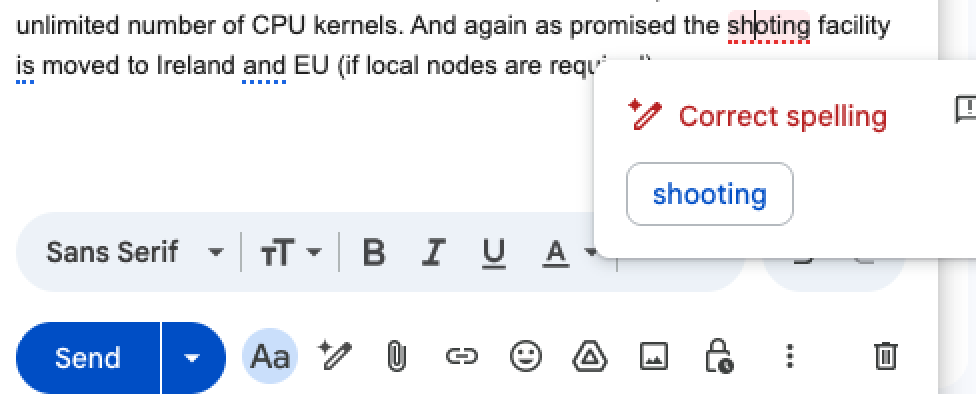
Google AI suggested replacing shoting with shooting since the EditDistance between these words is 1 namely the nearest candidates!
Step 1. insert
"o":"shoting"⟶"shooting"
In[]:=
EditDistance["shoting","shooting"]
Out[]=
1
However, the nearest Semantics given the context of other words in a document might be longer distances away as you can see the proper candidate is hosting and that is 2 units of EditDistance away:
Step 1. delete
Step 2. insert
"s":"shoting"⟶"hoting"
Step 2. insert
"s":"hoting"⟶"hosting"
In[]:=
EditDistance["shoting","hosting"]
Out[]=
2
Why wait for Google! Write your own!
Don’t waste your precious life and mind waiting for these inept AI super corporations, code your own and build your own systems. This prospect is far better for your intellectual life than waiting for Google and others to fulfill their obligations and promises to their paying customers!
myEditDistance [ ] is a complete implementation of the Levenshtein distance between strings [1].
myEditDistance [ ] is a complete implementation of the Levenshtein distance between strings [1].
In[]:=
Clear[editDistance];myEditDistance[s0_,t0_]:=Module[{m,n,s,t,d,d2,substitutionCost},(*foralliandj,d[i,j]willholdthedistancebetweenthefirsticharactersofsandthefirstjcharactersoftnotethatdhas(m+1)*(n+1)values*)m=StringLength[s0];n=StringLength[t0];d=ConstantArray[0,{m+1,n+1}];(*1-indexedarrays*)s=StringSplit[s0,""];t=StringSplit[t0,""];(*sourceprefixescanbetransformedintoemptystringbydroppingallcharacters*)(*1-indexedmatrix*)Do[d[[i,1]]=i-1,{i,2,m+1}];(*targetprefixescanbereachedfromemptysourceprefixbyinsertingeverycharacter*)Do[d[[1,j]]=j-1,{j,2,n+1}];substitutionCost=0;Do[If[s[[i-1]]==t[[j-1]],substitutionCost=0,substitutionCost=1];d[[i,j]]=Min@{(d[[i-1,j]]+1),(d[[i,j-1]]+1),(d[[i-1,j-1]]+substitutionCost)},{j,2,n+1},{i,2,m+1}];d2=Prepend[Transpose@d,Join[{""},StringSplit[s0,""]]];d2=Prepend[Transpose@d2,Join[{"",""},StringSplit[t0,""]]];d2[[Dimensions[d2][[1]],Dimensions[d2][[2]]]]=(Highlighted@d2[[Dimensions[d2][[1]],Dimensions[d2][[2]]]]);Clear[];=d2//MatrixForm;d[[m+1,n+1]]];
In[]:=
phrase1="nik";phrase2="ink";myEditDistance[phrase1,phrase2]
Out[]=
2
In[]:=
Out[]//MatrixForm=
i | n | k | ||
0 | 1 | 2 | 3 | |
n | 1 | 1 | 1 | 2 |
i | 2 | 1 | 2 | 2 |
k | 3 | 2 | 2 |
In[]:=
phrase1="kitten";phrase2="sitting";myEditDistance[phrase1,phrase2]
Out[]=
3
In[]:=
Out[]//MatrixForm=
s | i | t | t | i | n | g | ||
0 | 1 | 2 | 3 | 4 | 5 | 6 | 7 | |
k | 1 | 1 | 2 | 3 | 4 | 5 | 6 | 7 |
i | 2 | 2 | 1 | 2 | 3 | 4 | 5 | 6 |
t | 3 | 3 | 2 | 1 | 2 | 3 | 4 | 5 |
t | 4 | 4 | 3 | 2 | 1 | 2 | 3 | 4 |
e | 5 | 5 | 4 | 3 | 2 | 2 | 3 | 4 |
n | 6 | 6 | 5 | 4 | 3 | 3 | 2 |
In[]:=
myEditDistance["shoting","hosting"]
Out[]=
2
Mighty Knn with Tiny Corpus
Develop a correct and effective Knn [2] algorithm with a tiny corpus to help in fixing the spelling problems for specific technical terms than the entire English language.
I compute such Knn applications in Wolfram Cloud to automatically correct my new small customer programming languages’ phrases.
I compute such Knn applications in Wolfram Cloud to automatically correct my new small customer programming languages’ phrases.
This tiny Knn not always fixes the spelling errors, it can be used for other vital applications as well e.g. layman to technical synonyms e.g. donut is technically named as torus:
Q: Where do words reside in?
A: Words reside in Nearest Neighbor Graphs!
Note that all NNGs require distance functions as the core mechanism for construction of the local edges between vertices. In this case use the function myEditDistance [ ] , yep do not wait for others code and build your own today!
Exercise 1: Explain the edge-construction between the candidate words looked up from a dictionary above.
Exercise 1: Explain the edge-construction between the candidate words looked up from a dictionary above.
Words’ neighborhoods
Exercise 2: Why does this subgraph’s edges extend only 1 unit of edge-length?
References