In quantum theory, not only one can have superposition of quantum states, but also superposition of different operations. This feature, which is usually called as “quantum switch” in the context of quantum computing, can be exploited to implement quantum algorithms with an efficiency “unlikely to be achieved on a fixed-gate-order quantum computer”. In this short computational essay, I showed how to implement quantum switch using the Wolfram Quantum Computation Framework.
Quantum Switch
Quantum Switch
The idea of superimposed quantum operations has been developed by G Chiribella and collaborators (eg see arXiv:0912.0195 or this talk by Chiribella). They usually refer to it as “quantum switch”. In our quantum framework, a quantum switch of two operators A and B can be easily implemented as where with the order, one can define on what qubits the quantum switch is acting.
In this short essay, we will implement an example which is based on a paper published in Nature Comm, where it has been shown experimentally how one can determine if two gates commute or anti-commute.
QuantumOperator[{"Switch",A,B},order]
In this short essay, we will implement an example which is based on a paper published in Nature Comm, where it has been shown experimentally how one can determine if two gates commute or anti-commute.
Commuting example
Commuting example
Create a random 2D unitary operator:
In[]:=
u=QuantumOperator["RandomUnitary"];
Create two random commuting operator:
In[]:=
A=QuantumOperator[u@QuantumOperator[{"Phase",RandomReal[{0,2π}]}]@u["Dagger"],"Label"->"A"];B=QuantumOperator[u@QuantumOperator[{"Phase",RandomReal[{0,2π}]}]@u["Dagger"],"Label"->"B"];
Note we consider as a case where [A,B]=0
In[]:=
(A@B-B@A)["Matrix"]//Chop//MatrixForm
Out[]//MatrixForm=
0 | 0 |
0 | 0 |
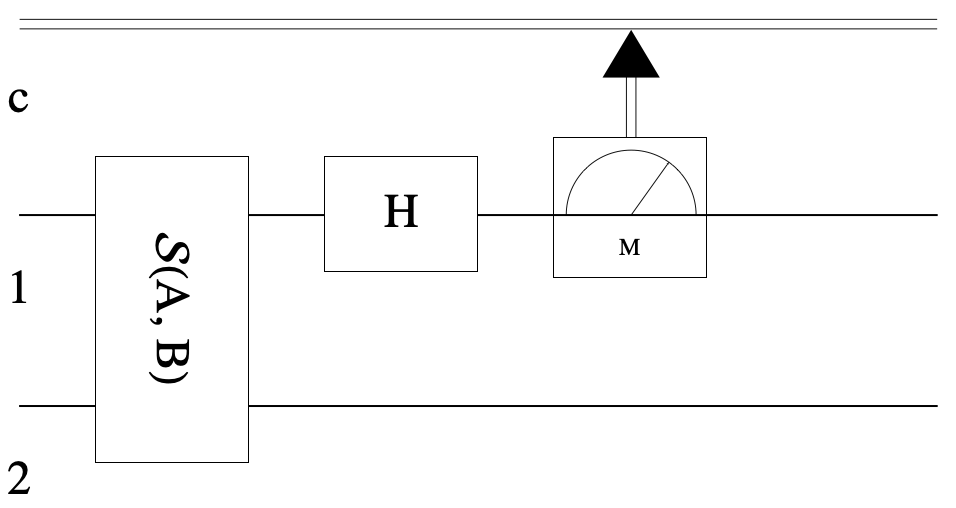
The action of following circuit on an initial state is as follows: which means if the qubit-1 is observed in the state then it confirms [A,B]=0; and if the qubit-1 is observed in the state then it confirms {A,B}=0
|+〉|ψ〉
1/2(|0〉{A,B}|ψ〉+|1〉[A,B]|ψ〉
|0〉
|1〉
Construct the circuit based on quantum switch (defined int he initialization):
In[]:=
qc=QuantumCircuitOperator[{QuantumOperator[{"Switch",A,B}],QuantumOperator["H"],QuantumMeasurementOperator[]}];qc["Diagram"]
Out[]=
Initial state :
|+〉|RandomPure〉
In[]:=
ψ0=QuantumTensorProduct[QuantumState["Plus"],QuantumState["RandomPure"]]
Out[]=
QuantumState


In[]:=
qc[ψ0]["ProbabilityPlot"]
Out[]=
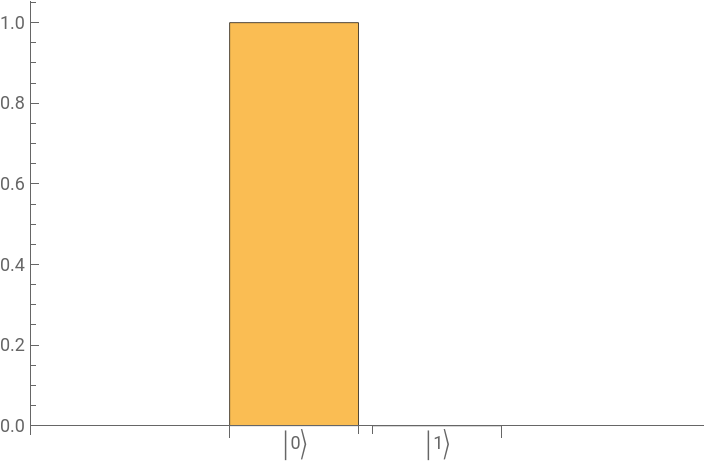
So it confirms the commuting case.
Anti-commuting example
Anti-commuting example
Create a random 2D unitary operator:
In[]:=
u=QuantumOperator["RandomUnitary"];
Create two commuting operator:
In[]:=
A=QuantumOperator[u@QuantumOperator["X"]@u["Dagger"],"Label"->"A"];B=QuantumOperator[u@QuantumOperator["Z"]@u["Dagger"],"Label"->"B"];
Note we consider as a case where {A,B}=0
In[]:=
(A@B+B@A)["Matrix"]//Chop//MatrixForm
Out[]//MatrixForm=
0 | 0 |
0 | 0 |
The action of following circuit on an initial state is as follows: which means if the qubit-1 is observed in the state then it confirms [A,B]=0; and if the qubit-1 is observed in the state then it confirms {A,B}=0
|+〉|ψ〉
1/2(|0〉{A,B}|ψ〉+|1〉[A,B]|ψ〉
|0〉
|1〉
Construct the circuit based on quantum switch (defined int he initialization):
In[]:=
qc=QuantumCircuitOperator[{QuantumOperator[{"Switch",A,B}],QuantumOperator["H"],QuantumMeasurementOperator[]}];qc["Diagram"]
Out[]=
Initial state :
|+〉|RandomPure〉
In[]:=
ψ0=QuantumTensorProduct[QuantumState["Plus"],QuantumState["RandomPure"]]
Out[]=
QuantumState

In[]:=
qc[ψ0]["ProbabilityPlot"]
Out[]=
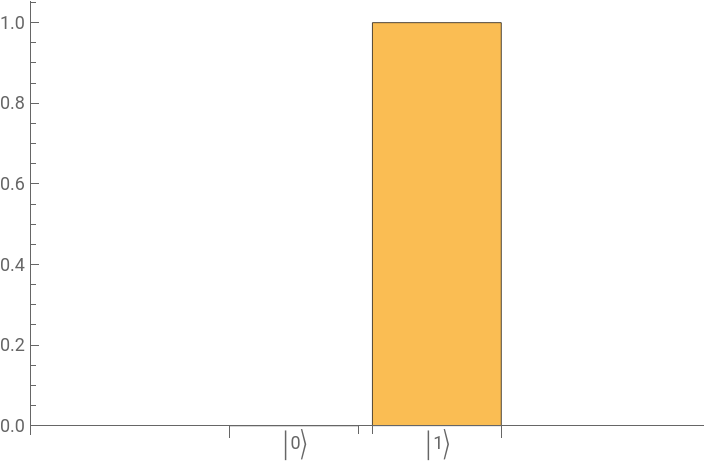
So it confirms the anti-commuting case.
Paclet Installation
Paclet Installation
You should be able to copy/paste the code from the WQCF webpage directly and evaluate it in your notebook. However, it is easier to install the paclet and use it. Using the following code, you can install the latest version of WQCF. Note that we first uninstall any quantum paclet (to be safe), clear everything and install the paclet:
In[]:=
PacletUninstall /@ PacletFind["Quantum*"];ClearAll["*QuantumFramework*","Wolfram`QuantumFramework`*", "Wolfram`QuantumFramework`**`*"];PacletInstall[CloudObject["https://wolfr.am/DevWQCF"], ForceVersionInstall -> True]<< Wolfram`QuantumFramework`
Out[]=
PacletObject
Here is the directory on your computer where the paclet is installed:
In[]:=
%%["Location"]
You can open the directory if needed:
In[]:=
SystemOpen[%]
Behind the scene
Behind the scene
For those of you who are interested to know how we have designed the quantum switch using partial tracing, contolled0-SWAP, CSWAP and some loops, here is its definition:
In[]:=
QuantumOperator[{"Switch",a_,b_},order:{1,2}]/;a["InputDimension"]==a["OutputDimension"]==b["InputDimension"]==b["OutputDimension"]&&Length[order]==2:=QuantumPartialTrace[ QuantumOperator[QuantumOperator[{"Controlled0","SWAP"},Prepend[order,Max[order]+1]]@QuantumOperator[b,order[[{2}]],order[[{2}]]]@QuantumOperator[a,order[[{1}]],order[[{1}]]]@QuantumOperator["CSWAP",Prepend[order,Max[order]+1]],"Label"->""[a["Label"],b["Label"]]], {Max[order]+1}]