Writing Wolfram Language code with generative LLM models makes it possible to create more complex projects in less time. In this post I describe a new paclet called PhysicsModelLink that I created largely with agentic use of LLMs. For this project I used both the Antigravity IDE (from Google) and VS Code IDE (from Microsoft) with a mixture of LLM models, primarily Google Gemini, Claude Sonnet, and Claude Opus.
The implementation of this paclet centers around a Rust physics engine called Rapier. The Wolfram Language code uses LibraryLink to call various Rust functions from that physics engine. Engineering the code in this way makes the computational steps very fast (at compiled Rust speeds) and exposes the higher level functions to the user with Wolfram Language modeling and visualizations functions—the best of both worlds.
The development workflow largely happened in the chat interface of the IDE. The first step was to create the Wolfram Language paclet structure and create the Rust project crate to build the Rust dynamic library. The Rust code is used completely unmodified, with various low-level Wolfram LibraryLink functions calling the Rust functions. The first step was to create a very simple LibraryLink function, RapierVersion, which simply gets the library’s version number.
The next major step was the create a complete set of low-level LibraryLink functions that call directly into the Rust library. When that was completed and tested, the user-facing Wolfram Language functions could be created using these lower level functions. In addition to that a few Wolfram Language level utility functions needed to be created. For example, the Rust physics engine computes object translations and rotations with quaternions, whereas the Wolfram Language uses transformation functions. An example of such a utility function is QuaternionToTransformation.
The code for this project lives on Github. I compiled dynamic libraries for Windows and MacOS, with Linux support hopefully to follow in the near future.
Let’s take a look at a few examples. The first example is basically the “Hello World” example of physical modeling: A bouncing ball. This example shows how to set up a model, display/plot it, and animate it over time.
First, install the paclet:
In[]:=
PacletInstall[ResourceObject["https://wolfr.am/1DvZZLuE7"]]
Out[]=
PacletObject

Load the package:
In[]:=
Needs["ArnoudBuzing`PhysicsModelLink`"]
Physical models contain fixed and dynamic bodies. Fixed bodies are typically used for floors and walls. Dynamic bodies move in space and are subject to gravitational forces. Dynamic bodies interact with other bodies and bounce off each other. A physical model can also contain a physical boundary box which acts as in convenient invisible wall in case you want to constrain your dynamic bodies to a scene.
Create the model:
In[]:=
model=CreatePhysicsModel{PhysicsBoundaryBox[{{-4,-4,0},{4,4,6}},"Thickness"->1],FixedBody[{HatchShading[.6,Blue],Cuboid[{-4,-4,-1},{4,4,0}]}],DynamicBody[{MaterialShading["Gold"],Sphere[{0,0,5},0.6]}]},
Out[]=
PhysicsModelObject
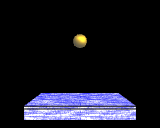
Models have an initial state and can be plotted with PhysicsModelPlot.
Plot the model:
In[]:=
PhysicsModelPlot[model]
Out[]=

Models can be evolved over time with PhysicsModelEvolve. This function returns a list of PhysicsModelObject(s) which contain the complete state over time.
Generate 300 frames with a 1/60 second time step:
In[]:=
frames=PhysicsModelEvolve[model,300,1/60];
These frames can then be used with, for example, PhysicsModelVideo to create a complete animation of the model as it evolves over time.
Generate a video from the list of frames:
In[]:=
PhysicsModelVideo[frames,PlotRange1.01`{{-5,5},{-5,5},{-1,6}}]
Out[]=
You can of course use many many more balls. Here is another over 100 balls bouncing of one larger ball. I am using the boundary box to constrain the balls from falling down endlessly.
Create the model:
In[]:=
model=CreatePhysicsModel{PhysicsBoundaryBox[{{-5,-5,-10},{5,5,16}}],FixedBody[{Sphere[{0,0,-6},4]}],Flatten@Table[DynamicBody[{Sphere[{i,j,k}+RandomReal[{-0.01,0.01},3],0.25]}],{i,-3,3},{j,-3,3},{k,0,14}]},
Out[]=
PhysicsModelObject
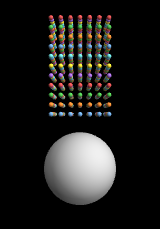
Evolve the model for 300 steps:
In[]:=
frames=PhysicsModelEvolve[model,300,1/60];
Generate a video:
In[]:=
PhysicsModelVideo[frames,PlotRange->1.05{{-7,7},{-7,7},{-10,2}}]
Out[]=
Besides balls and cuboids as shapes, you can use cylinders, cones, capsules, and the convex hull of a set of points. Here is an example of a dodecahedron rolling over an inclined plane (two convex hull meshes).
Create the model:
In[]:=
dodecahedron=Translate[ConvexHullMesh[N[PolyhedronData["Dodecahedron","Points"]]],{3,0,5}];model=CreatePhysicsModel{DynamicBody[{StandardOrange,HatchShading[],dodecahedron}],PhysicsBoundaryBox[{{-5,-5,0},{5,5,7}}],FixedBody[{Gray,HatchShading[],ConvexHullMesh[{{-5,-5,0},{-5,5,0},{5,5,0},{5,-5,0},{-5,-5,1},{-5,5,1},{5,5,3},{5,-5,3}}]}]},
Out[]=
PhysicsModelObject
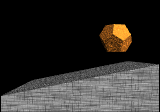
Evolve it for 300 steps:
Create the video:
Using agentic LLM is a strange experience, but not an altogether bad one. It can offload a lot of low-level programmatic drudgery. Things that are humanly possible but time-consuming can be done in significantly less time now. Occasionally the LLM will go completely off the rails and pursue an incorrect solution. It helps to monitor the progress and abort the process when this happens. An LLM can easily spend a large budget of tokens on doing something completely wrong or inefficient. But overall I like this new mode of programming, especially because it makes it much simpler to do complex things at a speed that is 100x the speed of my human typing and thinking.
CITE THIS NOTEBOOK
CITE THIS NOTEBOOK
PhysicsModelLink: modeling physical models with The Wolfram language
by Arnoud Buzing
Wolfram Community, STAFF PICKS, April 22, 2026
https://community.wolfram.com/groups/-/m/t/3701211
by Arnoud Buzing
Wolfram Community, STAFF PICKS, April 22, 2026
https://community.wolfram.com/groups/-/m/t/3701211