This is a continuation to the posts listed at: https://community.wolfram.com/web/ggoff/
Abstract
Abstract
Example 1 used the Wolfram Language to create/export/import a slice of a sphere/crown-like object. The slices were rotated around the z-axis in two animations. In Example 2 two grids of superellipsoids were used as basis for animated lamps and other objects.
Experiments
Experiments
Example 1: Metamorph
Example 1: Metamorph
Initialization
Initialization
In[]:=
path0=SetDirectory[NotebookDirectory[]<>"/data/"]
Out[]=
/Users/gg/Desktop/ams12pub/data
From slice to animation
From slice to animation
A vertical slice of a sphere was prepared and exported:
In[]:=
slice=ParametricPlot3D[{Sin[u]Sin[v],Cos[u]Sin[v],Cos[v]},{u,0,Pi/8},{v,-π,0},Boxed->False,Axes->False,PlotRange->{{-1,1},{-1,1},{-1,1}}]
Out[]=

In[]:=
Export[path0<>If[StringTake[$System,3]=="Win","\\","/"]<>"slice.dxf",slice]
Out[]=
/Users/gg/Desktop/ams12pub/data/slice.dxf
The slice was rotated around the z-axis with step-size Pi/8. resulting in a sliced sphere.
In[]:=
slices=Table[Graphics3D[GeometricTransformation[slice[[1]],RotationTransform[iPi/8,{0,0,1}]],Boxed->False,Axes->False,PlotRange->{{-1,1},{-1,1},{-1,1}}],{i,1,16}];Show[slices]
Out[]=

To the first slice another one was added until the sphere was closed.
In[]:=
slices2=Table[Show[slices[[1;;i]],PlotRange->{{-1,1},{-1,1},{-1,1}}],{i,1,Length[slices]}];ListAnimate[slices2]
Out[]=
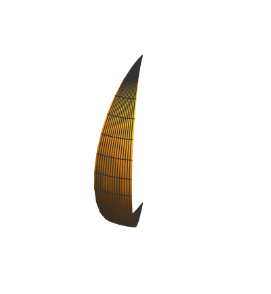
From imported slice to animation
From imported slice to animation
In Blender the sphere slices were bended along the x-axis. One slice of the resulting object was exported as a stl-file.
In[]:=
slice3=Import[path0<>If[StringTake[$System,3]=="Win","\\","/"]<>"slice2.stl"];Show[slice3,Boxed->True]
Out[]=

Again a bunch of rotated slices was built together. The visualization showed a crown-like object.
In[]:=
slices4=Table[Graphics3D[GeometricTransformation[slice3,RotationTransform[iPi/8,{0,0,1}]],Boxed->False,Axes->False,PlotRange->2{{-1,1},{-1,1},{-1,1}}],{i,1,16}];Show[slices4]
Out[]=

In the next step the development of the “crown” was animated.
In[]:=
slices5=Table[Show[slices4[[1;;i]],PlotRange->2{{-1,1},{-1,1},{-1,1}}],{i,1,16}];ListAnimate[slices5]
Out[]=
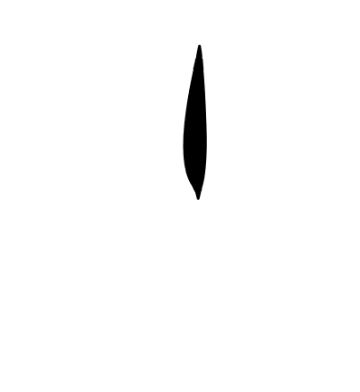
An Wolfram Language implementation of bending a cupola
An Wolfram Language implementation of bending a cupola
In an architectural Wolfram Demonstration (by myself, name of project listed below) a pavilion was built and bent with NURBS. The code was adapted to mimic the result from bending in Blender:
In[]:=
(*ResourceData["Demonstrations Project: 3D Transformations Applied to a NURBS Pavilion"]*)
In[]:=
BendCupola[λ_,solo_]:=Block{pts1,pts2,pts3,cup1,cup2,cup3},pts1={{-3,0,0},{-2,0,4},{0,0,4}};pts2=N[Table[pts1[[i]].RotationMatrix[tt,{0,0,1}],{tt,0,2π,π/16},{i,1,Length[pts1]}]];pts2=pts2.RotationMatrix[Pi/2,{0,1,0}];pts3=Tablepts2[[j,k,1]]+4-Cos[λpts2[[j,k,3]]]+,pts2[[j,k,2]],-pts2[[j,k,1]]+4-Sin[λpts2[[j,k,3]]],{j,1,33},{k,1,3};cup1=ListPointPlot3D[pts3];cup2=Graphics3D[Line[pts3]];cup3=Graphics3D[{Yellow,BSplineSurface[pts3]}];If[solo,cup3,Show[cup1,cup2,cup3]]
1
λ
1
λ
1
λ
With/without control points:
In[]:=
BendCupola[0.001,False]BendCupola[0.001,True]
Out[]=

Out[]=

Via ListAnimate the bending was animated :
In[]:=
bc=Table[BendCupola[λ,True],{λ,-0.05,-0.5,-0.05}];
ListAnimate[bc]
Out[]=

Blender
Blender
Part 1:
A sliced sphere was imported in Blender and given a scratched gold-like material. In an animation a half sphere was rotated to open the sliced sphere, then moved outside of the camera-view. At the center a small only slightly transparent glass sphere was positioned.
Part 2-4:
Within the small-glass sphere a light-source was placed. Both delivered a soft colored light for the inside of the sliced-half-sphere. In an animation the half-sphere was bent along the x-axis. It formed a half-hyperboloid with teeth. Then the modified hyperboloid was completed in a further animation.
Part 5:
The color of the centered light-source was changed. From above a torus with emissive material was sent through the modified hyperboloid in a last animation.
A sliced sphere was imported in Blender and given a scratched gold-like material. In an animation a half sphere was rotated to open the sliced sphere, then moved outside of the camera-view. At the center a small only slightly transparent glass sphere was positioned.
Part 2-4:
Within the small-glass sphere a light-source was placed. Both delivered a soft colored light for the inside of the sliced-half-sphere. In an animation the half-sphere was bent along the x-axis. It formed a half-hyperboloid with teeth. Then the modified hyperboloid was completed in a further animation.
Part 5:
The color of the centered light-source was changed. From above a torus with emissive material was sent through the modified hyperboloid in a last animation.
Example 2: Interieur
Example 2: Interieur
In[]:=
Initialization
Initialization
In[]:=
path0=SetDirectory[NotebookDirectory[]<>"/data/"]
Out[]=
D:\DDocs\0-published\woco\ams12pub\data
Grid of Superellipsoids
Grid of Superellipsoids
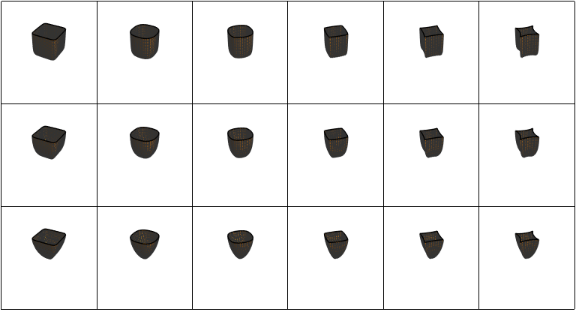
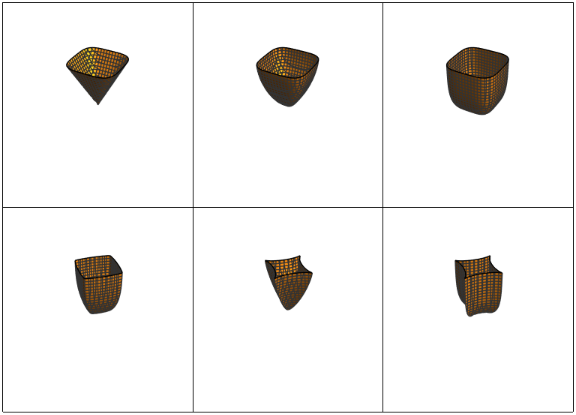
A table of superellipsoids was built, then shown in a grid. The parameters for a subset of six objects were chosen and a second grid created and all six of them exported as dxf-files.
In[]:=
Superellipsoid[{ee_,nn_}]:=Block[{suell},suell=(Abs[x]^(2/ee)+Abs[y]^(2/ee))^(ee/nn)+Abs[z]^(2/nn)-1==0;ContourPlot3D[Evaluate[suell],{x,-2,2},{y,-2,2},{z,-2,0},Boxed->False,Axes->False]]
In[]:=
suell=Table[Superellipsoid[{ee,nn}],{nn,0.25,1.25,0.5},{ee,0.25,2.75,0.5}];
In[]:=
GraphicsGrid[suell,Frame->All,ImageSizeLarge]
Out[]=
In[]:=
In[]:=
suell2=Superellipsoid[#]&/@{{0.5,2.},{0.5,1.25},{0.5,0.5},{1.75,0.75},{2.75,1.5},{2.75,0.5}};
In[]:=
GraphicsGrid[Partition[suell2,3],Frame->All,ImageSize->Large]
Out[]=
In[]:=
SetDirectory[NotebookDirectory[]<>"/data/"]
Out[]=
D:\DDocs\0-published\woco\ams12pub\data
In[]:=
Do[Export["su"<>ToString[i]<>".dxf",suell2[[i]]],{i,1,1}]
The exported dxf-files were imported in Blender.
Partial recreation of the animations done in Blender
Partial recreation of the animations done in Blender
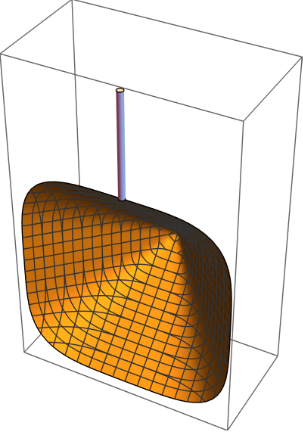
The first lamp showed upwards. A fitting superellisoid was chosen, solidified and given a glass-like material. It’s rotating around the x-axis from up to down was animated. Below this animation is was partially rebuilt in Mathematica:
In[]:=
rot1=Table[Graphics3D[{GeometricTransformation[suell2[[1,1]],RotationMatrix[iDegree,{1,0,0}]],Cylinder[{{0,0,1},{0,0,2}},0.03]}],{i,90,180,15}];ListAnimate[rot1]
Out[]=
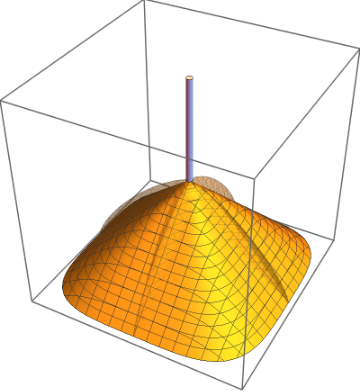
In the next phase the first lamp was slowly made transparent. Parallel a second lamp was changed to solid and given an abstract multicolored material. A version of it was rebuilt in Mathematica:
In[]:=
op1=Table[Graphics3D[{Cylinder[{{0,0,1},{0,0,2}},0.03],Opacity[0.3],GeometricTransformation[suell2[[5,1]],RotationMatrix[180Degree,{1,0,0}]]}],{i,0,1,0.1}];op2=Table[Graphics3D[{Opacity[i],GeometricTransformation[suell2[[1,1]],RotationMatrix[180Degree,{1,0,0}]]}],{i,1,0,-0.1}];ListAnimate[Show[#]&/@Transpose[{op1,op2}]]
Out[]=
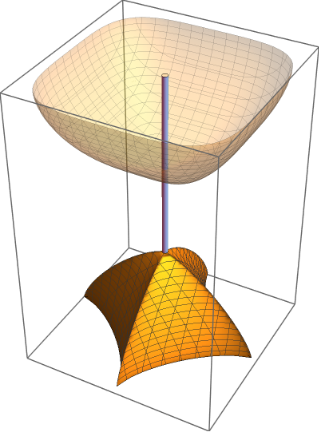
A third object with abstract material was placed upwards above the second and connected with a cylinder with the second object positioned downwards. The third object is moved down along the cylinder to a position just above the second object. Again a Wolfram Language version of this animation was developed.
In[]:=
rot2=Graphics3D[{Cylinder[{{0,0,1},{0,0,3}},0.03],GeometricTransformation[suell2[[5,1]],RotationMatrix[180Degree,{1,0,0}]]}];trans1=Table[Graphics3D[{Opacity[0.3],GeometricTransformation[suell2[[2,1]],TranslationTransform[{0,0,i}]]}],{i,3,2,-0.1}];ListAnimate[Show[#,rot2]&/@trans1]
Out[]=
References
References
Collection of animations
Collection of animations
References
Metamorph
Scene: Modified Spheres, Hyperbola & Torus
“Wolfram Language & System Documentation Center,” April 16, 2022. https://reference.wolfram.com/language/.
Audio:
Stock Music & Sound Effects - Royalty Free Audio - Storyblocks
https://storyblocks.com/audio (accessed 2022-04-16)
Media-Music Group. Bells And Strings for Tutorials Explainer 30 Sec. Accessed April 16, 2022. Asset ID: SBA-346556536.
Scene: Modified Spheres, Hyperbola & Torus
“Wolfram Language & System Documentation Center,” April 16, 2022. https://reference.wolfram.com/language/.
Audio:
Stock Music & Sound Effects - Royalty Free Audio - Storyblocks
https://storyblocks.com/audio (accessed 2022-04-16)
Media-Music Group. Bells And Strings for Tutorials Explainer 30 Sec. Accessed April 16, 2022. Asset ID: SBA-346556536.
Interieur
Scene : Modified Superellipsoid & Cylinder
superellipse - Wolfram | Alpha
https://wolframalpha.com (accessed 2022 - 05 - 01) .
“POV-Ray: Documentation: 2.4.1.11 Superquadric Ellipsoid.” Accessed May 1, 2022. http://www.povray.org/documentation/view/3.6.1/285/.
Audio : Stock Music & Sound Effects - Royalty Free Audio - Storyblocks.
https://storyblocks.com/audio (accessed 2022 - 05 - 01)
Gribanova, Valentina . Atmospheric Phenomenon . Accessed May 1, 2022. SBA - 300418824
Scene : Modified Superellipsoid & Cylinder
superellipse - Wolfram | Alpha
https://wolframalpha.com (accessed 2022 - 05 - 01) .
“POV-Ray: Documentation: 2.4.1.11 Superquadric Ellipsoid.” Accessed May 1, 2022. http://www.povray.org/documentation/view/3.6.1/285/.
Audio : Stock Music & Sound Effects - Royalty Free Audio - Storyblocks.
https://storyblocks.com/audio (accessed 2022 - 05 - 01)
Gribanova, Valentina . Atmospheric Phenomenon . Accessed May 1, 2022. SBA - 300418824