Abstract
Abstract
The objective of this project was to create a recursive neural net (RNN) that suggests variable names based on a piece of code. Data for training the notebook was collected from the Wolfram Function Repository and the Wolfram Language documentation. The neural net's structure was based on one found in the Wolfram Language documentation. Due to the subjective nature of variable names, accuracy of the neural net was not measured.
Introduction
Introduction
Currently, many developers find naming variables a difficult process. It is often hard to name variables in an understandable way that expresses the purpose of the variable. It is even harder to name a variable when the actual meaning of the function is unclear. The process of choosing variable names is quite subjective, but generally most variables should express their purpose and be easily readable without being lengthy. Many programmers have their own way of capitalizing or otherwise structuring variable names. Some of these include camelCase, snake_case, and PascalCase. For the purpose of this project, only variables that start with lowercase letters were selected in order to avoid the issue of suggesting a variable name like List, which is Wolfram Language function.
Dataset Creation
Dataset Creation
Function for variable extraction
Function for variable extraction
In order to create a dataset of variable names and the associated definition, a function called findVariables was created to extract variable names:
In[]:=
findVariables[nb_,minLengthV_:3,maxLengthV_:15,minLengthD_:4,maxLengthD_:250]:=Quiet[Block[{nbCleaned,rawPos,extracted,extractClean,listFunctions,rawDataset},nbCleaned=DeleteCases[Flatten[Table[Cases[nb,RowBox[x___]x,Infinity],{n,{nb}}]]," "];rawPos=Position[nbCleaned,"="];extracted=Table[DeleteCases[Extract[nbCleaned,x]," "],{x,(If[Length[#]>1,Delete[#,-1],{#-1,#+1}]&/@rawPos)}];extractClean=Select[DeleteDuplicatesBy[extracted,First],StringQ[First[#]]&];listFunctions=(StringJoin@@(#[[2]]//.RowBox[x___]x))&/@extractClean;rawDataset=Select[Transpose[{listFunctions,(First/@extractClean)}],LowerCaseQ[First[Characters[Last[#]]]]&&minLengthV<StringLength[Last[#]]<maxLengthV&&minLengthD<StringLength[First[#]]<maxLengthD&]]];
The function findVariables accepts a notebook expression. The local variable nbCleaned replaces all occurrences of the function RowBox with the contents of RowBox. All blank spaces are then removed.
The local variable rawPos finds the locations of all occurrences of "=" in the notebook expression. If the position of an "=" is nested (meaning its position is something like {32, 1, 1} v.s. {32}), then the last element of its position is removed (i.e. {32, 1, 1} {32,1}). Otherwise, its position is changed to be the previous element's position and the following element's position (i.e. {32} {{31},{33}}). These modified positions are then used in extracted to extract the variable names and their definitions.
In extractClean any duplicate variable names from extracted are deleted.
listFunctions further removes the expression RowBox from the variable definitions.
In rawDataset, the final transformations of the variable names and definitions occur. The list of variable definitions, listFunctions, is combined with the variable names from extractClean. From this list, any variable names that do not begin with a lowercase letter are removed and any variable names longer than maxLengthV (whose default is 15) and shorter than minLengthV (whose default is 3) are removed. Any variable definitions longer than maxLengthD (whose default is 250) and shorter than minLengthD (whose default is 4) are removed. The final output of findVariables is in the following format: {{variableName1, definition1}, {variableName2, definition2}…}.
Variable Extraction
Variable Extraction
Originally, variables were extracted from notebooks using the default length of minLength in findVariables, because any variables of a length less than three tend to not have a clear meaning. However, in order to capture any short variable names that do express their meaning well, such as i for integers and x for numbers, the value of minLength was changed to one. The value of maxLength was kept at 15 because long variable names, like superLongVariableNameThatIsRidiculouslyUnusable are hard to program with.
From the Wolfram Function Repository
From the Wolfram Function Repository
Originally data from the Wolfram Function Repository (WFR) was used, but due to the low number of data points (around 5000), variables from the Wolfram Language documentation were also included. Data was extracted from WFR source notebooks. The variable wfrDefintions stores the file paths of these notebooks, which are not publicly available.
This code extracts the variables names from the WFR source notebooks:
In[]:=
varDataset=Flatten[Table[(findVariables[Import[i],1]),{i,wfrDefinitions}],1];
The length of this dataset:
In[]:=
varDataset//Length
Out[]=
4923
From the Wolfram Language Documentation
From the Wolfram Language Documentation
One of the sources of variables and their definitions for this dataset was the Wolfram Language documentation. Since all of the documentation on desktop Mathematica comes in the form of Notebooks, variable extraction was trivial.
The following code gets the file paths of all of the documentation notebooks. *This code will only work on desktop Mathematica*:
In[]:=
refDefinitions=FileNames[LetterCharacter~~"*.nb",FileNameJoin[{$InstallationDirectory,"Documentation","English","System","ReferencePages","Symbols"}]];
This code extracts all of the variables from the notebooks using findVariables:
varRefDataset=Flatten[Table[findVariables[Import[i],1],{i,refDefinitions}],1];
The number of data-points from the Wolfram Language Documentation almost quadrupled my original dataset:
In[]:=
varRefDataset//Length
Out[]=
18160
Dataset Combination and Export
Dataset Combination and Export
Once both datasets where created they had to be combined. The combined dataset was then exported to a Wolfram Cloud Object so it could be easily reaccessed.
This code combines the two datasets:
In[]:=
combDataset=Select[Join[varDataset,varRefDataset],StringQ[#[[1]]]&];
The length of the combined dataset:
In[]:=
combDataset//Length
Out[]=
20795
Exported cloud object:
In[]:=
CloudPut[combDataset,"WFRVariables"]
Out[]=
RNN Creation and Training
RNN Creation and Training
The machine learning structure used to predict variable names was a recurrent neural network (RNN). RNNs are often used for machine translation, speech recognition, and other natural language processing tasks. The neural net that was created for this project is based of off the following neural net from the Wolfram Language Documentation (see section "Integer Addition with Variable-Length Output"), with a few slight modifications to optimize for data types. When the neural net was first trained, a GPU/CPU memory limit exceeded error resulted. After further tests on different machines, it was assumed that there was a underlying error with MXNet. After further debugging, it was discovered that the some extremely long variable definitions (>10,000 characters) were causing the error. This mistake was fixed by limiting the length of variable definitions to a range of 4-250 characters in findVariables.
Importing the dataset from the cloud
Importing the dataset from the cloud
The following code imports the dataset created earlier and splits it into a training set and a testing set.
Import the full dataset from the cloud and store it in variable varDefList:
In[]:=
varDefList=CloudGet["https://www.wolframcloud.com/obj/jwgerlach/WFRVariables"];
Extract 80% of the elements from varDefList and convert it to a list of rules. This is the training set:
In[]:=
trainingSet=RandomSample[Rule@@@varDefList,Round[N[Length[varDefList]*.8]]];
Extract the remaining 20% of elements not used in trainingSet from varDefList and convert it into a list of rules. This is the test set:
testSet=Complement[Rule@@@varDefList,trainingSet];
Creating a list of characters used in the dataset
Creating a list of characters used in the dataset
For the encoders and decoders used later in the RNN, a list of characters in the dataset was created.
In[]:=
characterListIn=DeleteDuplicates[Flatten[Characters[#[[1]]]&/@varDefList]];
This code generates a list of characters from the variable names:
In[]:=
characterListOut=DeleteDuplicates[Flatten[Characters[#[[2]]]&/@varDefList]];
The number of characters in these lists is actually quite different because characterListIn includes special symbols used in expressions like "[" and "&" which can't be used in variable names.
Creation of Encoders and Decoders
Creation of Encoders and Decoders
Encoders
Encoders
In order for the neural net to understand the dataset, the data must first be converted into a sequence of integers:
Create an encoder for both the target (the variable name) and the input (the variable definition):
In[]:=
targetEnc=NetEncoder[{"Characters",{characterListOut,{StartOfString,EndOfString}Automatic}}]
Out[]=
NetEncoder

In[]:=
inputEnc=NetEncoder[{"Characters",{characterListIn,{StartOfString,EndOfString}Automatic}}]
Out[]=
NetEncoder
Decoder and Encoder Net
Decoder and Encoder Net
This is the part of the RNN that is trainable. This is where the encoded input is modified to become the output based on past training data. The type of RNN layer used in these is a GRU (Gated Recurrent Unit).
The NetChain for taking the encoded input and converting it into a vector of size 150:
In[]:=
encoderNet=NetChain[{UnitVectorLayer[],GatedRecurrentLayer[150],SequenceLastLayer["Input"{"Varying",150}]}]
Out[]=
NetChain


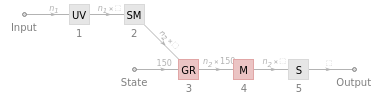
The Net Graph for taking a vector of size 150 from encoderNet and converting it into a array:
In[]:=
decoderNet=NetGraph[{UnitVectorLayer[],SequenceMostLayer[],GatedRecurrentLayer[150],NetMapOperator[LinearLayer[]],SoftmaxLayer[]},{NetPort["Input"]12345,NetPort["State"]NetPort[3,"State"]}]
Out[]=
NetGraph


Creation of final neural net
Creation of final neural net
The final neural net is the combined encoderNet and the decoderNet with a DropoutLayer to reduce overfitting (when the neural net is trained to be efficient for the training data, but not other data). Encoded data is then processed through this network. The final output actually comes from a CrossEntropyLossLayer and cannot predict variable names alone. In order to predict variable names, further processing is needed.
This is the completed (untrained) neural net:
trainingNet=NetGraph[<|"encoder"encoderNet,"decoder"decoderNet,"dropout"DropoutLayer[0.7],"loss"CrossEntropyLossLayer["Index"],"rest"SequenceRestLayer[]|>,{NetPort["Input"]"encoder"NetPort["decoder","State"],NetPort["Target"]NetPort["decoder","Input"],"decoder"NetPort["dropout","Input"],"dropout""loss",NetPort["Target"]"rest"NetPort["loss","Target"]},"Input"inputEnc,"Target"targetEnc]
Out[]=
NetGraph
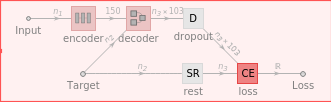
The neural net represented by trainingNet is untrained. The following code trains the neural net. The following code is VERY resource intensive:
Train the neural net:
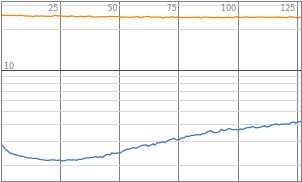
result=NetTrain[trainingNet,RandomSample[trainingSet],All,ValidationSet->testSet,BatchSize->8,TimeGoal->Quantity[1.5,"Hours"]]trainedNet=result["TrainedNet"]

The final neural net was exported to a .wlnet to use later:
Export["wsc20-2-trained.wlnet",trainedNet]
Variable prediction
Variable prediction
The trained neural net trainedNet outputs the cross-entropy loss of the input and target data. This is not a suggested variable. In order to suggest a variable name, a function called predict2 is created. Before predict2 is defined, a number of variables that store extracted parts of the trainedNet must be defined.
Extract parts of trainedNet to use in predict2:
trainedEncoder=NetReplacePart[NetExtract[trainedNet,"encoder"],"Input"inputEnc];trainedDecoder=NetExtract[trainedNet,"decoder"];targetDec=NetDecoder[{"Characters",{characterListOut,{StartOfString,EndOfString}Automatic},"InputDepth"1}];charPredictor1=NetGraph[{trainedDecoder,SequenceLastLayer[]},{12},"Input"targetEnc,"Output"targetDec];
Define predict2:
Examples
Examples
Out[]=
Variable Name | Variable Definition |
chain | NetPairEmbeddingOperator[linear,DistanceFunctionEuclideanDistance] |
maxtet | -OptionValue["CardSpreadAngle"]/2 |
model | BoundaryMesh@DiscretizeRegion@Map[First]@GeoGridPosition[geopol,"Mollweide"] |
pts2 | StringLength[#]&/@pickets |
comp | SymmetrizedDependentComponents[{1,1,2},%] |
dist | ChiSquareDistribution[ν] |
colors | Map[(ColorConvert[RGBColor@@#,"HSB"][[3]])&,clusters,{2}] |
props | makeColorFunction[OptionValue[ColorFunction], {z, w}] |
link | likelihood PDF[prior,var]/Expectation[likelihood,varprior] |
colors | CloudDeploy[APIFunction["x" "Integer", Identity, AllowedCloudExtraParameters "_exportform"]] |
Future Additions
Future Additions
1
.Export the RNN to an API
2
.Extract variables and definitions from more data sources (i.e. Stack Exchange, Wolfram Community)
3
.Create a GUI and Palette for variable suggestion
4
.Predict variable names based on surrounding code
Keywords
Keywords
◼
Machine Learning
◼
Variables
◼
Recursive Neural Network