CITE THIS NOTEBOOK: Wolfram R&D LIVE: Understand Time, Date and Calendars by Nick Lariviere. Wolfram Community MAR 14 2023.
Introduction to Time
Introduction to Time
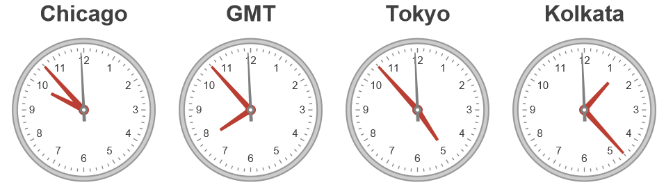
What time is it?
What time is it?
In[]:=
UnixTime[]
Out[]=
1678820588
What is time?
What is time?
Time is the continued sequence of existence and events that occurs in an apparently irreversible succession from the past, through the present, into the future.
◼
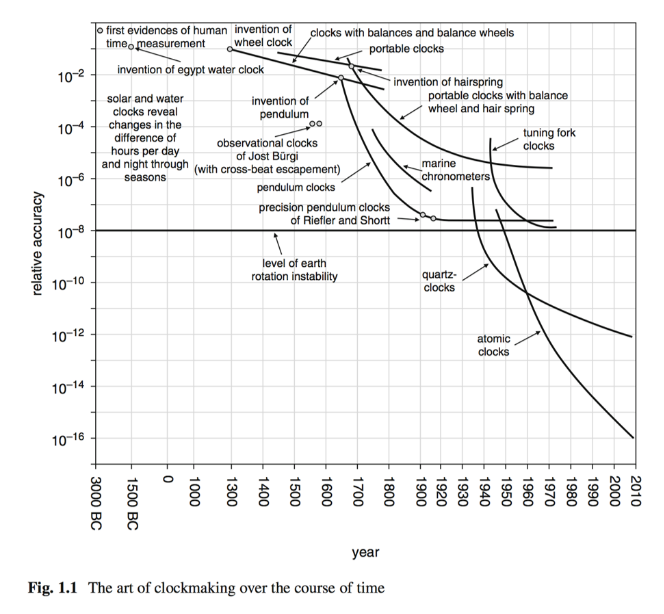
The current definition in the International System of Units for a second:
The second is defined by taking the fixed numerical value of the caesium frequency, ΔνCs, the unperturbed ground-state hyperfine transition frequency of the caesium 133 atom, to be 9192631770 when expressed in the unit Hz, which is equal to s−1.
In[]:=
Dynamic[Refresh[UnixTime[],UpdateInterval->1]]
In[]:=
Dynamic[Refresh[SiderealTime[],UpdateInterval->1]]
Introduction to Dates
Introduction to Dates
In[]:=
TimelinePlot[RandomDate[10]]
Out[]=

What is today’s date?
What is today’s date?
In[]:=
Today
Out[]=
In[]:=
DateObject[Today,CalendarType->"ISOWeek"]
Out[]=
In[]:=
DateObject[Today,CalendarType->"Japanese"]
Out[]=
In[]:=
Manipulate[DateString@DateObject[CalendarType->i],{{i,"Gregorian"},CalendarData["DateCalendar"]}]
Out[]=

What are dates?
What are dates?
• A date is a reference to a particular instance of time (typically a day) represented within a calendar system, which allows the specific instance to be uniquely identified.
Introduction to Calendars
Introduction to Calendars
Out[]=
January 2023 |


What are calendars?
What are calendars?
• A calendar is a system for organizing dates and times using periods of time, often consisting of various elements like days, months, and/or years.
What types of calendars are there?
What types of calendars are there?
In[]:=
CalendarData["DateCalendar"]
• Observational calendars
• Regnal calendars
In[]:=
DateObject[CalendarType->"Japanese"]
Out[]=
• Arithmetic calendars
In[]:=
CalendarData["ArithmeticCalendar"]
• Astronomical calendars
In[]:=
CalendarData["AstronomicalCalendar"]
◼
Solar calendars
Solar calendars (including Egyptian, Armenian, Persian, Gregorian, Julian, Coptic, Ethiopic, ISO, French Revolutionary and Bahá’í) are based on the yearly solar cycle. Most solar calendars are divided into months, but these months are divorced from the lunar events.
◼
Lunar calendars
Lunar calendars (such as Islamic and Jewish) take the monthly lunar cycle as their basic building block.
◼
Lunisolar calendars
Lunisolar calendars combine the yearly solar cycle with monthly lunar cycles. Because these two cycles do not align, they typically include periodic leap months and/or days for realignment.
In[]:=
CalendarConvert@DateObject[{72,25,4,20},"Day",CalendarType"Chinese"]
Out[]=
In[]:=
CalendarConvert@DateObject[{72,25,LeapVariant[4],20},"Day",CalendarType"Chinese"]
Out[]=
In[]:=
DateValue,{"Year","Month","Day"}
Out[]=
{2039,LeapVariant[7],LeapVariant[14]}
Calendar Granularity
Calendar Granularity

What are calendar granularities?
What are calendar granularities?
Calendar granularities are the units that compose the timekeeping steps of a given calendar, such as a year, month or day.
What is a Year?
What is a Year?
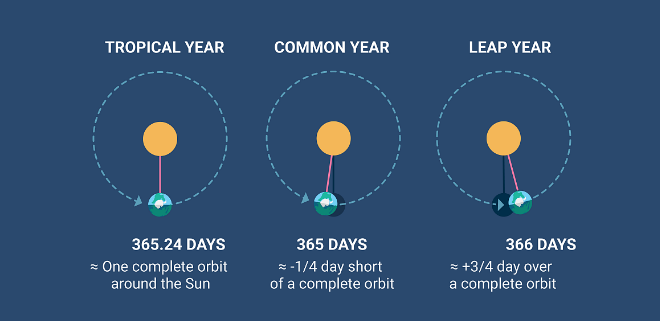
• The calendar granularity associated to the motion of the Earth around the Sun. There are two main definitions: the tropical year and the sidereal year, with the first one being more important, because it is tied to the seasons, something fundamental for agriculture. Then there are many other concepts of year.
Out[]=
Years | |
LeapYears | |
GregorianYears | |
JulianYears | |
SiderealYears | |
TropicalYears | |
LunarYears |
What is a Month?
What is a Month?
• A month is approximately the time that the moon takes to move once around the earth. This is a vague definition. The motion of the moon has several irregularities, so the definition needs to be an average anyway.
• The lunar cycle formed the basis for the palaeolithic marking of time. Some calendars start a month with the new moon (Hebrew or Islamic) or with the full moon (in northern India, for example). For calendars in which the month begins with the observed new moon, beginning the day at sunset is natural.
Out[]=
Months | |
GregorianMonths | |
SynodicMonths | |
SiderealMonths | |
TropicalMonths | |
LunarMonths |
What is a Day?
What is a Day?
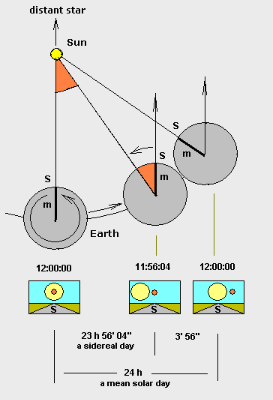
• A day is the time period of a full rotation of the Earth with respect to the Sun (on average, this is 24 hours, 1440 minutes, or 86,400 seconds, but as with other granularities the actual length of a day varies depending on the point of reference).
In[]:=
Grid[{#,UnitConvert[Quantity[1.,#],"Seconds"]}&/@{"Days","SiderealDays","LunarDays"},Alignment->Left]
Out[]=
Days | |
SiderealDays | |
LunarDays |
• The difference between a sidereal day and a solar day is associated with the tropical year:
In[]:=
1/(1/Quantity["SiderealDays"]-1/Quantity["Days"])
Out[]=
In[]:=
%==Quantity[1,"TropicalYears"]
Out[]=
True
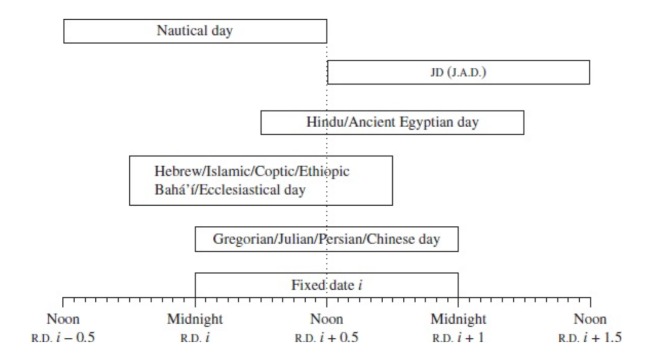
• The day starts at different times in different calendars: sunset, midnight, sunrise, noon. From CC, definition of day i (JD means Julian Day):
In[]:=
CalendarData["Gregorian"]
Out[]=
{Gregorian,YearZeroFalse,StartOfDayMidnight}
In[]:=
CalendarData["ModernHinduSolar"]
Out[]=
ModernHinduSolar,YearZeroTrue,StartOfDaySunrise,Location
In[]:=
CalendarData["JulianDate"]
Out[]=
{JulianDate,StartOfDayNextNoon}
Application to Arithmetic
Application to Arithmetic
What is the date one month after January 30th?
What is the date one month after January 30th?
In[]:=
DatePlus,
Out[]=
What are date arithmetic methods?
What are date arithmetic methods?
There are two main methods of doing arithmetic with dates:
◼
Continuous - uses a fixed definition of unit steps (e.g. 1 month is always 2628000 seconds), and thus does not need to account for variation in unit length
In[]:=
DatePlus,Quantity[1,"Month"],Method->"Continuous"
Out[]=
In[]:=
»
Out[]=
◼
Discrete - uses calendar steps of potentially dynamic length (depending on the calendar being used), which needs to account for gaps/intercalation/daylight saving/leap seconds.
In[]:=
DateObject[{2023,2,30}]
Out[]=
For discrete arithmetic, there is also variation in the method by which variable calendar step lengths handle “rolling” when a gap is encountered during arithmetic (most commonly “Month” on the Gregorian calendar). The three main methods for doing this are:
◼
Roll Forward - skip over to the next valid date
◼
Roll Backward - stay on the last valid date
◼
Roll Over - continue to the next valid date and keep adding from there
Out[]//TableForm=
RollForward | RollBackward | RollOver | |
In[]:=
DatePlus,Quantity[1,"Months"],Method->#&/@{"Continuous","RollBackward","RollForward","RollOver"}
Out[]=
,,,
Time Zones
Time Zones
Out[]=
What are time zones?
What are time zones?
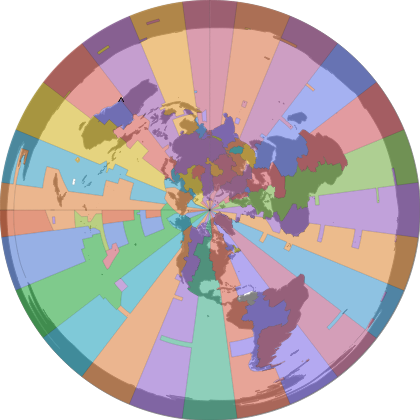
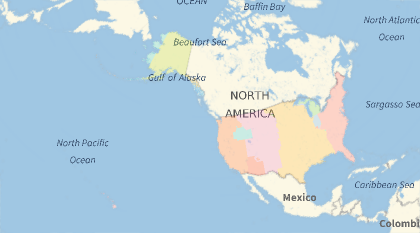
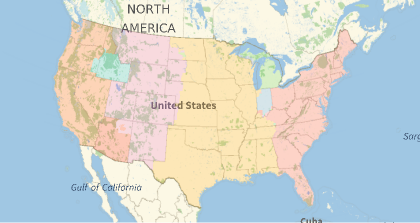
A time zone is an area which observes a uniform standard time. Time zones typically to follow the boundaries between countries and their subdivisions instead of strictly following longitude, because it is convenient for areas in frequent communication to keep the same time.
In[]:=
Lengthzones=["TimeZones"]
Out[]=
29
In[]:=
GeoGraphics[Table[{ColorData[109,k],Polygon@zones[[k]]},{k,1,Length[zones]}]]
Out[]=
In[]:=
Show%,GeoRangeGeoVariant,"DefaultMapArea"
Out[]=
What kinds of time zones are there?
What kinds of time zones are there?
◼
numeric time zones
These time zones are a fixed offset from Greenwich Mean Time (GMT), and typically given as a number of hours difference in locale time.
In[]:=
$SystemTimeZone
Out[]=
-6.
In[]:=
TimeZoneOffset[-6]
Out[]=
-6
◼
internet time zones
The Internet Assignment Number Authority (IANA) maintains a database of geographic time zones in a database that collects the various rules for time zone offsets both historically and currently, and is updated regularly.
In[]:=
$TimeZoneEntity
Out[]=
In[]:=
TimeZoneOffset
Out[]=
-6.
In[]:=
TimeZoneOffset,0,
Out[]=
-5.
In[]:=
TimeZoneOffset,0,
Out[]=
-5.84333
In[]:=
LocalTimeZone
Out[]=
In[]:=
TimeZoneConvert[Now,GeoPosition[{-34,151}]]
Out[]=
Time Systems
Time Systems
What are time systems?
What are time systems?
A time system is a specification for measuring time (the rate at which time passes, how points in time are measured, or both).
What kinds of time systems are there?
What kinds of time systems are there?
In[]:=
now=Now;Grid[{#,TimeSystemConvert[now,#]}&/@{"SmearedUTC","UTC","UT1","TT","TAI","ET","TCB","TCG"},Alignment->Left]
Out[]=
SmearedUTC | |
UTC | |
UT1 | |
TT | |
TAI | |
ET | |
TCB | |
TCG |
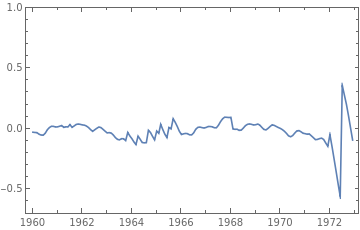
Between 1960 and 1972, frequently added fractional seconds and was more closely aligned to :
"UTC"
"UT1"
In[]:=
DateListPlot[{#,DateDifference[DateObject[#,TimeSystem->"UT1"],DateObject[#,TimeZone->0,TimeSystem->"UTC"],"Second"]}&/@DateRange[{1960,1,2},{1973,1,1},"Month"],PlotRange->{-.7,1}]
Out[]=
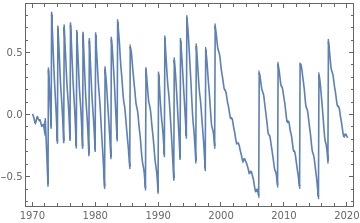
Starting in 1972, adds only whole leap seconds, as needed, to remain within 1 second of :
"UTC"
"UT1"
In[]:=
DateListPlot[{#,DateDifference[DateObject[#,TimeSystem->"UT1"],DateObject[#,TimeZone->0,TimeSystem->"UTC"],"Second"]}&/@DateRange[{1970,1,1},{2020,1,1},"Month"]]
Out[]=
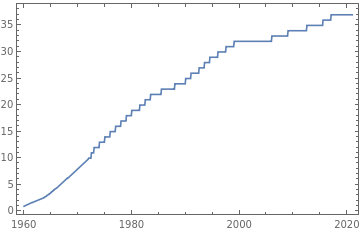
The difference between and shows the number of leap seconds added since began:
"TAI"
"UTC"
"UTC"
In[]:=
DateListPlot[{#,DateDifference[DateObject[#,TimeSystem->"TAI"],DateObject[#,TimeZone->0,TimeSystem->"UTC"],"Second"]}&/@DateRange[{1960,1,2,0,0,0},{2021,1,1},"Month"]]
Out[]=
observation of the duration of each day from 1990 to 2000
In[]:=
DateListPlot[GeoOrientationData[DateInterval[{{1990},{2000}}],"DayDurationExcess"],TargetUnits->"Seconds"]
Out[]=
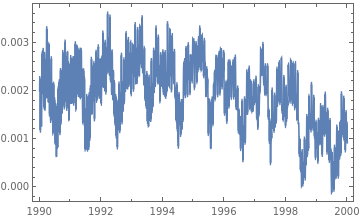
because these were all longer than 24 hours, we need leap seconds.
get the difference between TAI and UT1 from 1990 to 2000
In[]:=
dates=DateRange[DateObject[{1990,1,1}],DateObject[{2000,1,1}]];dt=GeoOrientationData[dates,"TAIMinusUT1"]
Out[]=
QuantityArray


get the difference between TAI and UTC for the same period
In[]:=
leap=GeoOrientationData[dates,"TAIMinusUTC"]
Out[]=
QuantityArray
In[]:=
Show[DateListPlot[{Transpose[{dates,dt-Quantity[0.9,"Seconds"]}],Transpose[{dates,dt+Quantity[0.9,"Seconds"]}]},PlotStyleOrange],DateListPlot[Transpose[{dates,leap}]],ImageSizeMedium]
Out[]=
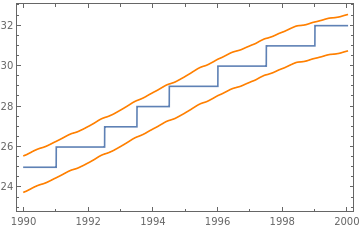
Here is an example comparing a leap second being added, as seen through both TAI and UTC:
DateObject[#,TimeZone->0,TimeSystem->"TAI"]&/@DateRange[{2017,1,1,0,0,33},{2017,1,1,0,0,40},Quantity[1,"Seconds"]]
Out[]=
,,,,,,,
In[]:=
TimeSystemConvert[#,"UTC"]&/@%
Out[]=
,,,,,,,
Introduction to Date Formats
Introduction to Date Formats
Out[]=
What are date formats?
What are date formats?
A date format is a specification of what elements of a date are given, and in what order. Date formats may come from international, national, or local standards.
What kind of date formats are there?
What kind of date formats are there?
◼
see the documentation for for an exhaustive list
In[]:=
DateString[]
Out[]=
Wed 8 Mar 2023 06:35:47
In[]:=
DateString["ISODateTime"]
Out[]=
2023-03-08T06:35:52
In[]:=
DateString["ISOWeekDate"]
Out[]=
2023-W10-3
In[]:=
DateString["ISOOrdinalDate"]
Out[]=
2023-067
In[]:=
DateString[{"DateShort","[","Time","]"}]
Out[]=
Wed 8 Mar 2023[08:57:29]
Introduction to Locales
Introduction to Locales
Out[]=
en-SBWednesday, 8 March 2023 at 9:03:52 AM |
yue2023年3月8日 星期三 上午9:03:52 |
smnkoskokko, njuhčâmáánu 8. 2023 tme 9.03.52 |
twqAlarba 8 Marsi 2023 09:03:52 |
ar-TDالأربعاء، ٨ مارس ٢٠٢٣ ٩:٠٣:٥٢ ص |
yo-BJƆjɔ́rú, 8 Oshù Ɛrɛ̀nà 2023 09:03:52 |
mfe-MUmerkredi 8 mars 2023 09:03:52 |
es-BRmiércoles, 8 de marzo de 2023, 09:03:52 |
What are locales?
What are locales?
A locale is a set of parameters that defines ones language, region and any special variants in localizing dates. Usually a locale identifier consists of at least a language code and a country/region code.
What kind of locales are available?
What kind of locales are available?
In[]:=
Manipulate[EntityList["LanguageLocale"][[i]],{i,1,Length@EntityList["LanguageLocale"],1}]
In[]:=
DateStringNow,
Out[]=
Wednesday, March 8, 2023 at 6:36:33 AM
In[]:=
DateStringNow,
Out[]=
martes, 7 de marzo de 2023, 16:10:09
In[]:=
DateString[Now,"ja"]
Out[]=
2023年3月7日火曜日 16:13:25
In[]:=
DateString[Now,<|"Language"->"Japanese","Elements"->"LocaleDateTimeLong"|>]
Out[]=
2023年3月7日 16:15:01
In[]:=
FromDateString["2023年3月7日 16:15:01","ja"]
Out[]=
Additional Resources
Additional Resources
◼
Calendrical Calculations by Edward M. Reingold, Nachum Dershowitz
◼
ISO-8601 date and time standard
◼
IANA time zone database