Introduction to XML
Introduction to XML
According to the W3C, XML (Extensible Markup Language) is a "simple, very flexible text format derived from SGML" that is "playing an increasingly important role in the exchange of a wide variety of data on the Web and elsewhere." Almost every webpage has XML embedded in it in a form known as HTML. Some image files, such as SVG (scalable vector graphics), also use the XML format. The main construct of XML is simple. XML contains nodes known as elements, elements can have attributes, and elements can contain children. Children can include text or more elements.
<bookstore>
<book category=”children”>
<title>Harry Potter</title>
<author>J K. Rowling</author>
<year>2005</year>
<price>29.99</price>
</book>
<book category=”web”>
<title>Learning XML</title>
<author>Erik T. Ray</author>
<year>2003</year>
<price>39.95</price>
</book>
</bookstore>
<book category=”children”>
<title>Harry Potter</title>
<author>J K. Rowling</author>
<year>2005</year>
<price>29.99</price>
</book>
<book category=”web”>
<title>Learning XML</title>
<author>Erik T. Ray</author>
<year>2003</year>
<price>39.95</price>
</book>
</bookstore>
Above is a simple example of XML. The root element is bookstore, and bookstore contains two book elements. The book elements each have attribute data labelled as "category". The book elements contain title, author, year, and price elements, which each contain text respectively. XML doesn't have a limit on how much you can nest elements. Some XML files will have simple nesting, and some will have much more complicated nesting.
The following is the Ubuntu logo as a scalable vector graphic:
In[]:=
ResourceFunction["SVGImport"]["/home/tbilik/ubuntu.svg"]
Out[]=

The following is a Ford Focus as a scalable vector graphic:
In[]:=
ResourceFunction["SVGImport"]["/home/tbilik/FordFocus.svg"]
Out[]=

This is a representation of the node nesting in the Ubuntu Logo vector:
In[]:=
Import["/home/tbilik/ubuntu.svg","XML"]//ExpressionGraph
Out[]=
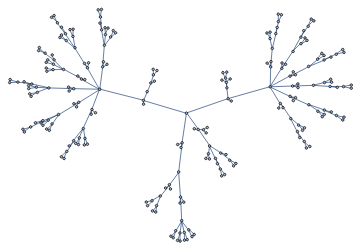
The Ford Focus Graphic has so much node nesting, Wolfram doesn't show the Expression Graph:
In[]:=
Import["/home/tbilik/FordFocus.svg","XML"]//ExpressionGraph
Out[]=
Graph


Wolfram's Import[] function can import a file as XML, as shown in the last two examples. When a file is imported as XML, Wolfram returns an XMLObject Document. XMLObject Documents contain two parameters. The first parameter contains the XML Declaration and/or Doctype. These state the standard of XML being used. The second parameter is an XMLElement. XMLElement contains 3 parameters. XMLElement contains the element name (often known as a tag), a list of rules that represent the attributes, and a list that represents the children of the element.
How can XMLElements be formatted/visualized in Wolfram?
How can XMLElements be formatted/visualized in Wolfram?
One approach I had to formatting XMLElements was to use recursion.
The function takes in an XMLElement. It will print the tag, attributes, and children. If one of the children is an XMLElement, the function will call itself, increasing the nesting by 1. The "nest" argument controls indentation:
In[]:=
XMLFormatter[element_XMLElement,nest_Integer:0]:=Module[{},Print[StringRepeat["\t",nest],Style[element[[1]],Bold]];Print[StringRepeat["\t",nest],Style[StringJoin[Keys[#],": ",Values[#]],Italic]]&/@element[[2]];If[Head[#]===XMLElement,XMLFormatter[#,nest+1],Print[StringRepeat["\t",nest],#]]&/@element[[3]];]
Here is an example:
In[]:=
exampleXML=Import["/home/tbilik/bookstore.xml","XML"];XMLFormatter[exampleXML[[2]]]
bookstore
book
category: children
title
Harry Potter
author
J K. Rowling
year
2005
price
29.99
book
category: web
title
Learning XML
author
Erik T. Ray
year
2003
price
39.95
This may be good for simple XML files, but the output will get larger and more complicated if the XML gets larger and further nested. Luckily, Wolfram has functions to allow for collapsed output. The OpenerView function is one function that does this.
Here is a simple OpenerView example. It takes a list of 2 elements. The first element is visible, the second one is collapsed:
In[]:=
OpenerView[{a,b}]
Out[]=
If multiple things needs to be visible or collapsed, Column[] can be used:
In[]:=
OpenerView[{Column[{a,b,c}],Column[{d,e,f}]}]
Out[]=
I also found a better solution to recursion when it comes to nesting. Instead of recursion, I can just write my own function that replaces XMLElement at all levels. Replacing heads at all levels in Wolfram is very easy with the Replace[] function.
This will replace XMLElement with MyXMLElement at all levels:
Replace[xmlElm,XMLElementMyXMLElement,Infinity,HeadsTrue]
Before I show the MyXMLElement function I created, I would like to show some of the variables and functions it depends on.
These styling variables need to be declared:
In[]:=
baseStyle={FontFamily"Source Sans Pro",FontSize14};tagStyle=Join[baseStyle,{Bold,Orange}];attStyle=Join[baseStyle,{Gray}];
This function will find hexadecimal color codes in a string. A hexadecimal color code contains a pound sign which is followed by 3 or 6 hexadecimal characters:
In[]:=
HexStringPattern:={"#"~~HexadecimalCharacter~~HexadecimalCharacter~~HexadecimalCharacter~~HexadecimalCharacter~~HexadecimalCharacter~~HexadecimalCharacter,"#"~~HexadecimalCharacter~~HexadecimalCharacter~~HexadecimalCharacter}
Now that the following have been declared, here is the entire MyXMLElement function.
In[]:=
MyXMLElement[title_,attributes_List,children_List]:=Module[{visible=Module[{y=#[[1]]},Row[{Style[y,#[[2]]]," ",If[StringContainsQ[y,HexStringPattern],RGBColor[StringCases[y,HexStringPattern][[1]]],""]}]]&/@Join[{{If[Head[title]===List,StringRiffle[title,"⁃"],title],tagStyle}},List[StringJoin[If[Head[Keys[#]]===List,StringRiffle[Keys[#],"⁃"],Keys[#]],": ",Values[#]],attStyle]&/@attributes]},If[Length[children]0,Column[visible],OpenerView[{Column[visible],Column[If[Head[#]===String,Style[#,baseStyle],#]&/@Cases[children,x___/;!(Head[x]===XMLObject["Comment"])]]},FrameMargins10]]]
This can look a bit daunting, but it's easier if it's broken down. MyXMLElement takes the exact same parameters that XMLElement does: tag name, attributes, and children. The module contains one variable in it's brackets: visible. As the name implies, this will generate the non-collapsed part of the OpenerView. It puts the tag name and attributes into its own row. Two things are worth noting in the visible variable: the RGBColor[] function, and the StringRiffle[] function. If a hexadecimal color code is found in an attribute (color codes are often found in HTML, SVG, and other formats), RGBColor[] will show that color in a square adjacent to the attribute. The StringRifle[] function has to do with XML namespaces. The usage of XML namespaces is outside the scope of this essay, but if XML namespaces exist in a tag or attribute, the tag or attribute key becomes a List of Strings rather than an independent String when imported as an XMLObject. StringRiffle[] will join the lists with unicode dashes in between. The code in the module generates an OpenerView if an element has children. The children are slightly modified, as XML comments are removed, and non-element children are given the base style. The "FrameMargins" option is mainly for aesthetics.
Without further ado, here is a demonstration:
In[]:=
exampleXML=Import["/home/tbilik/ubuntu.svg","XML"];Replace[exampleXML[[2]],XMLElementMyXMLElement,Infinity,HeadsTrue]
Out[]=
To make using this functionality slightly less tedious, I wrote a function that will either take an XML file or XMLObject and will do the head replacement:
In[]:=
XML2OpenerView[input_]:=Module[{xmlObj=Which[Head[input]===String&&FileExistsQ[input],Import[input,"XML"],Head[input]===XMLObject["Document"],input,True,1]},If[xmlObj===1,Return[Failure["InvalidInput",<||>]]];Replace[xmlObj[[2]],XMLElementMyXMLElement,Infinity,HeadsTrue]]
Using XML2OpenerView with a filename:
In[]:=
XML2OpenerView["/home/tbilik/ubuntu.svg"]
Out[]=
Using XML2OpenerView with an XMLObject:
In[]:=
XML2OpenerView[exampleXML]
Out[]=
Making the XML Visualizer Dynamic
Making the XML Visualizer Dynamic
Since the beginning of the project, I wanted to have a two-way transformation between the XML Text and the Visualized XML. More specifically, I wanted to be able to modify the contents of the visualized XML, and then to have function that would be able to scrape it and turn it back into XML Text. To allow for the modification of the visualized XML, I made every element, attribute, and child a button. It can be clicked on to open up an input field where the contents can be changed. Here is the modified MyXMLElement function that allows for this functionality.
MyXMLElement[title_,attributes_List,children_List]:=Module[{visible=Module[{y=#[[1]]},Row[{Button[Style[Dynamic[y],#[[2]]],CreateDialog[InputField[Dynamic[y],String]],AppearanceNone]," ",Dynamic[If[StringContainsQ[y,HexStringPattern],RGBColor[StringCases[y,HexStringPattern][[1]]],""]]}]]&/@Join[{{If[Head[title]===List,StringRiffle[title,"⁃"],title],tagStyle}},List[StringJoin[If[Head[Keys[#]]===List,StringRiffle[Keys[#],"⁃"],Keys[#]],": ",Values[#]],attStyle]&/@attributes]},If[Length[children]0,Column[visible],OpenerView[{Column[visible],Column[If[Head[#]===String,Module[{y=#},Button[Style[Dynamic[y],baseStyle],CreateDialog[InputField[Dynamic[y],String]],AppearanceNone]],#]&/@Cases[children,x___/;!(Head[x]===XMLObject["Comment"])]]},FrameMargins10]]]
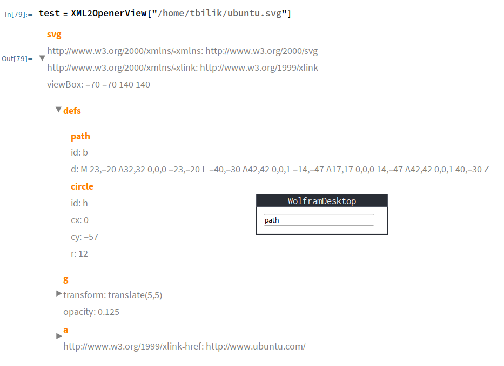
This isn't largely different, except for the fact that some things are now dynamic. This likely won't execute easily in the cloud, so here is a screenshot of the functionality. In the photo, I had clicked on the "path" tag, and a window with an input field popped up. The contents of the input field will modify the visualizer.
Now that the visualizer can be modified, a scraper function will be needed to turn it back into XML Text. With replace functionality and pattern matching, the visualized XML can be turned back into an XMLObject with relative ease. Before I show the scraping function, these functions are required for the scraping functionality. Both of these functions are related to parsing the tag and attributes that were modified in the visualizer.
Attribute Parser:
In[]:=
String2Attributes[x_List]:=(If[StringContainsQ[#[[1]],"⁃"],StringSplit[#[[1]],"⁃"],#[[1]]]#[[2]])&/@StringSplit[x,": "];
Tag Parser:
In[]:=
String2Tag[x_]:=If[StringContainsQ[x,"⁃"],StringSplit[x,"⁃"],x]
Without further ado, here is the scraper function:
In[]:=
OpenerView2XML[input_,format_OpenerView]:=Module[{xmlObj=Which[Head[input]===String&&FileExistsQ[input],Import[input,"XML"],Head[input]===XMLObject["Document"],input,True,1]},If[xmlObj===1,Return[Failure["InvalidInput",<||>]]];xmlObj[[2]]=format//.Row[{x_,___}]x;xmlObj[[2]]=xmlObj[[2]]//.Button[Style[x_,___],CreateDialog[InputField[x_,String]],___]Setting[x];xmlObj[[2]]=xmlObj[[2]]//.OpenerView[{Column[x_],Column[y_]},___]XMLElement[String2Tag[First[x]],String2Attributes[Drop[x,1]],y];xmlObj[[2]]=xmlObj[[2]]//.Column[x_]XMLElement[String2Tag[First[x]],String2Attributes[Drop[x,1]],{}];xmlObj]
Similar to XML2OpenerView, it takes an XMLObject or filename. The main reason for this is to retrieve XML Declaration/Doctype data, which is not embedded in the visualization. As stated, the function then uses various replacements and patterns to scrape the visualized XML. There is nothing particularly unique about this process, other than Setting[x]. This converts everything from dynamic to the latest static value at the time of execution. The function returns an XMLObject, which can be easily exported to XML Text using one of Wolfram's export functions.
Exporting via the ExportString function:
ExportString[%,"XML"]
Further Improvements
Further Improvements
Some XML functionality is not supported by my code, such as CDATA. For highly nested XML, the collapsed format can be tedious, so I would like to make it so that some (but not all) OpenerViews are open by default. More testing needs to be done as well in general.
Keywords
Keywords
◼
XML: Extensible Markup Language, a documenting format
◼
HTML: Hypertext Markup Language, a form of XML that is used for webpage structure
◼
SVG: Scalable Vector Graphics, a form of XML that is used for images
◼
Hexadecimal: a numbering system that uses base-16. Uses the numbers in base 10 along with the letters a through f.