Navigating the Entity Framework
Navigating the Entity Framework
Navigating the Wolfram Entity Framework can be confusing and sometimes it can be a hit or miss from my experience. Often we start with Ctrl-= to get a semantic interpretation to get us started, but then again how do we go from there? There are too many ways to achieve the same thing in the Entity framework with all the special Entity expressions out there. I always wanted to be able to get Entity information right from the start with the least amount of expressions.
So during the last few days, I took a deep dive into the framework to find Expressions that can get me information quickly and reasonably consistently.
In this post, I would like to share my findings as a quick tutorial.
So during the last few days, I took a deep dive into the framework to find Expressions that can get me information quickly and reasonably consistently.
In this post, I would like to share my findings as a quick tutorial.
EntityValue is Key
EntityValue is Key
The key expression to start navigating the entity framework is EntityValue. It’s key because it will get you a list of entities, entity classes, properties, property classes and property metadata.
On the highest level of abstraction (group) there are Entity Types.
You can evaluate EntityValue[ ] to get a list of CanonicalNames of the all the Entity Types.
On the highest level of abstraction (group) there are Entity Types.
You can evaluate EntityValue[ ] to get a list of CanonicalNames of the all the Entity Types.
Entity Types
Entity Types
In[]:=
EntityValue[]//Short
Out[]//Short=
{AdministrativeDivision,Aircraft,Airline,Airport,AirportType,Alphabet,332,WritingScriptWhiteSpace,YogaPose,YogaPosition,YogaProp,YogaSequence,ZIPCode}
Entities
Entities
Next we’ll find the Canonical name of the Entity type we’re are interested in i.e. “Country”.
To retrieve all entities we can start with EntityList , but some entity type lists may contain many entities which takes some time to load.
So I suggest you first verify how many entities there are. We will use EntityCount (which is also fast to evaluate) as so:
To retrieve all entities we can start with EntityList , but some entity type lists may contain many entities which takes some time to load.
So I suggest you first verify how many entities there are. We will use EntityCount (which is also fast to evaluate) as so:
In[]:=
EntityValue["Country","EntityCount"]
Out[]=
250
As expected in the case of countries, this is a manageable number of Entity objects, so we proceed with EntityList to produce a list of 250 country Entitiy objects:
In[]:=
EntityList@EntityValue["Country"]//Shallow
Out[]//Shallow=
,,,,,,,,,,240
For this quick tutorial we are interested in the United States, which is this entity:
In[]:=
Out[]//InputForm=
Entity[Country, UnitedStates]
The country entity obviously has geographic information enclosed in the Entity object i.e. we can plot the entity directly in e.g. GeoListPlot :
In[]:=
GeoListPlot
Out[]=
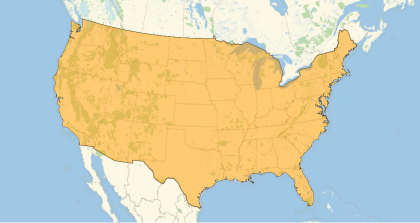
Note: if the entity list is too unwieldy, transform the entities into a list of CanonicalNames as so and perform a “search”:
In[]:=
CanonicalName/@EntityList@EntityValue["Country"]//ShortSelect[StringMatchQ[___~~"United"~~___]]@%
Out[]//Short=
{Afghanistan,AlandIslands,Albania,Algeria,AmericanSamoa,Andorra,Angola,236,Vietnam,WallisFutuna,WestBank,WesternSahara,Yemen,Zambia,Zimbabwe}
Out[]=
{UnitedArabEmirates,UnitedKingdom,UnitedStates,UnitedStatesMinorOutlyingIslands,UnitedStatesVirginIslands}
Entity Properties
Entity Properties
So what properties can we find for the United States entity?
Entity properties are defined on the highest level i.e. at the level of Entity Type , but we can also find them at the Entity-object level in the same way i.e. through the “Properties” option as so:
Entity properties are defined on the highest level i.e. at the level of Entity Type , but we can also find them at the Entity-object level in the same way i.e. through the “Properties” option as so:
In[]:=
EntityValue["Country","Properties"]//Shallow["Properties"]//Shallow
Out[]//Shallow=
,,,,,,,,,,741
Out[]//Shallow=
,,,,,,,,,,741
The result is a list of EntityProperty objects which can be long and in this case the list compromises of 751 property objects:
In[]:=
Out[]=
751
Note: we can also produce a list of entity properties as a list of CanonicalNames in the same way we did before.
In this example, we are interested in the population size
In[]:=
Out[]//InputForm=
EntityProperty[Country, Population]
Now the Entity property quantity can be easily retrieved in operator form as so:
In[]:=
Out[]=
Note: You can also use the CanonicalName instead of the population EntityProperty object.
Annotations
Annotations
There are additional properties we can retrieve, annotations that is: “Source” and “Date” which concerns reference information and date.
We can get those data through the Entity object as so:
We can get those data through the Entity object as so:
In[]:=
Out[]=
Out[]=
Property Metadata
Property Metadata
There is even more information we can retrieve which is enclosed in so-called metadata for which we have to go back to our EntityValue expression as so:
In[]:=
EntityValue,"Qualifiers"
Out[]=
{Age,CitizenshipStatus,Date,Gender,HispanicOrigin,MarginOfError,Percent,Race,TwoOrMore,UrbanRural}
Note there are a number of metadata properties you can try out i.e.:
Out[]=
{Qualifiers,QualifierValues,Label,Definition,Source,PhysicalQuantity,Unit}
The result is a list of property metadata.
We are particularly interested in the QualifierValues which gives a list of “rules” of metadata properties we can retrieve
We are particularly interested in the QualifierValues which gives a list of “rules” of metadata properties we can retrieve
In[]:=
EntityValue,"QualifierValues"
Out[]=
{Age{Adult,MiddleAge,PreSchool,SchoolAge,Senior,Young,YoungAdult},CitizenshipStatus{BornInPuertoRico,BornInUS,BornToAmericanParents,NaturalizedCitizen,NotCitizen,TotalCitizens},Date{},Gender{Female,Male},HispanicOrigin{Argentinean,Bolivian,CentralAmerican,Chilean,Colombian,CostaRican,Cuban,Dominican,Ecuadorian,Guatemalan,Hispanic,HispanicOrLatinoAllOther,Honduran,Mexican,Nicaraguan,NotHispanic,OtherCentralAmerican,OtherHispanicOrLatino,OtherSouthAmerican,Panamanian,Paraguayan,Peruvian,PuertoRican,Salvadoran,SouthAmerican,Spaniard,Spanish,SpanishAmerican,Uruguayan,Venezuelan},MarginOfError{MarginOfError,StandardError},Percent{Main},Race{AmericanIndian,Asian,Black,NativeHawaiian,Other,TwoOrMore,White,{All,Hispanic}},TwoOrMore{ThreeOrMore,TwoIncludingOther},UrbanRural{Rural,Urban}}
We can retrieve the metadata by reverting to the UnitedStates Entity and the CanonicalName of the entity property one-at-a-time as so:
In[]:=
Out[]=
In[]:=
Out[]=
Dated metadata
Dated metadata
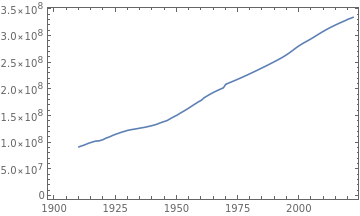
Some entities have TimeSeries information in the QualifierValues’ Date, which can be retrieved as so:
In[]:=
Out[]=
TimeSeries


Out[]=
Differences between entities
Differences between entities
For country entities, we used a list with a begin date and and an end date in DateObject format to retrieve a TimeSeries object.
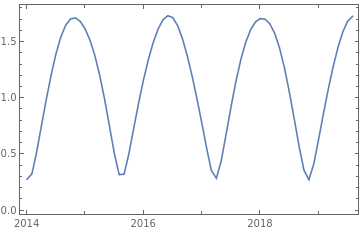
The way we can find dated metadata may vary per entity. Here are two other examples where we have to use an Interval or a DateRange.
The way we can find dated metadata may vary per entity. Here are two other examples where we have to use an Interval or a DateRange.
For example Planet Entity properties e.g. Venus’ distance from earth of can be retrieved one -date-at-a-time, so if we need a time series we need a few intermediate steps:
In[]:=
Function[a,{a,Entity["Planet","Venus"]["DistanceFromEarth","Date"->a]}]/@DateRange,,"Month"//TimeSeriesDateListPlot@%
Out[]=
TimeSeries
Out[]=
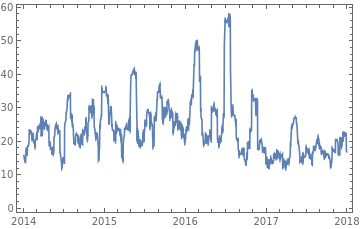
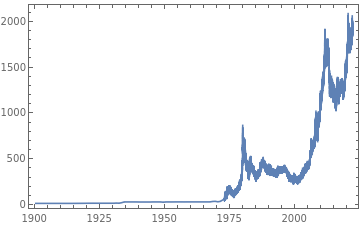
This example uses the entity framework as a source of financial data (in conjunction with FinancialData, see below).
TimeSeries data can be retrieved directly, using an Interval (not a DateInterval..BTW) as so:
TimeSeries data can be retrieved directly, using an Interval (not a DateInterval..BTW) as so:
In[]:=
Out[]=
TimeSeries
Out[]=
Using the Dated Expression on Entity
Using the Dated Expression on Entity
There is another way to retrieve dated Entity data i.e. using the Dated[ ] expression directly on the Entity object.
The way we can use it for e.g. country entities is by using the Interval of two dates i.e.:
The way we can use it for e.g. country entities is by using the Interval of two dates i.e.:
In[]:=
Dated,Interval@{DateObject[{1998,7,1}],Today}["Population"]
Out[]=
TimeSeries
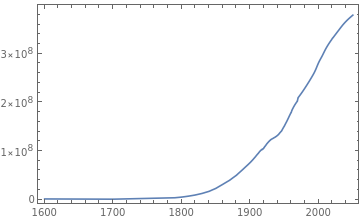
Note that, again, DateInterval should have been a more logical choice for a date interval. With the Dated expression we have the option to retrieve all dated information using the option “All” as so:
In[]:=
Dated,All["Population"]DateListPlot@%
Out[]=
TimeSeries
Out[]=
For commodity prices we can retrieve the complete Time Series as so:
In[]:=
Dated[Entity["Element","Gold"],All]["Price"]DateListPlot@%
Out[]=
TimeSeries

Out[]=
Again using Dated is still limited to one-date-at-a-time for Planet Entities so if we want a TimeSeries we have to use this instead:
In[]:=
Function[a,{a,Dated[Entity["Planet","Venus"],a]["DistanceFromEarth"]}]/@DateRange,,"Month"//TimeSeriesDateListPlot@%
Out[]=
TimeSeries
Out[]=
Entity Properties as a Dataset
Entity Properties as a Dataset
So far I focussed on single properties per Entity, but we can also retrieve all properties of an Entity in e.g. Dataset format directly from the Entity:
In[]:=
Out[]=


Entity Classes
Entity Classes
Some Entity Types may contain EntityClasses which are groups of Entity Types which we can retrieve using the EntityClassList as so:
In[]:=
EntityClassList@EntityValue["Country"]//Shallow
Out[]//Shallow=
,,,,,,,,,,349

The Country Entity Class comprise of countries grouped by continents, unions etc.
For example: which countries are part of the European Union?
For example: which countries are part of the European Union?
In[]:=
EntityList@EntityClass["Country","EuropeanUnion"]
Out[]=
,,,,,,,,,,,,,,,,,,,,,,,,,,
Property Classes
Property Classes
Some Entity properties are grouped into property classes , similar to entities classes.
There is no such expression as EntityPropertyClassList, but the property classes are retrieved in a similar way we retrieve properties i.e.:
There is no such expression as EntityPropertyClassList, but the property classes are retrieved in a similar way we retrieve properties i.e.:
In[]:=
EntityValue["Country","PropertyClasses"]
Out[]=
We can use the Entity to get all the relevant data from the PropertyClass in one go:
In[]:=
Out[]=
0.414,,,,,,
We retrieve a list of PropertyClass properties associated with this class in a similar to the way we get Entity properties i.e. through the “Properties” option as so:
In[]:=
Out[]=
,,,,,,

Now we can retrieve any property of the property class from the Entity in our example:
In[]:=
Out[]=
Note we can also getPropertyClass properties from EntityClasses e.g.:
In[]:=
Out[]=
0.308,,,,,,,0.272,,,,,,
Specialized Entity Types
Specialized Entity Types
Of the Entity Types, there are a few curated special Entity types. These are named <XXX>Data and you can find them as follows:
In[]:=
?*Data
I will not go into detail here about the specialized entity types e.g. CountryData (where we can find data on the UnitedStates)., but you can experiment with it.
Summary
Summary
Your key expression to navigate the Wolfram Entity Framework is EntityValue. You can use it to retrieve: entity types, entities, properties, entity classes , property classes and finally property metadata. Once you’ve found the entities and their properties of interest, you can use the Entity object to get the property quantities and metadata. To sum up the expressions I use most:EntityValue[ ] -> List of Entity Type CanonicalNameEntityValue[ Entity type CanonicalName,“Properties” ] -> List of EntityProperty objectsEntityValue[ Entity type CanonicalName,”PropertyClasses” ] -> List of EntityPropertyClass objectsEntityValue[ Entity Property object, “metadata” ] -> List of Property metadata rulesEntityList@ EntityValue[ Entity Type CanonicalName ] -> List of Entity objectsEntityClassList@ EntityValue[ Entity Type CanonicalName ] -> List of EntityClass objectsEntityList@ EntityClass object -> List of Entity objectsPropertyClass object [“Properties”] -> List of EntityProperty objectsEntity object [ “Dataset” ] -> Dataset with all Entity PropertiesEntity object[ EntityProperty object ] -> QuantityEntity object[ Property CanonicalName, metadata rule ] -> Quantity, Data, TimeSeries etc.
Of course this is my own selection of methods to navigate the framework and there are many, many ways to achieve the same results.
You can play with the framework to achieve all the identities available, but I like to keep it simple: EntityValue to get property objects/names, and the Entity object to get the data quantities.
I hope this is helpful. Have fun navigating the entity framework.
Cheers,
Dave
Of course this is my own selection of methods to navigate the framework and there are many, many ways to achieve the same results.
You can play with the framework to achieve all the identities available, but I like to keep it simple: EntityValue to get property objects/names, and the Entity object to get the data quantities.
I hope this is helpful. Have fun navigating the entity framework.
Cheers,
Dave