Introduction
Introduction
The Doomsday Clock is a symbolic timepiece maintained by the Bulletin of the Atomic Scientists (BAS) since 1947. It represents how close humanity is perceived to be to global catastrophe, primarily nuclear war but also including climate change and biological threats. The clock’s hands are set annually to reflect the current state of global security; midnight signifies theoretical doomsday.
In this notebook we consider two tasks:
◼
Parsing of Doomsday Clock reading statements
◼
Using both Functional Parsers (FP) (aka "parser combinators"), [AAp1], and Large Language Models (LLMs).
◼
We take text data from the past announcements, and extract the Doomsday Clock reading statements.
◼
Evolution of Doomsday Clock times
◼
We extract relevant Doomsday Clock timeline data from the corresponding Wikipedia page.
◼
(Instead of using a page from BAS.)
◼
We show how timeline data from that Wikipedia page can be processed with “standard” Wolfram Language (WL) functions and with LLMs.
◼
The result plot shows the evolution of the minutes to midnight.
◼
The plot could show trends, highlighting significant global events that influenced the clock setting.
◼
Hence, we put in informative callouts and tooltips.
The data extraction and visualization in the notebook serve educational purposes or provide insights into historical trends of global threats as perceived by experts. We try to make the ingestion and processing code universal and robust, suitable for multiple evaluations now or in the (near) future.
Remark: Keep in mind that the Doomsday Clock is a metaphor and its settings are not just data points but reflections of complex global dynamics (by certain experts and a board of sponsors.)
Data ingestion
Data ingestion
Here we ingest the Doomsday Clock timeline page and show corresponding statistics:
In[]:=
url="https://thebulletin.org/doomsday-clock/timeline/";txtEN=Import[url,"Plaintext"];TextStats[txtEN]
Out[]=
Characters77662,Words11731,Lines1119
By observing the (plain) text of that page we see the Doomsday Clock time setting can be extracted from the sentence(s) that begin with the following phrase:
In[]:=
startPhrase="Bulletin of the Atomic Scientists";sentence=Select[Map[StringTrim,StringSplit[txtEN,"\n"]],StringStartsQ[#,startPhrase]&]//First
Out[]=
Bulletin of the Atomic Scientists, with a clock reading 90 seconds to midnight
Grammar and parsers
Grammar and parsers
In[]:=
ebnf="<TOP> = <clock-reading> ;<clock-reading> = <opening> , ( <minutes> | [ <minutes> , [ 'and' | ',' ] ] , <seconds> ) , 'to' , 'midnight' ;<opening> = [ { <any> } ] , 'clock' , [ 'is' ] , 'reading' ; <any> = '_String' ;<minutes> = <integer> <& ( 'minute' | 'minutes' ) <@ \"Minutes\"->#&;<seconds> = <integer> <& ( 'second' | 'seconds' ) <@ \"Seconds\"->#&;<integer> = '_?IntegerQ' ;";
Remark: The EBNF grammar above can be obtained with LLMs using a suitable prompt with example sentences. (We do not discuss that approach further in this notebook.)
Here the parsing functions are generated from the EBNF string above:
In[]:=
ClearAll["p*"]res=GenerateParsersFromEBNF[ParseToEBNFTokens[ebnf]];res//LeafCount
Out[]=
375
We must redefine the parser pANY (corresponding to the EBNF rule “<any>”) in order to prevent pANY of gobbling the word “clock” and in that way making the parser pOPENING fail.
In[]:=
pANY=ParsePredicate[StringQ[#]&&#!="clock"&];
Here are random sentences generated with the grammar:
In[]:=
SeedRandom[32];GrammarRandomSentences[GrammarNormalize[ebnf],6]//Sort//ColumnForm
Out[]=
54jfnd 9y2f clock is reading 46 second to midnight |
clock is reading 900 minutes to midnight |
clock is reading 955 second to midnight |
clock reading 224 minute to midnight |
clock reading 410 minute to midnight |
jdsf5at clock reading 488 seconds to midnight |
Verifications of the (sub-)parsers:
In[]:=
pSECONDS[{"90","seconds"}]
Out[]=
{{{},Seconds90}}
In[]:=
pOPENING[ToTokens@"That doomsday clock is reading"]
Out[]=
{{{},{{That,doomsday},{clock,{is,reading}}}}}
Here the “top” parser is applied:
In[]:=
str="the doomsday clock is reading 90 seconds to midnight";pTOP[ToTokens@str]
Out[]=
{{{},{{{the,doomsday},{clock,{is,reading}}},{{{},Seconds90},{to,midnight}}}}}
Here the sentence extracted above is parsed and interpreted into an association with keys “Minutes” and “Seconds”:
In[]:=
aDoomReading=Association@Cases[Flatten[pTOP[ToTokens@sentence]],_Rule]
Out[]=
Seconds90
Plotting the clock
Plotting the clock
Using the interpretation derived above here we make a list suitable for ClockGauge:
In[]:=
clockShow=DatePlus[{0,0,0,12,0,0},{-(Lookup[aDoomReading,"Minutes",0]*60+aDoomReading["Seconds"]),"Seconds"}]
Out[]=
{-2,11,30,11,58,30}
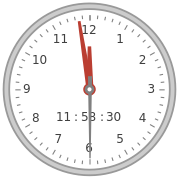
In that list, plotting of a Doomsday Clock image (or gauge) is trivial.
In[]:=
ClockGauge[clockShow,GaugeLabelsAutomatic]
Out[]=
Let us define a function that makes the clock-gauge plot for a given association.
In[]:=
Clear[DoomsdayClockGauge];Options[DoomsdayClockGauge]=Options[ClockGauge];DoomsdayClockGauge[m_Integer,s_Integer,opts:OptionsPattern[]]:=DoomsdayClockGauge[<|"Minutes"->m,"Seconds"->s|>,opts];DoomsdayClockGauge[a_Association,opts:OptionsPattern[]]:=Block{clockShow},clockShow=DatePlus[{0,0,0,12,0,0},{-(Lookup[a,"Minutes",0]*60+Lookup[a,"Seconds",0]),"Seconds"}];ClockGaugeclockShow,opts,GaugeLabelsPlacedStyle"Doomsday\nclock",,FontFamily->"Krungthep",Bottom;
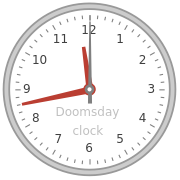
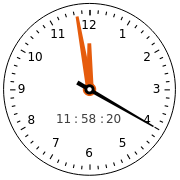
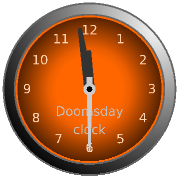
Here are examples:
In[]:=
Row[{DoomsdayClockGauge[17,0],DoomsdayClockGauge[1,40,GaugeLabels->Automatic,PlotTheme->"Scientific"],DoomsdayClockGauge[aDoomReading,PlotTheme->"Marketing"]}]
Out[]=
More robust parsing
More robust parsing
More robust parsing of Doomsday Clock statements can be obtained in these three ways:
◼
“Fuzzy” match of words
◼
For misspellings like “doomsdat” instead of “doomsday.”
◼
Parsing of numeric word forms.
◼
For statements, like, “two minutes and twenty five seconds.”
◼
Delegating the parsing to LLMs when grammar parsing fails.
Fuzzy matching
Fuzzy matching
The parser ParseFuzzySymbol can be used to handle misspellings (via EditDistance):
In[]:=
pDD=ParseFuzzySymbol["doomsday",2];lsPhrases={"doomsdat","doomsday","dumzday"};ParsingTestTable[pDD,lsPhrases]
Out[]=
# | Statement | Parser output |
1 | doomsdat | {{{},doomsday}} |
2 | doomsday | {{{},doomsday}} |
3 | dumzday | {} |
In order to include the misspelling handling into the grammar we manually rewrite the grammar. (The grammar is small, so, it is not that hard to do.)
In[]:=
pANY=ParsePredicate[StringQ[#]&&EditDistance[#,"clock"]>1&];pOPENING=ParseOption[ParseMany[pANY]]⊗ParseFuzzySymbol["clock",1]⊗ParseOption[ParseSymbol["is"]]⊗ParseFuzzySymbol["reading",2];pMINUTES="Minutes"->#&⊙(pINTEGER⊲ParseFuzzySymbol["minutes",3]);pSECONDS="Seconds"->#&⊙(pINTEGER⊲ParseFuzzySymbol["seconds",3]);pCLOCKREADING=Cases[#,_Rule,∞]&⊙(pOPENING⊗(pMINUTES⊕ParseOption[pMINUTES⊗ParseOption[ParseSymbol["and"]⊕ParseSymbol["&"]⊕ParseSymbol[","]]]⊗pSECONDS)⊗ParseSymbol["to"]⊗ParseFuzzySymbol["midnight",2]);
Here is a verification table with correct- and incorrect spellings:
In[]:=
lsPhrases={"doomsday clock is reading 2 seconds to midnight","dooms day cloc is readding 2 minute and 22 sekonds to mildnight"};ParsingTestTable[pCLOCKREADING,lsPhrases,"Layout""Vertical"]
Out[]=
1 | command: | doomsday clock is reading 2 seconds to midnight |
parsed: | {Seconds2} | |
residual: | {} | |
2 | command: | dooms day cloc is readding 2 minute and 22 sekonds to mildnight |
parsed: | {Minutes2,Seconds22} | |
residual: | {} |
Parsing of numeric word forms
Parsing of numeric word forms
One way to make the parsing more robust is to implement the ability to parse integer names (or numeric word forms) not just integers.
Remark: For a fuller discussion -- and code -- of numeric word forms parsing see the tech note "Integer names parsing" of the paclet "FunctionalParsers", [AAp1].
First, we make an association that connects integer names with corresponding integer values
In[]:=
aWordedValues=Association[IntegerName[#,"Words"]->#&/@Range[0,100]];aWordedValues=KeyMap[StringRiffle[StringSplit[#,RegularExpression["\\W"]]," "]&,aWordedValues];Length[aWordedValues]
Out[]=
101
Here is how the rules look like:
In[]:=
aWordedValues〚1;;-1;;20〛
Out[]=
zero0,twenty20,forty40,sixty60,eighty80,one hundred100
Here we program the integer names parser:
In[]:=
pUpTo10=ParseChoice@@Map[ParseSymbol[IntegerName[#,{"English","Words"}]]&,Range[0,9]];p10s=ParseChoice@@Map[ParseSymbol[IntegerName[#,{"English","Words"}]]&,Range[10,100,10]];pWordedInteger=ParseApply[aWordedValues[StringRiffle[Flatten@{#}," "]]&,p10s⊗pUpTo10⊕p10s⊕pUpTo10];
Here is a verification table of that parser:
In[]:=
lsPhrases={"three","fifty seven","thirti one"};ParsingTestTable[pWordedInteger,lsPhrases]
Out[]=
# | Statement | Parser output |
1 | three | {{{},3}} |
2 | fifty seven | {{{},57},{{seven},50}} |
3 | thirti one | {} |
There are two parsing results for “fifty seven”, because pWordedInteger is defined with p10s⊗pUpTo10⊕p10s... . This can be remedied by using ParseJust or ParseShortest:
In[]:=
lsPhrases={"three","fifty seven","thirti one"};ParsingTestTable[ParseJust@pWordedInteger,lsPhrases]
Out[]=
# | Statement | Parser output |
1 | three | {{{},3}} |
2 | fifty seven | {{{},57}} |
3 | thirti one | {} |
Let us change pINTEGER to parse both integers and integer names:
In[]:=
pINTEGER=(ToExpression⊙ParsePredicate[StringMatchQ[#,NumberString]&])⊕pWordedInteger;lsPhrases={"12","3","three","forty five"};ParsingTestTable[pINTEGER,lsPhrases]
Out[]=
# | Statement | Parser output |
1 | 12 | {{{},12}} |
2 | 3 | {{{},3}} |
3 | three | {{{},3}} |
4 | forty five | {{{},45},{{five},40}} |
Let us try the new parser using integer names for the clock time:
In[]:=
str="the doomsday clock is reading two minutes and forty five seconds to midnight";pTOP[ToTokens@str]
Out[]=
{{{},{Minutes2,Seconds45}}}
Enhance with LLM parsing
Enhance with LLM parsing
There are multiple ways to employ LLMs for extracting “clock readings” from arbitrary statements for Doomsday Clock readings, readouts, and measures. Here we use LLM few-shot training:
In[]:=
flop=LLMExampleFunction[{"the doomsday clock is reading two minutes and forty five seconds to midnight"->"{\"Minutes\":2, \"Seconds\": 45}","the clock of the doomsday gives 92 seconds to midnight"->"{\"Minutes\":0, \"Seconds\": 92}","The bulletin atomic scienist maybe is set to a minute an 3 seconds."->"{\"Minutes\":1, \"Seconds\": 3}"},"JSON"]
Out[]=
LLMFunction

Here is an example invocation:
In[]:=
flop["Maybe the doomsday watch is at 23:58:03"]
Out[]=
{Minutes1,Seconds57}
The following function combines the parsing with the grammar and the LLM example function -- the latter is used for fallback parsing:
Clear[GetClockReading];GetClockReading[st_String]:=Block[{op},op=ParseJust[pTOP][ToTokens[st]];Association@If[Length[op]>0&&op[[1,1]]==={},Cases[op,Rule],(*ELSE*)flop[st]]];
Robust parser demo
Robust parser demo
Here is the application of the combine function above over a certain “random” Doomsday Clock statement:
In[]:=
s="You know, sort of, that dooms-day watch is 1 and half minute be... before the big boom. (Of doom...)";GetClockReading[s]
Out[]=
Minutes1,Seconds30
Remark: The same type of robust grammar-and-LLM combination is explained in more detail in the video "Robust LLM pipelines (Mathematica, Python, Raku)", [AAv1]. (See, also, the corresponding notebook [AAn1].)
Timeline
Timeline
In this section we extract Doomsday Clock timeline data and make a corresponding plot.
Parsing page data
Parsing page data
In[]:=
url="https://en.wikipedia.org/wiki/Doomsday_Clock";data=Import[url,"Data"];
Get timeline table:
In[]:=
tbl=Cases[data,{"Timeline of the Doomsday Clock [ 13 ] ",x__}:>x,Infinity]//First;
Show table’s columns:
In[]:=
First[tbl]
Out[]=
{Year,Minutes to midnight,Time ( 24-h ),Change (minutes),Reason,Clock}
Make a dataset:
In[]:=
dsTbl=Dataset[Rest[tbl]][All,AssociationThread[{"Year","MinutesToMidnight","Time","Change","Reason"},#]&];dsTbl=dsTbl[All,Append[#,"Date"->DateObject[{#Year,7,1}]]&];dsTbl[[1;;4]]
Out[]=
Here is an association used to retrieve the descriptions from the date objects:
In[]:=
aDateToDescr=Normal@dsTbl[Association,#Date->BreakStringIntoLines[#Reason]&];
Using LLM-extraction instead
Using LLM-extraction instead
Alternatively, we can extract the Doomsday Clock timeline using LLMs. Here we get the plaintext of the Wikipedia page and show statistics:
In[]:=
txtWk=Import[url,"Plaintext"];TextStats[txtWk]
Out[]=
Characters43623,Words6431,Lines315
Here we get the Doomsday Clock timeline table from that page in JSON format using an LLM:
In[]:=
res=LLMSynthesize[{"Give the time table of the doomsday clock as a time series that is a JSON array.","Each element of the array is a dictionary with keys 'Year', 'MinutesToMidnight', 'Time', 'Description'.",txtWk,LLMPrompt["NothingElse"]["JSON"]},LLMEvaluator->LLMConfiguration[<|"Provider"->"OpenAI","Model"->"gpt-4o","Temperature"->0.4,"MaxTokens"->5096|>]]
Post process the LLM result:
In[]:=
res2=ToString[res,CharacterEncoding->"UTF-8"];res3=StringReplace[res2,{"```json","```"}->""];res4=ImportString[res3,"JSON"];res4[[1;;3]]
Out[]=
{{Year1947,MinutesToMidnight7,Time23:53,DescriptionThe initial setting of the Doomsday Clock.},{Year1949,MinutesToMidnight3,Time23:57,DescriptionThe Soviet Union tests its first atomic bomb, officially starting the nuclear arms race.},{Year1953,MinutesToMidnight2,Time23:58,DescriptionThe United States and the Soviet Union test thermonuclear devices, marking the closest approach to midnight until 2020.}}
Make a dataset with the additional column “Date” (having date-objects):
In[]:=
dsDoomsdayTimes=Dataset[Association/@res4];dsDoomsdayTimes=dsDoomsdayTimes[All,Append[#,"Date"->DateObject[{#Year,7,1}]]&];dsDoomsdayTimes[[1;;4]]
Out[]=
Here is an association that is used to retrieve the descriptions from the date objects:
In[]:=
aDateToDescr2=Normal@dsDoomsdayTimes[Association,#Date->#Description&];
Remark: The LLM derived descriptions above are shorter than the descriptions in the column “Reason” of the dataset obtained parsing the page data. For the plot tooltips below we use the latter.
Timeline plot
Timeline plot
In order to have informative Doomsday Clock evolution plot we obtain and partition dataset’s time series into step-function pairs:
In[]:=
ts0=Normal@dsDoomsdayTimes[All,{#Date,#MinutesToMidnight}&];ts2=Append[Flatten[MapThread[Thread[{#1,#2}]&,{Partition[ts0[[All,1]],2,1],Most@ts0[[All,2]]}],1],ts0[[-1]]];
Here are corresponding rule wrappers indicating the year and the minutes before midnight:
In[]:=
lbls=Map[Row[{#Year,Spacer[3],"\n",IntegerPart[#MinutesToMidnight],Spacer[2],"m",Spacer[2],Round[FractionalPart[#MinutesToMidnight]*60],Spacer[2],"s"}]&,Normal@dsDoomsdayTimes];lbls=Map[If[#[[1,-3]]==0,Row@Take[#[[1]],6],#]&,lbls];
Here the points “known” by the original time series are given callouts:
In[]:=
aRules=Association@MapThread[#1->Callout[Tooltip[#1,aDateToDescr[#1[[1]]]],#2]&,{ts0,lbls}];ts3=Lookup[aRules,Key[#],#]&/@ts2;
Finally, here is the plot:
In[]:=
DateListPlotts3,
Out[]=
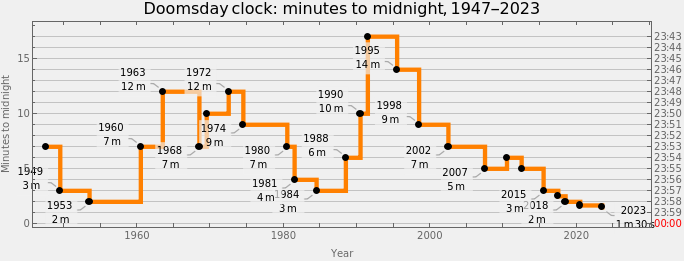
Remark: By hovering with the mouse over the black points the corresponding descriptions can be seen. We considered using clock-gauges as tooltips, but showing clock-settings reasons is more informative.
Remark: The plot was intentionally made to resemble the timeline plot in Doomsday Clock's Wikipedia page.
Conclusion
Conclusion
As expected, parsing, plotting, or otherwise processing the Doomsday Clock settings and statements are excellent didactic subjects for textual analysis (or parsing) and temporal data visualization. The visualization could serve educational purposes or provide insights into historical trends of global threats as perceived by experts. (Remember, the clock’s settings are not just data points but reflections of complex global dynamics.)
One possible application of the code in this notebook is to make a “web service“ that gives clock images with Doomsday Clock readings. For example, click on this button:
Out[]=
Setup
Setup
References
References
Articles, notebooks
Articles, notebooks
[AAn1] Anton Antonov, "Making robust LLM computational pipelines from software engineering perspective", (2024), Wolfram Community.
Paclets
Paclets
Videos
Videos
[AAv1] Anton Antonov, "Robust LLM pipelines (Mathematica, Python, Raku)", (2024), YouTube/@AAA4prediction.
CITE THIS NOTEBOOK
CITE THIS NOTEBOOK
Doomsday clock parsing and plotting
by Anton Antonov
Wolfram Community, STAFF PICKS, December 31, 2024
https://community.wolfram.com/groups/-/m/t/3347065
by Anton Antonov
Wolfram Community, STAFF PICKS, December 31, 2024
https://community.wolfram.com/groups/-/m/t/3347065