A couple of years ago in 2019 I had the opportunity to take part in the Wolfram Technology Conference in Champaign Illinois. It was a great experience and I am still thankful to the entire Wolfram team to organise these events. (This year's Wolfram Technology Conference was virtual, which allowed me to participate as well. Thanks to the team for organising a great event!) At the conference in 2019 I took part in the One Liner Competition, which honours the best piece of Wolfram Language program that can be implemented in 128 or fewer characters. In that year I submitted the following piece of code, which opens an AudioCapture window, you can say something and record it. Then the function SpeechRecognize tries to identify what is being said and transcribes it. The transcribed text is then read out again (using SpeechSynthezise). The entire process is repeated 10 times. In the code I change the “speakers” (which is done by the VoiceStyleData function), and I allow also non-English speakers, which degrades the recognisability of the spoken text.
The idea is that similar to the Telephone Game or “Chinese Whispers”, where children whisper a sentence into the ear of a friend, who then whispers whatever they understood into someone else’s ear and so on, until at the end something completely different comes out. This is an example of how repeated copying of copies degrades the original signal.
The idea is that similar to the Telephone Game or “Chinese Whispers”, where children whisper a sentence into the ear of a friend, who then whispers whatever they understood into someone else’s ear and so on, until at the end something completely different comes out. This is an example of how repeated copying of copies degrades the original signal.
Example 1
Example 1
In this first example I speak the sentence “She sells sea shells on the sea shore, but the sea shells she sells on the sea shore are sea shells no more.” After 10 iterations the audio is basically not recognisable anymore.
In[]:=
NestList[SpeechSynthesize[SpeechRecognize[#],RandomChoice["Name"/.GatherBy[VoiceStyleData[],#[[2]]&][[1]]]]&,AudioCapture[],10]
Out[]=
,,,,,,,,,,
I will use SpeechRecognise on the last output to check what SpeechRecognize thinks it hears:
In[]:=
SpeechRecognize[%[[-1]]]
Out[]=
she said it said sundays like this swift she sat down to see should attach no more
This is obviously quite far from the original.
Example 2
Example 2
The next example is my daughter (who is a native speaker as opposed to me) who says “supercalifragilisticexpialidocious”.
In[]:=
NestList[SpeechSynthesize[SpeechRecognize[#],RandomChoice["Name"/.GatherBy[VoiceStyleData[],#[[2]]&][[1]]]]&,AudioCapture[],10]
Out[]=
,,,,,,,,,,
So what does SpeechRecognize understand at the end?
In[]:=
SpeechRecognize[%[[-1]]]
Out[]=
sweether fan frame blows to a power to el dishes
That, too, is not really close to the original.
Example 3
Example 3
The final example is showing that sometimes it actually works
In[]:=
NestList[SpeechSynthesize[SpeechRecognize[#],RandomChoice["Name"/.GatherBy[VoiceStyleData[],#[[2]]&][[1]]]]&,AudioCapture[],10]
Out[]=
,,,,,,,,,,
In this case the final audio file is actually consistent with the “message” in the original.
SpeechRecognize[%[[-1]]]
Out[]=
sweet sixteen
A variation
A variation
The audio file versions do not really work well in a post on this platform, so to show the flow of the information through the repetitions. I reverse the order of the SpeechRecognize and the SpeechSynthezise and display the text rather than the audio.
In[]:=
NestList[SpeechRecognize[SpeechSynthesize[#,RandomChoice["Name"/.GatherBy[VoiceStyleData[],#[[2]]&][[1]]]]]&,"She sells sea shells on the sea shore, but the sea shells she sells on the sea shore are sea shells no more.",10]//Column
Out[]=
She sells sea shells on the sea shore, but the sea shells she sells on the sea shore are sea shells no more. |
she sell sea shelves on the seashore but the sea shells he sells on the sea short of sea shelves no more |
she sell the shells on the sea short opasy shelf he sells on to see short top sea shelves no more |
she sell the shells on the sea short opace shelf he sells on to see short popsy shells no more |
she sell the shells unto sea short to past she few sails on to see short epoxy shells no more |
she sell the shells on to see short of past civie sails on to see short depoxe shell no more |
she sell the shells on to see short of pesticity sales on to see short pokes shell no more |
she sell the shells on to see short of pesticity fails on to see short poles shall no more |
she sell the shells on to see sort of pesticity fails on to see short polor chanomor |
she sell the shells on to see sort of pesticity fails on to see short polar chanmer |
she sell the shells on to see sort of gusticity fails on to see short doller chanmer |
This shows how the sentence changes over time. I have spent some time to investigate whether these sentences “converge”, i.e. whether we reach a fixed point so that there is no more change, but his is beyond the scope of this post.
The telephone game, but visual
The telephone game, but visual
I yesterday posted an article on this community where I developed some functionality to interact with OpenAI’s APIs. The post has an attachment GPT-via-API.wl which offers the functions that we will also use in this post. If you have an OpenAI API key in your system credentials this should work:
In[]:=
Import["/Users/thiel/Desktop/GPT-via-API.wl"]
I will add the file as an attachment to this post, too.
Our objective will be to play the telephone game with pictures. Two different apis will be relevant. One is DALL-E, which can produce pictures from text, and another one is GPT-4-vision which can analyse images and provide textual descriptions of the image. I will then - similar to the telephone game above produce a chain of images, and descriptions thereof, which will be used to generate a new image, which then will be described again and so on. Here is the first example. I generate an image from the description “Generate a photorealistic image of a tropical beach paradise. There should be white sand, blue water and sky, and palm trees. Make it look like a beautiful retreat.” I then use the prompt “Give a detailed description of the image you see. The objective is that someone can draw the image based on your description alone. Your description should be a prompt that allows DALL-E do draw the image. Take a deep breath. Think about what you want to say.” to generate a description of the new image, which then is handed to DALL-E again.
Our objective will be to play the telephone game with pictures. Two different apis will be relevant. One is DALL-E, which can produce pictures from text, and another one is GPT-4-vision which can analyse images and provide textual descriptions of the image. I will then - similar to the telephone game above produce a chain of images, and descriptions thereof, which will be used to generate a new image, which then will be described again and so on. Here is the first example. I generate an image from the description “Generate a photorealistic image of a tropical beach paradise. There should be white sand, blue water and sky, and palm trees. Make it look like a beautiful retreat.” I then use the prompt “Give a detailed description of the image you see. The objective is that someone can draw the image based on your description alone. Your description should be a prompt that allows DALL-E do draw the image. Take a deep breath. Think about what you want to say.” to generate a description of the new image, which then is handed to DALL-E again.
In[]:=
result=NestList[callDALLE[callGPTVisionFromImage["Give a detailed description of the image you see. The objective is that someone can draw the image based on your description alone. Your description should be a prompt that allows DALL-E do draw the image. Take a deep breath. Think about what you want to say.",#,myAPIKey],myAPIKey]&,callDALLE["Generate a photorealistic image of a tropical beach paradise. There should be white sand, blue water and sky, and palm trees. Make it look like a beautiful retreat.",myAPIKey],2]
Out[]=

Here it appears that at least for these few iterations the system works. The image is rather stable. I think that this might be because of the fact that the first image is generated from a rather generic description and there is nothing really interesting here to happen. That will change in the next example though
Escher’s Drawing Hands
Escher’s Drawing Hands
I will next use a more intricate image to start with. I will use the “Drawing Hands” by Escher from 1948.
In[]:=
Out[]=
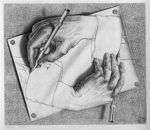
If we use that image as a starting point and proceed otherwise as above, we obtain the following result:
result=NestListcallDALLE[callGPTVisionFromImage["Give a detailed description of the image you see. The objective is that someone can draw the image based on your description alone. Your description should be a prompt that allows DALL-E do draw the image. Take a deep breath. Think about what you want to say.",#,myAPIKey],myAPIKey]&,
,10;
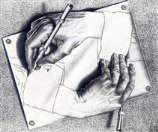
Let’s represent that neatly in a table form.
In[]:=
Grid[Partition[result,2],Frame->All]
Out[]=
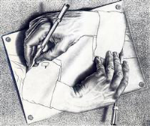









(I had to reduce the image size for the post. The full resolution images can be downloaded from here: )
Keep in mind that at this point generating many images can produce costs via the API, so even though it is tempting to run this for 100 or more iterations I refrained from doing so.
Conclusion
Conclusion
The new functionality of OpenAI’s APIs in combination with the ease of use of them via the Wolfram Language allows us to play with ideas that previously were much more difficult or even impossible to implement. In this case, the ability to describe an image and to generate photorealistic images allowed us to apply the telephone game into a new domain of images and descriptions thereof. To finish this article I copy a short description of the relevance of the game given by ChatGPT:
“Chinese Whispers is a popular group game that demonstrates how easily information can become distorted through indirect communication. The game typically involves players sitting in a circle. The first player whispers a message to the person next to them, who then whispers what they heard to the next person, and so on around the circle. The last player announces the message they received out loud, and it’s often humorously compared to the original message, highlighting the changes and errors that occurred during transmission.
This game is an excellent metaphor for communication errors in various contexts, including oral history, news reporting, and even scientific communication. It can be used to illustrate the importance of direct and clear communication, the potential for misunderstandings, and the way information can be unintentionally altered as it is passed from person to person.
In a mathematical or data science context, this could be related to signal processing, information theory, and error propagation in data transmission. The game provides a simple, real-world example of how noise can affect communication channels, leading to loss of information fidelity.”
This game is an excellent metaphor for communication errors in various contexts, including oral history, news reporting, and even scientific communication. It can be used to illustrate the importance of direct and clear communication, the potential for misunderstandings, and the way information can be unintentionally altered as it is passed from person to person.
In a mathematical or data science context, this could be related to signal processing, information theory, and error propagation in data transmission. The game provides a simple, real-world example of how noise can affect communication channels, leading to loss of information fidelity.”
CITE THIS NOTEBOOK
CITE THIS NOTEBOOK
The Telephone Game - next level with GPT
by Marco Thiel
Wolfram Community, STAFF PICKS, November 10, 2023
https://community.wolfram.com/groups/-/m/t/3062832
by Marco Thiel
Wolfram Community, STAFF PICKS, November 10, 2023
https://community.wolfram.com/groups/-/m/t/3062832