Follow the steps below, and at the end you will have yourself a nifty musical tool!
A Musical Keyboard
A Musical Keyboard
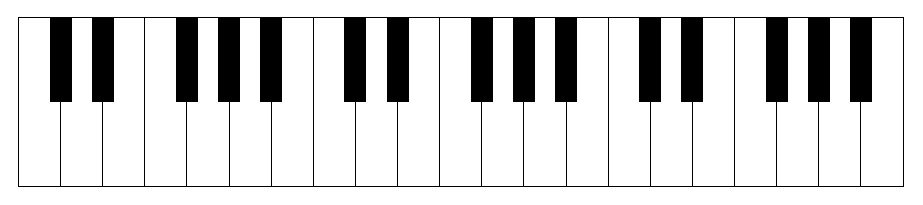
The goal of this exploration is to create a dynamic and interactive musical keyboard that leverages many of the great sounds one can produce in the Wolfram Language.
Rian Shams
Creating the Keyboard
Creating the Keyboard
In[]:=
constructKeyboard[nOctaves_Integer]/;nOctaves>0:=With[{whiteKeysInOctave=7,blackKeysInOctave=5},Join[constructWhiteKeys[whiteKeysInOctave*nOctaves],constructBlackKeys[blackKeysInOctave*nOctaves]]]constructWhiteKeys[nKeys_Integer]/;nKeys>0:=With[{whiteKeyxMinFunc=Identity},constructWhiteKey/@whiteKeyxMinFunc/@Range[nKeys]]constructBlackKeys[nKeys_Integer]/;nKeys>0:=With[{blackKeyxMinFunc=(LinearRecurrence[{1,0,0,0,1,-1},{1,2,4,5,6,8},#][[-1]]+.75)&},constructBlackKey/@blackKeyxMinFunc/@Range[nKeys]]constructWhiteKey[xMin_]/;xMin>0:=constructKey[White,xMin,0,xMin+1]constructBlackKey[xMin_]/;xMin>0:=constructKey[Black,xMin,2,xMin+.5]constructKey[color_,xMin_,yMin_,xMax_]:={EdgeForm[Thin],color,Rectangle[{xMin,yMin},{xMax,4}]}
Manipulation Test
Manipulation Test
In[]:=
Manipulate[Graphics[constructKeyboard[nOctaves],ImageSizeFull],{{nOctaves,3,"Number Of Octaves"},Range[7]}];
Creating the Keyboard Labels
Creating the Keyboard Labels
A label is the scientific pitch notation for each key in the constructed keyboard. For example, “C4”, “C#4”, “E3” and so on.
In[]:=
constructLabels[keyboard_List]:=With[{nOctaves=Length[keyboard]/12},Join[constructWhiteLabels[nOctaves],constructBlackLabels[nOctaves]]]constructWhiteLabels[nOctaves_Integer]/;nOctaves>0:=With[{chars=RotateLeft[CharacterRange["A","G"],2]},Flatten[Thread[constructWhiteLabel[chars,#]]&/@octaveRange[nOctaves]]]constructBlackLabels[nOctaves_Integer]/;nOctaves>0:=With[{chars=Delete[RotateLeft[CharacterRange["A","G"],2],{{3},{7}}]},Flatten[Thread[constructBlackLabel[chars,#]]&/@octaveRange[nOctaves]]]constructWhiteLabel[pitch_String,octNum_Integer]:=pitch~~ToString[octNum]constructBlackLabel[pitch_String,octNum_Integer]:=pitch~~"#"~~ToString[octNum]octaveRange[1]:={4};octaveRange[n_?EvenQ]:=Prepend[octaveRange[n-1],octaveRange[n-1][[1]]-1];octaveRange[n_?OddQ]:=Append[octaveRange[n-1],octaveRange[n-1][[-1]]+1];
Manipulation Test
Manipulation Test
In[]:=
Manipulate[constructLabels[constructKeyboard[nOctaves]],{{nOctaves,3,"Number Of Octaves"},Range[7]}];
A Dynamic Transformation of the Keyboard
A Dynamic Transformation of the Keyboard
Putting It All Together
Putting It All Together
Start here if you just want to begin playing!
Don't forget to evaluate all prior cells. Then just click the keys to begin producing music.
In[]:=
Manipulate[Graphics[makeKeyboardPlayable[constructKeyboard[nOctaves],labeledQ,instrument],ImageSizeFull],{{nOctaves,3,"Number Of Octaves"},Range[7]},{{labeledQ,False,"Show Labels"},{True,False}},{{instrument,"Piano","Instrument"},instruments}]
Out[]=

FURTHER EXPLORATIONS
AUTHORSHIP