A Computational Analysis of the Heights and Weights of Major League Baseball Players
A Computational Analysis of the Heights and Weights of Major League Baseball Players
This is an example of a quick computational exploration of some data available on the Wiki site of Statistics Online Computational Resource. This particular data set contains 1035 records of heights and weights for some current and recent Major League Baseball (MLB) Players.
Get the Data
Get the Data
Check what elements are available for import from this URL:
In[]:=
Import["http://wiki.stat.ucla.edu/socr/index.php/SOCR_Data_MLB_HeightsWeights","Elements"]
Out[]=
{Data,FullData,Hyperlinks,ImageLinks,Images,Plaintext,Source,Summary,Title,XMLObject}
Check what is downloaded for the “Data” element (use Shallow so that the output is limited to a few lines):
In[]:=
Import["http://wiki.stat.ucla.edu/socr/index.php/SOCR_Data_MLB_HeightsWeights","Data"]//Shallow
Out[]//Shallow=
{{{4},Log in,{9},{5}},{Privacy policy,About Socr,Disclaimers}}
On inspection of the previous output we see that the 3rd item in the first list (one with 1035 inner elements) is what we would like to use for the computational exploration.
heightWeightData=Import["http://wiki.stat.ucla.edu/socr/index.php/SOCR_Data_MLB_HeightsWeights","Data"][[1,3]];
The first row seems like the column headers:
heightWeightData[[1]]
Out[]=
{Name,Team,Position,Height(inches),Weight(pounds),Age}
Extract the first row containing the column headers into a list for use later:
headers=First[heightWeightData]
Out[]=
{Name,Team,Position,Height(inches),Weight(pounds),Age}
Extract the rest of the rows which contain the data elements:
rows=Rest[heightWeightData];
Look at the first row:
rows[[1]]
Out[]=
{Adam_Donachie,BAL,Catcher,74,180,22.99}
Check the type of expression imported for each column, using the first row as an example:
Head/@rows[[1]]
Out[]=
{String,String,String,Integer,Integer,Real}
Look at a few random samples:
RandomSample[rows,5]
Out[]=
{{Melky_Cabrera,NYY,Outfielder,71,170,22.55},{Jim_Edmonds,STL,Outfielder,73,212,36.68},{Greg_Norton,TB,Outfielder,73,200,34.65},{Claudio_Vargas,MLW,Starting_Pitcher,75,228,28.7},{Juan_Uribe,CWS,Shortstop,71,175,27.61}}
Quick Visual Exploration: Histograms
Quick Visual Exploration: Histograms
Check the headers to identify the content of each column:
headers
Out[]=
{Name,Team,Position,Height(inches),Weight(pounds),Age}
Extract the height column (column 4):
heights=rows[[All,4]];
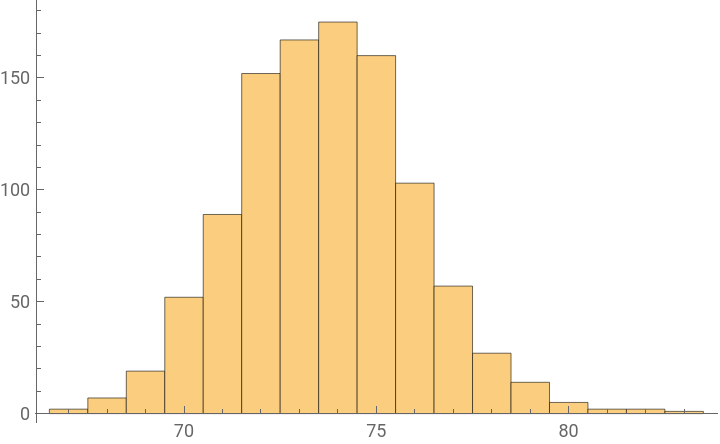
Visualize in a histogram:
Histogram[heights]
Out[]=
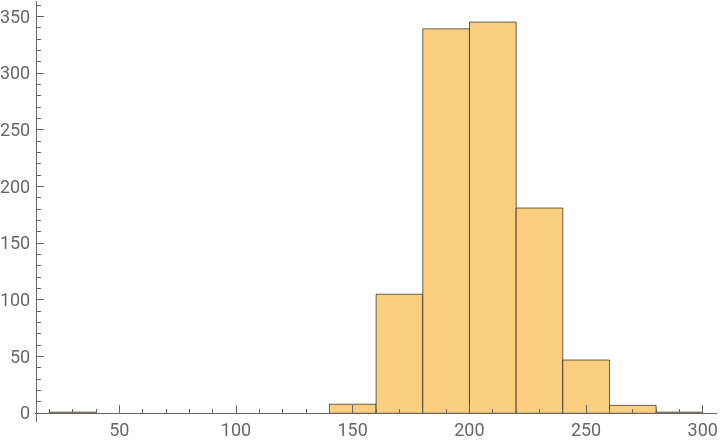
The weights are in column 5. Visualize in a histogram:
Histogram[rows[[All,5]]]
Out[]=
The sixth column is age. Try to visualize in a histogram:
Histogram[rows[[All,6]]]

This runs into an error because some rows don’t seem to have a 6th column.
Cleaning Data
Cleaning Data
Columns 4, 5 and 6 seem to contain numerical features. Extract them into variable:
numericFeatures=rows[[All,4;;]];
Ideally this would be a 1034 X 3 array.
Check the number of rows and columns:
Dimensions[numericFeatures]
Out[]=
{1034}
That only a single number is returned means it must be a ragged array (number of columns not the same for each row).
Check for the different numbers of columns across all the rows:
DeleteDuplicates[Length/@numericFeatures]
Out[]=
{3,2}
Some rows have 3 while some rows have 2 columns:
Check which row has less than 3 columns:
Select[numericFeatures,Length[#]≠3&]
Out[]=
{{72,27.77}}
Just one sample where one feature (seems like the weight) is missing.
Delete the sample with the missing feature value:
numericFeatures=DeleteCases[numericFeatures,{72,27.77`}];
Check the dimensions of the cleaned dataset:
Dimensions[numericFeatures]
Out[]=
{1033,3}
Statistical Exploration
Statistical Exploration
Compute some descriptive stats for the numeric data.
Mean can be used to compute the mean of a 1 dimensional list:
N[Mean[{1,2,3,4,5,6}]]
Out[]=
3.5
Mean[{1,2,3,4,5,6}]//N
Out[]=
3.5
You can compute the mean of all columns at once:
Mean[numericFeatures]//N
Out[]=
{73.6989,201.689,28.7376}
Compute the median:
Median[numericFeatures]
Compute the standard deviation:
Tukey' s "Five Number Summary"
Tukey' s "Five Number Summary"
John Tukey suggested a set of descriptive statistics for the features (independent variables) that provide information about a dataset, such as:
Minimum
First quartile
Median
Third quartile
Maximum
Find the Mean, Median, and StandardDeviation:
Find the Min, Quartiles, and Max for each of the three columns:
Further Visual Exploration
Further Visual Exploration
Some visualization functions can include a lot of information in one picture.
Use the BoxWhiskerChart to visualize the statistical summary of the numeric features:
Visualize a scatter plot of weight against height:
Visualize a scatter plot of age against height:
Let’s Try Some Machine Learning
Let’s Try Some Machine Learning
Predict weight from height and age
Predict weight from height and age
Revisit the headers:
Revisit the numeric features:
If we want to predict a numeric value from other features of a sample, the input data has to be set up in a specific format to be used by machine learning superfunctions like Classify and Predict.
For example, Predict needs the input as follows where the LHS are the input features and RHS is the target value to be predicted. In this case height and age are input features, and weight is target value to be predicted.
Restructure the data:
Split the data 80:20 for training and test sets:
Use Predict to train a predictor function modeled on the training data:
Evaluate the performance of the trained predictor model using the test data:
Classify positions from height, weight and age
Classify positions from height, weight and age
Revisit the headers:
Check for samples that have less than 6 columns:
Remove the row with the sample that has a missing value:
Restructure the data so that the 3 numeric features (height, weight and age are input values) and the position is the output label to be predicted as follows:
Also randomly shuffle the data while restructuring:
Split into training and test data:
Train a classifier model using the labeled training data:
Evaluate the performance of the classifier using the test data:
The classifier performs very poorly, trying to label most samples with the position “Relief Pitcher”. We will need to do look into better feature selection and extraction if we want to build a better model.
Clustering Data
Clustering Data
Supervised learning can be expensive because labeled training data is not always easy to get. In the absence of labeled training data, we can use unsupervised learning algorithms that do not need labels, e.g. Clustering.
Find clusters in the data, using only the numeric features height and weight:
Check how many clusters were found automatically:
Visualize the clusters:
FeatureSpacePlot can automatically plot data samples in a 2-dimensional featurespace:
Some interesting clusters are visualized here.