
3D Game Development in Wolfram Language
3D Game Development in Wolfram Language
Kevin Daily
Wolfram Research
Abstract
Abstract
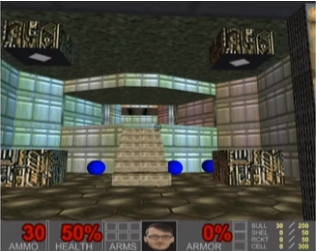
Discover the possibilities of game development solely within Wolfram Notebooks. Our main focus is to guide you through the process of creating a first-person gaming experience using Graphics3D and Dynamic. We will explore essential techniques such as camera control, integration with external game controllers, collision detection and line-of-sight mechanics.
Wolfram Notebooks as a Game Engine
Wolfram Notebooks as a Game Engine
A game engine is an interface that assists in building and playing games, including
graphics
physics
user input
collision detection
animation
sound
etc.
The tools to create games can be built up with Wolfram Language and the games run in a Wolfram Notebook.
Preview
Preview
In[]:=
Features and Resources
Features and Resources
Graphics3D[…,Method->{…}]
Graphics3D[…,Method->{…}]
"CacheAllTextures"->True
"TextureSampling"->"Nearest"
"EdgeDepthOffset"->"False"
Use a Resource Function
Use a Resource Function
Similar to
Import[…,"OBJ"]
Graphics3D
Graphics3D
Our game takes place in a Graphics3D expression with geometric primitives:
In[]:=
Graphics3D[{Purple,Sphere[{3,2,4},0.5],Cuboid[{1,1,1},{2,2,2}],AbsoluteThickness[3],Line[{{1,4,3},{1,4,1}}],Polygon[{{2,2,0},{2,4,0},{4,4,0.5},{4,2,0.5}}]},Axes->True,AxesLabel->{"x","y","z"},FaceGrids->{{0,0,-1},{-1,0,0},{0,1,0}},ImageSize->Scaled[0.33],PlotRange->{{0,5},{0,5},{0,5}}]
Dynamic Is the Driver
Dynamic Is the Driver
We create a runaway Dynamic evaluation to drive the apparent motion of game objects.
Basic Principles
Basic Principles
Dynamic
Dynamic
The goal of is to display expr as it is right now:
Dynamic[expr]
In[]:=
x=0.5;
In[]:=
Dynamic[x]
DynamicWrapper
DynamicWrapper
As long as the first argument is visible on screen, the second argument evaluates:
DynamicModule
DynamicModule
Localize variables to prevent dynamic interfaces from cross-communicating:
Demo: Shuffleboard
Demo: Shuffleboard
Camera: ViewAngle, ViewVector and ViewVertical
Camera: ViewAngle, ViewVector and ViewVertical
There are other ways to control the camera, but I find these options the easiest to understand. Some neat community examples include Understanding Graphics3D’s View Options: The Intuitive Way by Silvia Hao and Glam-ifying 3D Graphics by Anika Patel.
(Bonus) Define Cube and Camera Pyramid Primitives
(Bonus) Define Cube and Camera Pyramid Primitives
Demo
Demo
Camera: Move
Camera: Move
Let’s start to manipulate the camera by keeping it facing the same direction but moving its location.
Two Movement Vectors
Two Movement Vectors
Demo
Demo
Camera: Look Around
Camera: Look Around
Let’s keep the camera fixed but pivot to look around the scene.
Rotation around Two Vectors
Rotation around Two Vectors
(Bonus) Rotation Functions
(Bonus) Rotation Functions
Demo
Demo
User Input
User Input
ControllerInformation
ControllerInformation
ControllerState
ControllerState
controllerReadyQ
controllerReadyQ
noDrift
noDrift
User Input: Camera Control
User Input: Camera Control
Free Movement
Free Movement
(Bonus) upDownRotationSafe
(Bonus) upDownRotationSafe
The endpoints of the pitch rotation are problematic. If we’re no longer facing along the forward-motion vector, then it won’t accept the rotation:
freeMovement
freeMovement
Demo: Floating Cubes
Demo: Floating Cubes
Graphics3D: A World of Textured Polygons
Graphics3D: A World of Textured Polygons
Refresher on Using Texture with Polygon
Refresher on Using Texture with Polygon
Introduction
Introduction
Low-pixel count
Low-pixel count
Multiple textures
Multiple textures
(Bonus) 13.3-: One Texture to Rule Them All…
(Bonus) 13.3-: One Texture to Rule Them All…
Canonicalize the VertexTextureCoordinates
Canonicalize the VertexTextureCoordinates
Adjust the bottom-left of the cutout such that it starts in the positive coordinate space, i.e. somewhere in the range 0 to 1:
If a texture’s coordinates extend beyond 1, then use ImageAssemble as necessary
If a texture’s coordinates extend beyond 1, then use ImageAssemble as necessary
Set all fully transparent pixels to the same value
Set all fully transparent pixels to the same value
This step makes it easier to find the lower-left corners of the following ImageCollage. Note: this example uses the RGB colorspace:
Use ImageCollage on the full-size images with “ClosestPacking”
Use ImageCollage on the full-size images with “ClosestPacking”
Use the same transparent color as in the above step:
Brute-force function to find the lower-left corner of an image within the collage
Brute-force function to find the lower-left corner of an image within the collage
One Texture, multiple polygons
One Texture, multiple polygons
(Optional) Merge polygons into a single multi-polygon
(Optional) Merge polygons into a single multi-polygon
Because we have one texture, why not also merge all polygons into a single multi-polygon?
Collision Detection: GJK Algorithm
Collision Detection: GJK Algorithm
The Gilbert–Johnson–Keerthi algorithm efficiently detects the distance between two convex objects. A good explanation can be found on the YouTube@Reducible channel:
(Bonus) Support Functions
(Bonus) Support Functions
impactQ
impactQ
supportPoint
supportPoint
The support function finds the furthest point on an object along a specified direction:
doSimplex
doSimplex
The cases to handle are the 2-, 3- and 4-simplex cases:
Demo: Bouncing through an Octagon
Demo: Bouncing through an Octagon
Collision Detection: Partition the World
Collision Detection: Partition the World
For example, Minecraft uses blocks and chunks. This data layer organizes which objects are relevant to the player due to the distance from the player’s position. It saves CPU power in exchange for additional memory storage.
2D Graphical Explanation
2D Graphical Explanation
(Bonus) Support Functions
(Bonus) Support Functions
Determine block membership
Determine block membership
The Ceiling function automatically threads over lists. Note that this conversion is not accurate if the input point is an exact integer at a block boundaries, but this is rare in practice due to numeric precision:
A block is indexed by {i, j, k} ∈ Integers. CoordinateBounds is useful to find the maximum encompassing Cuboid around an object. This is effectively an axis-aligned bounding box:
Calculate the surface normal from polygon vertices
Calculate the surface normal from polygon vertices
The vertices are assumed to be in clockwise order. If the orientation is reversed, then set flipQ to True:
Isolate surface data
Isolate surface data
The data can be a set of vertices:
Create a GraphicsComplex from the surface data
Create a GraphicsComplex from the surface data
Reverse the $Data into tuples of {_Texture, {__Polygon}}:
For the debug/developer mode, we need to tag each surface with ShowContents. It’s conceptually similar to the above case, but the second argument of the GraphicsComplex becomes a large Dynamic expression:
makeSurfaceData
makeSurfaceData
Data Layer
Data Layer
(Bonus) Determine Surface Collisions
(Bonus) Determine Surface Collisions
CoordinateBoundingBox provides an axis-aligned bounding box for the player object:
Demo: Partitioned Bouncing through an Octagon
Demo: Partitioned Bouncing through an Octagon
Getting Maps from the Internet
Getting Maps from the Internet
The world we’ll use comes from vrchris@Sketchfab (CC4). I’ve edited the original MTL file to not use hard-coded paths and repackaged the data to my GitHub account.
ResourceFunction[“ImportOBJ”]
ResourceFunction[“ImportOBJ”]
I developed this function specifically to import textured models, not just the mesh:
Be Wary of the Coordinate System
Be Wary of the Coordinate System
Rotate to our conventions:
Build the Surface Data
Build the Surface Data
Collision Detection: Surface Data
Collision Detection: Surface Data
(Bonus) Collision and Ramp Code
(Bonus) Collision and Ramp Code
resolveSurfaceCollision
resolveSurfaceCollision
Loop over all simultaneously impacting surfaces. Allow for passing through surfaces that face the same direction as the player:
convertStepsToRamps
convertStepsToRamps
Update Movement Function
Update Movement Function
We no longer have free movement:
Demo: Moving within a Polygon Environment
Demo: Moving within a Polygon Environment
Gravity
Gravity
Add a downward acceleration to the player to keep them grounded.
Update Movement Function
Update Movement Function
Demo: Moving within a Polygon Environment with Gravity
Demo: Moving within a Polygon Environment with Gravity
Collision Detection: Line of Sight
Collision Detection: Line of Sight
Determining line of sight is another expensive operation that is made simpler when partitioning the world into blocks.
(Bonus) Super-Cover the Line of Sight in an Ordered Set of World Blocks
(Bonus) Super-Cover the Line of Sight in an Ordered Set of World Blocks
Demo
Demo
Code: orderedBlocksAlongLineOfSight
Code: orderedBlocksAlongLineOfSight
(Bonus) Find the Nearest Surface
(Bonus) Find the Nearest Surface
We calculate the point where the ray intersects the infinite plane that the polygon surface lives within. The distance to this plane is the distance to the polygon surface if and only if the intersection point is within the polygon:
If there are multiple polygons within a given block, then we need to figure out which ones are pierced by the ray, and of those that are pierced, which one is closest to the ray origin:
Demo: Highlight Surfaces
Demo: Highlight Surfaces
Collision Detection: Line-of-Sight Interactions
Collision Detection: Line-of-Sight Interactions
Make Billboard Targets
Make Billboard Targets
Make a set of Cylinder primitives. The cylinders will be used for hit detection while we draw billboards in the game world:
(Bonus) Find the Nearest Primitive
(Bonus) Find the Nearest Primitive
I’ve only implemented Cylinder, but this should be extensible to other primitives by overloading the intersectionPoints function.
intersectionPoints
intersectionPoints
See this explanation on gamedev.stackexchange.com. The approach first shifts the origin to the center of the cylinder. The cylinder’s axis is used as a coordinate axis, so many of the calculations involve projections along this axis and in other vector operations:
findPrimitiveInLineOfSight
findPrimitiveInLineOfSight
This is almost identical to findSurfaceInLineOfSight, but it applies to any primitive, so long as an appropriate version of intersectionPoints exists for that primitive. It uses memoization to avoid duplicating expensive calculations:
(Bonus) Silly Sounds
(Bonus) Silly Sounds
Movement: Output the Player’s Angle and Add a New Button
Movement: Output the Player’s Angle and Add a New Button
(Bonus) Make Target Copies
(Bonus) Make Target Copies
Demo: Target Practice
Demo: Target Practice
Heads-Up Display (HUD)
Heads-Up Display (HUD)
(Bonus) makeHUD
(Bonus) makeHUD
HUD
HUD
Make Items
Make Items
Replace some of the targets we had earlier with spheres that will act as objects that we can collect:
(Bonus) Make Item Copies and Collect Items
(Bonus) Make Item Copies and Collect Items
Demo: Collecting Items
Demo: Collecting Items
Citations
Citations
Geometry
Geometry
Doom E1M1 map by vrchris at SketchFab | License: Creative Commons 4
Sounds
Sounds
Further Reading
Further Reading
Wolfram Community
Video Game Physics Tutorial by Nilson Souto
Gilbert–Johnson–Keerthi algorithm
GameDev.StackExchange
(Bonus) Code Variations
(Bonus) Code Variations
Different Version of resolveSurfaceCollision
Different Version of resolveSurfaceCollision
Note: This version of resolveSurfaceCollision has more arguments, as it allows the player’s vertical position to automatically (and rather jarringly) increase in order to step over walls of a given stepSize.
stepSize: the maximum height of a step that the player can get over
Jumping Using a Button
Jumping Using a Button
Note: This movement function assumes the player automatically steps over a minimum step size and is intended to work with the above resolveSurfaceCollision function.
stepSize: the maximum height of a step that the player can get over
impulse: the initial vertical velocity due to clicking the jump button
buttonEnabledQ: Boolean that prevents continuous jumping by holding down the jump button
(Bonus) Tool: Developer Mode
(Bonus) Tool: Developer Mode
Items: add health or armor bonus locations on the ground (indicated by blue and green disks)
Doors: indicate which surfaces should move when interacted with
The list of surfaces within the door logic are removed from collision detection and not drawn.
Doors can be set to be opened via a switch.
Switches: indicate which surfaces act as switches
Enemies: add enemy positions on the ground (red disks)
(Bonus) Code: surfacePropertySetter, …
(Bonus) Code: surfacePropertySetter, …
Demo
Demo