International Essays

さらに多くの新しいアイディアと新機能:Wolfram言語とMathematicaのバージョン14.1のリリース

Wolframの研究開発パイプラインが贈る,36回目の最新バージョン


統合されたWolfram Appの登場


ベクトルデータベースと意味検索


LLMのための検索拡張生成と動的プロンプト


好みのLLMに接続する


記号配列とその微積分


多項式とピッチフォーク:数学の慣習を辿る


微分方程式および差分方程式の固定点と安定性


偏微分方程式の着実な進歩


記号生体分子とその可視化


GPU/NPU用のニューラルネットの最適化


日付統計


プログラムを使って動画を構築する

Manipulate
は2007年のバージョン6で導入された関数で,インタラクティブな「操作可能」インターフェースを即座に構築する方法を提供します.また,
Manipulate
オブジェクトを動画にエキスポートすることは以前から可能でした.しかし,動画で何が起きなければならないのでしょうか.どのスライダーをどんなふうに動かせばよいのでしょうか.バージョン12 .3で登場した
AnimationVideo
は1つのパラメータが時間と共に変化する動画の作成を可能にしました.バージョン14.1で登場した
ManipulateVideo
は動画の中で複数のパラメータを同時に変化させることができます.自分がやりたいことを指定する方法の一つに,各パラメータについて一連の時間で取得する値を指定する(デフォルトでは,動画の先頭からの秒数で測定する)ことが考えられます.
ManipulateVideo
はこれらの値の間を補間して滑らかな動画を生成します:
Part
:Part specification $Failed〚1〛 is longer than depth of object.
Part
:Part specification $Failed〚1〛 is longer than depth of object.
Part
:Part specification $Failed〚1〛 is longer than depth of object.
(別の方法として,特定の時間に実行される操作を指定して完全な「キーフレーム」を指定することが考えられます.)
ManipulateVideo
は,ある意味では,
Manipulate
を制御することで動画を作成する「総合的な」方法を提供します.過去数回のバージョンで,私たちは「既存の構造」から動画を作成するための多くの関数を導入してきました(例えば
FrameListVideo
はフレームのリストから動画を組み立てます).しかし,時には一度に1フレームずつ動画を構築したいこともあるでしょう.バージョン14.1ではそのための関数の
SowVideo
と
ReapVideo
が導入されました.この2つの関数は,基本的に動画フレーム用の
Sow
と
Reap
です.
SowVideo
は1つあるいは複数のフレームを「播き」.
ReapVideo
は播かれたすべてのフレームを集めてそこから動画を組み立てるのです:
In[]:=
ReapVideoSowVideo
,
1
s
;DoSowVideoImageRotate
,θ,Full,{θ,0,π,.1}
Out[]=
​
SowVideo
/
ReapVideo
のよくある応用例に,他の動画から何らかの基準に従ってプログラム的に集められたフレームを使った動画の組立てがあります.例えば,以下は播かれた鳥を含むフレームを「刈り取り」ます.
In[]:=
ReapVideoVideoMapListIfImageContainsQ#Image,
bird
CONCEPT
,SowVideo[#Image]&,

Out[]=
​
Part
:Part specification $Failed〚1〛 is longer than depth of object.
Part
:Part specification $Failed〚1〛 is longer than depth of object.
Part
:Part specification $Failed〚1〛 is longer than depth of object.
ある動画から別の動画をプログラム的に作成する別の方法に,既存の動画からフレームを漸進的に「折りたたむ」ことがあります.
VideoFrameFold
はこれを行う関数です:
VideoFrameFold[ImageCompose[#1,RemoveBackground[#2,"Salient"]]&,
]
Out[]=
Part
:Part specification $Failed〚1〛 is longer than depth of object.
Part
:Part specification $Failed〚1〛 is longer than depth of object.
Part
:Part specification $Failed〚1〛 is longer than depth of object.
Part
:Part specification $Failed〚1〛 is longer than depth of object.
Part
:Part specification $Failed〚1〛 is longer than depth of object.
Part
:Part specification $Failed〚1〛 is longer than depth of object.
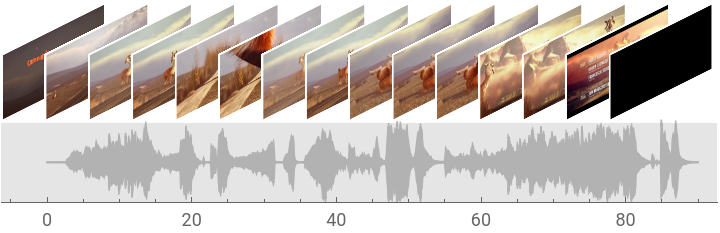
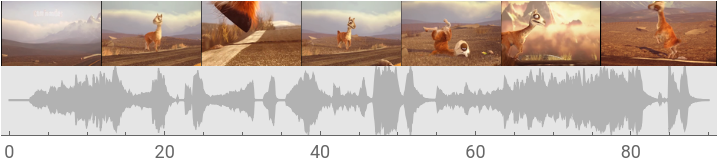
バージョン14.1には,この他にも動画を扱うための新しい「便利な関数」が多数あります.
VideoSummaryPlot
はその一つで,動画(とその音声)の「一目で分かる」さまざまな要約を生成します:
VideoSummaryPlot[
]
Part
:Part specification $Failed〚1〛 is longer than depth of object.
Part
:Part specification $Failed〚1〛 is longer than depth of object.
Part
:Part specification $Failed〚1〛 is longer than depth of object.
Out[]=
VideoSummaryPlot[
,"Row"]
Out[]=
Part
:Part specification $Failed〚1〛 is longer than depth of object.
Part
:Part specification $Failed〚1〛 is longer than depth of object.
Part
:Part specification $Failed〚1〛 is longer than depth of object.
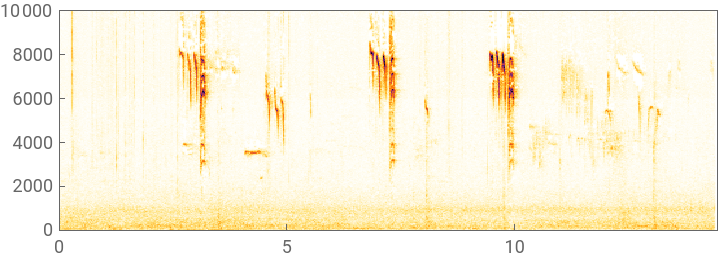
バージョン14.1には,音声処理関数を直接動画に適用できる機能もあります:
Spectrogram[
]
Part
:Part specification $Failed〚1〛 is longer than depth of object.
Part
:Part specification $Failed〚1〛 is longer than depth of object.
Part
:Part specification $Failed〚1〛 is longer than depth of object.
Out[]=
そうです.これは鳥です:
AudioIdentify[
]
Out[]=
chirp
Part
:Part specification $Failed〚1〛 is longer than depth of object.
Part
:Part specification $Failed〚1〛 is longer than depth of object.
Part
:Part specification $Failed〚1〛 is longer than depth of object.

音声認識のワークフローの最適化

SpeechRecognize
は2019年のバージョン12 .0で導入された関数ですが,バージョン14.1で大きく改変されました.