
引用此筆記本
引用此筆記本
本篇文章是使用大型語言模型工具所創建的繁體中文譯本:
用 FunctionCompile 在 Wolfram 語言中重現經典 ASCII Donut
作者:Shenghui Yang
原文出自 Wolfram 社群文章精選推薦,2025 年 10 月 24 日
Reconstructing the classic ASCII donut in Wolfram language using FunctionCompile
用 FunctionCompile 在 Wolfram 語言中重現經典 ASCII Donut
作者:Shenghui Yang
原文出自 Wolfram 社群文章精選推薦,2025 年 10 月 24 日
Reconstructing the classic ASCII donut in Wolfram language using FunctionCompile
使用 FunctionCompile 在 Wolfram 語言中重現經典的 ASCII 圓環
使用 FunctionCompile 在 Wolfram 語言中重現經典的 ASCII 圓環
本作品將 Andy Sloane 的 fixed-point donut.c 翻譯為 Wolfram 語言,並利用 FunctionCompile 功能來高效計算。
此專案展示了如何在高階符號環境中忠實重現底層 C 語言演算法。透過結合 Style 與 ListAnimate,實作能呈現流暢的 ASCII 動畫,並可自訂顏色效果。
此專案展示了如何在高階符號環境中忠實重現底層 C 語言演算法。透過結合 Style 與 ListAnimate,實作能呈現流暢的 ASCII 動畫,並可自訂顏色效果。
In[]:=
Clear[RotateStep,IntDonutFrame];
建立一個編譯器環境來儲存這些函數的聲明:
In[]:=
env=CreateCompilerEnvironment[];
CORDIC + Newton 步驟用於保持重複計算時的精確度:
In[]:=
decl1=FunctionDeclaration[RotateStep,Typed[{"PackedArray"::["MachineInteger",1],"MachineInteger","MachineInteger"}->"PackedArray"::["MachineInteger",1]]@Function[{arg1,mul,shift},Module[{xx=arg1[[1]],yy=arg1[[2]],tmp,star},tmp=xx;xx=xx-BitShiftRight[mul*yy,shift];yy=yy+BitShiftRight[mul*tmp,shift];star=BitShiftRight[3145728-xx*xx-yy*yy,11];xx=BitShiftRight[xx*star,10];yy=BitShiftRight[yy*star,10];{xx,yy}]]];
聲明處理旋轉與 ASCII 繪製的核心函數:
In[]:=
decl2=FunctionDeclaration[IntDonutFrame,Typed[{"MachineInteger","MachineInteger","MachineInteger","MachineInteger"}->"ListVector"::["String"]]@Function[{cA,sA,cB,sB},Module[{w=80,h=22,chars={".",",","-","~",":",";","=","!","*","#","$","@"},b=CreateDataStructure["FixedArray"," ",1760],z=CreateDataStructure["FixedArray",127,1760],sj=0,cj=1024,si=0,ci=0,R1=1,R2=2048,K2=5120*1024,x0,x1,x2,x3,x4,x5,x6,x7,x,y,Nl=1,o=0,zz},Do[si=0;ci=1024;Do[x0=R1*cj+R2;x1=BitShiftRight[ci*x0,10];x2=BitShiftRight[cA*sj,10];x3=BitShiftRight[si*x0,10];x4=R1*x2-BitShiftRight[sA*x3,10];x5=BitShiftRight[sA*sj,10];x6=K2+R1*1024*x5+cA*x3;x7=BitShiftRight[cj*si,10];x=40+Quotient[30*(cB*x1-sB*x4),x6];y=12+Quotient[15*(cB*x4+sB*x1),x6];Nl=BitShiftRight[-cA*x7-cB*(BitShiftRight[-sA*x7,10]+x2)-ci*BitShiftRight[cj*sB,10],10];Nl=BitShiftRight[Nl-x5,7];o=x+80*y;zz=BitShiftRight[x6-K2,15];If[0<y<22&&0<x<80&&zz<z["Part",o+1],z["SetPart",o+1,zz];b["SetPart",o+1,chars[[If[Nl>0,Nl+1,1]]]]];{ci,si}=RotateStep[{ci,si},5,8];,{i,0,323,1}];{cj,sj}=RotateStep[{cj,sj},9,7];,{j,0,89,1}];b["Elements"]]]];
將兩個聲明放在同一個環境中:
In[]:=
CompilerEnvironmentAppendTo[env,{decl1,decl2}]
Out[]=
CompilerEnvironmentObject


編譯旋轉函數與核心函數:
In[]:=
cfRotateStep=FunctionCompile[Function[{Typed[arg1,"PackedArray"::["MachineInteger",1]],Typed[m,"MachineInteger"],Typed[s,"MachineInteger"]},RotateStep[arg1,m,s]],CompilerEnvironment->env];
In[]:=
Information@cfRotateStep
Out[]=
In[]:=
cfIntDonutFrame=FunctionCompile[Function[{Typed[cA,"MachineInteger"],Typed[sA,"MachineInteger"],Typed[cB,"MachineInteger"],Typed[sB,"MachineInteger"]},IntDonutFrame[cA,sA,cB,sB]],CompilerEnvironment->env];
函數內部結構的摘要:
In[]:=
Information@cfIntDonutFrame
Out[]=
使用編譯過的函數 cfRotateStep 來建立一個含有 600 組 3D 環形取向的清單:
In[]:=
configs=Join@@@Transpose@{NestList[cfRotateStep[#,5,7]&,{0,1024},600],NestList[cfRotateStep[#,5,7]&,{1024,0},600]};
將我的函數定義分發到子核心:
In[]:=
Once[LaunchKernels[];DistributeDefinitions[cfRotateStep,cfIntDonutFrame]];
在我的 Mac Air M2 上,使用 8 個平行子核心產生全部 600 幅畫面只需不到 2 秒:
In[]:=
AbsoluteTiming[data=ParallelMap[StringJoin/@Partition[cfIntDonutFrame[Sequence@@#],80]&,configs];]
Out[]=
{1.02595,Null}
已自訂範例中所使用的配色方案:
In[]:=
(*hbrw=RGBColor[107/256,218/256,70/256];tomatchcolorschemeinmactermimalhomebrewcolor*)clb=Blend[{White,RGBColor["#9B2A7F"],RGBColor["#748358"],RGBColor["#57C78B"],RGBColor["#E647AE"],White},#]&;
在 Style 函數中使用其他設置運行動畫以調整大小。強烈建議在深色模式下運行此程式碼:
In[]:=
ListAnimate[Table[Style[Column[data[[i]],Spacings->0.2],Bold,FontFamily->"Courier",FontSize->12,clb[i/600](*hbrw*)],{i,600}],60,SaveDefinitions->True]
Out[]=
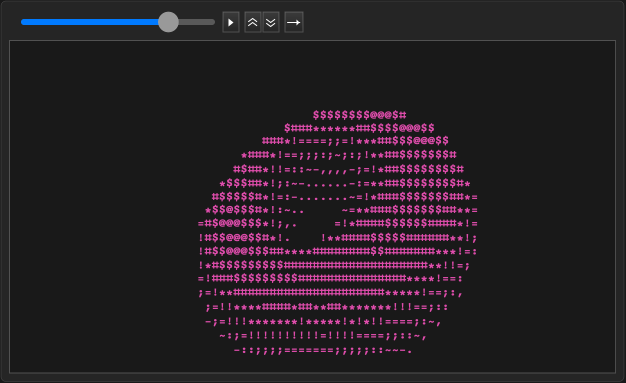
編譯後的版本大約比未編譯的版本快 100 倍。