
Reconstruction du Donut ASCII classique en Wolfram Language à l'aide de FunctionCompile
Reconstruction du Donut ASCII classique en Wolfram Language à l'aide de FunctionCompile
par Shenghui Yang
Cet ouvrage présente une traduction en code du programme à virgule fixe d’Andy Sloane en Wolfram Language, à l’aide de la fonctionnalité FunctionCompile pour obtenir un calcul efficace. Ce projet montre la façon dont les algorithmes C de bas niveau peuvent être fidèlement reproduits dans un environnement symbolique de haut niveau. En combinant Style et ListAnimate, cette implémentation permet une animation fluide en ASCII avec des effets de couleur personnalisables.
In[]:=
Clear[RotateStep,IntDonutFrame];
Créez un environnement de compilation pour stocker les déclarations des fonctions :
In[]:=
env=CreateCompilerEnvironment[];
In[]:=
decl1=FunctionDeclaration[RotateStep,Typed[{"PackedArray"::["MachineInteger",1],"MachineInteger","MachineInteger"}->"PackedArray"::["MachineInteger",1]]@Function[{arg1,mul,shift},Module[{xx=arg1[[1]],yy=arg1[[2]],tmp,star},tmp=xx;xx=xx-BitShiftRight[mul*yy,shift];yy=yy+BitShiftRight[mul*tmp,shift];star=BitShiftRight[3145728-xx*xx-yy*yy,11];xx=BitShiftRight[xx*star,10];yy=BitShiftRight[yy*star,10];{xx,yy}]]];
Déclarez la fonction principale qui gère la rotation et le rendu ASCII :
In[]:=
decl2=FunctionDeclaration[IntDonutFrame,Typed[{"MachineInteger","MachineInteger","MachineInteger","MachineInteger"}->"ListVector"::["String"]]@Function[{cA,sA,cB,sB},Module[{w=80,h=22,chars={".",",","-","~",":",";","=","!","*","#","$","@"},b=CreateDataStructure["FixedArray"," ",1760],z=CreateDataStructure["FixedArray",127,1760],sj=0,cj=1024,si=0,ci=0,R1=1,R2=2048,K2=5120*1024,x0,x1,x2,x3,x4,x5,x6,x7,x,y,Nl=1,o=0,zz},Do[si=0;ci=1024;Do[x0=R1*cj+R2;x1=BitShiftRight[ci*x0,10];x2=BitShiftRight[cA*sj,10];x3=BitShiftRight[si*x0,10];x4=R1*x2-BitShiftRight[sA*x3,10];x5=BitShiftRight[sA*sj,10];x6=K2+R1*1024*x5+cA*x3;x7=BitShiftRight[cj*si,10];x=40+Quotient[30*(cB*x1-sB*x4),x6];y=12+Quotient[15*(cB*x4+sB*x1),x6];Nl=BitShiftRight[-cA*x7-cB*(BitShiftRight[-sA*x7,10]+x2)-ci*BitShiftRight[cj*sB,10],10];Nl=BitShiftRight[Nl-x5,7];o=x+80*y;zz=BitShiftRight[x6-K2,15];If[0<y<22&&0<x<80&&zz<z["Part",o+1],z["SetPart",o+1,zz];b["SetPart",o+1,chars[[If[Nl>0,Nl+1,1]]]]];{ci,si}=RotateStep[{ci,si},5,8];,{i,0,323,1}];{cj,sj}=RotateStep[{cj,sj},9,7];,{j,0,89,1}];b["Elements"]]]];
Placez deux déclarations dans un seul environnement :
In[]:=
CompilerEnvironmentAppendTo[env,{decl1,decl2}]
Out[]=
CompilerEnvironmentObject


Compilez la fonction de rotation et la fonction principale :
In[]:=
cfRotateStep=FunctionCompile[Function[{Typed[arg1,"PackedArray"::["MachineInteger",1]],Typed[m,"MachineInteger"],Typed[s,"MachineInteger"]},RotateStep[arg1,m,s]],CompilerEnvironment->env];
In[]:=
Information@cfRotateStep
Out[]=
In[]:=
cfIntDonutFrame=FunctionCompile[Function[{Typed[cA,"MachineInteger"],Typed[sA,"MachineInteger"],Typed[cB,"MachineInteger"],Typed[sB,"MachineInteger"]},IntDonutFrame[cA,sA,cB,sB]],CompilerEnvironment->env];
Voici le résumé de la structure interne de la fonction :
In[]:=
Information@cfIntDonutFrame
Out[]=
Utilisez la fonction compilée cfRotateStep pour créer une liste de 600 ensembles d’orientations pour le donut 3D :
In[]:=
configs=Join@@@Transpose@{NestList[cfRotateStep[#,5,7]&,{0,1024},600],NestList[cfRotateStep[#,5,7]&,{1024,0},600]};
Répartissez les définitions de mes fonctions sur les sous-noyaux :
In[]:=
Once[LaunchKernels[];DistributeDefinitions[cfRotateStep,cfIntDonutFrame]];
Sur mon Mac Air M2, il faut moins de 2 secondes pour générer les 600 images sur 8 sous-noyaux parallèles :
In[]:=
AbsoluteTiming[data=ParallelMap[StringJoin/@Partition[cfIntDonutFrame[Sequence@@#],80]&,configs];]
Out[]=
{1.02595,Null}
Personnalisation du schéma de couleurs utilisé dans l’exemple :
In[]:=
(*hbrw=RGBColor[107/256,218/256,70/256];tomatchcolorschemeinmactermimalhomebrewcolor*)clb=Blend[{White,RGBColor["#9B2A7F"],RGBColor["#748358"],RGBColor["#57C78B"],RGBColor["#E647AE"],White},#]&;
Lancez l’animation avec d’autres paramètres dans la fonction Style pour ajuster la taille. Il est fortement recommandé d’exécuter le code en mode sombre :
In[]:=
ListAnimate[Table[Style[Column[data[[i]],Spacings->0.2],Bold,FontFamily->"Courier",FontSize->12,clb[i/600](*hbrw*)],{i,600}],60,SaveDefinitions->True]
Out[]=
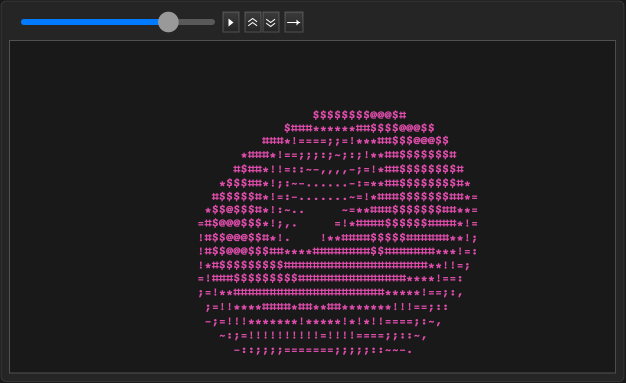
La version compilée est environ 100 fois plus rapide que la version non compilée.
CITER CE NOTEBOOK
CITER CE NOTEBOOK
Reconstruction du Donut ASCII classique en Wolfram Language à l’aide de FunctionCompile
par Shenghui Yang
Communauté Wolfram, CHOIX DE L’ÉQUIPE, 24 octobre 2025
https://community.wolfram.com/groups/-/m/t/3564927
par Shenghui Yang
Communauté Wolfram, CHOIX DE L’ÉQUIPE, 24 octobre 2025
https://community.wolfram.com/groups/-/m/t/3564927