Machine learning is everywhere around us. From categorization of images of dogs vs. cats, to voice-to-text systems, it revolutionized the ease, safety, and efficiency of our lives. But what if we take a step back to understand how machine learning can deal with some of the most basic data types: numbers? The objective of this project was to analyze how various basic deep learning systems are trained to Booleans functions. In this experiment, three main variables were changed: the number of layers in the system, the number of nodes, and the types of activation functions in each layer. In conclusion it was found that an increased number of layers and nodes resulted in a higher accuracy.
Brief Introduction to Machine Learning
Brief Introduction to Machine Learning
Machine learning is a branch of computer science which uses data to train an algorithm to artificially “learn” without human assistance. There are three basic Machine Learning types: Supervised Learning, Unsupervised Learning, and Reinforcement Learning. This project has a focus on Supervised Learning.
Supervised learning algorithms take in labeled data, for example a list of cat and dog images each labeled by their respective pet, and processes this data through a model. After a sufficient amount of training, this model is able to make predictions and classifications on data that it has never seen before. so for example, having seen a myriad of cat images, once it encounters one that it has never seen before, it can infer based on similar features that the image resembles a cat more than a dog.
My project takes a closer look at how simple Wolfram Language algorithms behave when trained using Boolean functions.
Supervised learning algorithms take in labeled data, for example a list of cat and dog images each labeled by their respective pet, and processes this data through a model. After a sufficient amount of training, this model is able to make predictions and classifications on data that it has never seen before. so for example, having seen a myriad of cat images, once it encounters one that it has never seen before, it can infer based on similar features that the image resembles a cat more than a dog.
My project takes a closer look at how simple Wolfram Language algorithms behave when trained using Boolean functions.
What are Boolean functions?
What are Boolean functions?
Boolean functions are functions that given specified restrictions return a binary value of 1 or 0 for every point in the plane. If a point satisfied the function, it will return 1 and if not, it will return a 0. By plotting these points, a shape can be defined.
What are activation functions?
What are activation functions?
Wolfram allows for a very wide adjustment of machine learning algorithms with activation functions being one of the simple layer types layers.
Getting Started
Getting Started
The first step to this machine learning project is developing the data. Throughout this notebook I will walk you through one of the seven functions I analyzed throughout this experiment, the most interesting. However the complete list of functions and experiments can be found at the end of this essay.
Here is the region plot representation of a function for a ring shape. The shaded region represents the areas where the function is true.
Here is the region plot representation of a function for a ring shape. The shaded region represents the areas where the function is true.
Plot a graph which satisfy both inequalities: (((2x-1)^2)+((2y-1)^2))<=.8 and (((2x-1)^2)+((2y-1)^2))>.2
f[{x_,y_}]:=(((2x-1)^2)+((2y-1)^2))<=.8&&(((2x-1)^2)+((2y-1)^2))>.2RegionPlot[f[{x,y}],{x,0,1},{y,0,1}]
Generating Data
Generating Data
Now, we can use this function to generate a list of inputs. The code below creates a list of rules which is made up of points from 0 to 1 on the x and y axis in increments of 0.05, and a respective value of 0 or 1 which indicates if this makes the Boolean function true or not.
Generate data where the points that make the both equations true are associated with a 1, and those that don’t are associated with a 0.
data=Flatten@Table[{x,y}Boole[(((2x-1)^2)+((2y-1)^2))<=.8&&(((2x-1)^2)+((2y-1)^2))>.2],{x,0,1,0.05},{y,0,1,0.05}];
Basic Variables
Basic Variables
Now that we have the data, we need to set up all the variables that will be changing in this experiment. This means that we need to generate a list of node values, and activation functions for one, two or three layers.
The code below creates a list of x and y values which respectively span from 64-192 and 32-160 in increments of 32.
The code below creates a list of x and y values which respectively span from 64-192 and 32-160 in increments of 32.
NodeValues
The list of y values, chosen randomly as opposed to the list of x values, will be used for the node values of 1 layer.
In[]:=
arrayXValues=Table[2^5*i,{i,6}][[2;;]]
Out[]=
{64,96,128,160,192}
In[]:=
arrayYValues=Table[2^5*i,{i,5}]
Out[]=
{32,64,96,128,160}
To create the possible node values for a list of two layers, we can combine the x and y values produced to create tuples where the first variable is always bigger or equal to the second. This is because in typical neural networks, the number of layers decreases or remains the same as the algorithm progresses.
In[]:=
ArrayOfTwoLayers=Tuples[{arrayXValues,arrayYValues}];ArrayOfTwoLayers=Select[ArrayOfTwoLayers,#[[1]]>=#[[2]]&]ArrayOfTwoLayers;
Out[]=
{{64,32},{64,64},{96,32},{96,64},{96,96},{128,32},{128,64},{128,96},{128,128},{160,32},{160,64},{160,96},{160,128},{160,160},{192,32},{192,64},{192,96},{192,128},{192,160}}
In order to create the list of three layers, I manually imputed a short list of three values. This is to because the algorithm with three layers would be complex and as a result, take longer to run. Therefore, running less experiments would allow us to grasp results while still conserving time.
In[]:=
ArrayOfThreeLayers={{128,64,32},{160,64,32},{192,64,32}}
Out[]=
{{128,64,32},{160,64,32},{192,64,32}}
There are three types of activation functions that we will use: Sin, Cos, and Tanh.
ActivationFunctions
This is a manual list of the three activation functions that will be used for networks with one layer.
Make a list with the three activation functions.
In[]:=
AC1Layer={Tanh,Sin,Cos}
Out[]=
{Tanh,Sin,Cos}
This is a list pairs of the two activation functions that will be used for networks with two layer. The function permutation is used to create unique combinations of the three possible functions which are joined together to create a list of possible pairs.
Make a list of all possible pairs of activation functions.
In[]:=
AC2Layer=Join[Permutations[{Tanh,Sin,Cos},{2}],{{Tanh,Tanh},{Sin,Sin},{Cos,Cos}}]
Out[]=
{{Tanh,Sin},{Tanh,Cos},{Sin,Tanh},{Sin,Cos},{Cos,Tanh},{Cos,Sin},{Tanh,Tanh},{Sin,Sin},{Cos,Cos}}
The code below creates a list of lists of the three activation functions that will be used for networks with two layer. The permutation functions are used to create unique combinations of the three possible functions which are joined together to create a list of possible triples.
Make a list of all possible triples of activation functions.
In[]:=
AC3Layers=Join[Permutations[{Tanh,Sin,Cos},{3}],Permutations[{Tanh,Tanh,Cos},{3}],Permutations[{Tanh,Tanh,Sin},{3}],Permutations[{Sin,Sin,Tanh},{3}],Permutations[{Sin,Sin,Cos},{3}],Permutations[{Cos,Cos,Tanh},{3}],Permutations[{Cos,Cos,Sin},{3}],{{Tanh,Tanh,Tanh},{Sin,Sin,Sin},{Cos,Cos,Cos}}]
Out[]=
{{Tanh,Sin,Cos},{Tanh,Cos,Sin},{Sin,Tanh,Cos},{Sin,Cos,Tanh},{Cos,Tanh,Sin},{Cos,Sin,Tanh},{Tanh,Tanh,Cos},{Tanh,Cos,Tanh},{Cos,Tanh,Tanh},{Tanh,Tanh,Sin},{Tanh,Sin,Tanh},{Sin,Tanh,Tanh},{Sin,Sin,Tanh},{Sin,Tanh,Sin},{Tanh,Sin,Sin},{Sin,Sin,Cos},{Sin,Cos,Sin},{Cos,Sin,Sin},{Cos,Cos,Tanh},{Cos,Tanh,Cos},{Tanh,Cos,Cos},{Cos,Cos,Sin},{Cos,Sin,Cos},{Sin,Cos,Cos},{Tanh,Tanh,Tanh},{Sin,Sin,Sin},{Cos,Cos,Cos}}
Writing an accuracy function
Writing an accuracy function
The accuracy function below takes in the data generated above and the trained data. Within the function, it adds all of the 0 and 1 values in the initial data and subtracts that from the 0 and 1 values trained data, divided by the length of the initial data. By doing so, we are get, in decimal form, the amount of values the net got incorrect. In order to get the value of the correct, we subtract this value from 1. Then we multiply by 100 to get the percentage representation.
accuracyPercentage[initalData_,netResults_]:=(1-N[Total[Abs[Flatten[Table[initalData[[x,2]],{x,1,Length[initalData]}]]-Flatten[netResults]]]/Length[initalData]])*100
Running an Experiment Of One Layer
Running an Experiment Of One Layer
Now, we can begin training the net using the function Net Train. This function is the most important because it prints a visual representation of how the network has learned through a List Density Plot Graph. The function below calculates the accuracy function and prints it as a column above the list density plot graph. The plot itself has two parts: the first is the overlaid red graphical representation of where the Boolean function is true, and the second is the blue and white areas of the plot. The white represent the areas where the trained data returned a 1 and the blue represents the area where a 0 was returned.
In order for the ladder to occur, a net must be trained. The NetTrain function takes in a net chain with one layer. Each run, the pure function takes in a different activation function and the n represents a various y value which stands for the node number.
In order for the ladder to occur, a net must be trained. The NetTrain function takes in a net chain with one layer. Each run, the pure function takes in a different activation function and the n represents a various y value which stands for the node number.
The x axis of the grid is representative of the activation layers in the order {Tanh,Sin,Cos} from left to right.The y axis is representative of the node values in the order {32, 64, 96, 128, 160} from top to bottom.
Write a function that prints out a list of ListDensityPlots which plots data from trained nets with varying node numbers and activation functions for one layer.
In[]:=
makeListDensityFromOneNet[net_]:=Module[{acc=accuracyPercentage[data,Flatten[Table[Round@Abs@net[{x,y}],{x,0,1,0.05},{y,0,1,0.05}]]]},Column[{acc,Overlay[{ListDensityPlot[Flatten[Table[{x,y,Round@Abs@net[{x,y}]},{x,0,1,0.05},{y,0,1,0.05}],1],PlotRangeAll],RegionPlot[(((2x-1)^2)+((2y-1)^2))<=.8&&(((2x-1)^2)+((2y-1)^2))>.2,{x,0,1},{y,0,1},BoundaryStyle->Red]}]}]]myTrain1L2[myData_,n_]:=NetTrain[NetChain[{n,#,1}],myData,TimeGoal3]&/@AC1LayerlistOfDensityPlots1L2[myData_,trials_]:=Module[{nets},nets=myTrain1L2[myData,trials[[#]]]&/@Range[Length[trials]];Map[makeListDensityFromOneNet,nets,{2}]]
This function takes in the original data, and the list of nodes. The results are printed out in the format of a grid.
In[]:=
Grid[listOfDensityPlots1L2[data,arrayYValues]]
Running an Experiment Of Two Layers
Running an Experiment Of Two Layers
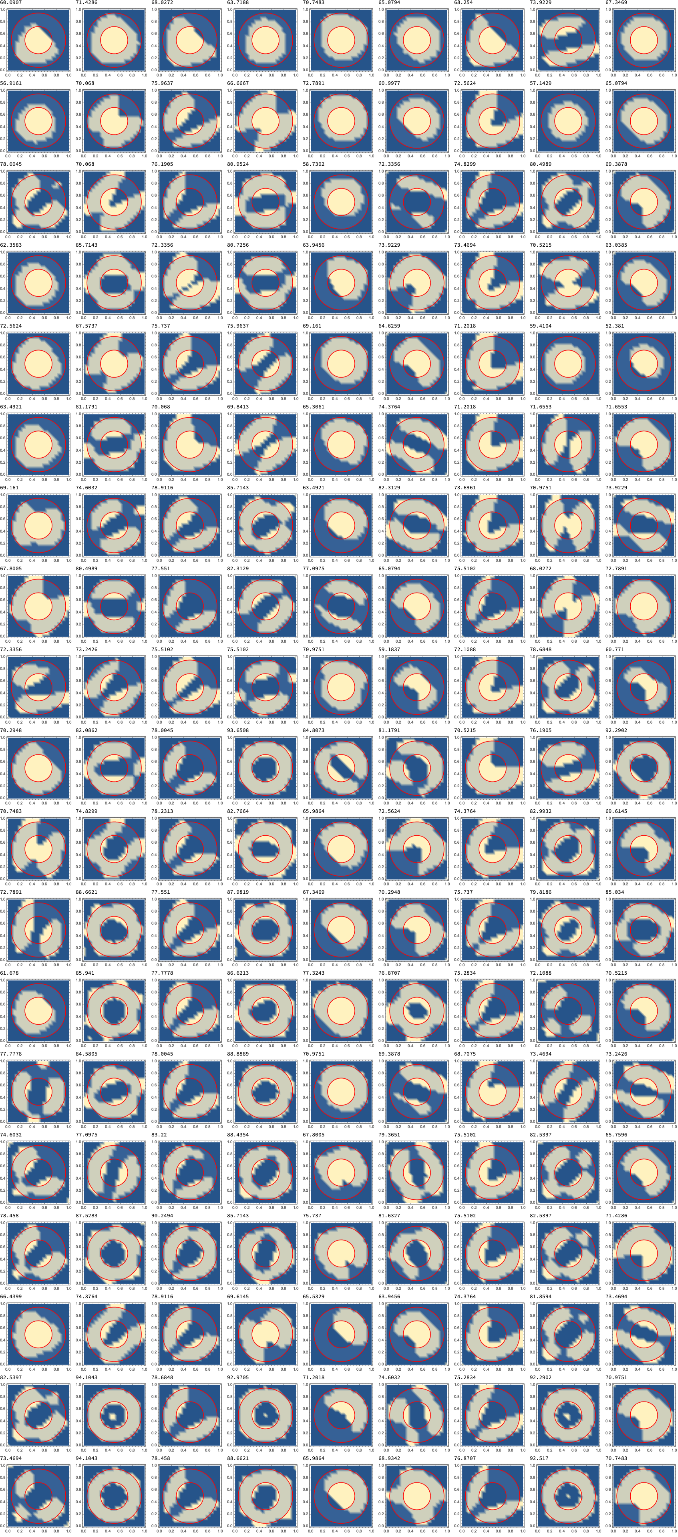
As seen above, the experiment with one layer proved not very accurate with a common accuracy percentage of around 65%. My hypothesis is that there will be a increase in efficiency. Let’s see if the accuracy changes if we increase the number of layers to 2. The overall function remains the same, except for the pure function in the NetTrain function which now takes in a list of pairs of two activation functions, and the n and m value which now represent differing numbers of nodes for each layer.
It is important to note that depending on the shape, the impact of these different features varies.
The x axis of the grid is representative of the activation layers in the order {{Tanh,Sin}, {Tanh,Cos}, {Sin,Tanh}, {Sin,Cos}, {Cos,Tanh}, {Cos,Sin}, {Tanh,Tanh}, {Sin,Sin}, {Cos,Cos}} from left to right.The y axis is representative of the node values in the order {{64,32}, {64,64}, {96,32}, {96,64}, {96,96}, {128,32}, {128,64}, {128,96}, {128,128}, {160,32}, {160,64}, {160,96}, {160,128}, {160,160}, {192,32}, {192,64}, {192,96}, {192,128}, {192,160}} from top to bottom.
Write a function that prints out a list of ListDensityPlots which plots data from trained nets with varying node numbers and activation functions for two layers.
makeListDensityFromOneNet[net_]:=Module[{acc=accuracyPercentage[data,Flatten[Table[Round@Abs@net[{x,y}],{x,0,1,.05},{y,0,1,.05}]]]},Column[{acc,Overlay[{ListDensityPlot[Flatten[Table[{x,y,Round@Abs@net[{x,y}]},{x,0,1,.05},{y,0,1,.05}],1],PlotRangeAll],RegionPlot[(((2x-1)^2)+((2y-1)^2))<=.8&&(((2x-1)^2)+((2y-1)^2))>.2,{x,0,1},{y,0,1},BoundaryStyle->Red]}]}]]myTrain2L2[myData_,n_,m_]:=NetTrain[NetChain[{n,#[[1]],m,#[[2]],1}],myData,TimeGoal3]&/@AC2LayerlistOfDensityPlots1L2[myData_,trials_]:=Module[{nets},nets=myTrain2L2[myData,#[[1]],#[[2]]]&/@trials;Print[Dimensions[nets]];Map[makeListDensityFromOneNet,nets,{2}]]
In[]:=
Grid[listOfDensityPlots1L2[data,ArrayOfTwoLayers]]
{19,9}
Out[]=
Three Layer Experiments-Trial
Three Layer Experiments-Trial
There was about a 20% accuracy jump from the 1 and 2 layer as due to our hypothesis. To test whether our results will remain consistent, we will use the same function as above, once again tweaking the list of nodes and activation functions.
The x axis of the grid is representative of the activation layers in the order {{Tanh,Sin,Cos}, {Tanh,Cos,Sin}, {Sin,Tanh,Cos}, {Sin,Cos,Tanh}, {Cos,Tanh,Sin}, {Cos,Sin,Tanh},{ Tanh,Tanh,Cos}, {Tanh,Cos,Tanh}, {Cos,Tanh,Tanh}, {Tanh,Tanh,Sin}, {Tanh,Sin,Tanh}, {Sin,Tanh,Tanh}, {Sin,Sin,Tanh}, {Sin,Tanh,Sin}, {Tanh,Sin,Sin}, {Sin,Sin,Cos}, {Sin,Cos,Sin}, {Cos,Sin,Sin}, {Cos,Cos,Tanh}, {Cos,Tanh,Cos}, {Tanh,Cos,Cos}, {Cos,Cos,Sin}, {Cos,Sin,Cos}, {Sin,Cos,Cos}, {Tanh,Tanh,Tanh}, {Sin,Sin,Sin}, {Cos,Cos,Cos}} from left to right.The y axis is representative of the node values in the order {{128,64,32}, {160,64,32}, {192,64,32}} from top to bottom.
The Three Layer experiment was tested on a smaller set of node values. Overall, there was a slight improvement of accuracy, with high accuracy values were much more consistent across the trial.
Conclusion and Future Exploration
Conclusion and Future Exploration
During the first experiment we noticed that the algorithm was more prone to creating a solid shape, resulting in a lower accuracy rate. Throughout the second experiment, and especially the third, distant large patches that nearly connected to create a ring shape began to appear. This observation was associated to higher accuracy. This might indicate that solid images such as a square or triangle might be easier to train that more non-solid, regular shapes.
In the future, it is important to analyze results gathered across wide group of Boolean functions to come to a more generalized conclusion to this experiment. Functions representing a square, triangle, Sine wave, circle, ring, heart, and hyperbola can be seen below. Using a larger dataset, it would be possible to analyze which activation function combinations are more adept given certain shapes and at what point the accuracy of a function begins to stagnate or decrease. Furthermore, though we only explore simple deep learning networks by altering activation functions, Wolfram Language has a wide range of alternative, more complex functions that would be very interesting to investigate. An example of this would be the Convolutional Layer.
Full list of experiments:
Full list of experiments: