The Cylinder we have in Wolfram Language is the simplest type: right circular cylinder. But with the help of BSplineSurface, more interesting variations can be created and represented in a compact fashion. This is a use case of spline surface constructed from so called Tensor Product.
To produce cylinder in the TP way, we realize a cylinder is merely a circle “sweeping” along a straight line, so it can be represented as “tensor product” of circle and straight line.
Helper functions
Helper functions
ClearAll[pipe,branch,branchSeq]pipe=RightComposition;branch=Through@*{##}&;branchSeq=pipe[branch[##],Apply@Sequence]&;
ClearAll[FindDivisionsExact]FindDivisionsExact[range:{_,_},n_Integer?(#≥2&)]:=Rescale[Range[n]//N//Rescale,{0,1},range]FindDivisionsExact[n_Integer?(#≥2&)]:=FindDivisionsExact[{0,1},n]
Circle as B-spline curve
Circle as B-spline curve
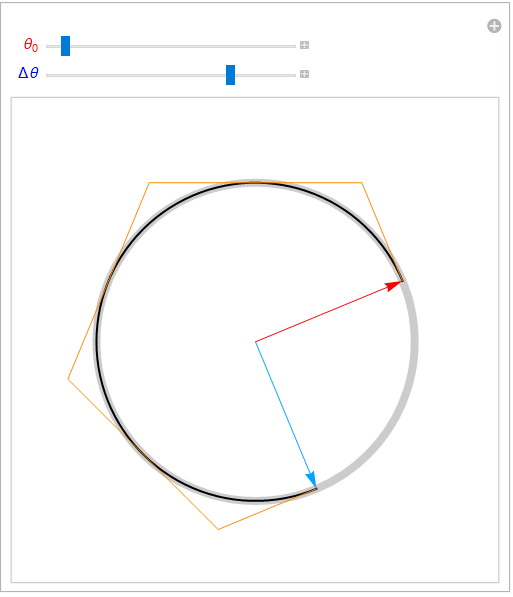
A generic circular arc (in 2D space) can be represented as BSplineCurve using the following circArc function:
In[]:=
ClearAll[arcControlPointSet]arcControlPointSet[θ0_,Δθ_]:=
Cos[θ0] | Sin[θ0] |
Cos[θ0]-Sin[θ0]Tan Δθ 8 | Sin[θ0]+Cos[θ0]Tan Δθ 8 |
Cos Δθ 4 | Sin Δθ 4 |
Cos 3Δθ 8 Δθ 8 | Sec Δθ 8 3Δθ 8 |
Cos Δθ 2 | Sin Δθ 2 |
Cos 5Δθ 8 Δθ 8 | Sec Δθ 8 5Δθ 8 |
Cos 3Δθ 4 | Sin 3Δθ 4 |
Cos 7Δθ 8 Δθ 8 | Sec Δθ 8 7Δθ 8 |
Cos[Δθ+θ0] | Sin[Δθ+θ0] |
In[]:=
ClearAll[circArc]circArc[θ0_,Δθ_]:=BSplineCurvearcControlPointSet[θ0,Δθ],SplineDegree2,SplineKnots0,0,0,,,,,,,1,1,1,SplineWeights1,Cos,1,Cos,1,Cos,1,Cos,1
1
4
1
4
1
2
1
2
3
4
3
4
Δθ
8
Δθ
8
Δθ
8
Δθ
8
In[]:=
ManipulateGraphics,AbsoluteThickness[7],Circle[],,Arrow@{{0,0},ReIm@Exp[Iθ0]},,Arrow@{{0,0},ReIm@Exp[I(θ0+Δθ)]},{Black,AbsoluteThickness[2],circArc[θ0,Δθ]},,AbsoluteThickness[1],Line@arcControlPointSet[θ0,Δθ],PlotRange,Style"",,Medium,0,2π,Δθ,,Style"Δθ",,Medium,0,2π,ControlPlacementTop


2
{{-1,1},{-1,1}},θ0,π
8
θ
0

3π
2

Out[]=
Right cylinder as B-spline surface
Right cylinder as B-spline surface
To uplift the arc to 3D space (lying in - plane), we add a coordinate to each points:
X
Y
Z
In[]:=
Moduleθ0=,Δθ=,ctrlGrid,ctrlGrid=arcControlPointSet[θ0,Δθ]//Map@Append[0];Graphics3D,Line[ctrlGrid],,ReplacePart[circArc[θ0,Δθ],1ctrlGrid],AxesTrue
π
8
3π
2


Out[]=

To “sweeping” the arc along axis, we use multiple geometric transformations (tfSet):
Z
In[]:=
Moduleθ0=,Δθ=,zSlices=5,zRange={-1,.5},circ3D,tfSet,ctrlGrid,circ3D=arcControlPointSet[θ0,Δθ]//Map@Append[0];tfSet=TranslationTransform[{0,0,#}]&/@Rescale[Range@zSlices,{1,zSlices},zRange];ctrlGrid=#[circ3D]&/@tfSet;Graphics3D,Line[ctrlGrid],,Line[ctrlGrid],,ReplacePart[circArc[θ0,Δθ],1#]&/@ctrlGrid,BoxedFalse,Lighting"Accent",AxesTrue
π
8
3π
2

Out[]=

To fully construct the TP surface, three more options need to be taken care of: SplineDegree, SplineKnots and SplineWeights :
The whole cylindrical surface changes with its generating circular arc:
Oblique cylinder as B-spline surface
Oblique cylinder as B-spline surface
Showcase
Showcase
We can summarize aboving code as following cylindricalPatch function:
A random graph composed with 100 random cylindrical patches:
It always looks cooler with lots of moving parts: