This is a continuation to the posts listed at: https://community.wolfram.com/web/ggoff/
Abstract
Abstract
In Example 1 the Wolfram Language was used to create color samples of images within a 3D-RGB-colorspace. Furthermore for a crystal-file of a pigment a wireframe for the unit-cell was implemented. In Example 2 the sphericon was plotted, analyzed and animated in Blender. A recreation of developing the sphericon animation is shown.
Experiments
Experiments
Example 1: Pigments
Example 1: Pigments
RGB-Space & Color Samples
RGB-Space & Color Samples
In[]:=
path0=SetDirectory[NotebookDirectory[]<>"/data/"]
Out[]=
C:\Users\ggoff\Downloads\0-published\woco\ams9pub\data
Before starting this project there was a question:
Is it possible to distinguish periods in art by taking color samples and place them in the RGB-space?
In creating the animation - Pigments - the path to an answer was followed partially:
Is it possible to distinguish periods in art by taking color samples and place them in the RGB-space?
In creating the animation - Pigments - the path to an answer was followed partially:
Three versions of a 3D-plot for RGB-Space were created:
In[]:=
chr0=ChromaticityPlot3D["RGB",Axes->False,Boxed->False]/.Line->(Tube[#,0.003]&);Export[path0<>"\\"<>"base0.3ds",chr0]
Out[]=
C:\Users\ggoff\Downloads\0-published\woco\ams9pub\data\base0.3ds
In[]:=
chr1=ChromaticityPlot3D["RGB",Axes->False,Boxed->False,FillingStyleNone]/.Line->(Tube[#,0.003]&);Export[path0<>"\\"<>"base1.3ds",chr1]
Out[]=
C:\Users\ggoff\Downloads\0-published\woco\ams9pub\data\base1.3ds
In[]:=
chr2=ChromaticityPlot3D["RGB",Axes->False,Boxed->False,FillingStyleOpacity[0.3]]/.Line->(Tube[#,0.003]&);Export[path0<>"\\"<>"base2.3ds",chr2]
Out[]=
C:\Users\ggoff\Downloads\0-published\woco\ams9pub\data\base2.3ds
In[]:=
GraphicsGrid[{{chr0,chr1,chr2}}]
Out[]=
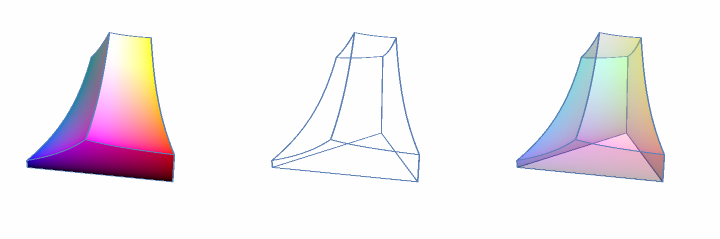
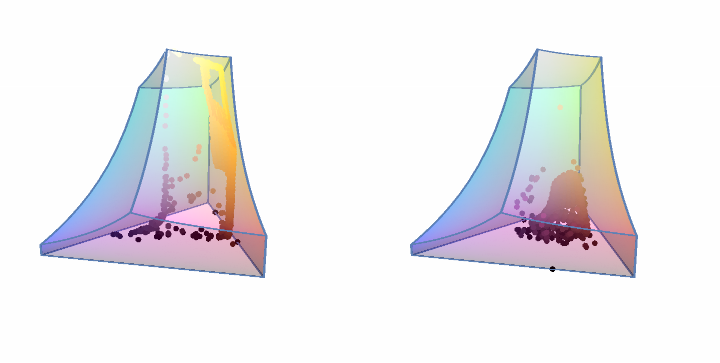
The goal was to bring the semi-transparent RBG-Space and the combined color samples from two pictures for each period within the color space into Blender.
The example below showed the process with screenshots from my videos.
The example below showed the process with screenshots from my videos.
In[]:=
imgList={};Do[img=Import[path0<>"\\p"<>ToString[i]<>".png"];AppendTo[imgList,ChromaticityPlot3D[img,Axes->False,Boxed->False]],{i,1,2}]
gg1=GraphicsGrid[{Show[chr2,#]&/@imgList}]gg2=GraphicsGrid[{imgList}]
Out[]=
Out[]=
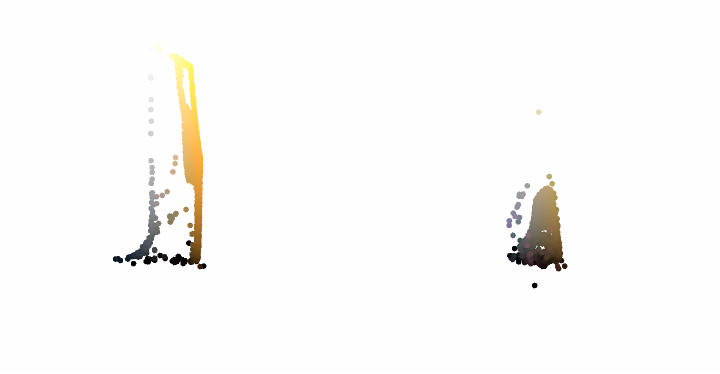
The opaque colored object for the RGB-space was exported in 3ds-format, converted in Blender 2.79 to ply-format, then finally ready to import in Blender 3.1 beta. The blue outlined version was recreated in Rhino, closed and brought into Blender as twin tower.
The samples of colored points in RBG-space for each period were saved separately as png- and ply-files.
From the ply-files the first was reimported:
In[]:=
sample1=Import[path0<>"\\"<>"1.ply","Graphics3D"]
Out[]=

Colors of objects are saved in 3D-formats e.g. per vertex, face, user-defined or in PBR-materials. Somewhere in the cycle of exporting/importing involving several apps/formats an interpretation of color-info can differ and it’s not displayed anymore.
For the animation each sample imported in Blende was split into a collection of spheres/polyhedra in Blender. The collection of objects was colored randomly via a color ramp, based on the five most prominent colors of each sample.
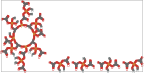
For the fourth part of the animation a crystal structure of azurite was prepared in Mathematica.
The crystal was read in, plotted in 3D, the coordinated of the Cu-atoms extracted.
In[]:=
mol1=Molecule;mol2=MoleculePlot3D[mol1,PlotTheme"Tubes"];

In[]:=
coords=Transpose[Map[Table,{mol1["AtomicSymbol"],QuantityMagnitude[Normal[mol1["AtomCoordinates"]]]}]];selected=Select[coords,(First[#]=="Cu")&];lenSelected=Length[selected]
Out[]=
14
Then the position of the eight Cu-atoms building the unit-cell was found interactively.
In[]:=
ListAnimate[Table[Column[{i,Show[{mol2,Graphics3D[{Blue,Sphere[selected[[i,2]],0.5]}]},ImageSize->Small]},Alignment->{Center,Center}],{i,1,Length[selected]}],DeployedTrue,AnimationRunningFalse]
Out[]=
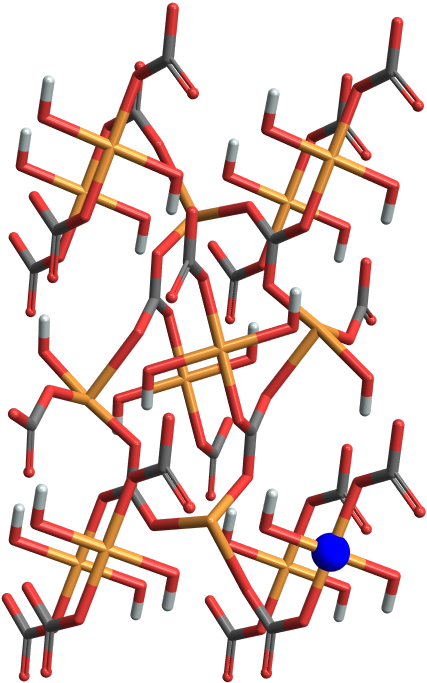
Now the edges of the unit-cell were blended in:
In[]:=
coords2=Transpose[selected][[2]][[1;;8]]
Out[]=
{{0.,0.,0.},{-0.435345,0.,10.3438},{0.,5.85,0.},{-0.435345,5.85,10.3438},{5.011,0.,0.},{4.57566,0.,10.3438},{5.011,5.85,0.},{4.57566,5.85,10.3438}}
In[]:=
tubes=Tube[coords2[[#]],0.08]&/@{{7,5,1,3,7},{8,6,2,4,8},{1,2},{3,4},{7,8},{5,6}};cif1=Show[{mol2,Graphics3D[{Green,#}]&/@tubes}];Show[cif1,ImageSize->Small]
Out[]=

The combined graphic was exported as ply-file .
Blender
Part 1:
The RGB-space was imported as ply-file. It was placed on pentagonal floor with metallic&shiny material. The floor was surrounded by a beveled curve. The first part of the animation showed the development of the tower with color gradients in a 2D/3D version.
Part 2:
Each midpoint of the pentagon’s sides was presented with a color-sample imported as 2D-image. During the rotation the names of the five periods in art is blended in/out (via decals). The twin tower was imported as dxf-file, subdivided and given a material with two characters blended between during the rotation.
Part 3:
Additionally to the setting of part 2 for each period a sample containing small polyhedra were imported from ply-files. Then the objects were split into individual polyhedra and colored randomly within a palette from their period. During the rotation the samples were transported within the twin tower. They were returning to their origin.
Part 4:
The azurite crystal was encased in a dual material. During the animation the floor material and the encasing of the molecules were morphed.
Part 5:
A light blue spherical object was split into parts (cell-fracture add-on) and distributed via a rigid-body particle-animation.
Part 1:
The RGB-space was imported as ply-file. It was placed on pentagonal floor with metallic&shiny material. The floor was surrounded by a beveled curve. The first part of the animation showed the development of the tower with color gradients in a 2D/3D version.
Part 2:
Each midpoint of the pentagon’s sides was presented with a color-sample imported as 2D-image. During the rotation the names of the five periods in art is blended in/out (via decals). The twin tower was imported as dxf-file, subdivided and given a material with two characters blended between during the rotation.
Part 3:
Additionally to the setting of part 2 for each period a sample containing small polyhedra were imported from ply-files. Then the objects were split into individual polyhedra and colored randomly within a palette from their period. During the rotation the samples were transported within the twin tower. They were returning to their origin.
Part 4:
The azurite crystal was encased in a dual material. During the animation the floor material and the encasing of the molecules were morphed.
Part 5:
A light blue spherical object was split into parts (cell-fracture add-on) and distributed via a rigid-body particle-animation.
Example 2: Portal
Example 2: Portal
Analyzing the object gave me an idea how to animate it in Blender.
The following WL-code simulated the building process of the sphericon used in the Portal animation:
The following WL-code simulated the building process of the sphericon used in the Portal animation:
Blender
Part 1:
The start was a line. Mirroring formed a V. They lines were rotated via screw modifier. The surface was subdivided and given a glassy material. The V was rotated 90° for building the second half. A rotation of the sphericon followed.
Part 2:
Both halves of the object were moved out of the screen, one to the left, the other to the right.
Part 1:
The start was a line. Mirroring formed a V. They lines were rotated via screw modifier. The surface was subdivided and given a glassy material. The V was rotated 90° for building the second half. A rotation of the sphericon followed.
Part 2:
Both halves of the object were moved out of the screen, one to the left, the other to the right.
References
References
Collection of animations
Collection of animations
References
References
Pigments
Scene: Modified RGB-Space, Cylinder, Icosahedra, Sphere & Crystal
Is it possible to distinguish periods in art by processing sample images in 3D-RGB-space?
The animation follows partially the quest for an answer. For each epoch (prehistoric, antique, medieval, renaissance, modern) 2 sample images and color-palettes were used as input. The output were 2x5 chromaticity-2D-graphics/3D-models for the samples plus two 3D-versions of RGB-Color-Space. For the blue pigment - azurite - a crystal-file from COD was used.
“ChromaticityPlot3D—Wolfram Language Documentation.” Accessed February 7, 2022. https://reference.wolfram.com/language/ref/ChromaticityPlot3D.html.
“Crystallography Open Database.” Accessed February 7, 2022. http://www.crystallography.net/cod/.
-. 10,000 Years of Art, Phaidon, 2009.
“Pigments through the Ages - Detailed Pigment Histories, Recipes.” Accessed February 7, 2022. http://www.webexhibits.org/pigments/.
Audio:
Stock Music & Sound Effects - Royalty Free Audio - Storyblocks
https://www.storyblocks.com/audio (accessed 2022-02-07)
Krotov, Vladyslav. “Download ‘Nature Breath’ Royalty-Free Music - Storyblocks.” Accessed February 7, 2022. Asset ID: SBA-300537256.
Scene: Modified RGB-Space, Cylinder, Icosahedra, Sphere & Crystal
Is it possible to distinguish periods in art by processing sample images in 3D-RGB-space?
The animation follows partially the quest for an answer. For each epoch (prehistoric, antique, medieval, renaissance, modern) 2 sample images and color-palettes were used as input. The output were 2x5 chromaticity-2D-graphics/3D-models for the samples plus two 3D-versions of RGB-Color-Space. For the blue pigment - azurite - a crystal-file from COD was used.
“ChromaticityPlot3D—Wolfram Language Documentation.” Accessed February 7, 2022. https://reference.wolfram.com/language/ref/ChromaticityPlot3D.html.
“Crystallography Open Database.” Accessed February 7, 2022. http://www.crystallography.net/cod/.
-. 10,000 Years of Art, Phaidon, 2009.
“Pigments through the Ages - Detailed Pigment Histories, Recipes.” Accessed February 7, 2022. http://www.webexhibits.org/pigments/.
Audio:
Stock Music & Sound Effects - Royalty Free Audio - Storyblocks
https://www.storyblocks.com/audio (accessed 2022-02-07)
Krotov, Vladyslav. “Download ‘Nature Breath’ Royalty-Free Music - Storyblocks.” Accessed February 7, 2022. Asset ID: SBA-300537256.
Portal
Scene: Modified Cones
Lastra, Alberto. “Special Families of Surfaces.” In Parametric Geometry of Curves and Surfaces: Architectural Form-Finding, edited by Alberto Lastra, 139–204. Mathematics and the Built Environment. Cham: Springer International Publishing, 2021. https://doi.org/10.1007/978-3-030-81317-8_ 4.
Audio:
Stock Music & Sound Effects - Royalty Free Audio - Storyblocks
https://www.storyblocks.com/audio (accessed 2021-12-24)
we20Nifty. Elements (34sec). Accessed December 24, 2021. Asset ID: SBA-300538711.
Scene: Modified Cones
Lastra, Alberto. “Special Families of Surfaces.” In Parametric Geometry of Curves and Surfaces: Architectural Form-Finding, edited by Alberto Lastra, 139–204. Mathematics and the Built Environment. Cham: Springer International Publishing, 2021. https://doi.org/10.1007/978-3-030-81317-8_ 4.
Audio:
Stock Music & Sound Effects - Royalty Free Audio - Storyblocks
https://www.storyblocks.com/audio (accessed 2021-12-24)
we20Nifty. Elements (34sec). Accessed December 24, 2021. Asset ID: SBA-300538711.