The Wolfram Emerging Leaders Program: High School (WELP:HS) is a remote, semester-long program designed for exceptional graduates from the Wolfram High School Summer Research Program to continue to develop their skills. Students work in a small group over the course of a semester to do either a research-based project or a product development–based project under the guidance of expert mentors. Projects are centered around a topic at the intersection of the group’s interests.
This essay was written by:
This essay was written by:
The goal of this project was to run image analysis on video game box art in order to find and visualize data on the features of this box art. We wanted to see if we could find a trend within the data throughout the different generations of video games. We were able to analyze and depict many different aspects of this box art and we used a VAE system to generate a visualization based on all of the box art.
Introduction
Introduction
Video Games have been around for quite some time and typically come with their own decorated box art. Many of these box arts tend to be detailed, particularly ones produced by larger companies for their mainstream games. Our goal with this project was to analyze different features of this box art such as the colors, the shadows, and the saturation and the changes that occurred between different generations of video games
Finding and Importing images
Finding and Importing images
To start with, we first did research into different generations of video game consoles to categorize each one into a specific generation. We then tied each console to a repository of game box art corresponding to that specific console. This let us compile the images into generations easily and download a specific generation of images for testing. In order for you to download it for yourself, you can head to this Github link, download the images, extract the zip, and insert the downloaded folders file path into the code below.
Import Images
Import Images
This allows us to import the images from our files.
In[]:=
masterFolder="/Users/roryf/Downloads/WELP-Game-Covers-main";folders={"GEN2","GEN3","GEN4","GEN5","GEN6","GEN7","GEN8"};subfolders={"atari2600","colecovision","fairchild","intellivision","odyssey2","atari7800","mastersystem","nes","gameboy","gamegear","genesis","lynx","snes","n64","saturn","gamecube","wii","3ds"};
In[]:=
ResizeGenImages[verString_] := RandomChoice[ ParallelMap[ ImageResize[#, {512,512}]&, Flatten[ Block[ {fileNames,importedImages,finalImages}, ParallelTable[ fileNames=FileNames["*.png", FileNameJoin[{masterFolder,folderPath,subfolderPath}]]; importedImages=Quiet[Import[#, "Image"]]&/@fileNames; finalImages=DeleteCases[importedImages,_?(Not@*ImageQ)]; Join[finalImages], {folderPath, {verString}}, {subfolderPath,subfolders} ] ] ] ],250]
In[]:=
Gen2ResizedImages = ResizeGenImages["GEN2"];Gen3ResizedImages = ResizeGenImages["GEN3"];Gen4ResizedImages = ResizeGenImages["GEN4"];Gen5ResizedImages = ResizeGenImages["GEN5"];Gen6ResizedImages = ResizeGenImages["GEN6"];Gen7ResizedImages = ResizeGenImages["GEN7"];Gen8ResizedImages = ResizeGenImages["GEN8"];allResizedImages = Flatten[Join[{Gen2ResizedImages,Gen3ResizedImages,Gen4ResizedImages,Gen5ResizedImages,Gen6ResizedImages,Gen7ResizedImages,Gen8ResizedImages}],1];
In[]:=
smallSample=RandomSample[allResizedImages,100];
Colors, Hue, Saturation, and Light
Colors, Hue, Saturation, and Light
Colors
Colors
To begin, we focused on analyzing the colors of the images. We tried 3 different approaches in order to extract data from the colors of the image. In each approach, we found a different way to visualize the colors found in the images across the generations.
Approach 1
Approach 1
In the first approach, we use the Dominant Colors function on each image to find a list of the dominant colors of the images.
In[]:=
colors=ParallelMap[DominantColors[#,2]&,{Gen2ResizedImages,Gen3ResizedImages,Gen4ResizedImages,Gen5ResizedImages,Gen6ResizedImages,Gen7ResizedImages,Gen8ResizedImages}];
In[]:=
sortedColors=ParallelMap[SortBy[Flatten[#],ColorDistance]&,colors];
From here we sort the colors into rows based on similar colors for each generations images
In[]:=
allColors=ParallelMap[Row[Graphics[{#,Rectangle[{0,0},{1,2}]},ImageSize->8]&/@#]&,sortedColors];
Gen 2
In[]:=
allColors[[1]]
Out[]=

Gen 3
In[]:=
allColors[[2]]
Out[]=

Gen 4
In[]:=
allColors[[3]]
Out[]=

Gen 5
In[]:=
allColors[[4]]
Out[]=

Gen 6
In[]:=
allColors[[5]]
Out[]=

Gen 7
In[]:=
allColors[[6]]
Out[]=

Gen 8
In[]:=
allColors[[7]]
Out[]=

Looking at the dominant colors over the 7 generations, we can see a clear pattern. The older generations have much more vibrant colors including red and yellow, but over time, we can see a slow increase in the polarization of colors, favoring larger amounts of black and white colors in the game arts.
Approach 2
Approach 2
In this approach, we combined each image into a collage and plotted the percentage coverage of the dominant color in a pie chart for each generation.
First we must determine the dominant colors in each generation
In[]:=
collage=ParallelMap[ImageCollage[#]&,{Gen2ResizedImages,Gen3ResizedImages,Gen4ResizedImages,Gen5ResizedImages,Gen6ResizedImages,Gen7ResizedImages,Gen8ResizedImages}];colors=ParallelMap[DominantColors[#,Automatic,{"Coverage","Color"}]&,collage];
Using the dominant colors we obtained, we can then calculate the percentage of dominance in it's corresponding generation and apply them to a pie chart with a corresponding percentage slice.
In[]:=
createPieChart[data_]:=Module[{coverages,colorValues},coverages=data[[All,1]];colorValues=data[[All,2]];PieChart[coverages,ChartStyle->colorValues]];pieCharts=ParallelMap[createPieChart,colors];chartCollage=ImageCollage[pieCharts]
Out[]=
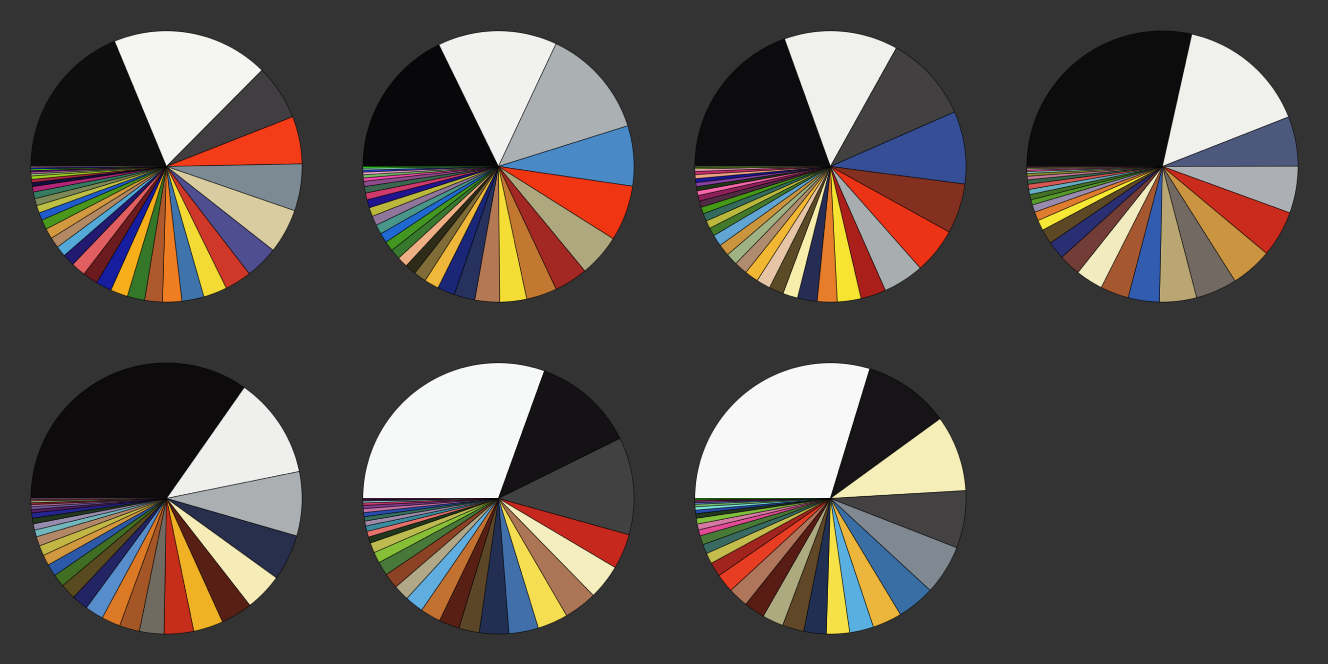
Looking at the pie charts, we can infer that earlier generations might have favored brighter, more primary colors to stand out on retail shelves, whereas later generations might have opted for a broader palette to reflect more detailed graphics and storytelling in the games themselves. This approach gave us an easy visualization to reinforce our observation about the trends over time from before.
Approach 3
Approach 3
This 3rd approach involved creating an association with keys being the colors and the values being their occurrences, we then found the color areas and made a bar chart based off of the areas.
Hue, Saturation, Light
Hue, Saturation, Light
Next, we wanted to figure out the values for Hue, Saturation, and Light. Hue represents the type of color and corresponds to a fractional value on the color wheel. Saturation shows how vibrant a picture is with 0% being grayscale and 100% for being fully colorful. Light simply shows how bright or dark an image is. We used color convert to make the images into HSB format so we can read these values.
The hsbValue contained a repeating sequence of 3 values, brightness, hue, and then saturation so we took the mean value of each
Hue (Color)
Saturation (Colorfulness)
Brightness
Foreground vs. Background
Foreground vs. Background
The next characteristic we analyzed was the foreground and the background percent. The foreground is the part of an image that appears closest to the viewer, often containing the main subject or objects of interest. On the other hand, the background is the part of the image that appears behind the foreground.
Foreground vs. Background
Foreground vs. Background
Morphological Binarize
Morphological Binarize
Morphological Binarize converts an images colors into black when below a certain threshold and white when above a certain threshold. We counted the amount of Black and white pixels after this and found the percentages for each, which tells us which is likely to be foreground and which is likely to be background.
FIrst lets define the function we will use to count the black and white pixels of each image.
Next we can define the function to make use of morphCountBlackWhitePixels and then take the mean of the values and output them.
Finally we can figure out the the foreground to background ratio for each generation.
Looking at the output, we can see that the ratio stays fairly equal throughout all the generations with there being more lighter pixels and therefore more foreground consistently. However, it is important to keep in mind the inaccuracy present in this method as as it just uses color values for differentiation between light pixels and dark pixels.
ChanVese Binarize
ChanVese Binarize
ChanVese Binarize is different to morphological binarize in which it traces around a specific foreground and identifies it as white while the rest is black. This is typically more accurate as the algorithm searches for distinct characteristics and intensity between different regions to differentiate
Next we can define the function to make use of countBlackWhitePixels and then take the mean of the values and output them .
Finally we can figure out the the foreground to background ratio for each generation .
Looking at the results of the ChanVese Binarize, we can see a reverse trend where there appears to be more background than foreground present in the images and it stays consistent through the generations with a small spike in background at Generation 5. Gen 5 is also known as the 3D era of video games, where games transitioned to use 3D polygon environments, so it makes sense that the games have a shift in the foreground vs background ratio.
Variational Auto Encoder
Variational Auto Encoder
A variational auto encoder (VAE) is a type of machine learning model that is used to identify patterns in unlabeled data. They are designed to compress input data (encoding) and then reconstruct it (decoding) as closely as possible to the original input. After training our VAE, we can use it to generate new images that will look like video game box arts.
Data Pre-Processing
Data Pre-Processing
First we have to convert our image into a 3x512x512 list so that the data can be read by our VAE, and delete all indexes in which the format is incorrect.
Creating The VAE
Creating The VAE
Now we can start making our VAE
At the heart of a VAE are two main components: the encoder and the decoder. These components are designed to compress and then reconstruct the images with the aim of learning a compact representation. The encoder's job is to take input data and compress it into a smaller, more dense representation, while the decoder's role is to reconstruct the input data from the compressed representation created by the encoder.
We can then put our encoder and decoder together and specify our Input, our video game box arts, to create a net graph. for our VAE
Then we must specify our training data as per the input and output formats as required by the net graph as seen above.
Finally we can train our VAE.
Generate a new game box art with the VAE
Generate a new game box art with the VAE
After training our VAE, we can now use it to generate new images that look like video game box arts.
First we must choose a random image.
Then we can run the image through our trained VAE.
Finally, we can display the generated image
Since we were only able to train our VAE with GEN 2 images, we are missing out on a huge portion of our dataset and so the generated image barely looks like a video game box art. However, we can still see small resemblances in which there are a few distinct horizontal layers for text and a lighter middle section likely for the main character of the video game.
Circle Packing
Circle Packing
We implement the paper Visualization of large hierarchical data by circle packing by Wang et al. (2006) in order to create a clear data visualisation of the changes over time in colour.
We first define two functions, one to initialise circles and another to find the center of a given circle.
We first define two functions, one to initialise circles and another to find the center of a given circle.
We then initialise two circles, the color being unique while the radius being the frequency of the color throughout the whole generation.
We then create a function to find the third circle through finding a tangent circle of the two other circles finding the intersection point of two circles with the radius of the first plus the third circle and the second plus the third circle.
Then we check whether the circle is intersecting the other circles.
We recreate the same function but also return which intersection is used since there is two intersections when finding the intersections between two circles .
We then create one whole function to add circles. It's important to point out that the circles will be incrementally added to the outside of the collection of circles so it's important that we keep a chain to understand which circles the new circle has to look out for.
Then we can run the function, adding the rest of the circles to get the positions of where all the circles should be.
This is a circle packing for GEN 2 video games, and looking at both the pie charts and Dominant color rows, we can see that the circle packing matches our expectations and confirms our findings that GEN 2 box arts are heavily dominated by red and yellow, and dark green and blue.
Conclusion
Conclusion
Overall, we combined a lot of different elements of analysis to make representations of the video game box art. We used the colors of the box art with our circle packing to make a visualization of all game covers over the different generations of games, and found out that the colors have gotten a lot less vibrant and more complex. We also found many different values such as the hue, saturation, brightness, and percent of shadows in each image in order to find trends. Finally, we generated a new game box art by resizing our images and running them through the VAE. However, there were very heavy limitations in our research as due to the large datasets and our lack of computational power, we were only able to run many of our functions for only one generations, and in the future we could apply our processes for all 7 generations and be able to discover more interesting trends and information.
Acknowledgements
Acknowledgements
We would like to thank our mentor Megan for all of their help throughout this project!
CITE THIS NOTEBOOK
CITE THIS NOTEBOOK
Analyzing Video Game Box Art
by Wolfram Emerging Leaders Program
Wolfram Community, STAFF PICKS, January 9, 2024
https://community.wolfram.com/groups/-/m/t/3098690
by Wolfram Emerging Leaders Program
Wolfram Community, STAFF PICKS, January 9, 2024
https://community.wolfram.com/groups/-/m/t/3098690