In this project, I conducted an in-depth analysis of CNN (Convolutional Neural Network) models to determine their accuracy in classifying rotated and blurred images. Additionally, I attempted to enhance the performance of these neural networks by implementing various modifications to both the training dataset and the model architecture.To achieve these objectives, I employed data visualizations, utilized transfer learning, applied image augmentation techniques, and constructed neural network models.
Introduction
Introduction
Ever since I was introduced to the world of AI and ML, image detection models have intrigued me the most . The fact that an artificially created algorithm could recognize the content of an image, just like a human can seemed like magic. My first ever AI project involved developing a CNN model for facial emotion detection. But as I delved deeper into the realm of Machine Learning, I noticed a persistent issue: standard CNN architectures often struggle to detect images when they're even slightly modified, a significant limitation considering the imperfections of real-life images. Motivated by this, I chose this project to explore the limitations of CNNs on modified images and to attempt to enhance their performance. But first, allow me to briefly explain what CNNs are.
Since their introduction in the 1980s, CNNs, or Convolutional Neural Networks, have become the primary choice for image classification in machine learning. A CNN is a type of Neural Network algorithm designed to identify patterns in data. Neural Networks in general are composed of a collection of neurons that are organized in layers, each with their own learnable weights and biases [1]. Basically, think of a Neural Network as a function that takes in data and adjusts itself to generate desired outputs.
CNNs, similar to traditional Neural Networks (NNs), have layers of neurons . However, CNNs also incorporate convolution layers . Unlike NNs, which have a single weight per neuron, CNNs utilize kernels (matrices with trainable weights) that directly process pixel values in images, generating feature maps . This ability to extract specific features from anywhere in an image makes CNNs excel at image recognition and classification .
Despite the impressive accuracy of CNNs in image detection, they often struggle to recognize the same image when it undergoes common modifications, such as rotation and blurring . Consequently, the focus of this essay is to explore the limitations of specific CNN models and attempt to enhance their accuracy in recognizing rotated and blurred images .
Visualizations & Analyses
Visualizations & Analyses
Visualization of VGG-16 Predictions
Visualization of VGG-16 Predictions
VGG-16 is a classic CNN model developed by Karen Simonyan and Andrew Zisserman of the Visual Geometry Group Lab of Oxford University in 2014 [2], which achieved a test accuracy of 92.7% on the ImageNet competition dataset. To obtain a general sense of CNN performance with modified images, I chose to utilize the VGG-16 model for experimentation.
Load the pretrained VGG-16 model from the Wolfram Neural Net Repository [3]
In[]:=
vgg16=NetModel["VGG-16 Trained on ImageNet Competition Data"]
Out[]=
NetChain


To generate a visualization of VGG-16 predictions with modified images, it is necessary to define certain helper functions. The vgg16Transformations function adjusts the image's rotation, blurriness and contrast, while the vgg16Predictions function generates a list of the top 5 predictions for an image using VGG-16.
Define helper functions
In[]:=
vgg16Transformations[image_Image,angle_,blur_,contrast_]:=ImageAdjust[Blur[ImageRotate[image,angleDegree,Masking->Full],blur],contrast]vgg16Predictions[image_Image]:=vgg16[image,"TopProbabilities"->5]
Create a visualization using Manipulate
In[]:=
ManipulateWith[{pred=vgg16Predictions[vgg16Transformations[image,angle,blur,contrast]]},Column[{vgg16Transformations[image,angle,blur,contrast],BarChart[Values[<|pred|>],ChartLegends->Keys[pred],ChartStyle->"DarkRainbow"],PieChart[Values[<|pred|>],ChartLabels->PercentForm/@Values[pred],ChartStyle->"DarkRainbow"]}]],image,,"Image:",{{angle,0,"Rotation(°):"}},{{blur,1,"Blur:"},1,10},{{contrast,0,"Contrast:"},-1,7}
Out[]=
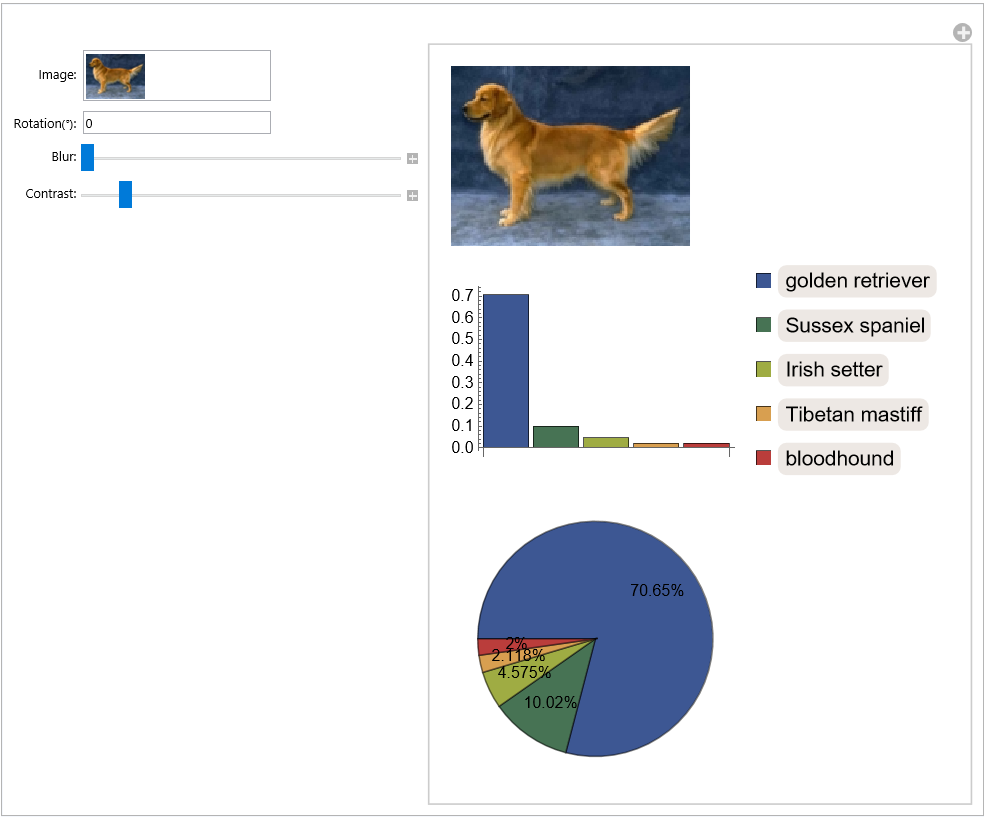
As expected, the experimentation with different rotation, blur, and contrast values reveals a substantial decline in the model's accuracy when the image is modified.
Visualization of LeNet Predictions
Visualization of LeNet Predictions
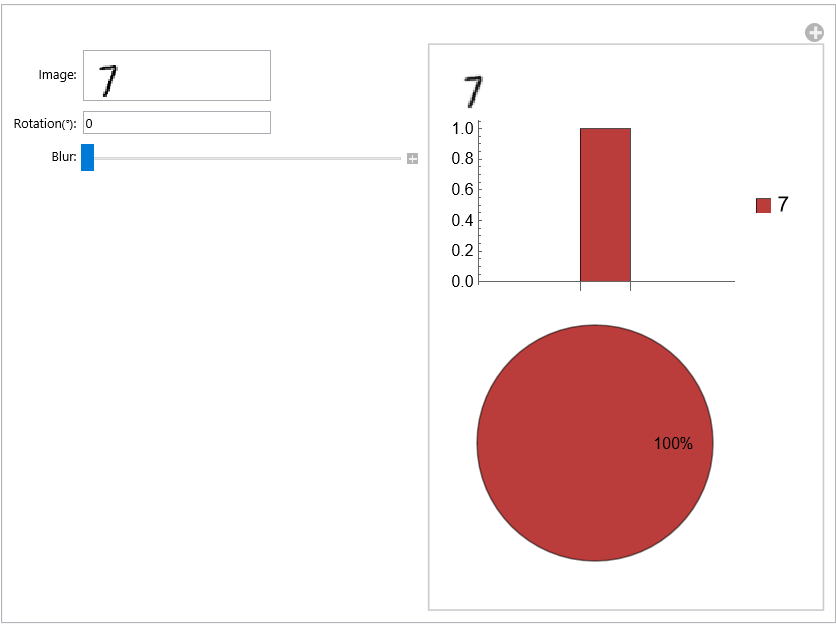
Due to the extreme computational complexity of generating rotated and blurred predictions for all image types recognized by VGG-16, I decided to use the LeNet model instead. LeNet, also known as LeNet-5, is an early CNN model developed by Yann LeCun in the 1990s [4] used to detect images of the numbers 0~9. It is trained on the MNIST dataset, which consists of 70,000 images of handwritten digits. With only 7 layers, LeNet offers a more feasible framework for experimentation compared to VGG-16. I applied the same visualization to LeNet.
Load the pretrained LeNet model from the Wolfram Neural Net Repository [5]
In[]:=
LeNet=NetModel["LeNet Trained on MNIST Data"]
Out[]=
NetChain
Define helper functions
In[]:=
transformations[image_Image,angle_,blur_]:=Blur[ImageRotate[image,angleDegree,Background->White],blur]predictions[model_NetChain,image_Image]:=model[image,"TopProbabilities"]
Create a visualization using Manipulate
In[]:=
modelPredictions[model_NetChain,initialImage_Image]:=Manipulate[With[{pred=predictions[model,transformations[image,angle,blur]]},Column[{transformations[image,angle,blur],BarChart[Values[<|pred|>],ChartLegends->Keys[pred],ChartStyle->"DarkRainbow"],PieChart[Values[<|pred|>],ChartLabels->PercentForm/@Values[pred],ChartStyle->"DarkRainbow"]}]],{{image,initialImage,"Image:"}},{{angle,0,"Rotation(°):"}},{{blur,1,"Blur:"},1,3}]
In[]:=
modelPredictionsLeNet,

Out[]=
Visualization & Analysis of Predictions of Rotated Images
Visualization & Analysis of Predictions of Rotated Images
After creating an interactive visualization for LeNet predictions, I focused on analyzing the prediction patterns of images rotated from 0° to 360°. The analysis primarily considers two factors: probability and accuracy. Probability represents the model's generated probability value for the correct prediction, while accuracy indicates the model's success rate at each rotation angle.
Probability
Probability
First, I analyzed the prediction probabilities of rotated images.
Define a function that rotates an image from 0° to 360°, then generates its prediction probabilities
Define a function that displays the rotation and probability values of data points when hovering over them
Then I used ListLinePlot to plot the data with the rotated angle as the x-axis and the probability as the y-axis.
The plot reveals an interesting pattern in the prediction probabilities: it initially drops, then rises back to 90% at 90°, subsequently plunges to 0% before eventually returning to 100% at 360°. However, this plot only shows the probabilities for a single image. To identify generalized patterns across multiple digits, additional data is necessary. Hence, I loaded the testing data from the MNIST dataset and selected 100 images for each of the 10 digits.
Load testing data from the MNIST dataset from the Wolfram Data Repository [6]
Define a function that calculates the average probabilities of 100 images rotated at each angle
Finally, I generated the average probabilities of 100 rotated images for each digit, then used Manipulate to plot them.
Generate average rotation probabilities
Define a function that plots rotation probabilities
Display plot
Accuracy
Accuracy
After visualizing the prediction probabilities for rotated images, I analyzed the accuracy of the results.
Define a function to identify threshold angles (where the list of accurate angles exhibits discontinuities)
For visualizing the rotation thresholds, I used the Mesh and MeshFunctions options of ListLinePlot to depict correct predictions as green and incorrect predictions as red on the plot.
To find more generalized patterns, I calculated the average accuracies of predictions at different angles with 100 images of each digit.
Calculate average accuracies
Next, I compared the accuracy plot to the probability plot, revealing a striking similarity between the two.
Compare accuracy to probability
Lastly, I utilized the findThresholds function to determine the rotation thresholds for each digit based on the average accuracies. Furthermore, using Manipulate, I color-coded the graph, marking the section with accuracy over 40% as green and the portion with accuracy under 40% as red. I also displayed the inaccurate rotation angle ranges for each digit.
Calculate rotation thresholds
Visualize rotation thresholds
Display inaccuracy ranges
In[]:=
Analysis
Analysis
◼
The probability of predictions for a rotated image depends significantly on both the angle of rotation and the specific digit being rotated . In general, LeNet' s recognition performance decreases between 30° and 50°, then improves again between 280° and 330° .
◼
For digit 0, the prediction probability spikes at approximately 90°, 180°, and 270°, while experiencing a notable decrease between these angles. Digits 1, 2, 5, and 8 show a slight increase in prediction probability around 180°. On the other hand, digits 4 and 9 display a slight decrease in prediction probability at 180°. Finally, digits 3, 6, and 7 tend to have prediction probability values that remain close to 0 across various rotation angles.
◼
The accuracy and probability plots are nearly identical. This means that the model's confidence (reflected in the probability) is well calibrated with its correctness (reflected in the accuracy).
◼
The inaccurate ranges predominantly occur between 30° and 60°, as well as from 260° to 330°. Notably, there are brief periods of accuracy for digits 0, 1, 4, 5, and 8 around 180°, possibly due to their more distinct and recognizable features when horizontally aligned.
Visualization & Analysis of Predictions of Blurred Images
Visualization & Analysis of Predictions of Blurred Images
After visualizing and analyzing the predictions of rotated images, I proceeded to explore the influence of blurring in a similar manner.
Probability
Probability
First, I created a function to generate prediction probabilities for images with blur values ranging from 0 to 3.
Generate blur probabilities
Define a function that displays the blur and probability values of data points when hovering over them
Then I calculated and visualized the average blur probabilities for every digit.
Define a function that calculates the average probabilities of 100 images with increasing levels of blur
Generate blur probabilities
Define a function that plots blur probabilities
Display plot
Accuracy
Accuracy
To determine the accuracy of the predictions, I developed a function to identify the blur threshold at which the image becomes unrecognizable.
Define a function that finds blur thresholds
A notable pattern I discovered is that thicker digits tend to perform better when subjected to blurring compared to thinner digits, as shown by the image-to-threshold list below.
Calculate blur thresholds for 7
Finally, I determined the average threshold value for each individual digit, as well as the overall average threshold value for all digits combined.
Calculate average blur thresholds for each digit
Calculate average blur threshold for all digits
Analysis
Analysis
◼
The prediction probability starts to decline for all digits except 1 after a blur value of 1.4, and each digit exhibits a unique rate of decrease in prediction probability as they get blurred.
◼
There is a noticeable sharp drop in probability from 2.4 to 2.5 for all digits except 1.
◼
Notably, the probability plots for digits 3, 5, and 9 demonstrate remarkable similarity.
◼
The constant near 100% prediction probability for digit 1 is due to the model predicting every image as 1 beyond a certain blur threshold.
◼
In terms of accuracy, the model generally performs better in predicting blurred images with thicker digits.
◼
The average blur threshold for each digit hovers around 2.3, except for 1 (2.98) and 8 (1.791), and the average blur threshold for all digits combined is 2.3163.
Transfer Learning
Transfer Learning
After analyzing the visualizations, it is evident that CNN models struggle with rotated and blurred images. To address this issue and improve model performance, I chose to use a machine learning technique called transfer learning. Transfer learning involves fine-tuning a pre-trained machine learning model, in this case, LeNet, by modifying the training and testing datasets.
Computer vision data augmentation is a powerful way to improve the performance of our computer vision models without needing to collect additional data . We create new versions of our images based on the originals but introduce deliberate modifications . This helps our model learn what an object generally looks like rather than having it memorize the specific way objects appear in our training data [7].
Rotation Augmentation
Rotation Augmentation
I conducted several experiments by first augmenting the training and testing datasets with additional images rotated at various angles, then evaluating the model performance after training it with the augmented data.
Load the training and testing data from the MNIST dataset from the Wolfram Data Repository [6]
Model 1
Model 1
Initially, I rotated each image in both the training and testing datasets by 60°. Subsequently, I retrained the model using the combined dataset, comprised of both the rotated images and the original images.
Generate training and testing data for model 1
Train model 1
I plotted the average probability for each digit predicted using the retrained model.
Calculate average rotation probabilities for model 1
Display plot
The results indicate a nearly 100% probability around 60°, but followed by a sharp decline after reaching 80°.
Model 2
Model 2
Aiming to achieve better results, I divided the training and testing data into 10 segments, with each segment exclusively comprising images for a specific digit. This allowed for targeted data generation for each digit.
Split the training and testing data into 10 segments
To generate improved training data, I iterated through each angle within the range of inaccurate thresholds by increments of 10°. For each angle, I randomly selected 600 images to be rotated.
Display rotation thresholds
Generate training and testing data for model 2
Then I retrained the model using the optimized dataset and plotted the average probabilities once again.
Train model 2
Calculate average rotation probabilities for model 2
Display Plot
The plot clearly demonstrates a substantial improvement in prediction results for all digits. However, there are a few notable flaws, such as the significantly lower prediction probability for 9 when rotated between 290° and 350°. This discrepancy may be attributed to a shift in the inaccuracy threshold due to the updated weights and biases.
Model 3
Model 3
To address this issue, I included additional rotated images at angles where the prediction probability of an image fell below 92% for model 2.
Generate training and testing data for model 3
I retrained the model one last time using a combination of all datasets.
Train model 3
Calculate average rotation probabilities for model 3
Display plot
The final model achieved an impressive prediction probability exceeding 90% for all digits.
Blur Augmentation
Blur Augmentation
I applied blur augmentation in a similarly to how I implemented rotation augmentation.
Model 4
Model 4
To generate data, I utilized the blur thresholds for each digit. For each image, I applied a random blur value within the range of the blur threshold ± 0.5, effectively augmenting the dataset with varying levels of blur.
Show blur thresholds
Generate training and testing data for model 4
Train model 4
Calculate average blur probabilities for model 4
Display plot
The model achieved a very high accuracy rate.
Designing & Training a Rotation Angle Detection Model
Designing & Training a Rotation Angle Detection Model
By using transfer learning and data augmentation techniques, we significantly improved LeNet's ability to detect rotated and blurred images. However, what if we want to detect any kind of rotated or blurred image, not just handwritten digits? Can we apply the same tricks to retrain larger CNNs like VGG-16? In theory, it's possible, but it requires a lot of computational power. Instead, we can try a different approach: instead of training CNNs to spot modified images, we can create an algorithm or train another machine learning model to recognize the specific modifications made to an image. Then, we can transform the image back to a format that the CNN can understand.
For practical reasons, we will use the CIFAR-10 dataset instead of the ImageNet dataset, which consists of 60,000 32x32 color images across 10 classes.
Data Generation
Data Generation
We will rotate the training and testing data by the most common rotation angles: 90°, 180° and 270°.
Load the CIFAR-10 dataset from the Wolfram Data Repository [8]
Create a list of the most common rotation angles
Rotate the training and testing data randomly
Model Design & Training
Model Design & Training
Now that we have the data, we need to obtain a model to train the data on. Since there weren't any pre-trained models that detected image rotation angles in the Wolfram Neural Net Repository, I decided to construct a CNN model myself, with the help of online articles [9] and the Introduction to Neural Nets guide [10].
First, we need to define the net encoders and decoders. The encoder transforms the input image into pixel values that the model can process, and the decoder transforms the final layer that contains prediction probabilities into prediction results.
Define net encoder
Define net decoder
For the model architecture, I constructed 5 Convolution Layers and 3 Linear Layers with Dropout layers in between, and a final SoftMax layer to calculate the prediction probabilities.
Construct model layers
Initialize model
We also need to construct the training network in order to train the model using NetTrain.
Construct training network
The input and target data also need to be converted into associations and connected to their respective ports in the training network.
Convert input and target data
Train model 7
Plot model 7 loss
The final accuracy of the model was around 60%.
Finally, we need to extract the model from the training network.
Extract the model
Applying the Model to Reverse Rotation
Applying the Model to Reverse Rotation
Lets see how well our model performs!
Define a function that rotates an image back to normal using the model's predictions, then classifies the image using VGG-16
The original prediction
The prediction after reversing rotation
Even though our model works for some cases, there is still a lot of room for improvement.
Conclusion & Future Work
Conclusion & Future Work
By conducting visualizations on model predictions, I discovered a lot of interesting patterns regarding the limitations of CNNs on rotated images. The analyses conducted on these visualizations proved highly useful, as they helped me identify the weaknesses in the models and allowed me to generate effective training data for transfer learning. To be honest, I did not anticipate the retrained LeNet model to perform so well with rotated and blurred images.
Building a CNN from scratch provided me with a deep understanding of CNN model architecture and the underlying mathematics. However, due to time and computational constraints, I was unable to further improve its accuracy. Therefore, I would like to enhance the rotation angle detection model and expand its capabilities to detect more rotations. I also aim to apply the model to other image modifications, such as blurring and cropping, and extend its usage to a wider range of images. Furthermore, I intend to learn more about state-of-the-art models, such as Spatial Transformers, that have significantly better performances on modified images. Overall, I had lots of fun doing this project, and learned a great deal about CNNs and the Wolfram Language.
Acknowledgments
Acknowledgments
I would like to thank all the wonderful and caring directors, mentors and TAs at the Wolfram Summer Research Program, especially my mentor Eli Morton, who helped me a lot throughout this project.
CITE THIS NOTEBOOK
CITE THIS NOTEBOOK
Analyzing and improving CNN performance with rotated and blurred images
by Yide Wang
Wolfram Community, STAFF PICKS, July 13, 2023
https://community.wolfram.com/groups/-/m/t/2963590
by Yide Wang
Wolfram Community, STAFF PICKS, July 13, 2023
https://community.wolfram.com/groups/-/m/t/2963590