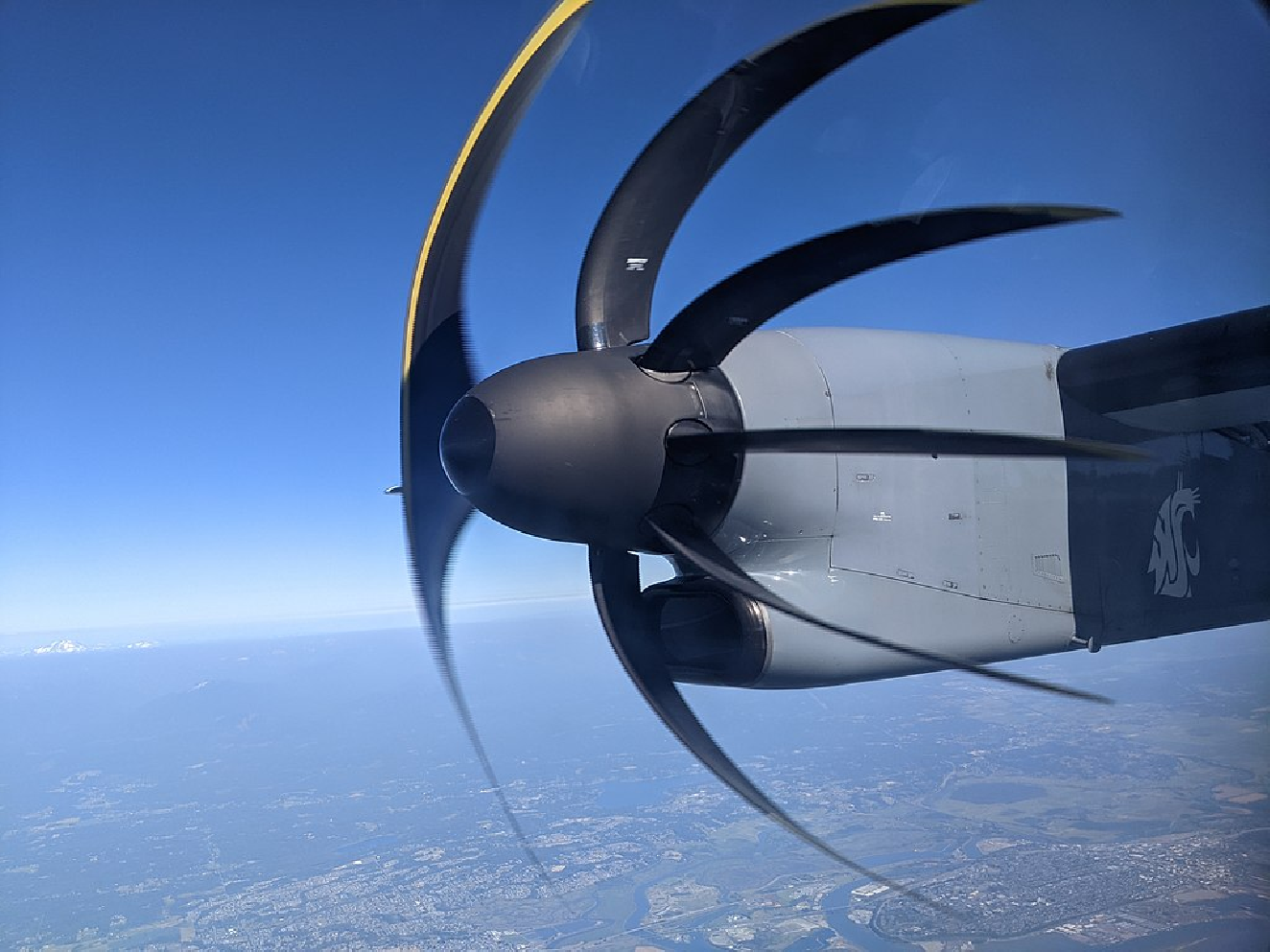
Some years back, I saw a pair of excellent blog posts on the rolling shutter effect. The rolling shutter effect is a form of distortion that can appear in photographs taken on a phone, since phone cameras typically capture frames by scanning across a scene horizontally/vertically over a period of time instead of capturing the entire scene at the same instant. When the subject of the photograph is static or slow-moving, this method of recording an image does not cause a problem. But for a fast-moving object such as an airplane propeller, a rolling shutter can produce fascinating forms of distortion. For example, here’s an image of an airplane propeller captured by a Pixel 3: Let’s start with a plot of an “airplane propeller.” For this example, we’ll use the polar equation :
r=3cos(5θ)
In[]:=
PolarPlot[3Cos[5θ],{θ,0,2Pi},ImageSize->300]
Now we can make the make the propeller spin by writing for some fixed value “time.”
r=3cos(5(θ+time))
In[]:=
Manipulate[PolarPlot[3Cos[5(θ+time)],{θ,0,2Pi},PlotPoints50,PlotRange{{-3,3},{-3,3}},ImageSize->300],{time,0,2Pi},ControlPlacement->Top]
Next, let’s get the rolling shutter into the mix. We’ll start with a horizontal line at that moves down as time progresses. This can be written as . We will also adjust our propeller equation to be . The newly introduced is a factor that is meant to represent the fact that the rate at which the shutter moves may differ from the rate at which the propeller rotates. We are putting the with the propeller since we are treating the speed of our rolling shutter as a constant while the speed of the propeller may vary:
y=3
y=3-time
r=3cos5θ+
time
s
s
s
In[]:=
ManipulateShowPolarPlot3Cos5θ+,{θ,0,2Pi},PlotPoints50,PlotRange{{-3,3},{-3,3}},Graphics[Line[{{-3,3-time},{3,3-time}}]],ImageSize->250,{time,0,6},{{s,1.05},.5,2},ControlPlacement->Top
time
s
In order to simulate the rolling shutter effect, it will be helpful to switch to a Cartesian plot instead a polar plot. First rewrite as . Then substitute in and to get . We can plot this using a contour plot:
r=3cos5θ+
time
s
1=
3cos(5θ)
r
r=+
2
x
2
y
θ=(x,y)
-1
tan
1=+
3cos5(x,y)+
-1
tan
time
s
2
x
2
y
In[]:=
ManipulateContourPlot3Cos5ArcTan[x,y]+Sqrt[x^2+y^2]1,{x,-5,5},{y,-5,5},PlotPoints50,PlotRange{{-3,3},{-3,3}},ImageSize->250,{time,0,6},{{s,1.05},.5,2},ControlPlacement->Top
time
s
Finally, we need to find the “distorted” plot from the rolling shutter effect. We are looking for the locus of points intersecting the shutter . Solving for gives us the following: In polar coordinates, , so . In rectangular coordinates, we also substitute in and : Let’s substitute all of this into our contour plot from above, +=1: +=1This looks like a mess, but let’s plot an example for to see if it looks reasonable:
y=3-time
time
time=3-y
y=rsin(θ)
time=3-rsin(θ)
r=+
2
x
2
y
θ=(x,y)
-1
tan
3cos5(x,y)+
-1
tan
time
s
2
x
2
y
3cos5(x,y)+
-1
tan
3-+sin(x,y)
2
x
2
y
-1
tan
s
2
x
2
y
s=0.8
In[]:=
s=0.8;ContourPlot1,{x,-5,5},{y,-5,5},PlotPoints50,PlotRange{{-3,3},{-3,3}}
3Cos5ArcTan[x,y]+
3-Sqrt+Sin[ArcTan[x,y]]
2
x
2
y
s
Sqrt[x^2+y^2]
This looks exactly like the type of plot we expect. Let’s put it all together to see:
ManipulateGraphicsDynamic@First@ContourPlot1,{x,-5,5},{y,-5,5},PlotPoints50,ContourStyle->Gray,PlotRange{{-3,3},{-3,3}},Dynamic@First@Graphics[{White,Rectangle[{-3,3-time},{3,-3}]}],Dynamic@First@ParametricPlot3Cos5θ+{Cos[θ],Sin[θ]},{θ,0,Pi},PlotStyleRed,RegionFunction->Function[{x,y,θ},y<3-time],Dynamic@First@Graphics[Line[{{-3,3-time},{3,3-time}}]],Axes->True,PlotRange->{{-3,3},{-3,3}},{time,0,6},{{s,0.8},0.3,4},ControlPlacement->Top
3Cos5ArcTan[x,y]+
3-Sqrt+Sin[ArcTan[x,y]]
2
x
2
y
s
Sqrt[x^2+y^2]
time
s
Here’s a prettier version:
In[]:=
ManipulateGraphicsDynamic@First@ContourPlot1,{x,-5,5},{y,-5,5},PlotPoints50,ContourStyle->Green,PlotRange{{-3,3},{-3,3}},Dynamic@First@Graphics[{Black,Rectangle[{-3,3-time},{3,-3}]}],Dynamic@First@ParametricPlot3Cos5θ+{Cos[θ],Sin[θ]},{θ,0,Pi},PlotStyleRed,RegionFunction->Function[{x,y,θ},y<3-time],Dynamic@First@Graphics[Line[{{-3,3-time},{3,3-time}}]],Axes->False,PlotRange->{{-3,3},{-3,3}},Background->Black,{time,0,6},{{s,0.8},0.3,4},ControlPlacement->Top
3Cos5ArcTan[x,y]+
3-Sqrt+Sin[ArcTan[x,y]]
2
x
2
y
s
Sqrt[x^2+y^2]
time
s