Boolean functions are functions that take in a set of booleans and produce an output based on a fixed set of rules. Often, it is used in computer science to evaluate outputs of programming, since booleans are closely correlated to the binary language of computers; thus, it is useful to know the expected output of their functions. Using a general neural network model with a combination of linear layers and softmax generalizing, we explore how well the output of every boolean function can be predicted based on input and function type.
Introduction: Boolean functions and the dataset
Introduction: Boolean functions and the dataset
Boolean functions are functions that have both boolean inputs and outputs: often, the functions evaluate a set of boolean functions. This project aims to train a neural network on a set of data that includes both boolean inputs and the type of boolean function in order to predict its output. The first step is to manually create the dataset, with known input and output values, including some randomness to the input later on.
Here is the structure of the dataset:
In[]:=
assigns={"AND"->0,"OR"->1,"NAND"->2,"NOR"->3,"XOR"->4};data={{1,1,0}->{1},{1,0,0}->{0},{0,1,0}->{0},{0,0,0}->{0},{1,1,1}->{1},{1,0,1}->{1},{0,1,1}->{1},{0,0,1}->{0},{1,1,2}->{0},{1,0,2}->{1},{0,1,2}->{1},{0,0,2}->{1},{1,1,3}->{0},{1,0,3}->{0},{0,1,3}->{0},{0,0,3}->{1},{1,1,4}->{0},{1,0,4}->{1},{0,1,4}->{1},{0,0,4}->{0}};
◼
For each instance of the data, there is an input vector of length three pointing to an output vector of length one.
◼
The first two values of the input vector indicate the pair of booleans used as input; the last value indicates the boolean operator in question. Each operator has been assigned a value. This structure will later be mirrored when creating the neural network.
The neural network
The neural network
A neural network is essentially a predictor that updates many layers of weights that are applied to the input in order to reach a certain output. A LineaLayer is a layer that uses minimal variables to create a linear predictor on one layer, while a SoftMaxLayer takes in input and turns it into a combination of probabilities that sum to 1. A combination of LinearLayers and SoftMaxLayers were created to later be combined into one neural network. Five LinearLayers were initially used, then a SoftMaxLayer was added to the end to obtain accuracy measurements during testing. The SoftMaxLayer's output was set with a NetDecoder that chose between two output classes: 0 and 1.
Below is the initialization of the layers:
In[]:=
layer1=NetInitialize@LinearLayer[3,"Input"->3]layer2=NetInitialize@LinearLayer[3,"Input"->3]layer3=NetInitialize@LinearLayer[3,"Input"->3]layer4=NetInitialize@LinearLayer[3,"Input"->3]layer5=NetInitialize@LinearLayer[2,"Input"->3]dec=NetDecoder[{"Class",{{0},{1}}}];softmax=SoftmaxLayer["Output"->dec]
Out[]=
LinearLayer


Out[]=
LinearLayer
Out[]=
LinearLayer
Out[]=
LinearLayer
Out[]=
LinearLayer
Out[]=
SoftmaxLayer
◼
When initializing the LinearLayers, it was necessary to specify the dimensions of their inputs and outputs. The output dimension of any given layer had to match the input dimension of the following layer, the input dimension was three, and the output dimension was one.
Preprocessing
Preprocessing
Even if there are many different boolean functions, it is still difficult to construct a dataset large enough to train an accurate model. Thus, we will get our manually created dataset, duplicate it multiple times, and perform a standard 80-10-10 train val test split. The TrainTestSplit method was used twice to create this format; then, the train and validation datasets will be used to train the created model.
Duplicating the data and adding randomness:
In[]:=
data=Flatten[Table[data,100],1];Do[data[[n]][[1]][[1]]+=RandomReal[{-0.1,0.1}],{n,Length[data]}]Do[data[[n]][[1]][[2]]+=RandomReal[{-0.1,0.1}],{n,Length[data]}]
Performing an 80-10-10 random split:
In[]:=
traintest=ResourceFunction["TrainTestSplit"][#&/@data];valtest=ResourceFunction["TrainTestSplit"][#&/@traintest[[1]],"TrainingSetSize"->0.5];
◼
The initial data was first copied 100 times into a Table, then flattened a dimension to preserve the format.
◼
After the dataset was created, a random value between -0.1 to 0.1 was added to each input value for a more realistic sample.
◼
split[[1]] contains the training set, while split[[1]] was divided again to create the validation and testing sets.
Chaining the layers and training the dataset
Chaining the layers and training the dataset
Now that the model and data are prepared, the NetChain method was first used to chain the layers and activation functions together. Then, we train the model on the training and validation sets stored in split[[1]] and valtest[[1]], respectively.
Below is the training of our model:
In[]:=
net=NetChain[{layer1,Tanh,layer2,Tanh,layer3,Tanh,layer4,Tanh,layer5,softmax}]results=NetTrain[net,traintest[[1]],ValidationSet->valtest[[1]]]
Out[]=
NetChain

Out[]=
NetChain
◼
Between each layer of the NetChain, Tanh was added as a standard activation function of the neural network.
◼
At the end of the net, the softmax layer was added to standardize the output of the neural network as a probability and allow accuracy measurements.
Getting and visualizing our results
Getting and visualizing our results
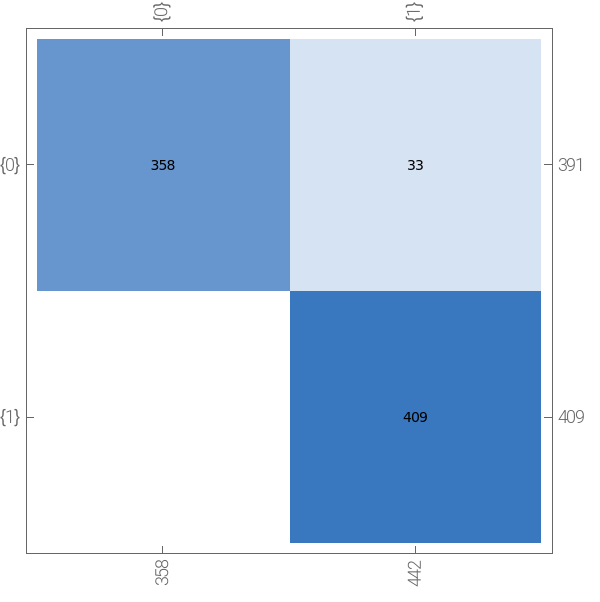
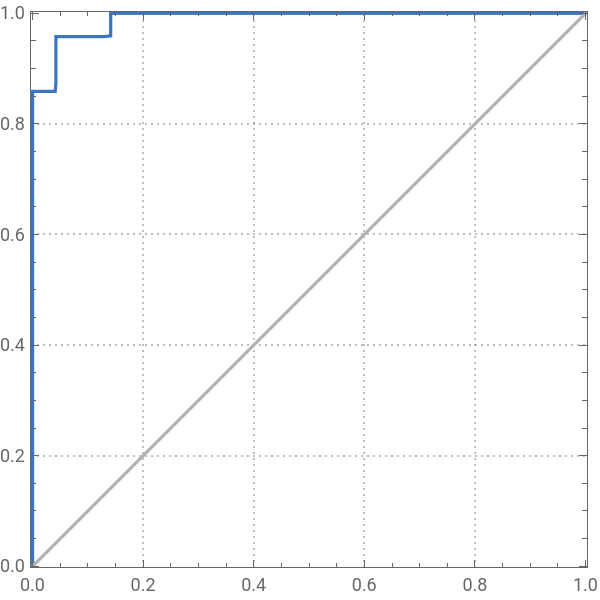
Now, we simply have to get our accuracy of our trained model on the remaining testing set, and visualize the conditions in which our neural network trains on. This was done with the NetMeasurements and the DensityPlot methods.
This will yield the model's accuracy performance on the testing set stored in valtest[[2]], as well as the testing confusion matrix and ROC curve:
In[]:=
NetMeasurements[results,valtest[[2]],"Accuracy"]NetMeasurements[results,valtest[[2]],"ConfusionMatrixPlot"]NetMeasurements[results,valtest[[2]],"ROCCurvePlot"]
Out[]=
0.95875
Out[]=
actual class | |
| predicted class |
Out[]=
recall | |
| false positive rate |
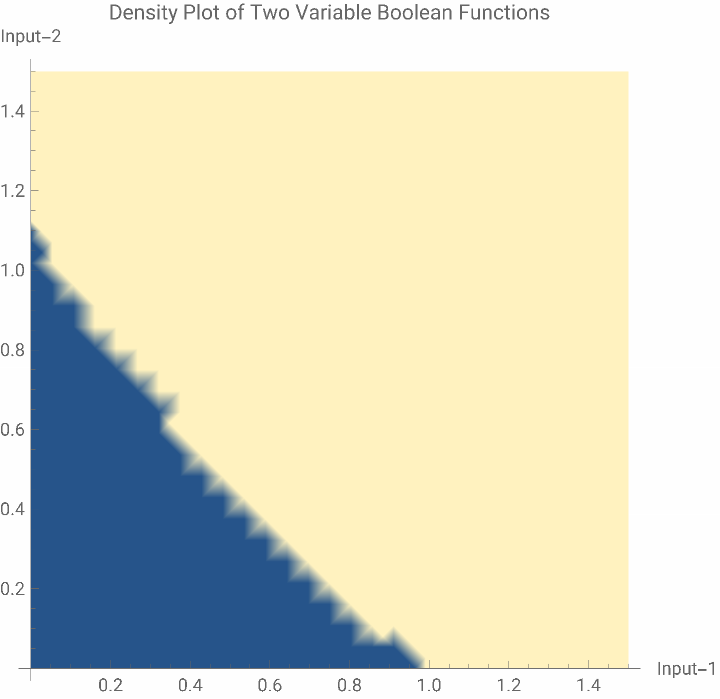
A DensityPlot visualizes the boundaries for which the neural network makes its decisions. For example, if the activation function is set as OR, the model sets boundaries of its two inputs as shown below:
In[]:=
DensityPlotnet[{x,y,1}],{x,0,1.5},{y,0,1.5},
Out[]=
◼
With randomized inputs, the model always displayed a high accuracy between 92-97%. The DensityPlot indicated that the neural network model set a very linear boundary for the OR function, and similar boundaries for every other boolean function tested.
◼
Next steps will be to test out boolean values that are not necessarily integers, and test out if the model can train on more robust data.
Conclusion
Conclusion
◼
The model was able to achieve a high enough accuracy with categorical data, but had a lower accuracy when random decimals were implemented into the dataset. It achieved an accuracy of around 95% consistently, with an variation of around 2%. The DensityPlot indicated that a linear boundary was enough to classify boolean data, even with random decimals embedded into the dataset.
◼
In the future, we could also try working on different types of models; in this project, a simple categorical classifier was used, but there could be more sophisticated models with better accuracies. Another possibility is training with more variable or boolean functions; the number of possible functions exponentially increases with the number of variables, and it will prove more difficult to train a model on three- or even four-variable data.
Citations
Citations
Below are the sources that I've used while working on this project:
◼
Neural Networks—Wolfram Language Documentation. (2022). Wolfram Language & System Documentation Center. https://reference.wolfram.com/language/guide/NeuralNetworks.html
◼
NetChain—Wolfram Language Documentation. (2022). Wolfram Language & System Documentation Center. https://reference.wolfram.com/language/ref/NetChain.html
◼
LinearLayer—Wolfram Language Documentation. (2022). Wolfram Language & System Documentation Center. https://reference.wolfram.com/language/ref/LinearLayer.html
◼
SoftmaxLayer—Wolfram Language Documentation. (2022). Wolfram Language & System Documentation Center. https://reference.wolfram.com/language/ref/SoftmaxLayer.html