Introduction
Introduction
Raspberry Pi 5’s are starting to become available with significant performance upgrades. We wanted to test one of these out against a few neopixels. Unfortunately, Jeremy Garff's controller does not support the latest hardware revision. Indeed, neither will DeviceRead and DeviceWrite when v14.0 soon becomes available to Debian users on RPi hardware. The delay is not as big a problem as rushing a product with quality issues to market. In our testing, first-out-of-gate armbian did not work well, and could not install Mathematica. Fortunately second-out-of-gate DietPi installed flawlessly with Mathematica and only a little bit of hassle having to switch the keymap to US, not their fault. DietPi could really be higher on DistroWatch.com, especially if they keep expanding supported devices.
While it is possible to set Rpi5 GPIO variables through a Mathematica terminal using a combination of Run and pinctrl, that doesn’t solve the difficult timing problem inherent to outputting an 800 KHz data stream. I emailed Jeremy Garff about this. He is always happy to see people using the rpi_ws281x library, and hopes the Pi5 will be supported soon. For now he suggests that the Pi4 works fine. Since Pi day rapidly approaches, downgrading seems like the most sensible thing to do, thus we made another order from amazon. The total hardware cost in the $100-$200 range is really not that expensive considering what all can be done almost immediately with an rpi4, a breadboard, some wires, and a few neopixels.
The last time we were having this much fun with Pi must have been in 2018, when we cracked a very nice creative telescoping algorithm, and computed some approximations with it. Unfortunately, almost no one could understand the calculus. Although next steps are still needed, I’m not sure anyone has figured out how to take them... While we wait for someone else to write a PhD about what I did wrong, our next idea is something more down to earth that could benefit a lot of aspiring EECS or physics undergrads. If you look at Jeremy’s git page, you’ll see there isn’t a Mathematica binding, which is a major disappointment considering there’s been 10 years to make one. So, let’s get started now...
Installation Notes and Circuit Design
Installation Notes and Circuit Design
A quick search of Wolfram Community found only one post even mentioning neopixels. While inspiring, it wouldn’t be helpful for beginners. Fortunately the adafruit NeoPixel guide has almost everything a person needs to know to get started. However, we don’t need and won’t use CircuitPython here. This is just because we’re starting to make our own binding, one that can and will make use of other Mathematica functions such as RealDigits, FirstPosition, and CheckAbort.
It may be possible to make do with less, but the canakit Rpi4 is already 14% off on Amazon.com. In addition to this, we need breadboard friendly neopixels, headers to connect to the breadboard, and maybe a kit like this. You can get your own soldering iron, but it’s usually possible just to find a shop and rent or borrow one (these days, who knows?). If a soldering iron isn’t available, you might need to get something more pre-fab like this (which we haven’t tested). If you’re trying to do it the hard way, remember that soldering is a dangerous activity--don’t burn yourself or inhale the fumes!
In testing on four neopixels only, we found the level shifter was not necessary, and caused malfunction when attempting to lift 3.3V up to 5V. Since there is no immediately apparent disadvantage to under-powering, we moved on quickly and did not discern what was causing signal loss. The neopixels are daisy-chained as such:
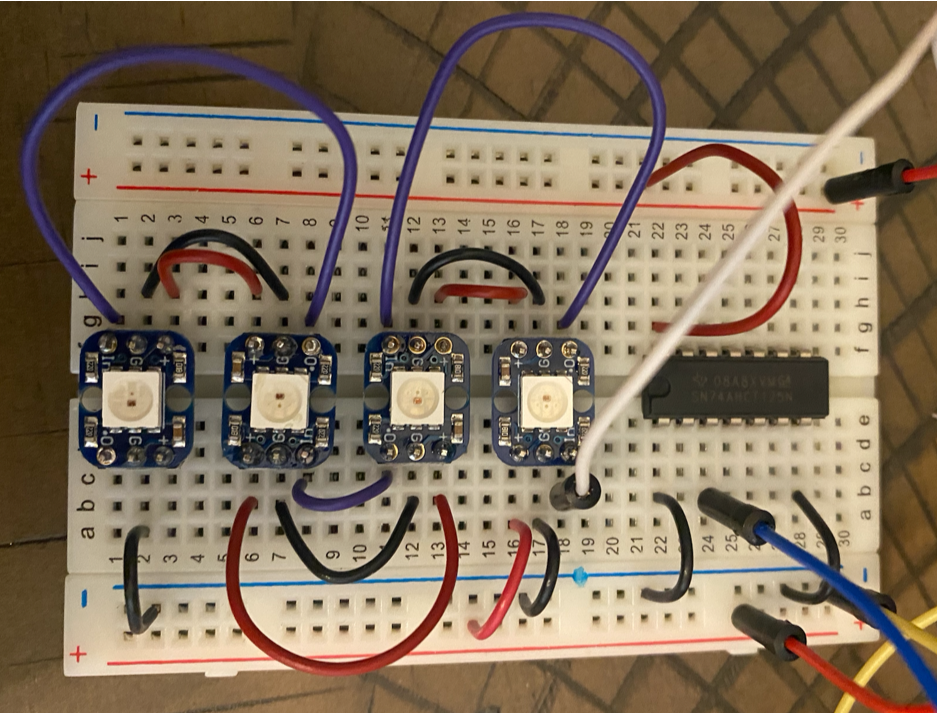
With the logical signal attached to GPIO 18 (#12), and 5V from #2 and / or #4, and ground from #6. Again, with so few pixels, it was not necessary to run a power source off-board. Other circuit designs make use of protective capacitors. We didn’t have any capacitors immediately available, and opted to run this initial experiment without them, again experiencing no problems.
The DietPi image can be downloaded here, and then flashed to microsd using the official etcher. After that you need to know how to install some software. It’s not that difficult if you just have access to an internet hardline. The Debian command “apt install” can be used to get a compiler like “gcc”, and the necessary libraries (through “build-essential”), as well as a free(!) version of “wolfram-engine”. A desktop environment is not needed, but can be tested for fun. The Pi 5 does a much better job with that, certainly. Additionally, “git” is needed and either “scons” or “cmake” to build the source code.
After cloning the git repository, and running the initial test, the source code main.c can be hacked apart and edited to make a few simple executables to call via Run. We opted for one “clear” function and another “ledset” that accepts integer selectors for Jeremy’s simple color vector “dotcolors”, then sets matrix values accordingly.
Once this is done, we can move back to the start up level, where we have all sorts of conveniences making it fun and easy to write impressive programs.
It’s almost a one liner...
It’s almost a one liner...
Actually, we’re not just having another party for Pi day. It would be nice to have some light-up displays for the ongoing games project, and how to get such displays could possibly be the subject for another chapter we would like to include in the eventual planned book-length write-up. Let’s, for a brief diversion, consider that the LED’s represent states in a combinatorial game such as this one (which might look familiar from this games post):
In[]:=
g1=Graph[FixedPointGraph[IterateGridGame[2,2],{InitializeGridGame[2]}],AspectRatio->2/3]
Out[]=
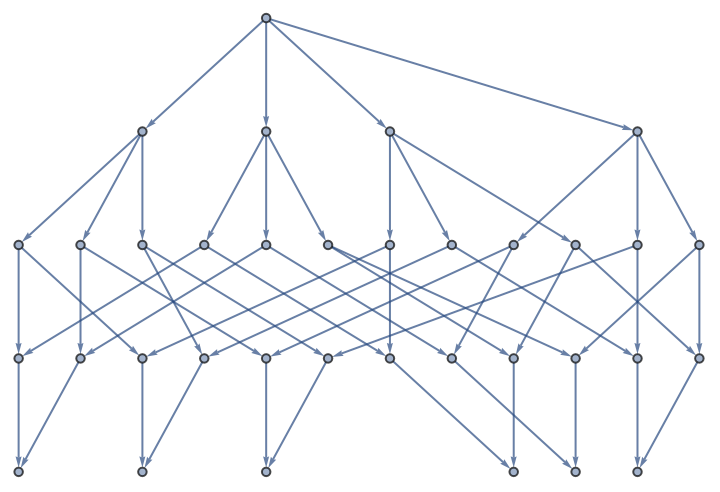
Assigning color rules, scanning through the vertices, and flattening each matrix state to a state vector, we get a sequence to depict and animate on our neopixel peripheral:
In[]:=
colorRules=Association[0->1,1->3,-1->5];
In[]:=
ArrayPlot[{Catenate[#]},ColorRules->{0->Green,1->Red,-1->Blue},ImageSize->20]&/@DepthFirstPath[g1]
Out[]=
{
,

,

,

,

,

,
,
,

,

,
,
,
,

,

,
,
,
,

,

,
,
,
,

,

,
,
,
,

,
,
,
,
,
,

,

,

,

,
,
,
,
,
,
,
,

,
,
,
,
,

,

,
,
,
,

,

,
,
,
,

,
,
,
,
,
,

,

,
,
,
,
,
,
,
,
,
,

,

,

,
,
,
,
,
,
,
,

,
,
,
,
,

,
,
,
,
,
,

,

,
,
,
,
,
,
,
,
,
,

,
,
,
,
,
,
,
,
,
,

,
,
,
,
,
,
,
,
,
}
The most expedient way to do so without needing to transfer large functions is probably just to export the codes to a text file:
Export[NotebookDirectory[]<>"codes.txt",StringJoin[Riffle[ToString/@Lookup[colorRules,Catenate[#]]," "]]&/@DepthFirstPath[g1]]
bounce the codes off a pastebin, and then import them into a .m file on the pi. One command for setting the display can be reconstructed, for example, as:
In[]:=
StringJoin["./ledset ",#]&[StringSplit[Import["https://0x0.st/H7UT.txt"],"\n"][[1]]]
Out[]=
./ledset 1 1 1 1
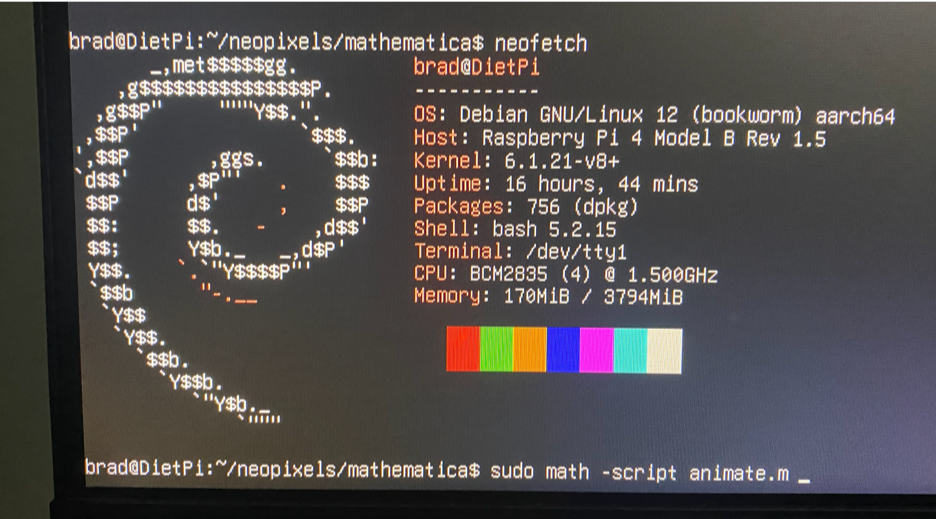
Only a few more lines need be added to the .m file. Those lines use Map + Run + Pause to time sequence the output signal, and clear the lights off at the end of the experiment:
commands=StringJoin["./ledset ",#]&/@StringSplit[Import["https://0x0.st/H7UT.txt"],"\n"];Map[Run[#];Pause[.25];&,commands]Pause[1];Run["clear"];
Right before hitting enter, the screen might looks like this:
After a few seconds spooling up, maybe five seconds, we get this:
Out[]=
(If five seconds is too much for you, there are definitely other C&C schemes with lower latency,
but you will have to read on other forums about those.)
but you will have to read on other forums about those.)
The code to make the headliner video is not much different. Getting 3ary digits of Pi is super easy,
and then we just use partition to get length 4 chunks, and an offset to scroll. One command looks like this:
and then we just use partition to get length 4 chunks, and an offset to scroll. One command looks like this:
In[]:=
StringJoin["./ledset ",Riffle[ToString/@#," "]]&[Partition[2RealDigits[Pi,3,100][[1]]+1,4,1][[1]]]
Out[]=
./ledset 3 1 1 3
A program that runs for one or two minutes through the first few digits of pi looks like this:
commands=StringJoin["./ledset ",Riffle[ToString/@#," "]]&/@Partition[2RealDigits[Pi,3,100][[1]]+1,4,1];Map[Run[#];Pause[.25];&,commands];Pause[1];Run["clear"];
Of course, Pi is an irrational number, so the choice of how many digits to run through depends mostly on the attention span of the audience. Someone could make progress by implementing and testing one or two of the spigot algorithms mentioned by Konstantinos Gavalas. Or how about going farther in the hardware direction, by making a peripheral with input controls? Or why not just write a spigot algorithm that no one’s ever seen before? Or would you rather make a whole suite of functions to compete with CircuitPython?
There’s a lot of work left to be done, and we’re hoping to find some intrepid young people who want to take up the challenge of doing more with Mathematica and Raspberry Pi. Doubting that the students can do it all on their own, let’s give one more example how to show the knowledge off...
A Dragon year spigot algorithm
A Dragon year spigot algorithm
Now that it’s 龍年率日, we shouldn’t become over-focused on just one digital sequence. Although it may seem unfair to mathematicians that the dragon (龍) should get an entire year (年), while Pi (率) gets only a single day (日)--That’s probably just a bias of our modernist outlook. In world history, dragons were much easier to understand in terms neolithic animism, while digital calculations took much longer to evolve. But the world isn’t always divided into math and fantastical nonsense--Sometimes we put those two things together, as in the case of the “Dragon curve”, which is a fractal formed from the regular paper-folding sequence.
Since we’ve already done a successful experiment with three colors, we could easily make a dragon scroller using only two colors. In that effort, we can almost immediately adapt OEIS code from 2015:
In[]:=
(*note:a->dragonval*)MapThread[(dragonval[x_/;IntegerQ[(x-#1)/4]]:=#2)&,{{1,3},{1,0}}];dragonval[x_/;IntegerQ[x/2]]:=a[x/2];dragonval/@Range[100]
Out[]=
{1,1,0,1,1,0,0,1,1,1,0,0,1,0,0,1,1,1,0,1,1,0,0,0,1,1,0,0,1,0,0,1,1,1,0,1,1,0,0,1,1,1,0,0,1,0,0,0,1,1,0,1,1,0,0,0,1,1,0,0,1,0,0,1,1,1,0,1,1,0,0,1,1,1,0,0,1,0,0,1,1,1,0,1,1,0,0,0,1,1,0,0,1,0,0,0,1,1,0,1}
The function “dragonval” is well-adapted to insertion in an open loop:
In[]:=
Module[{ind=1},While[True,Echo@dragonval[ind++];Pause[1]]]
This is already good enough for outputting to the peripheral, but unfortunately, it’s not a spigot algorithm, so it won’t help us understand what’s so great about BPP for Pi. To see why, let’s look at a trace:
Notice that to compute the value at n=20, the algorithm needs the value at n=10 and then another at n=5. A spigot algorithm would never do something like this, because spigot algorithms should require at most one look back. Well, that sounds great, but how is this possible? Generally, a spigot algorithm can be written by finding a data model that pairs nicely with a state-to-state iterator.
Since we’ve already been making a lot of iterators for the games project, it should be well within our capabilities to make another one, this time for getting dragon digits. And in this case, the iterator doesn’t branch, it’s just a time stream, so really it should be easier than solving a board game. To up the difficulty, instead of just binary dragon digits, let’s aim for a function capable of n-ary output and then map it to three or four colors!
First we need a counter capable of incrementing a bit vector. This one works just fine:
We know that it works fine because it’s not too difficult to read the source code. This function first adds one to the least significant digit of the bit vector, then loops over the carry procedure until all digits are valid. If the looping goes through the entire vector, another more significant digit is added before halting. Just to be safe, we can test that it passes correct first values for a few small radices:
The iterator for dragon digits is not much more difficult, but also not entirely trivial:
The “Index” increments to increase, and determines an integer index as seen in the tests above. The “Output” gives the sequence value, which we will eventually send to the peripheral. We also need a memory footprint, here written down under the “Values” key. The “Values” are not associated to any particular index. Instead, they are passed from state-to-state and updated one-component at a time.
In principle, given knowledge of both “Index” and “Output”, it should be possible to reverse engineer the indices associated to all “Values”. Once this is realized, we expect to hear from a tyrannical math professor soon thereafter: Doesn’t this mean DragonIterator isn’t good for a spigot algorithm? And unfortunately, sometimes we have no choice but to debate definitions...
“A spigot algorithm is an algorithm which generates digits of a quantity one at a time without using or requiring previously computed digits. Amazingly, spigot algorithms are known for both pi and e.”
This definition is misleading, because in practice, spigot algorithms depend on history through their data model. To get any particular state vector, typically all predecessors must be iterated through sequentially because extra variables in each state encode information about what digits have already been seen. For example, around t=1:30 in this experiment, we can see that {q,r,t} have already grown quite large, and only to compute the first four or five digits of pi. Similarly for DragonIterator, if the “Values” are thought of as just one number, then that particular number grows at a rate comparable to the “Index”.
Since we’ve gotten stuck on definitions again, we don’t have any time or space left to explain why DragonIterator outputs the correct digits for the dragon sequence, but indeed it does:
A hint as to why is given by checking a few levels of the limit-periodic property:
The interested reader should try and understand why these tests are true, and then work backward to a definition what a limit-periodic sequence really is. Is there a general spigot algorithm for any limit periodic sequence? Have we already uncovered most of it?
Before moving on to higher-radix sequences, let’s take a look what happens with integer encoding of the extra “Values” found during iteration of the binary dragon sequence:
Quite amazingly, the OEIS seems to have this sequence as A279645. It might be easy to prove this conjecture, but then again, maybe not. Does anyone want to try?
While that new dragon challenge hangs out there, let’s just rush ahead to the engineering. To make our new changing-lights device really impressive, we need to make full use of its capabilities by adding a fourth color. To do this we just generate a dragon signal with radix=4:
This sequence is not apparently in the OEIS, but it makes a good candidate for inclusion by satisfying at least one interesting relation (not just a matter of testing, this can be easily proven by induction):
Whether it ends up included or not, we don’t need record keeping to turn on our four-color dragon scroller. What we need is one more function that iterates through values and outputs to a 1x4 neopixel array. Lucky or unlucky, such a script is available via pastebin, at least until the sunset condition triggers. From a linux command line, you can just use “wget” to download this file to an rpi4 and run. Right before hitting enter, the screen might look like this:
After another few seconds delay, we get this:
Now there’s nothing left to do other than to write a short nature poem celebrating the new-found success of this wonderful electronics invention:
Dragon programmers,
running dragon data streams,
computer nature on!
running dragon data streams,
computer nature on!
Acknowledgements
Acknowledgements
Thanks to sixth floor tech. support and Andrea Li for contributing parts,
and congrats to Andrea for also helping find the Device* bug, nice work!
Thanks again Jeremy Garff for sharing your code and insights!
and congrats to Andrea for also helping find the Device* bug, nice work!
Thanks again Jeremy Garff for sharing your code and insights!
Other code
Other code
CITE THIS NOTEBOOK
CITE THIS NOTEBOOK
Downgrading for dragon year Pi day
by Brad Klee
Wolfram Community, STAFF PICKS, March 13, 2024
https://community.wolfram.com/groups/-/m/t/3140560
by Brad Klee
Wolfram Community, STAFF PICKS, March 13, 2024
https://community.wolfram.com/groups/-/m/t/3140560