Millions of people across the globe use Spotify to listen to a diverse variety of music every day. They do this with playlists, whether made by themselves or someone else. As a Spotify user myself and feeling inspired to understand my personal playlists further, I did a multifaceted analysis of a Spotify playlist, using Spotify API and their precomputed features for songs. I looked at unique clusters of songs within my playlist and visualized the playlist in a multitude of ways. These visualizations led me to construct a graph representing my playlist, where I then found the playlist's central themes and an order ("flow") for the playlist. Along the way, I also discuss higher dimensional data analysis, finding the importance of properly representative methods of analysis.
Setup
Setup
Lets begin this journey by getting our data setup! I'm using a personal playlist of mine for this analysis ( psst: https://open.spotify.com/playlist/2P8sGJIDJGz6tgVOHsMg5v ) and have an attached file with song data for each song in it, previously collected using the Spotify API.
Import playlist song data:
In[]:=
songData=;
Spotify has a multitude of precomputed features for their database of songs, such as valence (positivity), energy, and acousticness. The whole reference page is here (https://developer.spotify.com/documentation/web-api/reference/get-audio-feature).I use these features throughout the rest of the analysis on the playlist.
Creates Dataset with raw Spotify data and headers:
In[]:=
ds=ResourceFunction["DatasetWithHeaders"][songData[[2;;-1]],songData[[1]]];features=ds[[1]]//Keys//Normal
Out[]=
{,danceability,energy,key,loudness,mode,speechiness,acousticness,instrumentalness,liveness,valence,tempo,type,id,uri,track_href,analysis_url,duration_ms,time_signature}
Example of a data entry
Filter dataset to only contain relevant features and create Tooltip list for later visualizations:
In[]:=
params={"","danceability","energy","speechiness","acousticness","liveness","valence"};dsfilt=ds[All,params];tt=Table[Tooltip[n,dsfilt[n,""]],{n,Length@dsfilt}];
Forms a raw version of song numerical data, does not include song titles:
In[]:=
mddat=Normal@Values[dsfilt[All,params[[2;;-1]]]];
Now lets also take a look at the distribution of the data to see if any additional normalization is needed. This is important as it helps ensure that each feature is given equal weight in further analysis’.
Defines method to find the passed in extrema of each column (feature):
In[]:=
findExtrema[function_,data_]:=function/@Normal@Transpose@data
Finds the minimum and maximum value of each feature column, then computes the range of values for each feature column:
In[]:=
minParams=findExtrema[Min,dsfilt[[All,2;;-1]]]maxParams=findExtrema[Max,dsfilt[[All,2;;-1]]]range=maxParams-minParams
Out[]=
danceability0.201,energy0.096,speechiness0.0244,acousticness7.53×,liveness0.028,valence0.0807
-6
10
Out[]=
danceability0.952,energy0.945,speechiness0.279,acousticness0.988,liveness0.88,valence0.967
Out[]=
danceability0.751,energy0.849,speechiness0.2546,acousticness0.987992,liveness0.852,valence0.8863
Based on this, speechiness and danceability have smaller than preferred ranges of values. In our subset of data, all of the other features fall within ~0-1 scales.
So, I needed to normalize the “speechiness” and “danceability” features of this dataset. I did this because it helps get more meaningful results. All of the features in this dataset are already closely connected as they are all pulled from the same niche playlist and therefore are closely related. Because of this, the analysis can easily be overcrowded by nonmeaningful similarities between the data as many of the similarities between these songs stem from them being a small, non representative sample of the millions of varying genre songs on Spotify. It is important to highlight the differences in their features more equitably to ensure that more subtle differences (the main differences between these songs) are more accurately captured in my analysis. Additionally, by normalizing the data, I am still preserving the important qualities of these features, such as the contrast in danceability between two songs.
Normalizes feature 1 and 3 of the dataset:
In[]:=
mddat[[All,1]]=Normalize[mddat[[All,1]]];mddat[[All,3]]=Normalize[mddat[[All,3]]];
Forming Clusters
Forming Clusters
Built in FindClusters[]
Built in FindClusters[]
To begin our exploration, lets see and compare how clusters are formed using built in Wolfram functionality!
I wanted to compare the seemingly (but not truthfully) more accurate results that come from clustering using a 3D subset of the song data to the more complicated results that come from clustering using the full array of data. Both will be plotted in 3D. I used features 2,4, and 6. Note that I only select the list elements that are greater than one because ListPlot3D cannot handle one element clusters, which may be generated.
Finds and plots 36 clusters using 3D subset of data:
In[]:=
ListPlot3D[Select[FindClusters[mddat[[All,{2,4,6}]],36],Length@#>1&]]
Out[]=

Finds 36 clusters using all features and plots clusters with a 3D subset of feature:
In[]:=
ListPlot3D[Select[FindClusters[mddat,36][[All,All,{2,4,6}]],Length@#>1&]]
Out[]=

There is definitely a difference between the two graphs of clusters! The second graph’s meshes may appear less accurate and more complicated compared to the first graph, however this is for a good reason. The first graph was only using three of the features from the dataset, it has a less rich understanding of the relationship between data points. However, the second graph is clustering based off 6D data, but is forced to display these clusters in a 3D subset of such data. This 3D plot only represents half of the features these songs were clustered based on, its bound to look less concretely organized.
You may also be asking: why 36 clusters? Although albeit arbitrarily chosen, I felt like this number expressed a good amount of clusters. Ensuring that each cluster encapsulates its own clear meaning is important, the number cannot be too little (too general) or too big (too precise). Here I felt like it was safer to overshoot as it would be more useful to have more niche results that would lead to more detailed future works than results that are too general and unable to abstract meaningful conclusions from. However despite this safety net in my cluster number, I feel like 36 is the right number as the cluster sizes dwindle down at this point, given by the alarming number of smaller groups near the end of the list of clusters.
Finds the length of each cluster when clustering on 3D version of song data:
In[]:=
Length/@FindClusters[mddat[[All,{2,4,6}]],36]
Out[]=
{4,6,12,4,6,10,4,11,8,3,10,5,8,4,7,5,11,4,4,7,7,5,3,8,9,4,5,2,3,2,3,4,3,2,3,3}
Clustering using own criteria
Clustering using own criteria
We’re going to now try clustering the data our own way! The game plan is to group songs that are close to each other; close being defined by using a distance function: Manhattan Distance.
How far away are points?
How far away are points?
To get started, lets look at the data in the lense of Manhattan distances and other distribution metrics.
Get the Manhattan distance of every point to another (nested loop):
In[]:=
mans=Table[dataPoint->Table[ManhattanDistance[dataPoint,dataPoint2],{dataPoint2,DeleteCases[mddat,dataPoint]}],{dataPoint,mddat}];
Lets look at the absolute extrema distances! Keep in mind, the theoretical greatest value for the distance between two points is 6 as each of the six selected features can take on values from 0 to 1.
Maximum distance between any two songs in the dataset:
In[]:=
Max[Max/@Association[mans]]
Out[]=
2.91499
Min distance between any two songs in the dataset :
In[]:=
Min[Min/@Association[mans]]
Out[]=
0.0504482
Given that the maximum Manhattan distance between any points is less than half of its highest possible value with this set of six Spotify features, it is evident that these points are relatively close to each other.
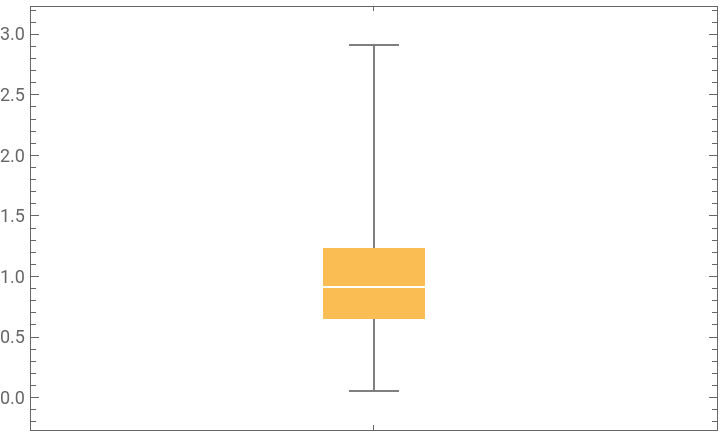
In further support of this, the Manhattan distances of all the values are mainly skewed downwards, with the median 0.91719. This illustrates how most of the data is even more closely similar than projected by looking at the maximum distance of any points.
Creates a BoxWhiskerChart with the distribution of the distance of every point to every other point:
BoxWhiskerChart[Flatten[mans[[All,2]]]]
Out[]=
Divide data into clustered lists
Divide data into clustered lists
Lets do one iteration of gathering data based on distance to see how its working! As a reminder, the plan is to group nodes which Manhattan distances are less than a certain value, say 0.4 (a semi-arbitrary threshold that is a bit smaller than the lower quartile to capture niche details in clusters).
Gathers groups of data based if the Manhattan distance between the points is less than .4:
In[]:=
gath=Gather[Normal@mddat,ManhattanDistance[#1,#2]<.4&];Length/@gath
Out[]=
{29,24,9,9,16,9,8,6,2,9,3,3,4,1,5,2,2,1,3,2,2,4,2,2,1,7,2,1,1,1,3,1,2,1,1,2,1,1,1,2,1,2,1,1,1,2,1,1,1,1,1,1}
The Gather[] function was able to gather the data into groups. However, there are a lot of smaller groups, with only one element! We want most of the data to be in groups, so I decided to recursively group songs that were in groups by themselves by increasing the threshold for grouping until most elements are grouped.
Defines method to find all the groups where there’s only one element and regathers them based on whether their Manhattan distance is smaller than the threshold:
In[]:=
divide[crit_,ogList_]:=Module[{ones,onesFlattened,gath2,gathUpdated},ones=Select[ogList,Length[#]<2&];onesFlattened=Flatten[ones,1];gath2=Gather[onesFlattened,ManhattanDistance[#1,#2]<crit&];gathUpdated=Complement[ogList,ones];{crit,Join[gathUpdated,gath2]}]
Uses above function, increasing the threshold for grouping each iteration until the past 5 iterations yield the same value:
In[]:=
clusters=NestWhile[divide[#[[1]]+0.16,#[[2]]]&,{0.4,gath},UnsameQ[#1[[2]],#2[[2]],#3[[2]],#4[[2]],#5[[2]]]&,5][[2]];Length/@clusters
Plotting the Clusters!
Plotting the Clusters!
Time to see what these groups (clusters) look like! We’re going to see this data plotted with respect to its energy, valence, and acousticness features. However, keep in mind that the data itself was grouped based on 6 features, not 3.
The only slight problem is that there are a couple groups with only one element in them, ListPlot3D throws an error for these clusters. To address this, I only plot clusters with more than two values as 1 and 2 length clusters will not render as meshes either way.
Selects clusters with more than two values and extracts three features from each song in each remaining cluster :
Creates an association for labeling purposes:
Plots the clusters in 3D with labeling:
Graph Analysis
Graph Analysis
Song and Cluster Web
Song and Cluster Web
To start of with some fun, lets connect songs, independent of their clusters , that are the closest in one dimension to each other and make a nice visual. The plan is to make lines to represent each of these three song connections in every dimension and overlay that with the clusters and see what we come up with!
Defines separate variables for each feature used in 3D plotting:
I will start by sorting the specific feature data by numerical value and partition the result into threes. The resulting array will be groups of songs that are most similar to each other, with respect to the feature.
Defines method that sorts and partitions singular feature data into groups of 3:
Since sortPart only looks at a data element from one dimension, I need to get the full 3d coordinate for each song in order to plot the lines in a 3D graphic.
Defines method to replaces each singular feature entry with its 3D representation:
Almost done! Just need to combine all these helper functions into one.
Defines a summary method which combines the two above functions and creates Graphics lines for plotting:
Putting it all together, I form the Graphics line components, making different features distinct by using Hues. Then I plot a combination of cluster meshes, points for singular clusters (which don’t have meshes), lines for pair clusters, and the lines connecting songs with singular dimensional analysis.
Selects all two-element clusters and forms thick purple Graphic lines to represent them:
Finds the singular value clusters and flattens them for point plotting:
Forms colored lines connecting similar songs by feature and overlays that with mesh and point clusters:
Combines all the Graphics elements made on a singular 3D plot:
Pretty cool graphic! We can also see how a lot of lines are extending between larger areas of the graphic space, further illustrating how clusters are formed using many features, of which can have much variation.
Connecting Clusters and Songs
Connecting Clusters and Songs
Since all of the songs in the playlist are connected in some way, why not look at the playlist as a graph of connected elements? That’s exactly what we’re going to accomplish! We have two ways represent the playlist nodes, through songs and clusters. Each of them represents the playlist in a different way, where songs represent each individual item and clusters represent broader themes within the playlist. In a graph, either would be an accurate choice for the vertices. A broad term for these different options for vertices are entities. In order to have the most meaningful results, I construct a directed graph where vertices form directed edges to their n-closest other vertices (n being a chosen variable). This graph is very helpful to my analysis as it represents the entire playlist in a computational way and allows me to do further analysis on connectivity and traversal.
Constructing Directed Graphs
Constructing Directed Graphs
As previously mentioned, we’re going to be constructing graphs using both entity types: songs and clusters. However, because clusters are varying in degree of dimensionality, I need to condense them in order to treat them as sortable and comparable objects to each other. I will do this by averaging all the columns in a cluster to output a single array. Since the clusters already contain values that are similar to each other, this is a good choice.
Defines a method to return the average 6D value for a cluster as an association and doesn’t return modified input if input is already an association:
Saves an association form of song data:
The next step is to form edges between vertices! In order to do this, I need to find the nodes that are closest to the currently considered vertex, and form directed edges between the two. Because we’re dealing with distance, Manhattan Distance will be used to evaluate the distance of nodes from each other and find the n-closest other nodes for each vertex.
To accomplish this, I create a method to find these n smallest relationships. I ensure that each entity being compared is a 2D list, not 3D. I then create an association of each entities Manhattan distance to all other entities. Then I take the n smallest distance away connections. Lastly, I format these filtered relationships in a format for Graphs.
Defines a method to finds the nth amount of closest entities for each entity :
Time to actually construct the graphs! I constructed two variations of each entity’s graphs, a graph where each node forms an edge with only its first-closest other node (Graph 1n, on the right) and a graph where each node forms an edge with its two-closest other nodes (Graph 2n, on the left). First pictured is the graphs for clusters, then for songs.
Creates directed graphs connecting song clusters where each cluster has one outgoing edge (right side) or two outgoing edges (left side)
Creates directed graphs connecting songs where each song has one outgoing edge (right side) or two outgoing edges (left side)
Something interesting to note is the vast difference in connectivity of the graph just by adding one more edge from each vertex. There’s over 20 small communities in song Graph 1n, but they are all able to connect together with an extra edge, illustrating how closely connected these songs are. Keep in mind there’s also almost 200 songs (199 to be exact)!
Finding Most Connected Songs and Clusters
Finding Most Connected Songs and Clusters
Now that the graphs have been constructed, its time to explore them! The first thing I want to do is use these graphs to find the common or most central ideas of my playlist. These central ideas would be the entities that are the most connected, have the most inbound edges, because they are the entities that the most vertices have commonality and connection with. I do this by simply finding the vertices with greatest inbound degree in each graph and do a bit of visualization and investigation with the results.
Defines method to return an association with each vertex corresponding to its inbound edge degree:
Defines method to go through all the vertexes and finds the n-top vertexes with respect to the greatest degree)and complementary method to highlight such vertices :
Defines methods to finds vertexes with the highest degree inwards and complementary method to highlight such vertices
Cluster Analysis
Cluster Analysis
Now, we're ready to rock n roll! Lets find out which clusters are the most connected and then visualize it on the graphs :
Gets the most connected clusters for Graph 1n and Graph 2n:
So what does this mean? Lets look at this visually before analyzing the results!
Highlights most connected cluster in each version of the graph, which happens to be the same cluster in both versions:
Now we see something really interesting! The same cluster is the most connected in both Graph 1n and Graph 2n, they corroborate each other! This is important as it strongly emphasizes the position of cluster #23 being the most central cluster in the playlist. I can with more confidence affirm that the songs in cluster #23, and the averaged features of that cluster, are representative of the central theme of the playlist.
Song Analysis
Song Analysis
Next (and a little lengthier): song graph analysis! Lets once again find the most connected songs, then visualize them and do some detective-style exploration.
Gets the most connected songs for Graph 1 n and Graph 2 n :
Lets see a visual reference before delving in!
Highlights the most connected songs in each of the song graphs:
Interestingly, the two graphs corroborate each other! Song #195 is the most connected in both of these graphs. But, there are also other most connected songs in Graph 2n. Which graph do you think is more accurate of depicting the songs that embody the central theme of the playlist?
Continuing on, lets investigate these song results further and see which clusters these most connected songs are in!
Finds the index of the cluster each of the most connected songs are in:
It’s pretty interesting how two of the songs are from the same cluster! This emphasizes their similar theme and emphasizes their features as being the core ones of the playlist.
Lets also visualize where these clusters of most connected songs are:
Despite all the excitement, its important to note that the clusters for these most connected songs are not the same as the cluster which is the most connected, these results are in contradiction of the main theme of the playlist. Which graph (clusters or songs) do you think is more reliable in depicting the main themes of the playlist?
Last thing--lets see where the most connected songs are on both graphs! Cross comparatively looking at these top songs will give us further insights.
Highlights vertices of most connected songs on both graphs:
We can notice that 195 and 177 are directly connected and remain in the same clique in both graphs. Song #43’s top connectedness Graph 2n is relatively predictable as it has 4 inbound edges in Graph 1n. Song #177 on the other hand only had 2 inbound edges in Graph 1n and rose to 5 edges (becoming a top connected song) in Graph 2n. That’s quite the jump! Especially considering how #195 only gained one inbound edge and #43 only gained two inbound edges between the two graphs. Although Song #43 did not have many inbound edges in Graph 1n, its still equally illustrative of a central theme song as its still heavily connected to other songs in the graph, its just second place in that connectivity so when only having a singular absolute connection, it did not seem heavily connected. This is why looking at both Graph 1n and 2n are important to forming conclusions, connectivity is a scale, not a binary value.
Graph Traversal
Graph Traversal
Playlist flow is another important trait of playlists that we can explore using this graphical model of the playlist. Some playlist creators organize their playlists in a way so that the succession of songs has an order or sense to it. By traversing the graph, a representation of the playlist, using multiple methods, I explore and model different ways of creating a “flow”.
Traversal by Postman Tour
Traversal by Postman Tour
The first method of graph traversal I’m exploring is by using PostmanTour[]. This finds the shortest path that traverses every edge at least once. I use Graph 2n for both entities as it (mainly) provides connections between all vertices. I also convert the previously directed graphs to undirected ones. The directives, though important, do not allow for a Postman Tour to be feasible for these graphs. Because a edge between two vertices, independent of the origin and endpoint, represents a similarity (connection) between the two nodes, the undirected connection can still be utilized to create a relatively reliable Postman Tour.
First, lets look at a traversal for song graph 2n!
Visualizes the shortest path that passes through all the clusters at least once:
Next, the traversal for the cluster graph 2n! Note that the secondary, 3 node isolated component (bottom left), is excluded from this traversal. This is because the three nodes do not allow for a Postman Tour to be completed and are negligible due to their small size as a component compared to the overwhelmingly larger primary component, of which encompasses more than 98% of the data (196/199 vertices).
Visualizes the shortest path that passes through all the clusters at least once:
One thing important to note about a Postman tour (and is evident in these traversal) is that some nodes are repeated. Besides from this, especially considering that edges between vertices are representative of a strong connection between the two and are formed due to a close distance, feature-wise, to each other, this method of graph traversal to create an order for the playlist is effective.
Traversal by Parameter Sorting
Traversal by Parameter Sorting
Another method of traversing this graph is to sort the nodes by one of their features (least to greatest) and traverse the graph using the numerical order of such feature.
Defines a method which sorts data by a parameter and highlights the resulting vertexes in succession:
Iterates defined method over the 3 parameters used for plotting in a 3D space and displays traversal for one parameter:
Note that I only display one parameter for space, however using the Manipulate with any of the parameters deems similar results. Interestingly, we can see that the graph isn’t traversed in a “tour” fashion, but rather it seems to be scattering from all over the place. Instead of flowing from node to node, the traversal grows out of communities of nodes to the less heavily connected areas. This is quite a stark difference from the flow seen in the Postman Tour method seen above. This is not a good thing as the graph is most illustrative of the connections between nodes, where the edges represent the strongest of the connections of nodes to each other. These important relational connections are not reinforced using this one parameter traversal method, nodes aren’t necessarily flowing through different themes and commonalities, but jumping around different, relatively unrelated, communities. This does not create a “flow” for the playlist. However, in support of this traversal method, unlike the Postman Tour, all nodes are only visited once, which may be more convenient and less repetitive for a "flow". More generally, the failure of this traversal method to accurately understand the closest entities to each other, compared to the multidimensional computation of closest connections in the graphs, demonstrates how one parameter does not tell the full story of a dataset and is ultimately unrepresentative of the data. This one parameter method may be more successful if using a feature that is weighted more heavily than others in the dataset.
Future Works
Future Works
There are so many more ways to explore this project an infinite number of questions I have to ask! I want to take this further and use these most common identified themes from my playlist in order to create a song recommendation system. In addition to recommending songs that align with the features of common themes within the playlist, recommendations for songs that would grow smaller communities of songs within the playlist would be another interesting approach to tackling song recommendation. I would also love to bring lyrical analysis into a better theme identification and traversal process to build more complex takeaways.
CITE THIS NOTEBOOK
CITE THIS NOTEBOOK
Spotify playlist themes, flows, and clusters
by Zoya Brahimzadeh
Wolfram Community, STAFF PICKS, June 19, 2023
https://community.wolfram.com/groups/-/m/t/2939539
by Zoya Brahimzadeh
Wolfram Community, STAFF PICKS, June 19, 2023
https://community.wolfram.com/groups/-/m/t/2939539