I analyzed Billboard data by song and artist, and created a graphical user interface that allows user to look at data about songs and artists.
Introduction:
Introduction:
I wanted to make an interactive program that allows the user to input a song or artist and get access to that data in the form of graphs. First, I had to clean the data because there were many elements and I didn't need all of them. I also made several helper functions that would analyze songs and artists so I could combine all of them into one big function at the end. This big function would be put into a GUI, so the user could explore on their own.
Obtain and sort data:
Obtain and sort data:
First, I imported the data, which I got from this link: https://data.world/kcmillersean/billboard-hot-100-1958-2017
locationOfData="path_to_original_csv";billboardCSV=Import[locationOfData,"CSV"];
Because I only wanted certain elements of the data, I extracted those. I wanted the elements song and performer because I wanted to analyze songs with their corresponding performers. I wanted the Week ID and Week position because it contains the date and corresponding position on the chart.
extractData[billboardDatasetInput_]:=<|If[StringMatchQ[#[[2]],"WeekID"],"WeekID"->"WeekID","WeekID"->FromDateString[#[[2]],{"Day","/","Month","/","Year"}]],"Song"->#[[4]],(*Song*)"Performer"->#[[5]],(*Performer*)"SongID"->#[[6]],(*SongID*)"Week Position"->#[[3]],(*WeekPosition*)"Peak Position"->#[[9]],(*PeakPosition*)"Weeks on Chart"->#[[10]](*Weeksonchart*)|>&/@billboardDatasetInputextractedCSV=extractData[billboardCSV];extractedDataset=Dataset@extractedCSV;
I created a metric with the extracted data:
In[]:=
createMetric[song_]:=Module[{lstPeakPos,lstWksOnChart,peakPos,wksOnChart},lstPeakPos=Normal[song[[All,Key["Peak Position"]]]];lstWksOnChart=Normal[song[[All,Key["Weeks on Chart"]]]];<|"WeekID"->Normal[song[[All,Key["WeekID"]]]],"Song"->First[song]["Song"],"Performer"->First[song]["Performer"],"SongID"->First[song]["SongID"],"WeekPosition"->Normal[song[[All,"Week Position"]]],"Min Peak Position"->Min[lstPeakPos],"Max Weeks on Chart"->Max[lstWksOnChart]|>]refinedData=createMetric/@groupedDataset;
Helper Functions:
Helper Functions:
Here I imported the data and used billboardDataCloud for the rest of my explorations.
In[]:=
In[]:=
billboardDataCloud=CloudGet[CloudObject[
https://www.wolframcloud.com/obj/cchen6130/RefinedBillboardDataset
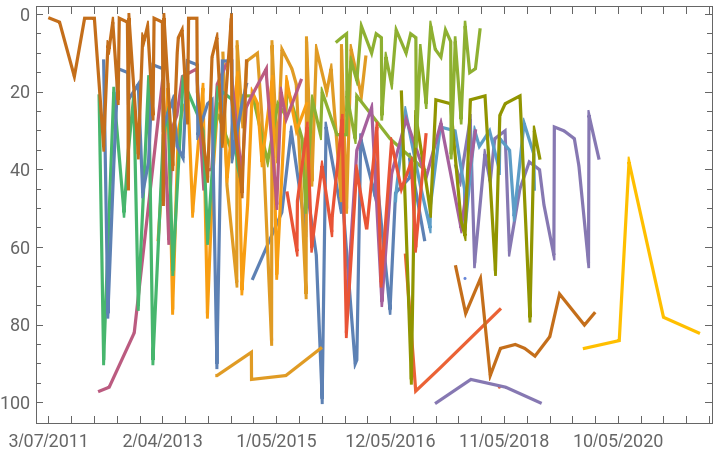
]];I wanted a function that could take the string input "ArtistName" and output either songs by just the artist (True) or output songs that have all instances of the artist, like collaborations and/or features (False).
In[]:=
searchByArtist[ArtistName_,AllArtistSongsQ_]:=If[ AllArtistSongsQ, Select[billboardDataCloud,StringMatchQ[ToString[#["Performer"]],ArtistName]&], Select[billboardDataCloud,StringContainsQ[ToString[#["Performer"]],___~~ArtistName~~___]&]]
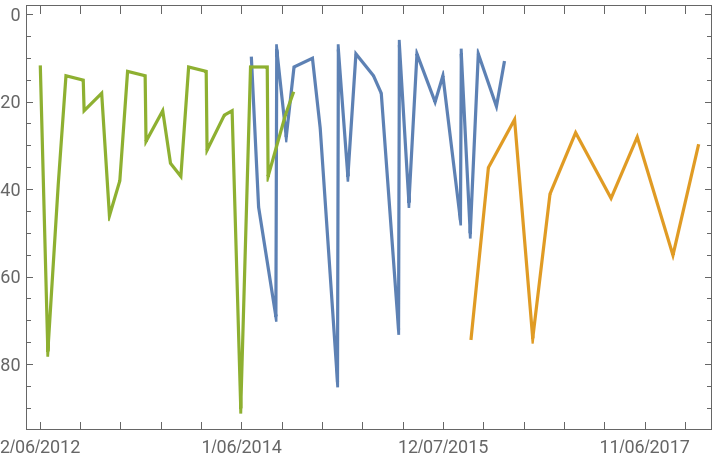
This function creates a graph of all the artists songs that were on the top 100, and overlays the songs in different colors.
In[]:=
graphArtistsSongsOverlay[SongDataList_Dataset]:= Module[ {graphData}, graphData = Normal[ Table[ Transpose[{Normal[SongDataList[[i]]["WeekID"]], Normal[SongDataList[[i]]["WeekPosition"]]}], {i,Length[SongDataList]} ] ]; DateListPlot[graphData, PlotLegends->Normal[SongDataList[[All, Key["Song"]]]], ScalingFunctions->"Reverse", DateTicksFormat->{"MonthShort","/","Day","/","Year"}]]
In[]:=
h=searchByArtist["Calvin Harris",True];(*outputssongsjustbytheartist*)graphArtistsSongsOverlay[h]
Out[]=


In[]:=
h=searchByArtist["Calvin Harris",False];(*outputsallsongstheartisthasappearedon*)graphArtistsSongsOverlay[h]
Out[]=


In[]:=
menuViewArtistGraphs[SongDataList_Dataset] := Module[ {plottableData, graphData}, plottableData = Normal[Table[Transpose[{Normal[SongDataList[[i]]["WeekID"]],Normal[SongDataList[[i]]["WeekPosition"]]}], {i,Length[SongDataList]}]]; graphData = DateListPlot[{#}]&/@plottableData; MenuView[AssociationThread[Normal[SongDataList[[All, Key["Song"]]]]->graphData]]]
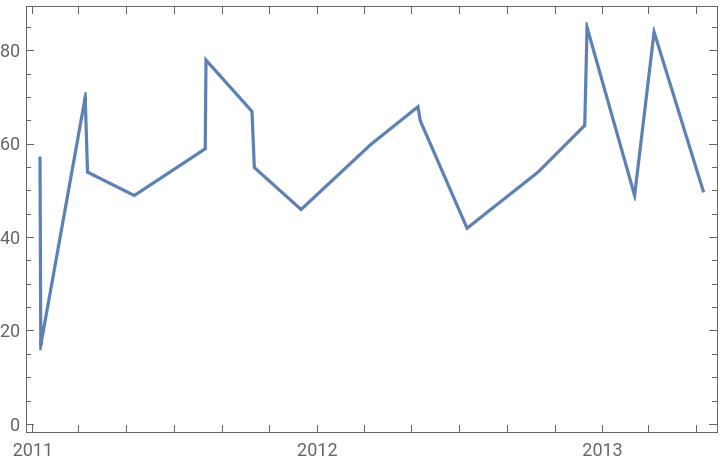
This function just puts the graph of all the artists songs into a menu view, which is helpful when the artist has many songs, because the user can just see one song instead of many songs overlaid.
In[]:=
h=searchByArtist["Taylor Swift",True];menuViewArtistGraphs[h]
Out[]=
This function combines the above functions, so that if AllSongsQ is true the function will output a graph with overlaid lines, and if false, it will output a menu view graph.
In[]:=
getGraphsOverTimeArtists[artistSongs_,graphArtistSongsOverlayQ_]:=Which[ graphArtistSongsOverlayQ==True, graphArtistsSongsOverlay[artistSongs], graphArtistSongsOverlayQ==False, menuViewArtistGraphs[artistSongs]]
Analyzing by song:
Analyzing by song:
This function can search and display songs with the same title, or with similar titles. If the Boolean value is true, it will output all songs with the same exact title as the song input, and if false the function will output songs with similar titles.
We can have a function that can graph these songs:
If the Boolean value is true, a graph will output a menu view with SongID:
This function combines the above functions:
This function will help us in the next section, basically searching for a song or an artist depending on input.
Combining all the helper functions:
Combining all the helper functions:
Creating an interactive display:
Creating an interactive display:
The final output is an interactive display where users can input a song or artist of their choice and can view graphs.
Notes:
Notes:
Some of the data is incorrect; there seems to be a song that has charted in 2022, which didn't happen yet.
Next Steps:
Next Steps:
I originally wanted analyze songs by genre, but did not have enough time. I would do this by finding another data set with genre and could match up song names to their respective genres.