Descartes Labs releases the data for mobility changes, up to the county level of USA. This data is available on their GitHub. In this short essay, I showed how to transform their data into a computable dataset in the Wolfram Language (WL). This data could be very useful for epidemiological studies, since it contains the actual distances for mobility, and not only relative changes in the case of Google mobility data.
Getting raw data
Getting raw data
Get the raw data from GitHub:
In[]:=
des=Import["https://raw.githubusercontent.com/descarteslabs/DL-COVID-19/master/DL-us-mobility-daterow.csv"];
A peak into the raw data
In[]:=
TableForm[RandomSample[des〚2;;〛,3],TableHeadings{None,des〚1〛}]
Out[]//TableForm=

In their GitHub, the last three columns are define as follows:
◼
sample: The number of samples observed in the specified region.
◼
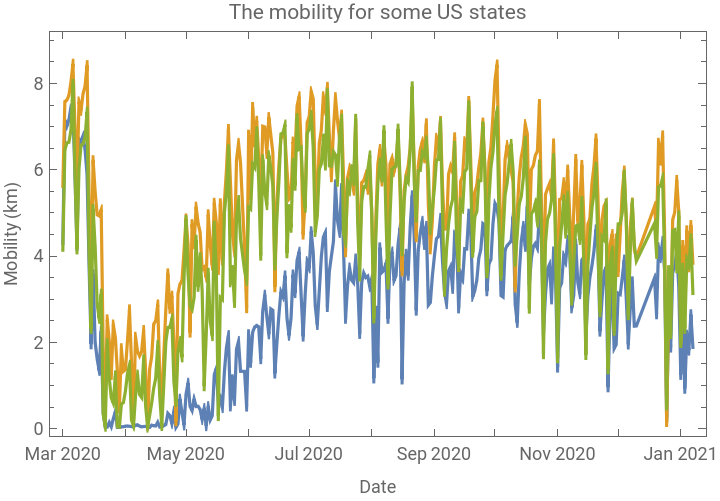
m50: The median of the max-distance mobility for all samples in the specified region.
◼
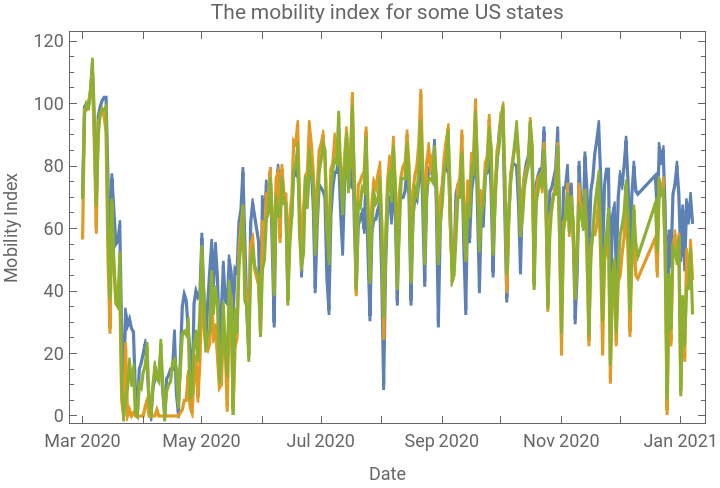
m50_index: The percent of normal m50 in the region, with normal m50 defined during 2020-02-17 to 2020-03-07.
Transforming data into computable dataset
Transforming data into computable dataset
Return head of each column:
In[]:=
AssociationThread[des〚1〛Head/@des〚2〛]
Out[]=
dateString,country_codeString,admin_levelInteger,admin1String,admin2String,fipsInteger,samplesInteger,m50Real,m50_indexInteger
Note since fips are integers, it will be a bit problematic for Alabama, Alaska, Arizona, Arkansas, California, Colorado, and Connecticut, because for these states the fips start with zero and if it is an integer, that zero will be missed. That’s why we shall transform fips into String, and will add zero at the beginning, as needed.
Get the level-0 of AdminLevel (US, as a country):
In[]:=
usDT=Cases[des,{_,_,0,__}];
A peak into 2 random sample of usDT:
In[]:=
TableForm[RandomSample[usDT,2],TableHeadings{None,des〚1〛}]
Out[]//TableForm=

Get the first element of from usDT, which corresponds to dates:
In[]:=
usDates=usDT[[All,1]];
Generate an association with keys as {Country, State, County, Samples, M50, M50Index}:
In[]:=
us=<|"Country"->,"State"Missing["NotAvailable"],"County"Missing["NotAvailable"],"Samples"TimeSeries[usDT〚All,-3〛,{usDates}],"M50"->TimeSeries[usDT〚All,-2〛,{usDates}],"M50Index"->TimeSeries[usDT〚All,-1〛,{usDates}]|>;
Define a function to generate an association with keys as {Country, State, County, Samples, M50, M50Index}:
In[]:=
tsGeneratorState[list_List]:=Module{dates},dates=list[[All,1]];<|"Country"->,"State"Interpreter["USState"][list〚1,4〛],"County"Missing["NotAvailable"],"Samples"TimeSeries[list〚All,-3〛,{dates}],"M50"->TimeSeries[list〚All,-2〛,{dates}],"M50Index"->TimeSeries[list〚All,-1〛,{dates}]|>
Given the state data (admin level 1), create the corresponding time series:
In[]:=
states=GroupBy[Cases[des,{_,_,1,__}],#〚4〛&,tsGeneratorState]//Values;
For counties, the admin level is 2, and to get the corresponding county as entity, we shall use fips. However, if the fips are only 4 digit integers, we should add zero at the beginning; that’s why we will transform fips into String.
Get the data for US counties and correct fips with 4-digit integers:
In[]:=
countiesDT=MapAt[If[IntegerLength[#]4,"0"<>ToString[#],ToString[#]]&,Cases[des,{_,_,2,__}],{All,-4}];
Note the data contains not all US counties but only 1627.
In[]:=
countiesDT〚All,5〛//DeleteDuplicates//Length
Out[]=
1627
A peak into the data:
In[]:=
TableForm[RandomSample[countiesDT,2],TableHeadings{None,des〚1〛}]
Out[]//TableForm=

Create an association with fips as keys and the corresponding county (as entity) as value:
In[]:=
fips=Association@EntityValue,EntityFunction[i,i["FIPSCode"]i];

Define a function to generate an association with keys as {Country, State, County, Samples, M50, M50Index}:
In[]:=
tsGeneratorCounty[list_List]:=Module{dates},dates=list[[All,1]];<|"Country"->,"State"Interpreter["USState"][list〚1,4〛],"County"fips[list〚1,-4〛],"Samples"TimeSeries[list〚All,-3〛,{dates}],"M50"->TimeSeries[list〚All,-2〛,{dates}],"M50Index"->TimeSeries[list〚All,-1〛,{dates}]|>
Given the county data (admin level 2), create the corresponding time series:
In[]:=
counties=GroupBy[countiesDT,#[[5]]&,tsGeneratorCounty]//Values;//AbsoluteTiming
Out[]=
{1236.16,Null}
Join three associations and generate a dataset:
In[]:=
dataset=Dataset@Join[{us},states,counties];
A peak into the dataset:
In[]:=
dataset[RandomInteger[Length[dataset],3]]
Out[]=

Some visualizations
Some visualizations
In[]:=
dataset[Select[MatchQ[#State,_Entity]&&MatchQ[#County,_Missing]&]][All,#State#M50&]//Normal//RandomSample[#,3]&//Association//DateListPlot[#,FrameLabel{"Date","Mobility (km)"},PlotLabel"The mobility for some US states"]&
Out[]=


In[]:=
dataset[Select[MatchQ[#State,_Entity]&&MatchQ[#County,_Missing]&]][All,#State#M50Index&]//Normal//RandomSample[#,3]&//Association//DateListPlot[#,FrameLabel{"Date","Mobility Index"},PlotLabel"The mobility index for some US states"]&
Out[]=
In[]:=
dataset[Select[MatchQ[#State,_Entity]&&MatchQ[#County,_Entity]&]][All,#County#M50&]//Normal//RandomSample[#,3]&//Association//DateListPlot[#,FrameLabel{"Date","Mobility (km)"},PlotLabel"The mobility for some US counties"]&
A function to retrieve the data and transform them into a dataset
A function to retrieve the data and transform them into a dataset
Since the raw data will be updated daily, one can transform it into a WL dataset using the following function. Please note that this process is time-consuming (~20min, or so).