Abstract
Abstract
Streamlining ChatGPT code generation workflows for different programming languages.

In[]:=
Mathematica code for plotting sin of x over minus one and five
In[]:=
Plot[Sin[x], {x, -1, 5}]
Plot[Sin[x], {x, -1, 5}]
Out[]=
Setup
Setup
Load paclets
Needs["AntonAntonov`OpenAIMode`"]
Convert notebook style
In[]:=
OpenAIMode[]
Default options
In[]:=
SetOptions[OpenAIInputExecuteToText,OpenAIModel->"text-davinci-003",OpenAITokenLimit->360,OpenAITemperature->0.4];
In[]:=
OpenAIModels[]//Sort
How does it work?
How does it work?
Consider the following flowchart:
Out[]=
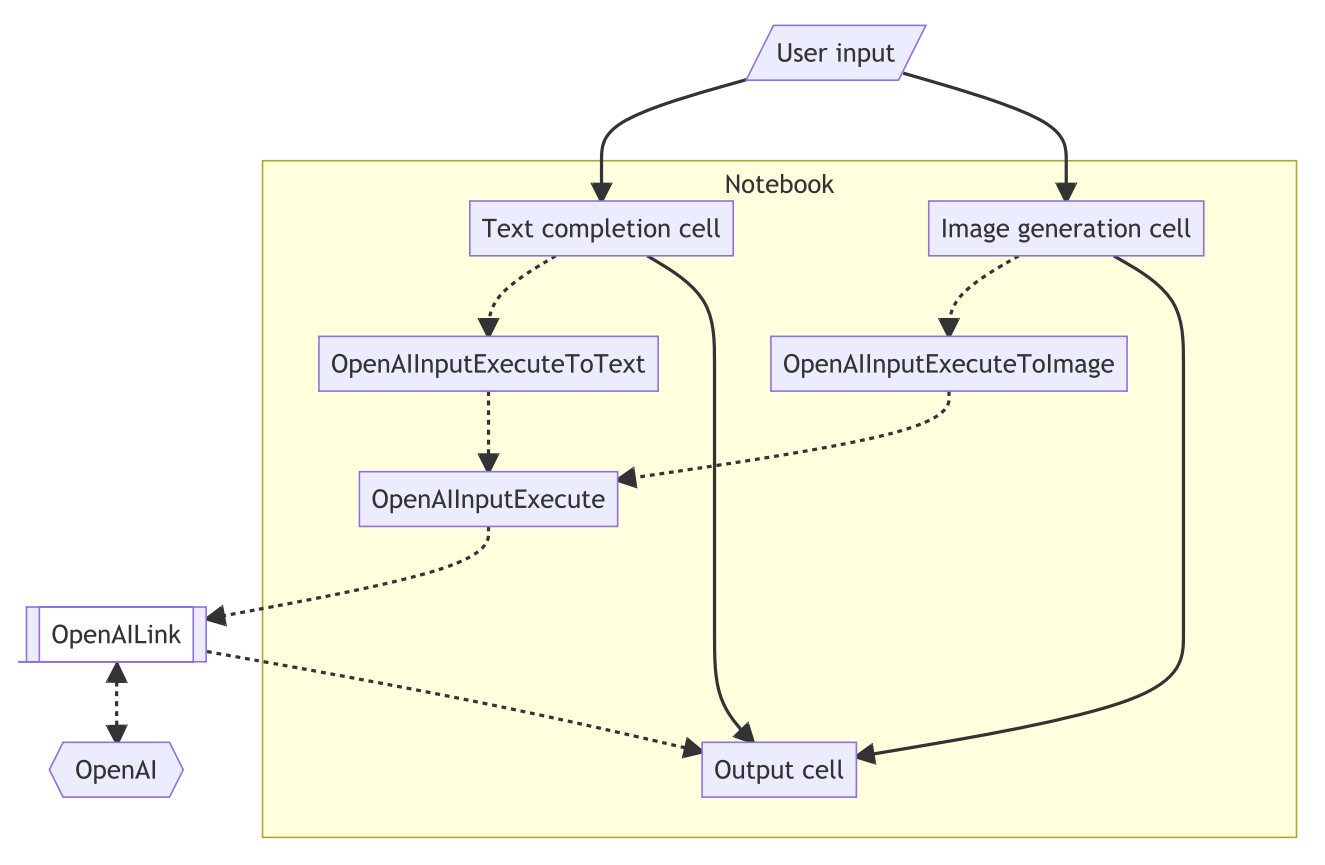
Experiments (WL)
Experiments (WL)
In[]:=
SetOptions[OpenAIInputExecuteToText,Epilog->Identity];
In[]:=
Mathematica code for transforming a list of numbers into their squares
Out[]=
list = {1, 2, 3, 4, 5};squares = list^2;Print[squares](* Output: {1, 4, 9, 16, 25} *)
In[]:=
SetOptions[OpenAIInputExecuteToText,Epilog->CellPrintWL];
In[]:=
Mathematica code for transforming a list of numbers into their squares
In[]:=
list = {1, 2, 3, 4, 5};
squares = Map[#^2 &, list]
(* Output: {1, 4, 9, 16, 25} *)
list = {1, 2, 3, 4, 5};
squares = Map[#^2 &, list]
(* Output: {1, 4, 9, 16, 25} *)
Out[]=
{1,4,9,16,25}
In[]:=
SetOptions[OpenAIInputExecuteToText,Epilog->CellPrintAndRunWL];
In[]:=
Plot the first 100 prime numbers with Mathematica
In[]:=
ListPlot[Prime[Range[100]]]
ListPlot[Prime[Range[100]]]
Out[]=
In[]:=
Numerical integration code in Mathematica for the function, one of the square root of X over the domain, two and 10
In[]:=
NIntegrate[Sqrt[x], {x, 2, 10}]
NIntegrate[Sqrt[x], {x, 2, 10}]
Out[]=
19.1962
Experiments (Python)
Experiments (Python)
In[]:=
plFlowchart
In[]:=
SetOptions[OpenAIInputExecuteToText,Epilog->CellPrintPython];
In[]:=
Generate Python code for iteration over a list
In[]:=
#Example list
my_list = [1, 2, 3, 4, 5]
#Iteration over a list
for item in my_list:
print(item)
#Example list
my_list = [1, 2, 3, 4, 5]
#Iteration over a list
for item in my_list:
print(item)
1
2
3
4
5
In[]:=
Generate Python code for replacing the elements of a list with their squares
In[]:=
# Initial list
list1 = [2, 4, 5, 6]
# Using list comprehension
list2 = [x**2 for x in list1]
# Printing list2
print(list2)
# Output: [4, 16, 25, 36]
# Initial list
list1 = [2, 4, 5, 6]
# Using list comprehension
list2 = [x**2 for x in list1]
# Printing list2
print(list2)
# Output: [4, 16, 25, 36]
[4, 16, 25, 36]
Experiments (Julia)
Experiments (Julia)
In[]:=
SetOptions[OpenAIInputExecuteToText,Epilog->CellPrintJulia];
In[]:=
Generate Julia code for iteration over a list
In[]:=
# Iterate over a list of numbers
list = [1, 2, 3, 4, 5]
for num in list
println(num)
end
# Iterate over a list of numbers
list = [1, 2, 3, 4, 5]
for num in list
println(num)
end
In[]:=
list
Out[]=
{1,2,3,4,5}
In[]:=
Julia code that changes a list of numbers into a list of strings
list_of_numbers = [1, 2, 3, 4]
list_of_strings = [str(num) for num in list_of_numbers]
print(list_of_strings) # ['1', '2', '3', '4']
list_of_numbers = [1, 2, 3, 4]
list_of_strings = [str(num) for num in list_of_numbers]
print(list_of_strings) # ['1', '2', '3', '4']
Experiments (R)
Experiments (R)
In[]:=
SetOptions[OpenAIInputExecuteToText,Epilog->CellPrintR];
In[]:=
Generate R code for iteration over a list
{
# Set up the list
list <- c(1, 2, 3, 4, 5)
# Iterate over the list
for (i in list) {
print(i)
}
}
# Set up the list
list <- c(1, 2, 3, 4, 5)
# Iterate over the list
for (i in list) {
print(i)
}
}
In[]:=
R code that changes a list of numbers into a list of strings
{
list_of_numbers = [1,2,3,4,5]
list_of_strings = [str(num) for num in list_of_numbers]
print(list_of_strings) # ['1', '2', '3', '4', '5']
}
list_of_numbers = [1,2,3,4,5]
list_of_strings = [str(num) for num in list_of_numbers]
print(list_of_strings) # ['1', '2', '3', '4', '5']
}
More examples of code narration
More examples of code narration
Acknowledgments
Acknowledgments
Kuba Podkalicki provided insightful and actionable help for the implementation of notebook stylesheets and interactive features. (Of RakuMode and DSLMode, which were followed while implementing OpenAIMode.)
CITE THIS NOTEBOOK
CITE THIS NOTEBOOK
Code generation demo using paclet OpenAIMode
by Anton Antonov
Wolfram Community, STAFF PICKS, April 10 2023
https://community.wolfram.com/groups/-/m/t/2893906
by Anton Antonov
Wolfram Community, STAFF PICKS, April 10 2023
https://community.wolfram.com/groups/-/m/t/2893906