CITE THIS NOTEBOOK: Wolfram R&D LIVE: Dive into Video Processing by Carlo Giacometti. Wolfram Community FEB 9 2023.
In this talk I will show the state of the Video object in the Wolfram Language as well as all the computational power developed around it in order to create, process or analyze videos.
Video Object
Video Object
The Video object as a first-class citizen in the Wolfram Language.
Create a Video from a remote file:
In[]:=
cars=Video["http://exampledata.wolfram.com/cars.avi"]
Out[]=
In[]:=
Out[]=
Create a Video from a local file:
In[]:=
fish=Video["ExampleData/fish.mp4"]
Out[]=
In[]:=
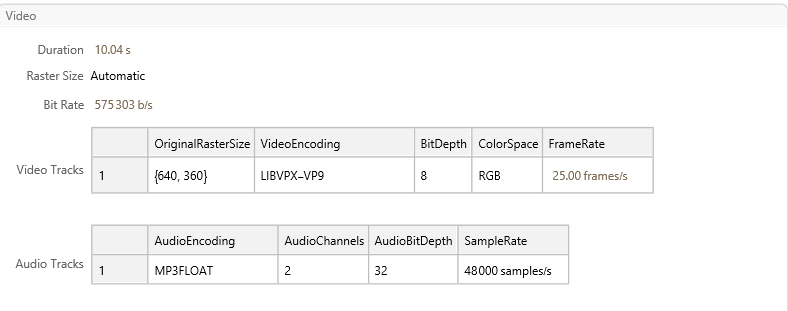
Information[cars=Import["http://exampledata.wolfram.com/cars.avi"]]
In[]:=
Duration[cars=Import["http://exampledata.wolfram.com/cars.avi"]]
Out[]=
In[]:=
ImageDimensions[cars=Import["http://exampledata.wolfram.com/cars.avi"]]
Out[]=
{640,360}
In[]:=
AudioChannels[cars=Import["http://exampledata.wolfram.com/cars.avi"]]
Out[]=
2
Generating Video
Generating Video
From video(s) to video
From video(s) to video
SnippetsVideo
SnippetsVideo
If we know a series of salient moments in a video, we can easily generate a summary of the original video by extracting snippets around the salient times:
In[]:=
v=Video["ExampleData/Caminandes.mp4"];SnippetsVideo[v,{23,40,50}]
Out[]=
GridVideo
GridVideo
You might want to crate a collage of synchronized videos:
In[]:=
videos=Video/@FileNames["*.mp4",FileNameJoin[{NotebookDirectory[],"Inputs"}]]
In[]:=
GridVideo[videos]
It is possible to control the background of the grid and its spacing:
In[]:=
GridVideo[videos,Background->Orange,Spacings->30]
If we want to control the precise position of a video in the final grid, we can input a list of lists of videos, using Missing[] to indicate slots without videos:
In[]:=
GridVideo[Insert[Partition[videos,2],Missing[],{{2,1},{1,2}}]]
OverlayVideo
OverlayVideo
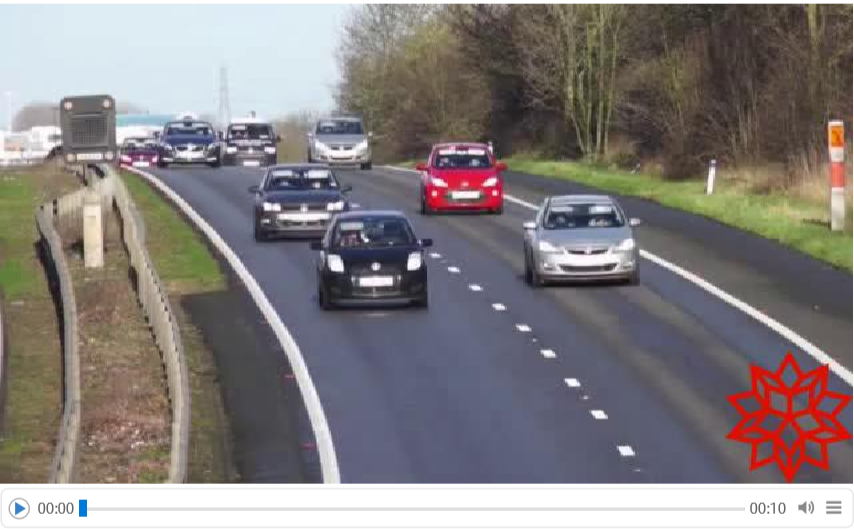
We can overlay multiple videos or images onto each other, like a watermark:
In[]:=
OverlayVideocars,

Out[]=
The overlay can also be a video, that will be synchronized to the background:
The overlay can also be expressed as a function of time:
An aside: common generation options
An aside: common generation options
Encoding
Encoding
GeneratedAssetLocation
GeneratedAssetLocation
RasterSize
RasterSize
Parallelize
Parallelize
Video Generation
Video Generation
SlideShowVideo
SlideShowVideo
Produce a video from a list of images:
Control the duration of each image individually:
Use a TimeSeries:
AnimationVideo
AnimationVideo
One way to create animations that has been in the system for a while is Manipulate. With AnimationVideo we wanted to create something that felt familiar:
The syntax follows the conventions of Manipulate (and Table, for that matter!):
AnimationVideo will work with expressions that evaluate to Images, but also 2 and 3D Graphics:
As most other video generation functions, Parallelize can be used to speed up the computation:
FrameListVideo & FrameTableVideo
FrameListVideo & FrameTableVideo
FrameListVideo is a very basic utility function that pumps a list of images into a video:
An alternative that doesn’t require holding all the data in memory lives in the Video` context:
TourVideo
TourVideo
Pan & zoom on a large image
Pan & zoom on a large image
Spiral tour
Spiral tour
Visit everyone
Visit everyone
From webcams
From webcams
Capture from any connected camera:
From screens
From screens
Video Editing
Video Editing
Temporal Editing
Temporal Editing
Trim, split, join delete in the time axis:
Image Editing
Image Editing
Crop, resize, reflect, etc using image functions:
Make the video darker, add effects:
Time Varying Editing
Time Varying Editing
Audio Editing & Processing
Audio Editing & Processing
Generic Functions
Generic Functions
VideoFrameMap
VideoFrameMap
VideoMapTimeSeries
VideoMapTimeSeries
VideoMapList
VideoMapList
Some more fun
Some more fun
Adding a bouncy beach ball to a beach video
Adding a bouncy beach ball to a beach video
Tracing a trajectory of a detected object
Tracing a trajectory of a detected object
Video of creating hand drawn images
Video of creating hand drawn images
Utility functions
Utility functions
Draw the car
Draw the car
Machine Learning for Videos
Machine Learning for Videos
Utility function
Utility function
Example
Example
Video can be found here: https://www.pexels.com/video/brown-dog-running-free-2796077/
Some examples from users
Some examples from users
From the Wolfram Community
From the Wolfram Community
From the WFR
From the WFR
Advanced usages
Advanced usages
All the video functionality uses ffmpeg as backend through the FFmpegTools paclet
Most of the functions are documented (in a very basic manner) and accessible by all users:
There is a shortcut to use some of the extensive list of filters from ffmpeg (https://ffmpeg.org/ffmpeg-filters.html ) by using VideoFrameMap:
Thank You!
Thank You!