In[]:=
?MapApply
Out[]=
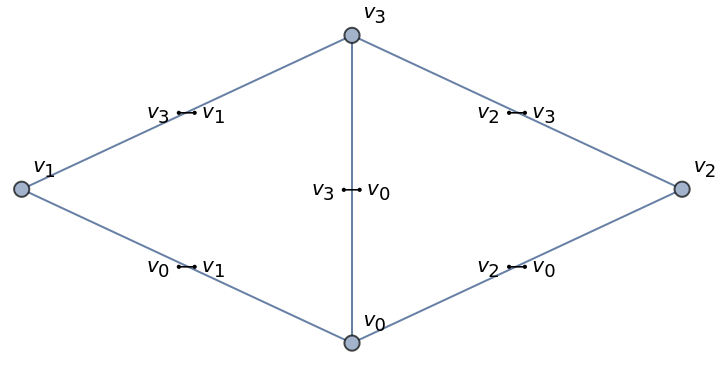
I wanted to share some uses of MapApply that I like. When I’m entering a graph, I can do it this way.
In[]:=
UndirectedEdge@@@{{,},{,},{,},{,},{,}}
v
2
v
3
v
2
v
0
v
3
v
0
v
0
v
1
v
3
v
1
Out[]=
{,,,,}
v
2
v
3
v
2
v
0
v
3
v
0
v
0
v
1
v
3
v
1
In[]:=
graph1a=Graph[{,,,},UndirectedEdge@@@{{,},{,},{,},{,},{,}}]
v
2
v
3
v
0
v
1
v
2
v
3
v
2
v
0
v
3
v
0
v
0
v
1
v
3
v
1
Out[]=
I would like to share one more example.
In[]:=
CenterDot@@Superscript@@@FactorInteger[46318231]
Out[]=
1
5849
1
7919
For details, please see Ed Pegg Jr’s Resource Function FormatFactorization’s notebook:
In[]:=
ResourceFunction["FormatFactorization"][46318231]
Out[]=
5849×7919
To do this, hover over and click i to open the Wolfram Function Repository page and the notebook icon to open the definition notebook of Format Factorization.

Add a frame:
In[]:=
Framed[CenterDot@@Superscript@@@FactorInteger[15000007]]
Out[]=
Use a cross instead of a dot to indicate multiplication:
In[]:=
Framed[Cross@@Superscript@@@FactorInteger[15000007]]
Out[]=
Here is what is happening step by step:
In[]:=
FactorInteger[1234567891011]
Out[]=
{{3,1},{7,1},{13,1},{67,1},{107,1},{630803,1}}
In[]:=
Superscript@@@FactorInteger[1234567891011]
Out[]=
{,,,,,}
1
3
1
7
1
13
1
67
1
107
1
630803
In[]:=
Cross@@Superscript@@@FactorInteger[1234567891011]
Out[]=
1
3
1
7
1
13
1
67
1
107
1
630803
We can use other symbols as well:
In[]:=
CircleDot@@Superscript@@@FactorInteger[1234567891011]
Out[]=
1
3
1
7
1
13
1
67
1
107
1
630803
In[]:=
CirclePlus@@Superscript@@@FactorInteger[1234567891011]
Out[]=
1
3
1
7
1
13
1
67
1
107
1
630803
In[]:=
CircleTimes@@Superscript@@@FactorInteger[1234567891011]
Out[]=
1
3
1
7
1
13
1
67
1
107
1
630803
If you have an interesting example of @@@ you would like to share and mention and comment, please add your example. There are more details about @@@ in Elementary Introduction to the Wolfram Language (EIWL) that are new to the 3rd edition published recently. I encourage you to go check them out. The index does not mention MapApply, but the index does indicate Apply/@@ is on page 216. For more details, please visit https://www.wolfram.com/language/elementary-introduction/3rd-ed/33-expressions-and-their-structure.html#p-216.