ABSTRACT (original article): It has been discussed for decades whether species occur most frequently at their geographic center, and more recently at their environmental niches’ center. The aim here is to analyze for each environmental gradient separately the ecological niche of 12 Mexican tree species and 16 abiotic environmental gradients, in the form of statistical probability density functions. Is a symmetrically positioned center always possible by searching for additional data? For each species-variable combination, the occurrences along an environmental gradient were grouped in histograms. Logistic regression was used to fit a polynomial equation, whose degree depended on the number of significantly different bins. A highest-probability interval on the gradient was determined, where 25% of the individuals were found with the highest probability. The relative distance from the center (midpoint) of the variable’s range was calculated, and the feasibility of expanding the encountered interval on the environmental gradient for symmetry was analyzed. For 183 species-variable combinations, in only 22 cases (12.0%) did the highest-probability intervals include the midpoint of the environmental gradient. Furthermore, for 55% of the species-variable combinations, the truncation of the environmental gradients for species makes it impossible to expand the measured range with additional data for the shorter tail. For example, precipitation cannot be negative. This truncation frequently causes asymmetry around the highest-probability intervals. In those cases, the classical environmental center-periphery hypothesis turns out to be wrong, whereas in the remaining cases it could apply. This has implications for biogeographical assumptions, such as where to identify the best areas for conservation or how to predict the effects of climate change. We propose a new conditioned environmental center-periphery hypothesis: “On an environmental gradient, a given species is able to cover a certain range. For environmental gradients, where natural truncation of the environmental gradient is not limiting, the highest probability of occurrence is found away from the range’s endpoints, tending towards its midpoint.” CITATION (original article): Antúnez, P., & M. Ricker. The conditioned environmental center-periphery hypothesis of biogeography: statistical evidence from tree species. Ecology and Evolution 15: e70934 (13 + 36 pages with appendices). https://doi.org/10.1002/ece3.70934
Introduction
Introduction
The algorithm presented here covers only the aspect to determine the “highest-probability interval” on an environmental gradient, where 25% (or another percentage) of the individuals were found with the highest probability. More generally, this interval covers the proportional area around the mode in a probability density function. There are three input elements:
a) A function, which in our case is a logistic function of the form 1/(1 + Exp[-term]), with “term” representing a polynomial. However, the algorithm below works for any function that can be integrated numerically.
b) The left and right x-limits that are to be applied to the function.
c) The desired proportion of integrated area under the function around the mode (0.25 or 25% in our article).
The following is our initial example input:
In[]:=
term=-28.6738+11.1907x-1.64558x^2+0.11191x^3-0.00366106x^4+0.0000462881x^5;functionUsed=1/(1+Exp[-term])
Out[]=
1
1+
28.6738-11.1907x+1.64558-0.11191+0.00366106-0.0000462881
2
x
3
x
4
x
5
x
In[]:=
leftLimit=3.;rightLimit=25.5;areaAroundMode=0.25;
Initial explanations:
Initial explanations:
Here is a graph of “functionUsed” between “leftLimit” and “rightLimit”, and the mode is calculated to be at 7.3455:
In[]:=
Plot[functionUsed,{x,leftLimit,rightLimit},PlotStyle->Red,ImageSize->300]
Out[]=
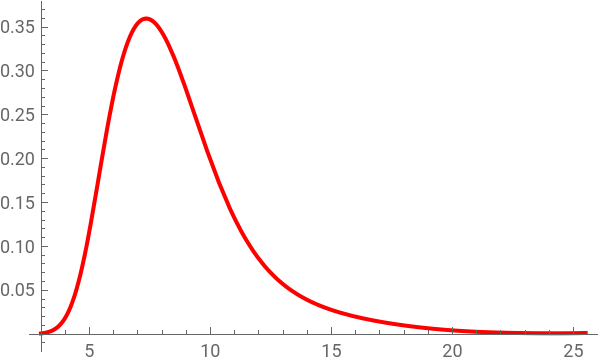
In[]:=
mode=NMaximize[{functionUsed,leftLimit<=x<=rightLimit},x][[2,1,2]]
Out[]=
7.3455
In our case, the integral cannot be solved in form of an explicit function.
In[]:=
Integrate[functionUsed,x]
Out[]=
x
1
1+
28.6738-11.1907x+1.64558-0.11191+0.00366106-0.0000462881
2
x
3
x
4
x
5
x
In order to avoid a interpolating simulation function with a polynomial, our approach differs from the one described in our article, in that we use here a search algorithm with numerical integration.
In order to interpret areas under the curve as cumulative probabilities, we want “functionUsed” to represent a statistical probability density function. However, currently the integral over its domain is not 1, as it has to be in a proper probability density function:
In order to interpret areas under the curve as cumulative probabilities, we want “functionUsed” to represent a statistical probability density function. However, currently the integral over its domain is not 1, as it has to be in a proper probability density function:
In[]:=
areaUnderFunction=NIntegrate[functionUsed,{x,leftLimit,rightLimit}]
Out[]=
1.9869
Dividing “functionUsed” by the “areaUnderFunction” value 1.9869 solves that problem, without affecting the shape of the function. This can be shown with a simplified symbolic function:
In[]:=
symbolicFunction=;
1
1+
-(b0+b1*x+b2*)
2
x
The function is integrated to a desired x-value, divided by the “areaUnderFunction” value, and then the derivative is taken to get the new probability density function. The result is conveniently the original sample function divided by the “areaUnderFunction” value:
In[]:=
D[Integrate[symbolicFunction,{x,leftX,xValue},GenerateConditions->False]/areaUnderSampleFunction,xValue]
Out[]=
1
areaUnderSampleFunction1+
-b0-b1xValue-b2
2
xValue
The new function for our example, corresponding to a probability density function (“pdf”), becomes:
In[]:=
pdfFunctionUsed=functionUsed/areaUnderFunction
Out[]=
0.503297
1+
28.6738-11.1907x+1.64558-0.11191+0.00366106-0.0000462881
2
x
3
x
4
x
5
x
The operation does only affect the scale on the y-axis, which looses its original meaning (here the probability to encounter an individual at the corresponding position on the environmental gradient). Here is a plot of the adjusted function for our example:
In[]:=
Plot[pdfFunctionUsed,{x,leftLimit,rightLimit},PlotStyle->Red,ImageSize->300]
Out[]=
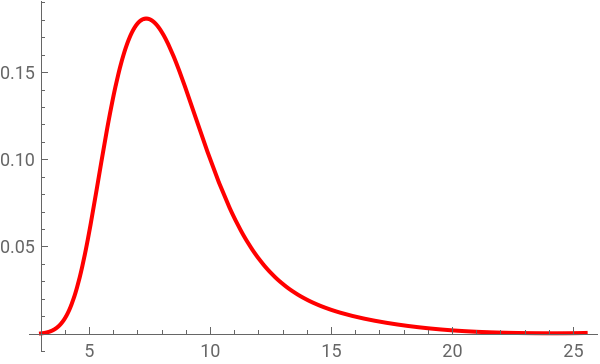
Integration from the left to the right limit results now exactly in 1:
In[]:=
NIntegrate[pdfFunctionUsed,{x,leftLimit,rightLimit}]
Out[]=
1.
One can now calculate the probability that an individual is found on the environmental gradient to the left of the mode:
In[]:=
areaToMode=NIntegrate[pdfFunctionUsed,{x,leftLimit,mode}]
Out[]=
0.356117
Two similar Functions for the algorithm
Two similar Functions for the algorithm
The first of the following two Functions searches iteratively the “leftBound” of the area of 25% (or another percentage) around the mode, and the second one the “rightBound”, basically representing a root finding algorithm, but without using Mathematica’s FindRoot function (a fast algorithm with the FindRoot function would be possible even with integrals that can only be calculated numerically, using SetDelayed, but it would hide any of the following didactical parts how to find quickly a solution). Each function repeats variations of the following code. Different x-values along the environmental gradient are tried with numerical integration as possible solutions, in the first Function for the “leftBound”. As an initial step size for the search, the range from the left to the right limit of the function is divided into 100 intervals (numbers that are chosen to be reasonable though arbitrary are presented in orange).
In[]:=
stepSize=(rightLimit-leftLimit)/100
Out[]=
0.225
The counting integer variable “i” is initialized as 1, and the integrated area from the left limit to the tested x-value is initialized to be larger than the “areaToLeftBound”; in the general case with symmetric areas of 12.5% (or another percentage) around the mode, it is calculated as
In[]:=
areaToLeftBound=areaToMode-areaAroundMode/2
Out[]=
0.231117
For the left bound, the search is first leftwards from the mode in steps of i*stepSize, until the calculated area is smaller than the “areaToLeftBound”. With i++, in each loop “i” augments by 1. The condition (i==100) is only for caution to avoid an endless loop, if something goes wrong:
In[]:=
i=1;area=areaToLeftBound+0.1;Until[(area<areaToLeftBound)||(i==100),tryX=mode-i*stepSize;area=areaToMode+NIntegrate[pdfFunctionUsed,{x,mode,tryX}];i++];tryX
Out[]=
6.4455
Next, the search goes rightwards, with a step size ten times smaller, until the calculated area is again larger than “areaToLeftBound”, and so on, until the step size becomes sufficiently small (here ≤).
-6
10
findLeftBoundFunction=Function[{areaToMode,areaToLeftBound,pdfFunctionUsed,leftLimit,mode,rightLimit},Module[{area,i,j,stepSize,tryX,tryXnew},stepSize=(rightLimit-leftLimit)/100;i=1;area=areaToLeftBound+0.1;Until[(area<areaToLeftBound)||(i==100),tryX=mode-i*stepSize;area=areaToMode+NIntegrate[pdfFunctionUsed,{x,mode,tryX}];i++];tryXnew=tryX;j=1;Until[(stepSize<=10^-6)||(j>20),tryX=tryXnew;stepSize=stepSize/10;i=1;Until[(area>areaToLeftBound)||(i==100),tryXnew=tryX+i*stepSize;area=areaToMode+NIntegrate[pdfFunctionUsed,{x,mode,tryXnew}];i++];tryX=tryXnew;stepSize=stepSize/10;i=1;Until[(area<areaToLeftBound)||(i==100),tryXnew=tryX-i*stepSize;area=areaToMode+NIntegrate[pdfFunctionUsed,{x,mode,tryXnew}];i++];j++];{tryXnew,stepSize,areaToMode+NIntegrate[pdfFunctionUsed,{x,mode,tryXnew}]}]];
For employing the two functions to determine the highest-probability interval, there are three possible cases to be distinguished:
1) The mode is sufficiently centered in the range from the left to the right limit, so that half of the highest-probability interval can be symmetrically on each side of the mode.
2) The mode is too far to the left, or even on the left limit, so that less than half of the highest-probability interval is on the left of the mode, and what is missing on the left has to be added on the right.
3) The mode is too far to the right, or even on the right limit, so that less than half of the highest-probability interval is on the right of the mode, and what is missing on the right has to be added on the left.
1) The mode is sufficiently centered in the range from the left to the right limit, so that half of the highest-probability interval can be symmetrically on each side of the mode.
2) The mode is too far to the left, or even on the left limit, so that less than half of the highest-probability interval is on the left of the mode, and what is missing on the left has to be added on the right.
3) The mode is too far to the right, or even on the right limit, so that less than half of the highest-probability interval is on the right of the mode, and what is missing on the right has to be added on the left.
The “resultForBounds” present the “leftBound” and the “rightBound”, together with the final step sizes and the calculated areas to the left or right bound, respectively:
The result can be checked by calculating the integral from the resulting left bound to the right bound, which should be equal to the proportion that was given as input:
Following, the overall results are presented in two tables and a graph. The graph and result table use again the original “functionUsed”, where the area under the curve is not 1, in order to return to our original problem. For showing a relative area of the total area under the curve, the absolute value of the total curve does not matter.
In the last section, the whole algorithm is packed into a single Function, in order to easily get results for other input values. Subsequently, the cases of the mode being close to the left limit or close to the right limit are shown.
The whole algorithm in a single Function
The whole algorithm in a single Function
First, the “proportionalAreaAroundModeFunction” is used to confirm the original input data:
Next, the case where the mode is close to the left limit, is demonstrated with the same input function:
Finally, the case where the mode is close to the right limit, is demonstrated with the same input function:
CITE THIS NOTEBOOK
CITE THIS NOTEBOOK
The conditioned environmental center-periphery hypothesis of biogeography: statistical evidence from tree species
by Pablo Antúnez & Martin Ricker
Wolfram Community, STAFF PICKS, September 23, 2026
https://community.wolfram.com/t/28154
by Pablo Antúnez & Martin Ricker
Wolfram Community, STAFF PICKS, September 23, 2026
https://community.wolfram.com/t/28154