Please read the first part to find FEN parser usage. Source code for both parts are attached in the Utility section at the bottom for your convenience.
Communicate with StockFish 12
Communicate with StockFish 12
There are several breakthroughs in the open source chess engine world. Lots of good stuff are already available in these engine through years of development
◼
4-layer based on mixture of supervised learning and reinforced learning neural-network (No need to use GPU acceleration)
NNUE
◼
Classical methods like alpha-beta pruning
◼
Endgame hit
tablebase
In addition to chess play analysis, I believe anyone reads publications and source code will learn a lot about advanced topics in AI and computer science. It would be nice to bolstered WL in chess world by the engine running at backend. In fact you do need some GUI app for these engine because they are usually command-interface software only.
So far I have only tried the function in macOS 11 Big Sur on my 2015 Intel MBP 16 GB RAM. I use homebrew to manage open source packages and the configuration looks like below
% brew -v Homebrew 2.5.11Homebrew/homebrew-core (git revision f6767; last commit 2020-11-22)Homebrew/homebrew-cask (git revision b0d0a; last commit 2020-11-22)% brew install stockfish% brew info stockfishstockfish: stable 12 (bottled), HEADStrong open-source chess enginehttps://stockfishchess.org//usr/local/Cellar/stockfish/12 (6 files, 20.4MB) * Poured from bottle on 2020-11-22 at 14:11:34From: https://github.com/Homebrew/homebrew-core/blob/HEAD/Formula/stockfish.rbLicense: GPL-3.0-only==> Options--HEAD Install HEAD version==> Analyticsinstall: 461 (30 days), 1,106 (90 days), 1,613 (365 days)install-on-request: 462 (30 days), 1,099 (90 days), 1,596 (365 days)build-error: 0 (30 days)
I read this source code to get some rough idea about language binding method. The constructor of the Stockfish class shows stdio pipe is sufficient for me to call the engine directly from WL. I haven’t create structured functions about them, so only bare-bone pipe communication is demonstrated:
Initialization
Initialization
◼
Start the engine runtime from the default installation path for stockfish via homebrew
In[]:=
process=StartProcess["/usr/local/bin/stockfish"]
Out[]=
ProcessObject

◼
Get banner
In[]:=
ReadString[process,EndOfBuffer]//StringTrim
Out[]=
Stockfish 12 by the Stockfish developers (see AUTHORS file)
◼
UCI chess game initialization
In[]:=
WriteLine[process,"ucinewgame"];WriteLine[process,"setoption name Ponder value false"];WriteLine[process,"isready"];
If nothing wrong, it returns readyok
In[]:=
ReadString[process,EndOfBuffer]//StringTrim
Out[]=
readyok
At this moment all pieces are at their initial position
In[]:=
WriteLine[process,"d"];status=ReadString[process,EndOfBuffer];
In[]:=
GetFENFromStockFish[status]
Out[]=
rnbqkbnr/pppppppp/8/8/8/8/PPPPPPPP/RNBQKBNR w KQkq - 0 1
In[]:=
ChessStatusFromFEN[%]
Out[]=
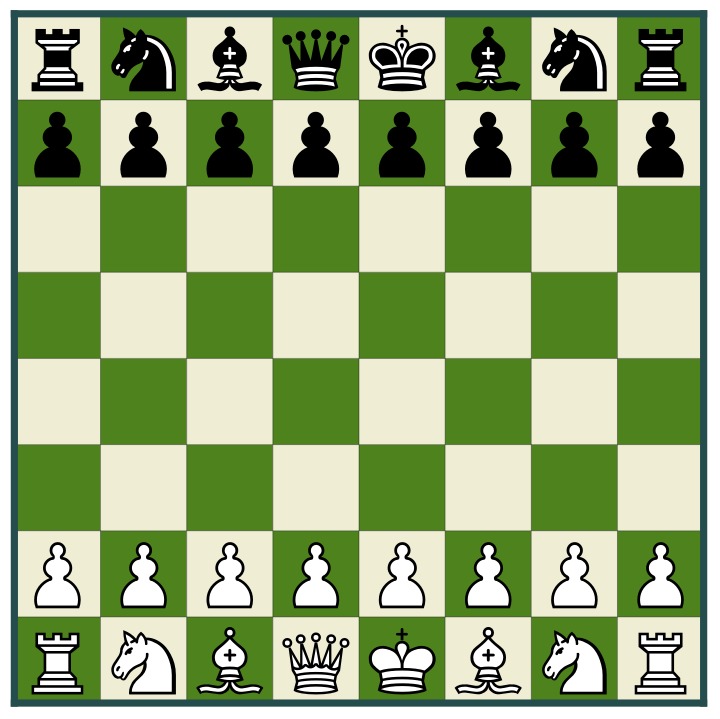
Move Analysis
Move Analysis
The commands and options available for StockFish is available at this link under “GUI to engine” section. For example I want to analyze our sample game in the first section with depth 20 after move Qd3 for white. I haven’t implement converter here between position and PGN
In[]:=
command=StringTemplate["position fen `FEN` moves `move`"][<|"FEN"fen,"move""d2d3"|>]
Out[]=
position fen 1r1qr1k1/1b3p1p/1p1p1bp1/p1p5/P1n1P3/2N3PP/1PPQ1PBN/1R2R1K1 w - - 4 19 moves d2d3
Send command to engine
In[]:=
WriteLine[process,command];
Now lets check the new status
In[]:=
WriteLine[process,"d"];status=ReadString[process,EndOfBuffer];ChessStatusFromFEN[GetFENFromStockFish[status]]
Out[]=
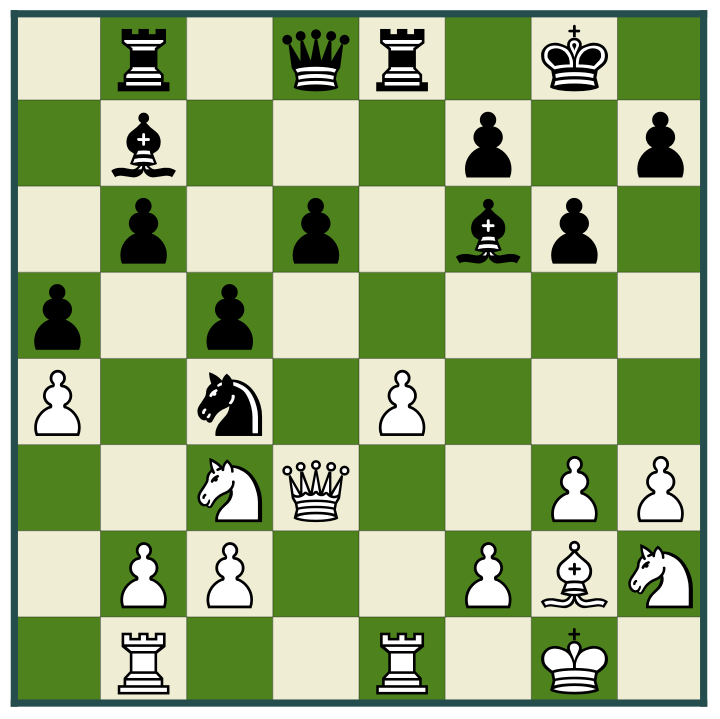
Compare to the original status and I can tell the white queen ascend one rank
In[]:=
ChessStatusFromFEN[fen]
Out[]=
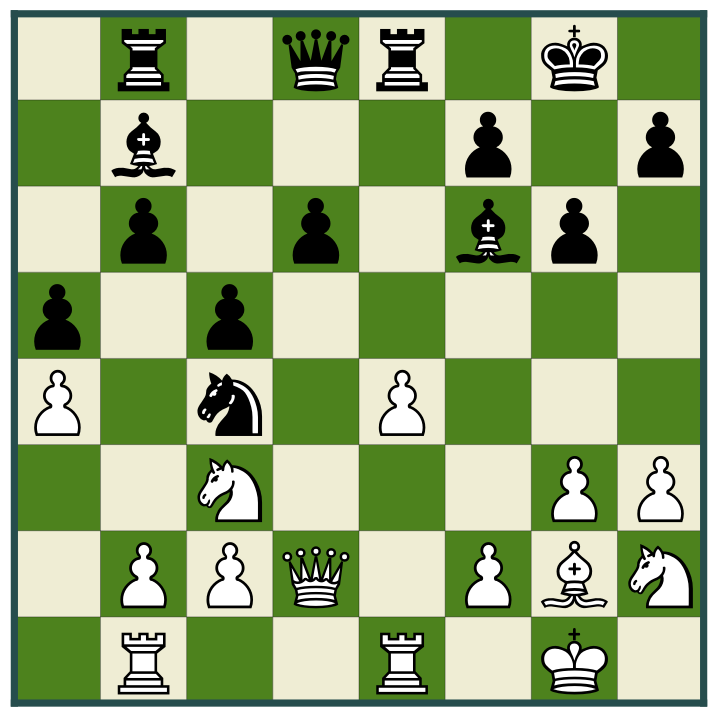
Say I want to search the best counter move after queen’s ascension. I need to use the “go” command. To save time I set depth to 20
In[]:=
WriteLine[process,"go depth 20"];
The search stop quickly with this setting. Again, use ReadString to get full print of log from buffer:
In[]:=
ReadString[process,EndOfBuffer]
Out[]=
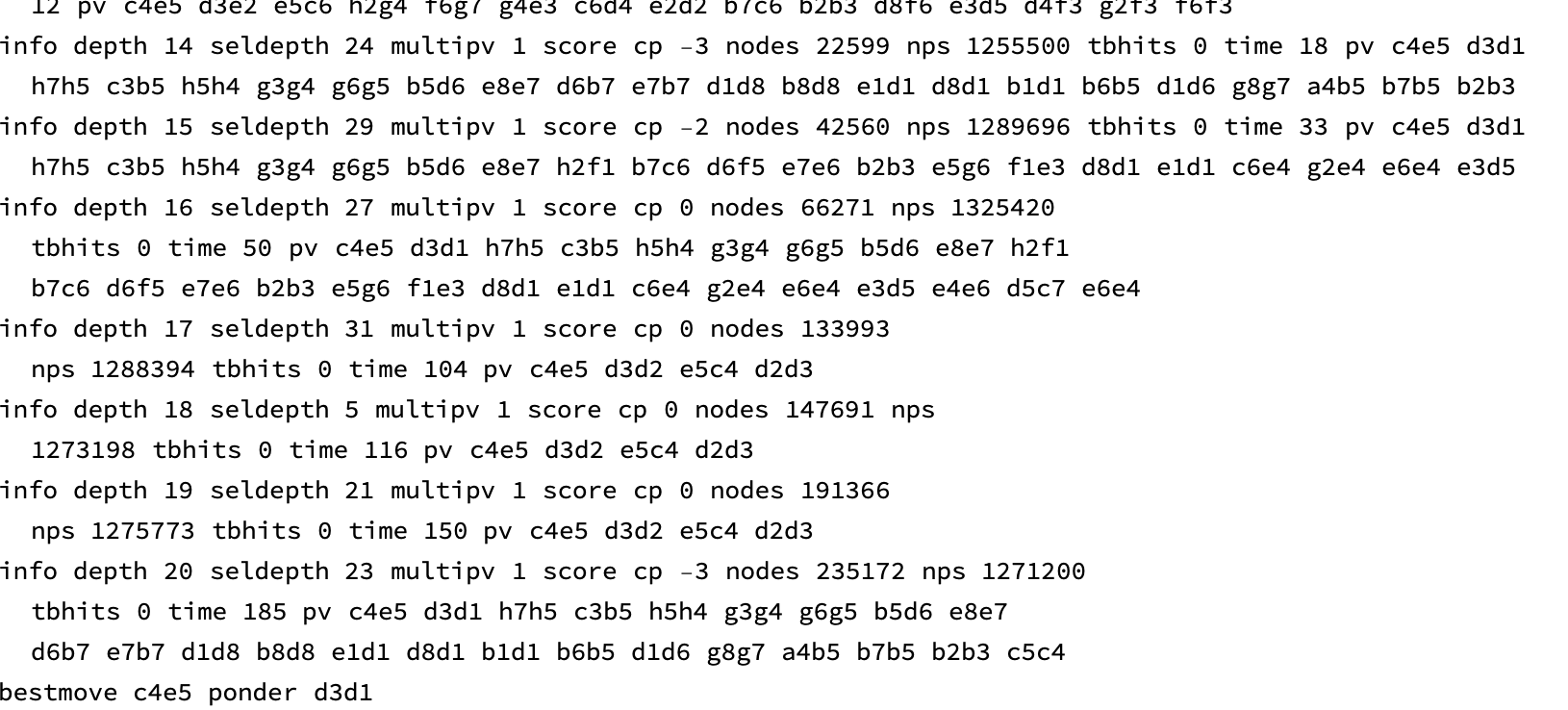
There are many things going on in the log. At this moment I am only interested in the end of the output. it says “bestmove c4e5 ponder d3d1”. This says the best move for black is move black knight on c4 to the e5. The counter move by white is descend queen to the first rank in the same file 3 (column 1). This is just an example with shallow search not the necessarily the best move. I think this case may be from the result of the game is draw.
Status Evaluation Heuristic
Status Evaluation Heuristic
There is also a command to create evaluation table after NNUE computes material for the current status with piece and position value.
Retrieve the evaluation table from stdio
In utility I have a simple parsing function to format the table. The meaning and calculation for each index below is found on https://www.chessprogramming.org/Stockfish#Evaluation
Stop chess engine
Stop chess engine
◼
To halt a long search after “go” command and still want the engine to run
◼
To completely terminate the runtime use the internal command of Stockfish
◼
To completely terminate the runtime use WL/OS command
Summary
Summary
◼
Use Stockfish UCI protocol and stdio pipe to link Wolfram language desktop product and the chess engine
◼
Use StartProcess/WriteLine/ReadString as streaming interface and core of the communication from Wolfram product side
◼
Acknowledgement to the following repo’s for parser, binding details and chess engine manual
Utility
Utility
Evaluation Table Parsing
Evaluation Table Parsing