Recently I watched an interesting talk about fonts design called Chinese All Over Chinese from ATypI All Over 2020. In it, the presenter demonstrated super-composing hundreds of Chinese characters from the same font to bring out common structures in the same squarish character box.
Note the original talk is made available by the presenter on video sharing website Bilibili. Although the website is in Chinese only, the talk itself is in English, so people interested in it can find it here.
Afterwards, I began to wonder how it may be possible to classify symbols based on how they look like. Taking Chinese characters for instance, almost all are monospaced, and consist of horizontal, vertical and 45° strokes (the “bi-hua”, in Chinese 笔画):
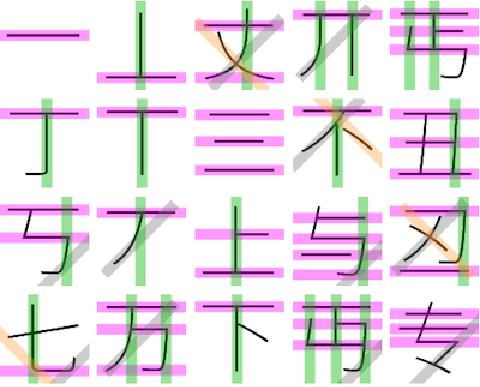
So my plan is to extract the positioning of all those bi-hua in each character, and then perform some sort of clustering. Onwards with the first task!
As usual some helper functions:
ClearAll[pipe,branch,branchSeq]pipe=RightComposition;branch=Through@*{##}&;branchSeq=pipe[branch[##],Apply[Sequence]]&;ClearAll[λ,ppImg](*assumeIusemyfirstmonitor:*)λ=1/First[Lookup["Scale"][SystemInformation["Devices","ConnectedDisplays"]]];ppImg[magF_:1]:=FunctionModule{nbMgfy=AbsoluteCurrentValue[EvaluationNotebook[],Magnification],$width=Part[ImageDimensions@#,1]},Image#,ImageSize->
magFλ$width
nbMgfy
charPage=Module[{fsize=50,width=64,height=64},16^^4E00-1+Range[widthheight]//pipe[FromCharacterCode[#,"Unicode"]&,Characters,Partition[#,width]&,Grid[#,BackgroundBlack,Spacings{0,0},ItemSize{1.5,1.2},Alignment{Center,Center},FrameAll,FrameStyleDirective[Red,AbsoluteThickness[3λ]]]&,Style[#,White,fsize,FontFamily"Source Han Sans CN",FontWeight"ExtraLight"]&,Rasterize[#,BackgroundBlack]&]];chargrid=charPage//ColorDistance[#,Red]&//Image[#,"Byte"]&//Sign//Erosion[#,5]&;lmat=chargrid//MorphologicalComponents[#,Method"BoundingBox",CornerNeighborsFalse]&;chars=ComponentMeasurements[{charPage//ColorConvert[#,"Grayscale"]&,lmat},"MaskedImage",#Width>10&]//Values//Map@RemoveAlphaChannel;chars=Module[{size=chars//Map@ImageDimensions//Max},ImageCrop[#,{size,size}]&/@chars];
chars//Partition[#,64]&//ImageAssemble
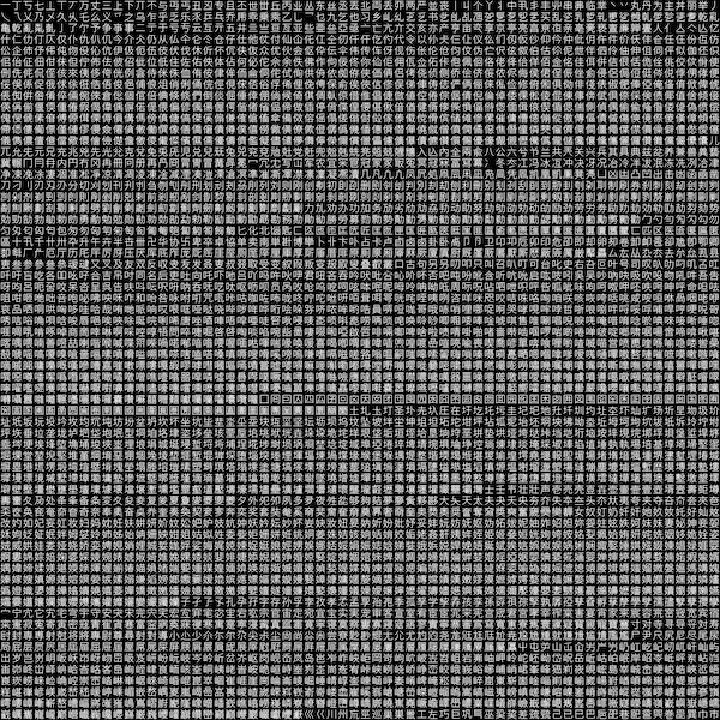
For rasterized bitmap of a single character, I was glad to find that Wolfram Language already has built-in functions like Radon and InverseRadon for exactly what I need. To illustrate:
demochar=chars〚668〛//ppImg[]

demochar//pipe[Radon[#,{4,501}]&,Echo[#,"result of Radon",pipe[ImageData,Iconize[#,"Radon"]&]]&,pipe[ImageData,Transpose,Map[Normalize[#,Norm[#,1]&]&],Ramp[#-.005]&,Transpose,Image],InverseRadon[#,93,4,MethodNone]&,ImageAdjust,&,ppImg[]]
.5
#
»
result of Radon
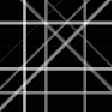
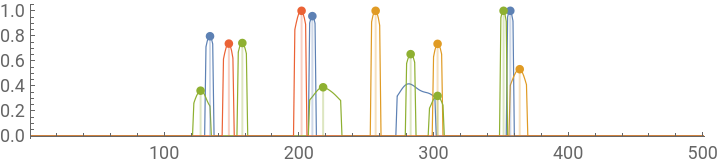
Or, instead of an image from InverseRadon, FindPeaks and LocalImageAdjust (an undocumented function working like a continuous version of LocalAdaptiveBinarize) can be used to extract parameters of projecting lines from result of Radon:
ClearAll[localEnhance]localEnhance=(Quiet[ImageStitch[];];Image`RegistrationDump`LocalImageAdjust);
-3
10
1
5


Thus a “vector-graphic” version of inverse Radon transform can be performed:
Module{char=demochar,size,dirRes=4,dRes,radon,dim,d,idxTF},size=ImageDimensions@char;dRes=Norm[size]//N//2Ceiling[#]&;radon=char//pipe[Radon[#,{dirRes,dRes}]&,ImageData,Transpose,Map@pipe[GaussianFilter[#,2]&,#*MaxDetect[#,.005]&,pipe[Image[{#}]&,localEnhance[#,200]&,ImageData,First,Rescale],FindPeaks[#,0,5,0.3]&],MapIndexed[Round[{#2〚1〛,#1〚1〛}]->#1〚2〛&,#,{2}]&,Flatten,SparseArray[#,{dirRes,dRes},0]&,Normal,Map[Rescale]];d=size1;dim=radon//Dimensions;idxTF=pipeRescalingTransform{{1,dim〚1〛},{1,dim〚2〛}},Subdivide-,,dim1{1,-2},{1,-1},Transpose[#,{2,3,1}]&,Apply@branch#2Exp[I#1]+(1+I)&,IExp[I#1]&;radon//pipeMapIndexed[#2&,#,{2}]&,N,idxTF,Prepend[radon],MapThreadFunction{intense,p0,dir},Ifintense==0.,{},p0+dir,p0-dir//ReIm//Line,#,2&,{Thickness[.04],Opacity[.4],{{RGBColor[1,0,1],GrayLevel[0.5],RGBColor[0.,0.7,0.],RGBColor[1.,0.65,0.3]},#}}&,Flatten,Graphics[#,ImageSizeλsize,FrameTrue,FrameTicksNone]&,branch[Identity,HighlightImage[char//ColorNegate//ppImg[],#]&],Row
-2
10
π
2
π
2
d
2
d
2.
d
2
d
2
8 more random examples:
Computing Radon transform for all 4096 characters is reasonably fast (using “Hough” method could make it even faster):
The inverse Radon transform is very fast as well:
For my next task, to keep things simple, I decided to focus only on the horizontal and vertical strokes. Also I only selected the first 200 characters so the diagram won’t grow too huge:
Using a simple distance defined by vector Dot, a hierarchic tree of similarity can be visualized as a Dendrogram:
radonDistM〚1〛 corresponds to horizontal strokes:
Or more intuitively:
radonDistM〚3〛 corresponds to vertical strokes:
Very good so far. Now, we are ready to cluster the characters along 2 dimensions: similarity in horizontal direction, and similarity in vertical direction. For each dimension. As the two directions are perpendicular to each other, one simple solution is to intertwine the two dendrograms like weaving a piece of cloth.
Now indeed I can see clusters of characters based on their similarity!
Some of the clusters in above diagram may look unintuitive or simply wrong in terms of stroke structure, but I’m sure it can be greatly improved if I choose a more sensible distance function. It would also be very interesting to try the similar analysis on other symbol set, like mathematical symbols, with informations more than straight strokes, like circular structures, crosses, etc.