Using the bathtub model and cellular automata (CA) approach, the project models the changing water levels of a region, and highlights which areas will become flooded.
Introduction
Introduction
Flooding in urban areas may cause severe damage to infrastructure and uproot communities. Cities by the ocean also regularly face coastal flooding. Accurate modeling of water flow is crucial for various applications, such as urban planning, flood prediction, and water resource management. With increased flood rates around the world, I decided to create a flood inundation model. This project was inspired by my mom’s work in Blue Acres in NJDEP. Her team worked on buying out properties susceptible to flooding, and I thought that a water flow model would provide valuable information. In this computation essay, I model water runoff using two different approaches: a bathtub inundation model and a cellular automata model. I want to visualize regions that will get the most water during heavy rainfall. The model assumes uniform rainfall, and hydrological losses are not considered. By incorporating the bathtub model into our framework, we ensure that water is distributed uniformly over the simulated area, facilitating an initial estimation of water accumulation and infiltration. Using a weighted cellular automata model enables a more realistic representation of water flow dynamics, accounting for the physical limitations on water velocity through the use Manning’s formula and the critical flow equation.
Locations
Locations
I ran the model over the following locations:
◼
Atlantic City, NJ
◼
Delaware River(PA & NJ)
◼
Princeton, NJ
Elevation Bathtub Model
Elevation Bathtub Model
To start, I used the simple bathtub inundation model to display the purpose of the project, which is to show where water will food when the water level is raised. The model assumes that the areas will be inundated if their elevation is below the projected water level.
Atlantic City
Atlantic City
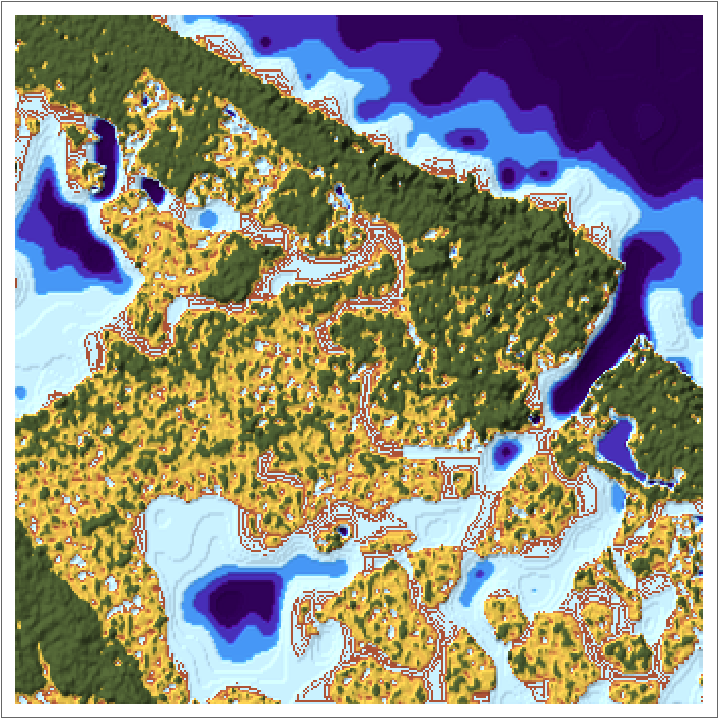
Atlantic City is a coastal resort city in New Jersey, know for its many casinos, wide beaches, and Boardwalk. It is frequently flooded by the Atlantic Ocean, especially with the ocean rising at faster rates in the future.
We access Wolfram' s GeoElevationData for Atlantic City, that is stored in a 2 D Quantity Array :
In[]:=
data=GeoElevationData,GeoRange,GeoProjectionAutomatic;
Here, we created a visualization that allows you to manipulate the sea level to observe which regions will be flooded. We used the Manipulate, ListPlot3D to plot the GeoElevationData, and used ColorFunction to set regions below sea level to blue.
In[]:=
Manipulate[ListPlot3D[Reverse[data],MeshFunctions->{#&},Mesh30,ImageSizeMedium,ColorFunction->Function[{x,y,z},If[z<=sealevel,ColorData["DeepSeaColors"][0.1z+2],RGBColor["#a38672"]]],ColorFunctionScaling->False],{sealevel,0,10},SaveDefinitions->True]
Out[]=


We can also visualize this in 2D, using a ReliefPlot.
In[]:=
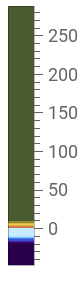
Manipulate[ReliefPlot[data,ColorFunction->Function[{x},If[x<=sealevel,ColorData["DeepSeaColors"][0.1x+2],ColorData["SandyTerrain"][0.1x]]],ColorFunctionScaling->False,PlotLegends->Placed[BarLegend[Automatic,LegendLabel->"Elevation"],{After,Top}]],{sealevel,0,10},SaveDefinitions->True]
Out[]=
Delaware River
Delaware River
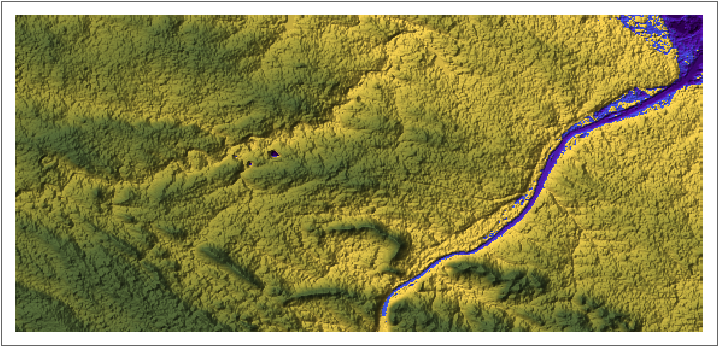
We will also apply the bathtub model to the Delaware River in the East Coast of the US.
We generate a list of coordinates based on the part of the Delaware River we want to focus. I will focus on the Pennsylvania-New Jersey section, stretching from New Hope, PA, to Hopewell, NJ:
In[]:=
DEcoords=Table[{x,y},{x,40.188083,40.353025,.001},{y,-74.959693,-74.730801}];
Then, I get the GeoPosition at the coordinates so I can use GeoElevationData on my coordinates.
In[]:=
DEdata=GeoElevationData[GeoPosition/@Flatten[DEcoords,1]];
We’ll visualize this again in 3D and 2D.
In[]:=
Manipulate[ListPlot3D[Reverse[DEdata],MeshFunctions->{#&},Mesh30,ImageSizeMedium,ColorFunction->Function[{x,y,z},If[z<=sealevel,ColorData["DeepSeaColors"][0.01z],ColorData["SandyTerrain"][0.001z+0.6]]],ColorFunctionScaling->False,PlotLegends->Automatic],{sealevel,50,600,10},SaveDefinitions->True]
Out[]=


In[]:=
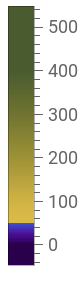
Manipulate[ReliefPlot[DEdata,ColorFunction->Function[{x},If[x<=sealevel,ColorData["DeepSeaColors"][0.01x],ColorData["SandyTerrain"][0.001x+0.6]]],ColorFunctionScaling->False,PlotLegends->Placed[BarLegend[Automatic,LegendLabel->"Elevation"],{After,Top}]],{sealevel,50,600,10},SaveDefinitions->True]
Out[]=
Unfortunately, water flow has many other factors than just elevation and wouldn’t just go where the lowest elevation. While the bathtub model captures the the general idea of where water will travel, our cellular automata model will consider more factors of how water flows and more accurately predict water spread.
Cellular Automata Approach
Cellular Automata Approach
I used a Cellular Automata(CA) approach to simulate flooding across a region due to heavy rainfall (pluvial flooding) in 2D. Cellular automata are discrete models that simulate the behavior of individual cells based on predefined rules. The model divides the area of land into a discrete space of square grid cells. I will take the Von Neumann neighborhood for each cell, meaning a central cell has 4 neighbor cells adjacent to it. Water flows from the central cell to neighboring cells depending on the water flow rules that the model will set.
Data
◼
Elevation - given by GeoElevationData --> constant
◼
Water Depth - we add a certain amount --> changing
◼
Water Level = Elevation + Water Depth --> what we compare
Each point in this graph represents one cell of water, whose volume will depend on the size of our dataset.
The neighbors function returns the list of vertices that neighbors the center cell parameter:
For example, consider vertex 9. NeighborhoodGraph will show the 4 neighbors of vertex 9. Here, vertex 9 is colored red.
Simple Cellular Automata Model
Simple Cellular Automata Model
Rule
Rule
The guiding transition rule of this model is for a central cell to give its neighboring cells 1 unit of water depth if it has a higher water level than its neighbor. Then, I apply this rule to every cell in the grid, iterating until the water depths are relatively constant.
Note that center cells will only give away water, and neighbor cells will only receive water.
Note that center cells will only give away water, and neighbor cells will only receive water.
So, upstream cells (higher water level than center) aren’t changed, and downstream cells will get water.
Data
Data
For this model, we will be using a much smaller dataset of Atlantic City, a 7 by 7 2D array.
We will have two versions of this model: one that updates each cell one by one, which is not as accurate since water doesn’t flow from one cell, rather all at once since it is coming from above, and one that updates the cells simultaneously. The first model helps us visualize what is actually going on at every step.
Step By Step Model
Step By Step Model
Helper Functions
We define two helper functions for the rule: add, which adds one to the value at waterdepths, and subtract, which subtracts one.
Rule Function
Here is the rule for the first simple model we will make.
Here is the rule for the first simple model we will make.
The rule goes through each neighbor cell of the center cell, which is passed as a parameter. Each neighbor cell is updated based on a water level comparison to the center cell. Note the center cell will not give water if it is less than 1, otherwise its water depth will be negative, which is not possible.
Visualization
We will plot the new waterdepths and elevation using BarChart3D. We stack the waterdepth over the elevation, to see what water will look like on the land we took. ** needs editing
We will plot the new waterdepths and elevation using BarChart3D. We stack the waterdepth over the elevation, to see what water will look like on the land we took. ** needs editing
waterdepths is set to 5 at cell, representative of the amount of uniform rainfall.
Before running the model, we reset the values of waterdepths.
To do this, we use ListAnimate and iterate through every step . One iteration is when every cell becomes the center cell once; it goes from 1 to 49, updating the waterdepths values each time . This allows us to see what it going on at each step .
As you can see, the water appears to build up towards a corner. This is because as we are updating cells one by one from cell 1-49, so the water moves across the grid. As we iterate more times, the water levels eventually become constant.
Simultaneously Updated Model
Simultaneously Updated Model
In this model, we use the same rules, except the waterdepths values are not being updated until the end of the iteration. This ensures that water is flowing uniformly from everything in the grid, like rainfall, and not moving across a grid, as if water is beginning one place and moving to the opposite corner.
To do this, we create a copy of waterdepths called tempwaterdepths, which will store the changes of one iteration. However, the comparisons will continue to use waterdepths values. At the end of the iteration, we simultaneously update waterdepths to tempwaterdepths.
Helper Functions
The helper functions stay the same, except it modifies the tempwaterdepth, which stores temporary alterations of an iteration.
Rule
The rule is similar, except we are storing changes in tempwaterdepth. Note that we use waterdepths to compare water levels, but use tempwaterdepth to check if it is greater than 1 to ensure we aren’t subtracting too much.
A function to update waterdepths after a full iteration:
Visualization
Weighted Cellular Automata Model
Weighted Cellular Automata Model
Now, we will use a more complex cellular automata model to display the water flow. This model, called WCA2D, Weighted Cellular Automata 2D, uses a weight computing system and physical limitations to model water flow without too complex mathematical equations and fluid dynamics concepts (Guidolin et al., 2016).
In the model, the ratios of water are transferred from the central cell to the downstream neighbor cells using a weight-based system.
The water transferred will be limited by Manning’s formula and the critical flow equation, to produce a more accurate prediction of resulting water levels.
Depth Updating
Depth Updating
Now, we can use our weights and total intercellular-volume to update the water depths of each cell. Each neighbor cell receives their respective weight times the total volume that leaves the center cell (Itot).
Since water flows simultaneously, we must update all the cells at once. One iteration constitutes every cell in the grid being the center cell once. Those calculations are all based on the starting waterdepths, and the changes are stored in a temporary variable.
We store the changes in a variable called changes.
First, we define a function calculate that performs a calculation on all the cells in the grid.
Then, we update all of the water depths at once.
Data Visualization
Data Visualization
Resets all the variables to initial values:
We will be using BarChart3D to visualize the model again. We will also use ArrayPlot to show how the water fluctuates as time passes.
Atlantic City
BarChart3D:
Displays waterdepth in ArrayPlot:
Princeton
We will apply this model on a portion of Princeton, New Jersey. To change dimensions, we re-define graph, area, and use the function reset.
We will apply this model on a portion of Princeton, New Jersey. To change dimensions, we re-define graph, area, and use the function reset.
Resets all the variables to initial values:
Reversed ArrayPlot of the GeoElevationData
Looking at the ArrayPlot of the water depths and the reversed ArrayPlot elevation data, we can see they look pretty similar. This means that the lower the elevation, there is generally more water. This result is similar to the Bathtub model, except there are a few differences that distinguish the two. On larger datasets, this information can be helpful for disaster mitigation.
Conclusion
Conclusion
Extensions
Extensions
While this model can be applied in many locations, there are many ways I can extend this:
◼
Compute the model’s accuracy given real hydrological data and contrast with other models
◼
Consider the actual time step
◼
Use Manning’s Roughness Coefficient and consider absorptive vs impervious surfaces
◼
Use other types of neighborhood s(Moore neighborhood) and grids (triangular, hexagonal, etc.)
◼
Model coastal flooding:
◼
Have water flow from one side of the grid
◼
River flooding:
◼
The river should already start with an initial water depth
◼
Predict optimal dyke placement, to prevent certain regions from flooding.
Acknowledgements
Acknowledgements
I would like to thank my mentor Yana Outkin for helping me throughout my entire project process!
References
References
Guidolin, M., Chen, A. S., Ghimire, B., Keedwell, E. C., Djordjević, S., Savić, D. A. (2016). A weighted cellular automata 2D inundation model for rapid flood analysis. Environmental Modelling Software, 84, 378–394. https://doi.org/10.1016/j.envsoft.2016.07.008
CITE THIS NOTEBOOK
CITE THIS NOTEBOOK
Modeling water flow using cellular automata
by Sophia Zhou
Wolfram Community, STAFF PICKS, July 13, 2023
https://community.wolfram.com/groups/-/m/t/2964707
by Sophia Zhou
Wolfram Community, STAFF PICKS, July 13, 2023
https://community.wolfram.com/groups/-/m/t/2964707