This is a followup of my previous post Visualization knot insertion of BSpline with de Boor's algorithm. In that post, we have seen how the de Boor’s algorithm works to trace a B-spline. Here we will take things to upper dimensions, explore how the de Casteljau algorithm provides a similar ability to trace a Bézier triangle.
Utilities
Utilities
As usual, here is the code dump of some helper functions. Readers can evaluate then safely skip this section.
code dump of helper functions
code dump of helper functions
ClearAll[pipe,branch]pipe=RightComposition;branch=Through@*{##}&;
The theory
The theory
For a Bézier triangle, the de Casteljau algorithm works just like its one dimensional case (i.e. Bézier curve), it’s basically recursive weighted linear combinations with a fixed pattern:
Layern
NodeValue
i,j,k
λ 1 | λ 2 | λ 3 |
Layern+1 NodeValue i+1,j,k |
Layern+1 NodeValue i,j+1,k |
Layern+1 NodeValue i,j,k+1 |
3
∑
i=1
λ
i
(
1
)Take an order 3 Bézier triangle for example, from control points to the actual result, 3 times of above recursion are needed. They can be arranged into a nice pyramid of 4 layers.
dimManifold=2;dimParam=dimManifold+1;
order=3;
Noticing the pattern of the index in the recursion formula, it’s easy to construct the dependency relationship of all values in all layers:
{vtxGroup,tripleGroup}={ConstantArray[0,dimParam]}//pipe[NestList[pipe[Outer[Plus,#,IdentityMatrix[dimParam],1]&,Sow,Apply@Union],#,order]&,Reap,MapAt[First,2]];
BezierPyramidGraph={vtxGroup,tripleGroup}//pipe[branch[pipe[First,Apply@Join],pipe[MapAt[Most,1],MapThread[List/*MapThread[Function[{vtx,pts},(#vtx)&/@pts]]],Flatten]],Apply@Sequence,Graph[#1,#2,VertexCoordinates#1,VertexLabelsThread[Rule[#1,#1//Map[Style[&@@#,15,FontFamily"Consolas"]&]]]]&]
Style["b",Bold,20]
##
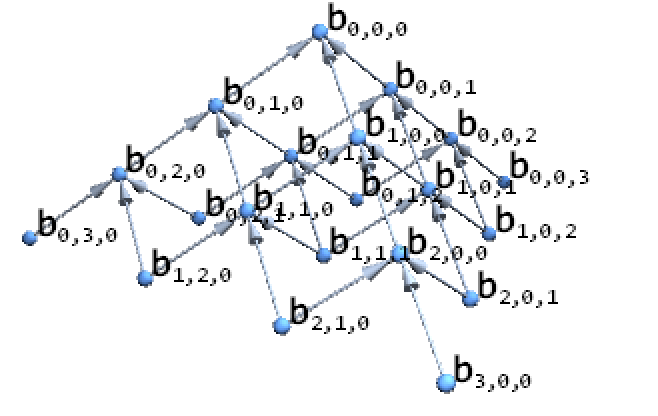
Here layer 4 (all with indices sum to 3) is the constant layer and serves as the “control net” of this Bézier triangle patch. Each node of a upper layer is linearly combined from its bottom layer. At the top of the pyramid is , the one that will trace the result surface.
b
i,j,k
b
000
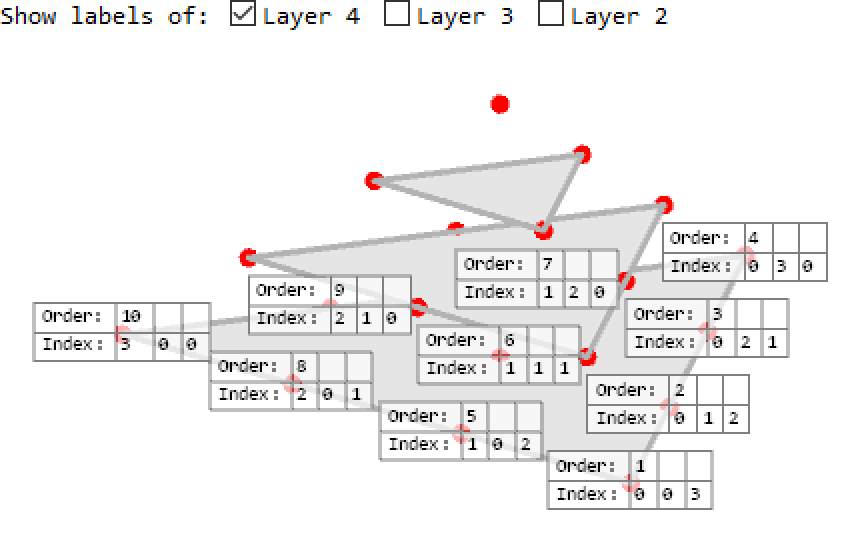
To observe the layers more clearly, readers can play with the following interactive diagram:
Withvv={0,0,1}//N//RotationTransform[40Degree,{1,-1,0}]//RotationTransform[-20Degree,-{1,1,1}],{1,1,1},DynamicModule{flag={order+1}},ColumnRow[{"Show labels of: ",CheckboxBar[Dynamic[flag],(order+2-#)("Layer "<>ToString[order+2-#])&/@Range[order]]}],With{layer=order+2-#,scale=Rescale[Range[order+1]]〚order+2-#〛},{EdgeForm[{AbsoluteThickness[3],GrayLevel[.7]}],GrayLevel[.9],scaleIdentityMatrix[3]//Simplex},MapIndexedTextDynamic[If[!MemberQ[flag,layer],"",Style[Grid[MapThread[Prepend,{{#2,#1},{"Order:","Index:"}}],FrameAll,FrameStyleGray,BackgroundGrayLevel[1,.7]],Bold,FontFamily"Consolas"]]],&,vtxGrouplayer,Red,TranslateSphere[{0,0,0},.02],&/@Range[order]//Append[{Red,Sphere[{0,0,0},.02]}]//Graphics3D[#,PlotRangePaddingScaled[.1],Lighting{{"Ambient",White}},ViewVectorvv,ViewVertical-{1,1,1},ViewProjection"Orthographic",AxesFalse,BoxedFalse,SphericalRegionTrue,RotationAction"Fit",ImageSize500]&
1
2×3
scale#1
layer-1
scalevtxGroup〚layer〛
layer-1
The implementation
The implementation
From the dependency relationship obtained in last section, we can derive a computing formula with ease. To take advantage of performance boost on modern hardware, we re-phrase the recursion formula to a vector form
Layern
V
#
n
λ
(1×)3
P
Layern+1
#
n
#
n+1
Layern+1
V
#
n+1
(
2
)where is the number of nodes in layer , and is a special index tensor used to select triple value tuples from layer . Apparently is determined by only the order of thus can be computed ahead. Note is the embedding dimension of each V. It has no relation with . Readers can think of the scenario as a 2 dimensional surface embeds in dimensional space.
#
k
k
P
k
k
P
k
V
k
dimManifold=2
From the viewpoint of computing, there could be better arrangement of ’s orders in each layer, but in this post, as a quick and dirty implementation, we’ll just use the orders in vtxGroup as is.
V
k
vtxGroup〚-1〛//branch[{Arrowheads[.1],Arrow@#}&,{AbsolutePointSize[10],Orange,Point@#}&,Map[Text[Style[#,Bold,15,Black],#,{-1,1}]&]]//Graphics3D

By rewriting the dependency relations to assignments (through Set) with our formula (2), and arranging them in a proper order, we can generate a compiled code in a fully automatic way:
The compiled code is reasonably short and efficient:
Similarly, by combining all intermediate result (through Inactive[Join]@@tempVarSet), we can get the following myBezierPyramid function to return the full pyramid:
Interesting examples
Interesting examples
From its theory we can see that Bézier triangle is essentially a method for smooth interpolation over its control net. The resulting surface lives in the same (possibly abstract) sapce as its control net. We’ll show some examples to illustrate the point.
Example 1: The geometric interpretation of de Casteljau algorithm
Example 1: The geometric interpretation of de Casteljau algorithm
Firstly we define a helper function planarMapping to map Triangle[IdentityMatrix[3]] to XY plane with upright direction:
To make the demonstration clearer to see, we set the control net (cptSet) to a bowl shape:
The triple nodes tuples in each layer will later be illustrated as triangles:
Hopefully it should be clear to see every node moves with λ while remains constrained on its generator triangle. Readers can also try increasing order (at the very beginning of this post) to higher integer values, say 6, then re-generate myBezierPyramid, see what happens to this example.
Example 2: Interpolation in color space
Example 2: Interpolation in color space
As we mentioned at the beginning of this section, the control net needs not to be in a “spacial” space. It can well operate on a (nearly) linear color space like CIE 1931 XYZ.
We set our control net as following: (remember they are in XYZ color space.)
Note if readers want to try order other than 3, then do make sure length of cptSet2 matches length of the control net (i.e. Length[vtxGroup〚-1〛]).
The interpolation result through Bézier triangle is simply get by
With the help of ChromaticityPlot3D, we can see how our control net spans the result manifold in color space:
And of course we are free to map the resulting colors back to the mesh to get a pointwise colorized triangle:
Conclusion - What’s more to explore?
Conclusion - What’s more to explore?
From the given examples, hopefully it’s straightforward to see how one can do certain kind of interpolation in any linear space with Bézier triangle.
References
References