Advancing towards Modeling 2.0 with neural-ODE via Wolfram Language
by James Lu
Principal AI Scientist, Genentech
by James Lu
Principal AI Scientist, Genentech
Introduction
Introduction
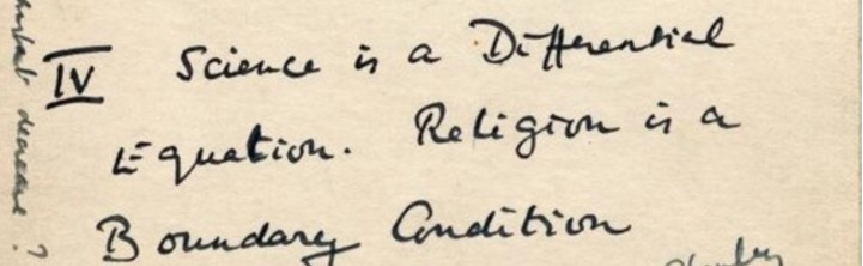
Since the days of Newton, scientists have used differential equations to describe the physical world. Alan Turing also once wrote on a postcard, “Science is a Differential Equation” (from Hodges, A., 2014):
In[]:=
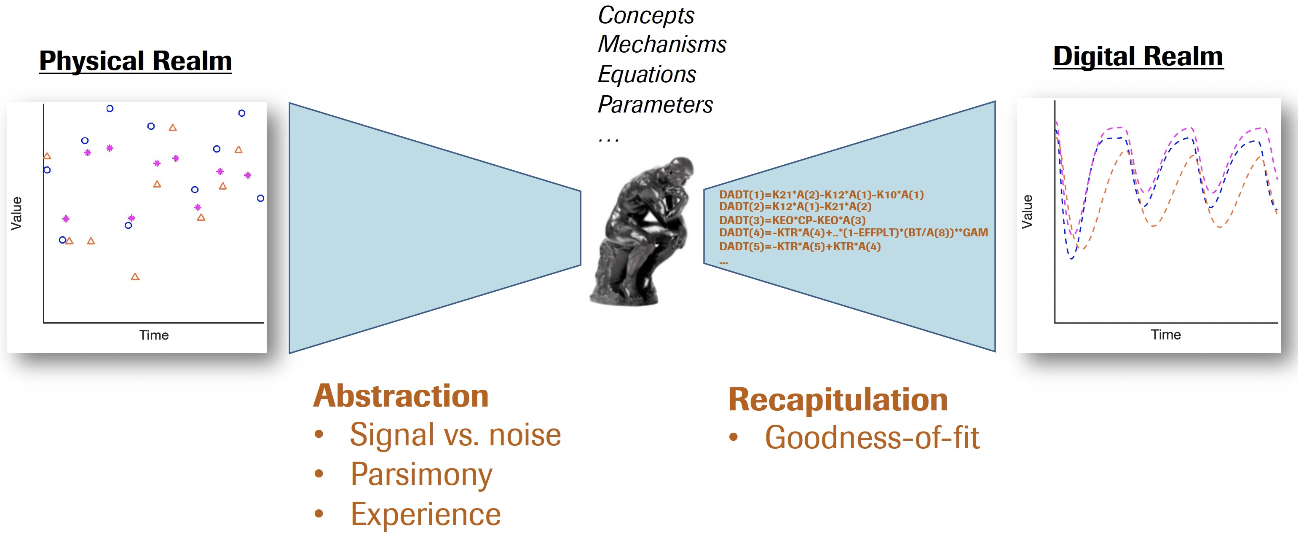
How have we gone about the process of creating differential equation models of data? In the field of Pharmacometrics modeling of clinical data, perhaps the following figure summarizes it :
In[]:=
However, with the advent of Deep Learning and the notion of Software 2.0, does that open up a new paradigm? We proposed the following as Modeling 2.0:
In[]:=
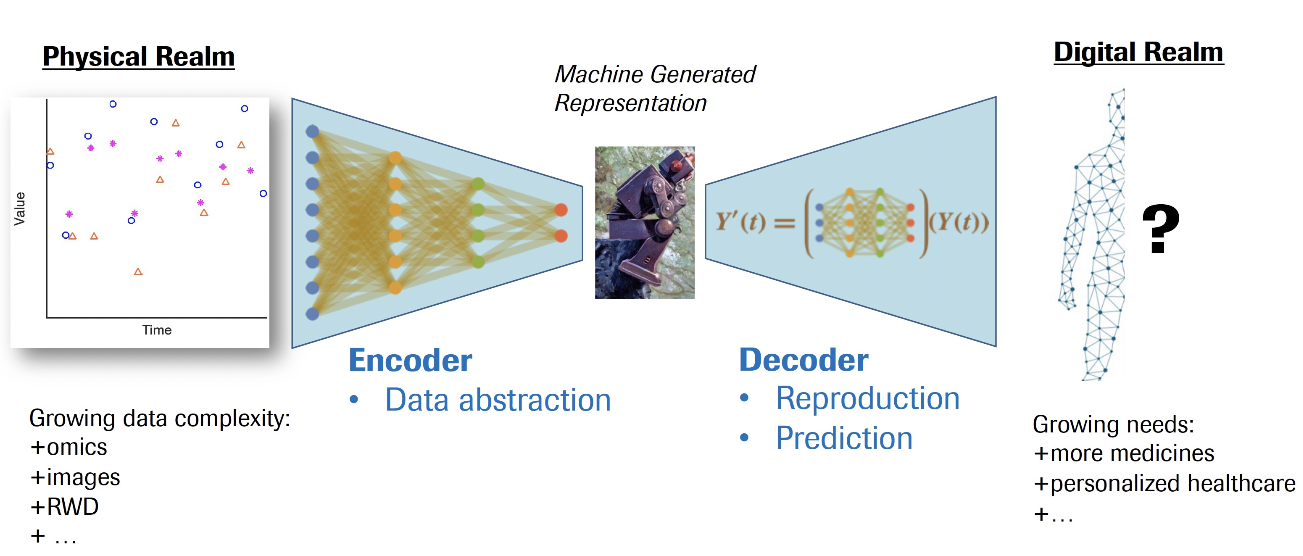
We’ve worked out how to do this in the Pharmacokinetics/Pharmacodynamics (PK/PD) setting (based on the seminal work of [Chen et al, NeurIPS 2018]) and proposed Neural-PK/PD methodology which was published in Nature Machine Intelligence (2021):

In the following, we give an overview of the data involved and how to build the PK and PD submodules respectively in a sequential manner. You’ll see how the basic layers offered by Wolfram Language is expressively enough to implement this formalism. Finally, we will show how to visualize the inner workings of such models.
Data
Data
Here, we set some hyperparameters of the model: in particular, our data will have 5 columns (“TAD (day)”,”TIME (day)”,”PK”,”PD”, “AMT(dosed)”):
In[]:=
DataDim=5;timeStepSize=1/4;
In[]:=
trainPKPDData={0,0,6.8146`,-100,222.`},{1.`,1,52.298`,196.`,-100},{8.`,8,17.141`,126.`,-100},;
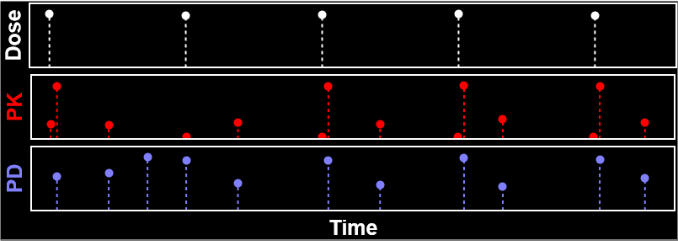
Here’s a visualization of the data:
Out[]=
Hyperparameters & Data Processing
Hyperparameters & Data Processing
We set the PK and PD variable and parameter dimensions: here, we can leverage prior intuition from ODE modeling regarding the complexity of the model required -
In[]:=
dimPKVar=2;dimPKParam=4;dimPDVar=4;dimPDParam=10;
Let’s compute the data normalization function:
In[]:=
feTimeCourse=FeatureExtraction[trainPKPDData]
Out[]=
FeatureExtractorFunction


Verify the mean and std of transformed data:
In[]:=
{Mean@#,StandardDeviation@#}&/@Transpose[feTimeCourse[trainPKPDData]]//Chop//TableForm
Out[]//TableForm=
0 | 1.01242 |
0 | 1.01242 |
0 | 1.01242 |
0 | 1.01242 |
0 | 1.01242 |
We then transform the training data:
In[]:=
inputData["Train"]=feTimeCourse/@{trainPKPDData};
Pharmaco-Kinetics Submodule
Pharmaco-Kinetics Submodule
We aim to use a neural net to approximate the vector field, f of the following ODE system:
Out[]//TraditionalForm=
Y(t)
t
n
d
∑
i=1
dose
i
T
i
Vector field
Vector field
In[]:=
PKDecoderNetInternal[n_]:=NetInitialize[NetGraph[<|"catenate"CatenateLayer[1],"lin1"LinearLayer[dimPKVar+dimPKParam+n],"SoftPlus1"ElementwiseLayer["SoftPlus"],"lin2"LinearLayer[dimPKVar+dimPKParam+n],"SoftPlus2"ElementwiseLayer["SoftPlus"],"lin3"LinearLayer[dimPKVar+dimPKParam+n],"SoftPlus3"ElementwiseLayer["SoftPlus"],"lin4"LinearLayer[dimPKVar+dimPKParam+n],"SoftPlus4"ElementwiseLayer["SoftPlus"],"lin5"LinearLayer[dimPKVar]|>,{{NetPort["PrevState"],NetPort["PKParam"]}"catenate","catenate"->"lin1""SoftPlus1"->"lin2""SoftPlus2"->"lin3""SoftPlus3"->"lin4""SoftPlus4"->"lin5"NetPort["VFOut"]},"PrevState"{dimPKVar},"PKParam"{dimPKParam},"VFOut"{dimPKVar}],"Method"{"Random","Weights"NormalDistribution[0,10^-10],"Biases"0}]
In[]:=
PKVFNet=PKDecoderNetInternal[1]
Out[]=
NetGraph


We can check the initialized network:
In[]:=
PKVFNet[<|"PrevState"{0,0},"PKParam"{1,1,1,1}|>]
Out[]=
{-4.29992×,-1.96244×}
-11
10
-11
10
Euler step
Euler step
This performs the computation required for 1 Euler step:
In[]:=
eulerStepNet=NetGraph[<|"pad 0"PaddingLayer[{{0,dimPKVar-1}}],"plus"ThreadingLayer[Plus],"add dose"ThreadingLayer[Plus],"VFnet"PKVFNet,"Δt*"ElementwiseLayer[timeStepSize*#&],"Volume"PartLayer[2],"Abs"ElementwiseLayer[Abs[#]&],"Obs comp"PartLayer[1],"divide"ThreadingLayer@Divide,"reshape1"ReshapeLayer[{1}],"reshape2"ReshapeLayer[{1}],"ReLU"Ramp|>,{NetPort["PrevState"]"add dose",NetPort["Dose"]"pad 0""add dose","add dose""plus","add dose""VFnet""Δt*""plus","plus""ReLU"NetPort["NewState"],NetPort["PrevState"]"Obs comp""reshape2",NetPort["PKParam"]"Volume""Abs""reshape1",{"reshape2","reshape1"}"divide"NetPort["ObsState"]},"PrevState"{dimPKVar},"NewState"{dimPKVar},"PKParam"dimPKParam]
Out[]=
NetGraph
However, we need to perform many steps to reach the end of the time domain, which we do via the following:
PK Time-Course Encoder
PK Time-Course Encoder
Loss function
Loss function
Combined net
Combined net
Finally, putting all the pieces together for our Neural-PK model:
Train
Train
Let’s try training it on just 1 single patient, replicated 10 times for the sake of example:
Pharmaco-Dynamics Submodule
Pharmaco-Dynamics Submodule
Having trained and saved the Neural-PK model, one can just load it and take out the part that we want to use further:
Vector Field
Vector Field
We now construct a combined Vector Field net for both PK and PD:
Euler Step
Euler Step
A pretty complex looking network model can be built up compactly using Wolfram Language:
PD Encoders
PD Encoders
Combined Net
Combined Net
Train
Train
It’s now time to train! A check point directory is handy to track and record the progress of the network as it the training proceeds.
Visualization
Visualization
We’d like to take a peek within the layers of Neural-PK/PD to get a sense of what kind computations occur behind the scene.
Let’s get the parts we want to visualize:
Let’s get the parts we want to visualize:
Let’s get the list of layers:
We’ll not visualize the SELU layers: let’s drop them -
We can easily get a list of networks that compute the outputs from the intermediary layers:
Let’s say we’d like to visualize a model with the following set of encoder outputs:
and the set simulated CP and PD variables at 5 given time points are:
We can map the above simulated values to the decoder layers and get a list of intermediate outputs:
Visualization of neural network layers
Visualization of neural network layers
This shows the sequence of 5 visualizations we get, for the state variable values at the 5 time points:
Simulation Dynamics
Simulation Dynamics
Creating a graphic to represent Neural-PK/PD is easy, thanks to the neural network visualization code contributed by the Wolfram user community:
And voila, we can visualize the
Encoder visualization
Encoder visualization
We can try to visualize what happens when individual patient data is fed into the encoders of Neural-PK/PD, in a similar manner. The model predictions are updated when individual data come in. Following similar recipe as described above, this is an example of what we get:
Final thoughts
Final thoughts
With the rich functionalities offered by Wolfram Language, you can see how the complete workflow, all the way from data preprocessing, network construction, sequential training, visualization and video generation can be done within a single framework. This capability significantly eases the work of Deep Learning and lets Machine Learning scientists focus on the conceptual breakthroughs rather than the mundane mechanics.