The theme of this month's MCCC is “Isometric”, so this is an isometric projection of some squares moving perpendicular to the y-axis.
Here’s the code:
In[]:=
DynamicModule[{cols},cols=RGBColor/@{"#ACE6F6","#FAEE5A","#ACE6F6","#4B89AC"};Manipulate[Graphics3D[{FaceForm[None],EdgeForm[Directive[JoinForm["Round"],Thickness[.005]]],Table[{EdgeForm[Directive[Blend[cols[[;;3]],1/2-1/2Cos[π/3(n+t+3/2)]],Opacity[1/2-1/2Cos[2π/3(n+t+3/2)]]]],Polygon[{{-1,n+t,-1},{1,n+t,-1},{1,n+t,1},{-1,n+t,1}}]},{n,-3/2,5/4,1/4}]},Boxed->False,PlotRange->3/2,ImageSize->540,ViewPoint->1000{1,1,1},Background->cols[[4]]],{t,0,1/4}]]
Out[]=


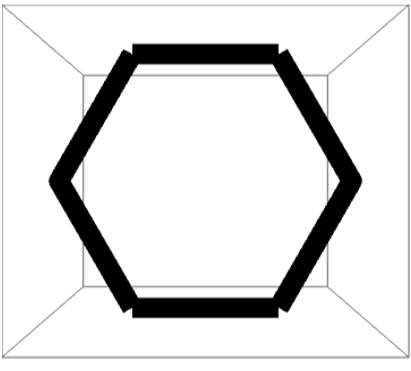
You probably can’t see it in the GIF because the lines are relatively thin, but there’s some weird stuff going on at the joins. First of all, using Polygon in Graphics3D does not seem to do what you would expect given the options in JoinForm. For example, this code:
In[]:=
Graphics3D[{FaceForm[None],EdgeForm[Directive[JoinForm["Round"],Thickness[.05]]],Polygon[Table[{Cos[θ],Sin[θ],0},{θ,0,2π-#,#}]&[2π/6]]},ViewPoint->Above]
This produces this image
You can more or less fix this by using Line instead of Polygon. For example, this code:
In[]:=
Graphics3D[{JoinForm["Round"],Thickness[.05],Line[Table[{Cos[θ],Sin[θ],0},{θ,0,2π,2π/6}]]},ViewPoint->Above]
Produces this image:

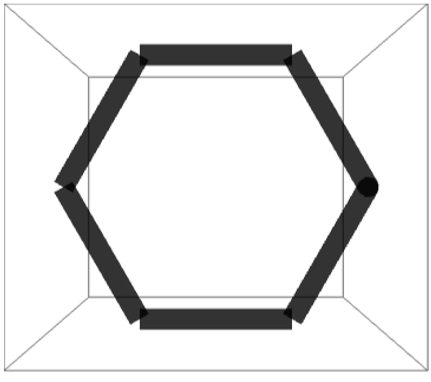
...but JoinForm with Line is totally busted when you have any transparency. For example, this code:
In[]:=
Graphics3D[{JoinForm["Round"],Thickness[.05],Opacity[.8],Line[Table[{Cos[θ],Sin[θ],0},{θ,0,2π,2π/6}]]},ViewPoint->Above]
yields this image:
Does anybody know of workarounds for any of this?