CartogramWL update — Alaska, Hawaii, and a faster default
CartogramWL update — Alaska, Hawaii, and a faster default
A short follow-up note on the diffusion-cartogram package introduced in the main post: what the recent commits changed, and where to download the current version.
Marco Thiel, April 2026 — github.com/mthiel74/Contiguous-Cartograms
1. What changed
1. What changed
Since the original post the package CartogramWL has picked up several improvements that are relevant if you tried the earlier version. The biggest single visible change is that WorldCartogram now correctly handles multi-part countries — in particular, the United States is represented as the contiguous 48 states plus Alaska and Hawaii rather than just the lower 48.
• Alaska, Hawaii and other "multi-part" countries are now rendered and deformed correctly. CountryData["UnitedStates", "Polygon"] only returns the contiguous 48 states; a new helper CountryPolygonRings[c] splices the Alaska and Hawaii AdministrativeDivision polygons back in before rasterisation. The same hook can be used to bring in France's overseas departments, Portugal's Azores/Madeira, Denmark's Greenland, and so on.
• A new PerformanceGoal -> "Speed" default pre-computes a handful of log-spaced density/gradient snapshots and linearly interpolates between them while the advection integrator runs. That cuts a full world cartogram from about 5 minutes to under a minute with sub-pixel agreement. PerformanceGoal -> "Quality" restores the bit-exact baseline.
• Any ColorData[...] gradient can be supplied as "ColorFunction"; "Background" -> "Satellite" textures each country with the corresponding patch of Wolfram's satellite imagery and deforms the imagery along with the cartogram.
• The metric argument is flexible: a recognised string, any CountryData property name, a custom Function[c, ...], or an Association like <|"Germany" -> 83., "France" -> 67.5, ...|> with missing countries optionally drawn in grey via "MissingCountries" -> "ShowGrey".
• A CartogramDistortionGrid[cart] helper returns the warped-grid lines so you can visualise the deformation field directly.
• A new PerformanceGoal -> "Speed" default pre-computes a handful of log-spaced density/gradient snapshots and linearly interpolates between them while the advection integrator runs. That cuts a full world cartogram from about 5 minutes to under a minute with sub-pixel agreement. PerformanceGoal -> "Quality" restores the bit-exact baseline.
• Any ColorData[...] gradient can be supplied as "ColorFunction"; "Background" -> "Satellite" textures each country with the corresponding patch of Wolfram's satellite imagery and deforms the imagery along with the cartogram.
• The metric argument is flexible: a recognised string, any CountryData property name, a custom Function[c, ...], or an Association like <|"Germany" -> 83., "France" -> 67.5, ...|> with missing countries optionally drawn in grey via "MissingCountries" -> "ShowGrey".
• A CartogramDistortionGrid[cart] helper returns the warped-grid lines so you can visualise the deformation field directly.
2. Alaska and Hawaii: what this actually looks like
2. Alaska and Hawaii: what this actually looks like
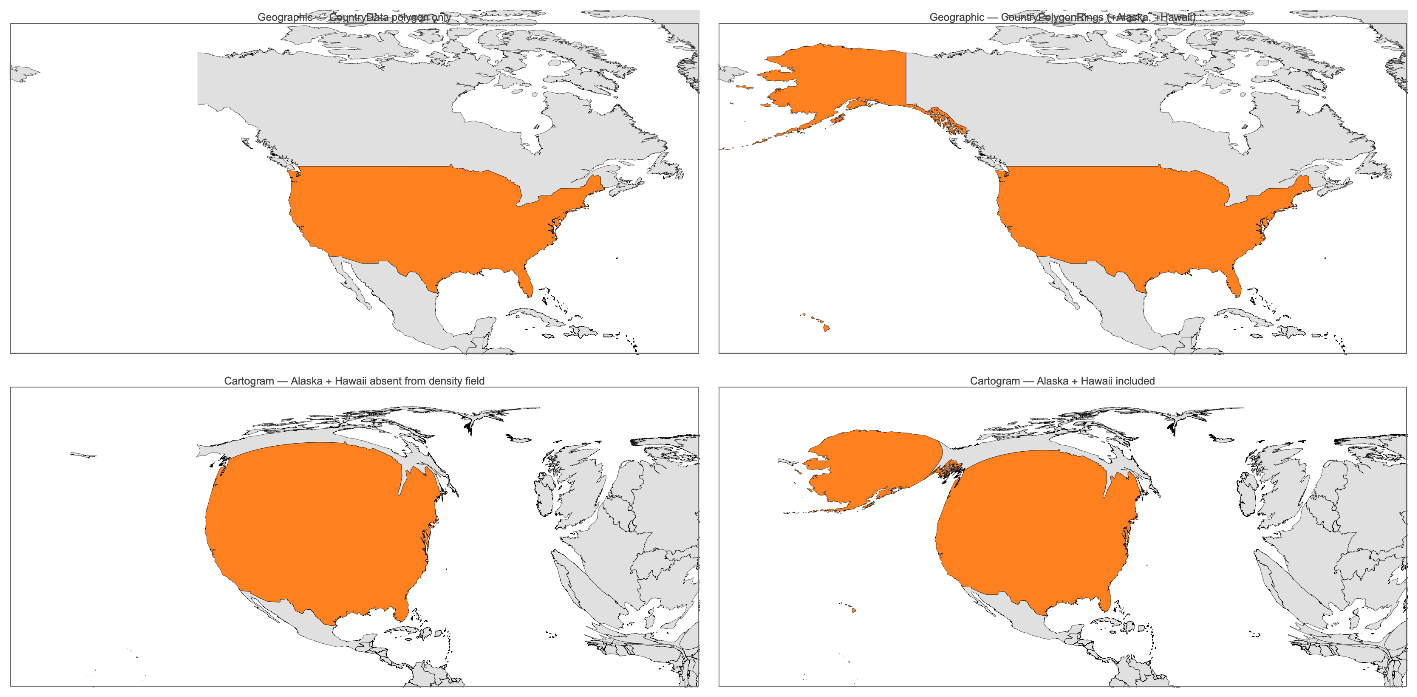
The figure below shows the GDP cartogram of North America rendered twice with identical parameters. In the left column the US polygon comes straight from CountryData; in the right column it comes from the new CountryPolygonRings. Top row is the geographic input (US highlighted in orange), bottom row is the cartogram. With the fix the United States ends up with 28 mainland rings + 77 Alaska rings (mainland + Aleutians) + 8 Hawaiian rings, all sharing a single country value, and Alaska and Hawaii inflate alongside the mainland instead of being silently dropped.
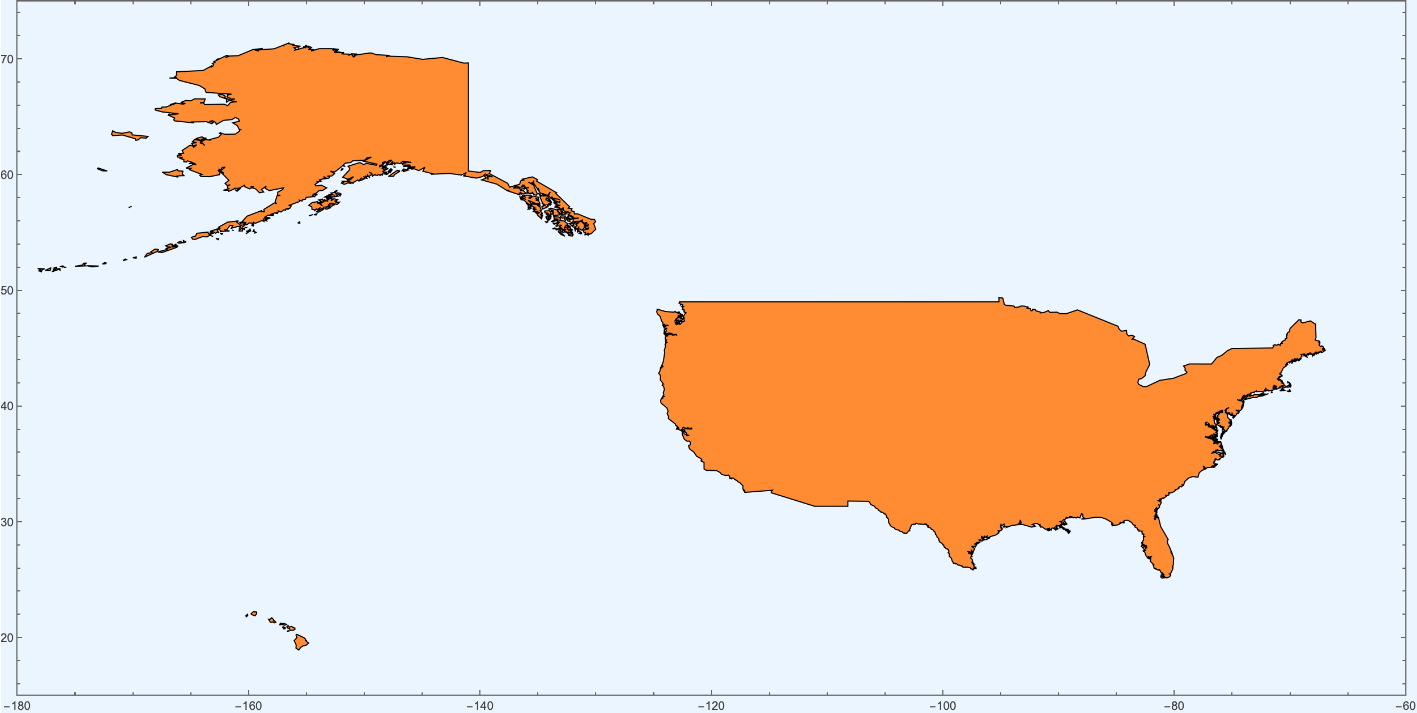
For reference, here is the full US ring set drawn in one go — 28 mainland rings, 77 Alaska rings, and 8 Hawaiian rings — so you can see what actually feeds the algorithm:
3. Getting the current version
3. Getting the current version
The package is a single .wl file with no external dependencies — pure Wolfram Language. The simplest way to try it right now is to download the file directly from GitHub and Get it:
url="https://raw.githubusercontent.com/mthiel74/Contiguous-Cartograms/main/wolfram/CartogramWL/CartogramWL.wl";path=URLDownload[url];Get[path];(*Built-inmetric*)WorldCartogram["Population"](*Customcolourscheme+satellitebackground*)WorldCartogram["GDP","ColorFunction"->ColorData["TemperatureMap"],"Background"->"Satellite"](*YourowndataasanAssociation*)WorldCartogram[{"my metric",<|"Germany"->83.,"France"->67.5,...|>},"MissingCountries"->"ShowGrey"]
That is one call to URLDownload followed by one call to Get; no paclet registration, no git clone, nothing to install. After that all the public symbols (WorldCartogram, CartogramDistortionGrid, CountryPolygonRings, and the low-level primitives DiffusionSolver, AdvectPoints, Cartogram, CartogramTransform, RasterizePolygons) live in the CartogramWL` context. ?WorldCartogram prints the full option list.
Power users who want the examples, the test suite, the experimental benchmark sandbox, or the Python twin can clone the repository: https://github.com/mthiel74/Contiguous-Cartograms.
4. Documentation links
4. Documentation links
• Wolfram section of the repository README — headline figure, one-line call, full option table (ColorFunction, Background, MissingCountries, PerformanceGoal, …), and inline examples. Written for a general Wolfram user and probably the best single entry point if you have just arrived here.
• wolfram/README.md — API cheat sheet, algorithm notes, grid conventions, and the mapping between the Wolfram and Python entry points.
• wolfram/CartogramWL/CartogramWL.wl — the package source, ~700 lines of commented Wolfram Language. The direct raw-file link used above is: https://raw.githubusercontent.com/mthiel74/Contiguous-Cartograms/main/wolfram/CartogramWL/CartogramWL.wl.
• wolfram/community/cartograms.nb — the main walkthrough notebook that this note comments on.
• the wolfram/ subtree on GitHub — examples (world.wls, world_metric.wls, distortion_grid.wls, alaska_before_after.wls), the 7-case regression suite, and the experimental benchmark sandbox that records what was measured and what did or did not pay off.
• wolfram/README.md — API cheat sheet, algorithm notes, grid conventions, and the mapping between the Wolfram and Python entry points.
• wolfram/CartogramWL/CartogramWL.wl — the package source, ~700 lines of commented Wolfram Language. The direct raw-file link used above is: https://raw.githubusercontent.com/mthiel74/Contiguous-Cartograms/main/wolfram/CartogramWL/CartogramWL.wl.
• wolfram/community/cartograms.nb — the main walkthrough notebook that this note comments on.
• the wolfram/ subtree on GitHub — examples (world.wls, world_metric.wls, distortion_grid.wls, alaska_before_after.wls), the 7-case regression suite, and the experimental benchmark sandbox that records what was measured and what did or did not pay off.
Feedback, bug reports and PRs all welcome on GitHub. If you spot a country whose CountryData polygon is incomplete in the same way the US was, the fix is one line in extraCountryRings — happy to merge.