Hypergraphs are typically plotted in the Wolfram Language using WolframModelPlot and the Spring Electrical Embedding. However, when animating the expansion of hypergraphs generated by the Wolfram Physics Project, graphs generated with this method do not use any information from previous graphs, and as such will often look vastly different from one updating event to the next. In this project, we implement a physics engine to continuously simulate the Spring Electrical Embedding of graphs as they expand in 2 and 3 dimensional spaces, guaranteeing temporal coherence between updating events. We also explore applications of these graphs to other systems such as multiway tag systems and simulating polymerization reactions.
Packages & Functions
Packages & Functions
This project uses the SetReplace paclet to generate universes from the Wolfram Physics Project. The paclet returns data about each time state of the graphs which we will then animate with a physics simulation.
In[]:=
PacletInstall["SetReplace"]Needs["SetReplace`"]
Out[]=
PacletObject

Hypergraphs
Hypergraphs
A brief overview of graphs
A brief overview of graphs
A graph consists of a set of vertices and the edges between them.
In[]:=
vertices={1,2,3,4};edges={12,23,34,13};GraphPlot[Graph[vertices,edges],VertexLabels->All]
Out[]=
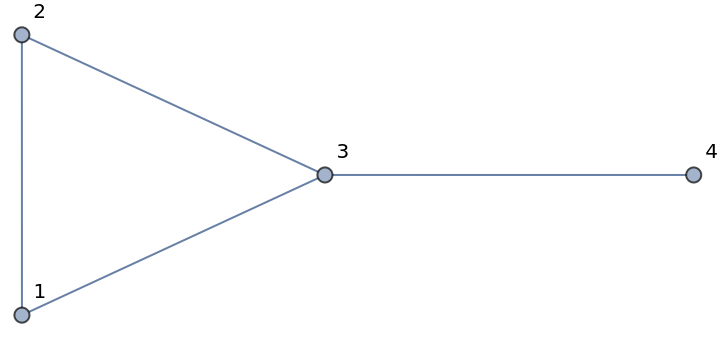
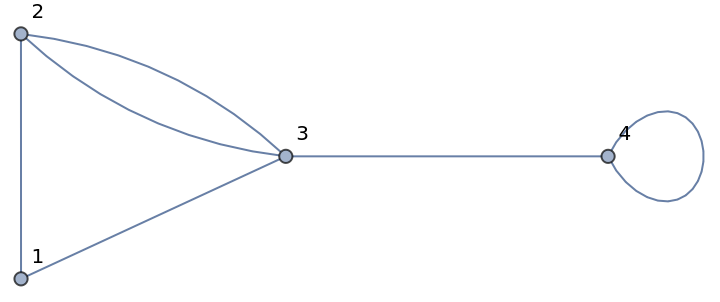
In this visual representation of a graph, edges are shown as lines between the two vertices they connect. For this project, we will assume that graphs are multigraphs, meaning they can have multiple edges between two vertices or edges that go from a vertex to itself, as shown below:
In[]:=
vertices={1,2,3,4};edges={12,23,23,34,13,44};GraphPlot[Graph[vertices,edges],VertexLabels->All]
Out[]=
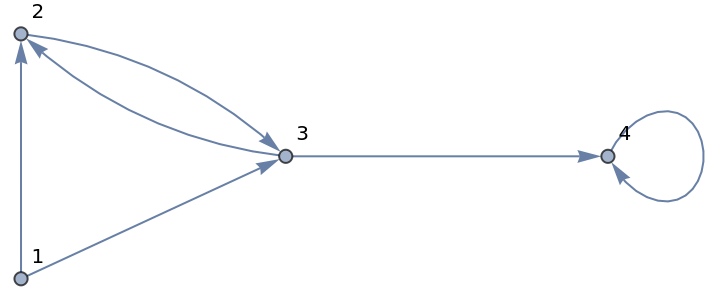
Graphs can be directed, meaning each edge only goes in one direction from a vertex to another vertex .
v
i
v
j
In[]:=
vertices={1,2,3,4};edges={12,23,32,34,13,44};GraphPlot[Graph[vertices,edges],VertexLabels->All]
Out[]=
Adjacency Matrices
Adjacency Matrices
The adjacency matrix of a graph is a square matrix of which the rows and columns are the vertices of the graph. The value of each cell in the matrix is equal to the amount of edges going from to .
(,)
v
i
v
j
v
i
v
j
In[]:=
graph1 = Graph[{1 2, 2 3, 3 1}, GraphLayout -> "CircularEmbedding", VertexLabels -> All];graph2 = Graph[{1 2, 2 3, 2 3}, GraphLayout -> "CircularEmbedding", VertexLabels -> All];graph3 = Graph[{1 2, 2 3, 3 1}, GraphLayout -> "CircularEmbedding", VertexLabels -> All];matrix1 = MatrixForm[AdjacencyMatrix[graph1]];matrix2 = MatrixForm[AdjacencyMatrix[graph2]];matrix3 = MatrixForm[AdjacencyMatrix[graph3]];Grid[{{graph1, graph2, graph3}, {matrix1, matrix2, matrix3}}]
Out[]=
|
|
|
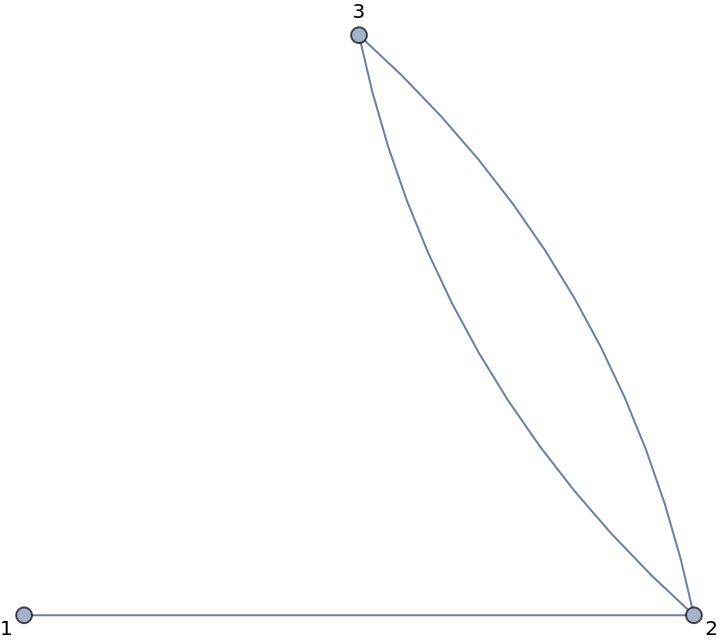
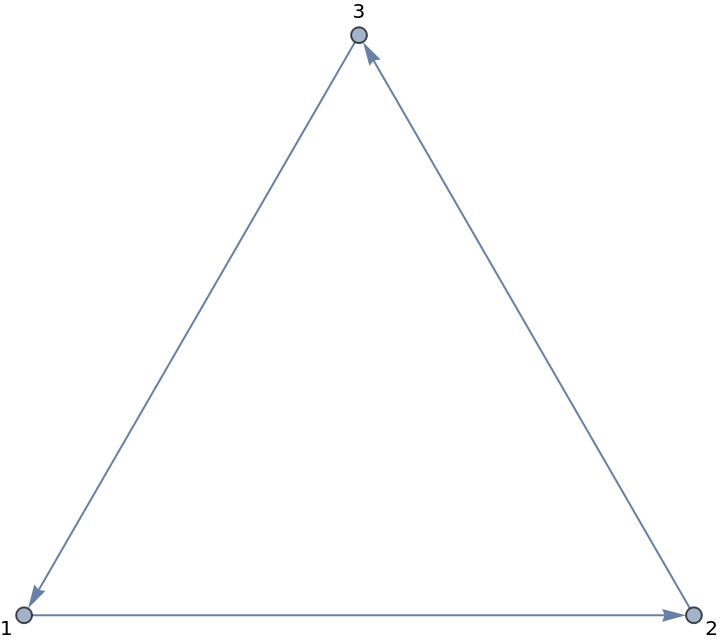
For undirected graphs, the adjacency matrices are symmetric, meaning if is adjacent to , then is also adjacent to .
v
i
v
j
v
j
v
i
When Matrices become Tensors
When Matrices become Tensors
A hypergraph is a generalization of a graph where edges can include any amount of vertices. This means that instead of representing an edge as we can represent it as . Such a relation is called a hyperedge.Hypergraphs have adjacency tensors instead of matrices, as their edge relations are of a higher arity.
e{,}
v
i
v
j
e{,,...,}
v
i
1
v
i
2
v
i
k
In[]:=
MatrixForm[{{{1,2},{3,4}},{{5,6},{7,8}}}]
Out[]//MatrixForm=
|
| ||||
|
|
Plotting hypergraphs
Plotting hypergraphs
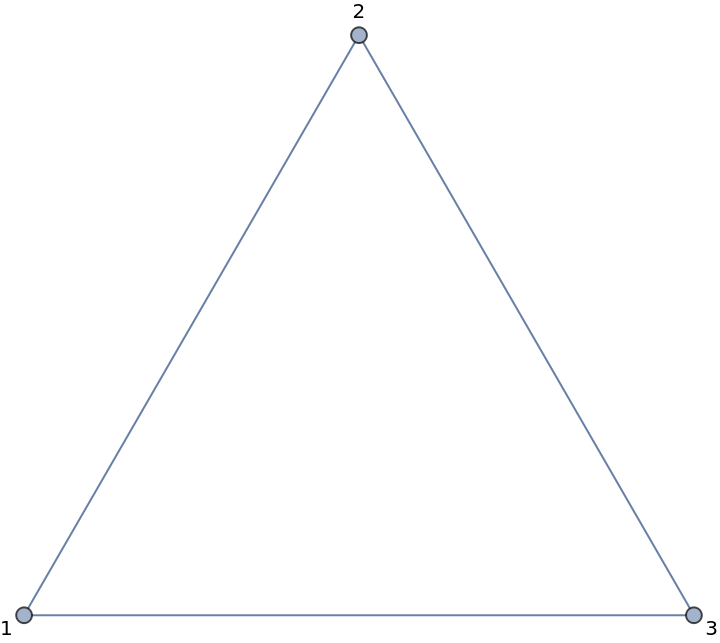
Just as regular edges can be represented by lines, hyperedges can be represented by polygons such that the vertices of the polygon are the vertices in the hyperedge.
In[]:=
Out[]=
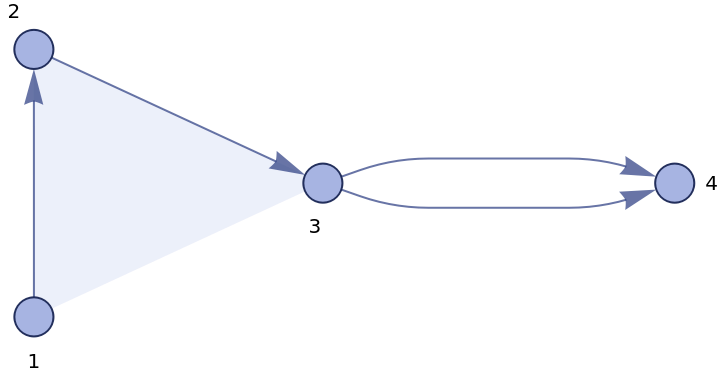
Here the shaded triangle represents the hyperedge .
e{1,2,3}
The Wolfram Physics Project
The Wolfram Physics Project
Rules
Rules
In the Wolfram Physics Project, rules define how a physics model (graph) will grow with each update.
An example of a rule is . This means that if the graph contains two vertices x and y which are connected, when the graph updates, there will be a connection between vertex y and a new vertex called z, as well as the previous connection. [2]
{{x,y}{{x,y},{y,z}}
In[]:=
RulePlot[WolframModel[{{x,y}}->{{x,y},{y,z}}]]
Out[]=

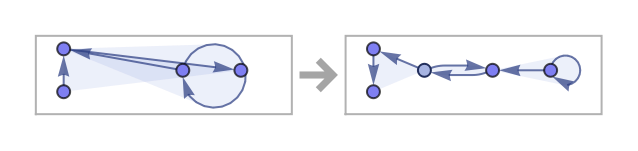
Rules can also apply to hyperedges.
In[]:=
RulePlot[WolframModel[{{1,1,2},{3,2,4}}->{{4,4,1},{1,5,1},{5,2,3}}]]
Out[]=
Repeated Rules
Repeated Rules
Rules have interesting emergent properties if we repeat them multiple times on a graph. “Repeating a rule” means that each iteration, all eligible groups of edges are updated using the rule.
Here is an example of one particular instance of applying a rule over and over again to a graph:
In[]:=
Grid[Partition[WolframModel[{{1,2},{1,3}}{{4,1},{1,4},{4,2},{3,4}},{{1,1},{1,1}},5,"StatesPlotsList"],3]]
Out[]=
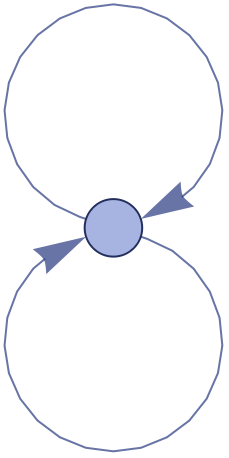

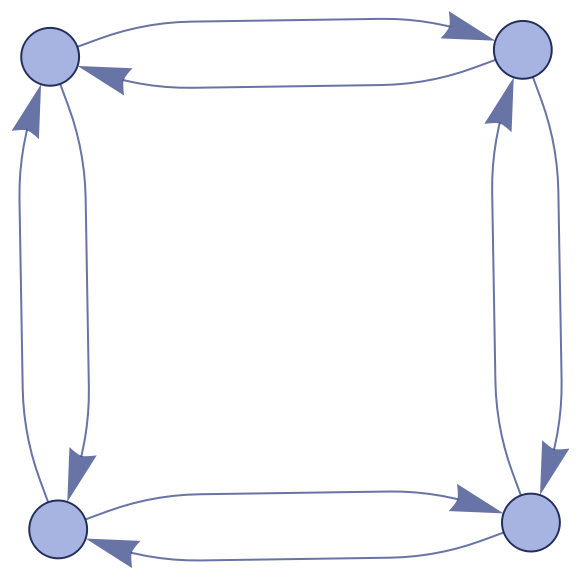
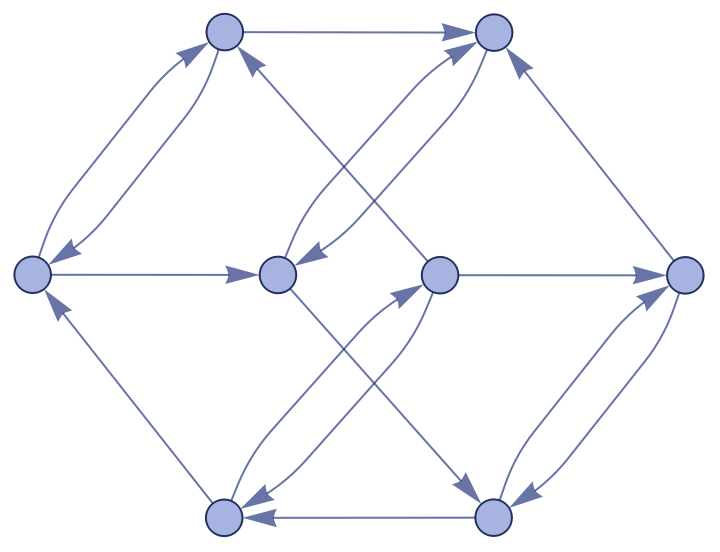
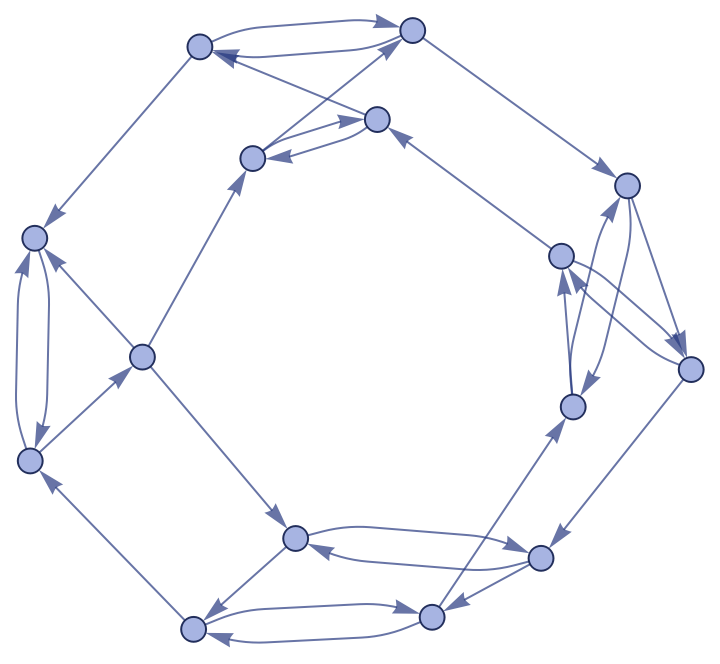
Rules can also use hyperedges.
The Issue
The Issue
Graphs (and hypergraphs) in the Wolfram Language are displayed using the “Spring Electrical Embedding” by default. This means that each vertex is treated like a point charge and each edge is treated as if it is a spring (in the case of hyperedges each vertex in the hyperedge exerts a spring force on each other vertex). Since the vertices naturally repel each other, the graph unfurls and becomes nicely spaced.
To watch a hypergraph expand as a rule is repeatedly applied to it, one can stitch together multiple plots of the hypergraph where each plot corresponds to the graph after each updating event. An updating event is when a rule is applied to one point, as opposed to an iteration when a rule is applied to every eligible point that was on the previous graph.
To watch a hypergraph expand as a rule is repeatedly applied to it, one can stitch together multiple plots of the hypergraph where each plot corresponds to the graph after each updating event. An updating event is when a rule is applied to one point, as opposed to an iteration when a rule is applied to every eligible point that was on the previous graph.
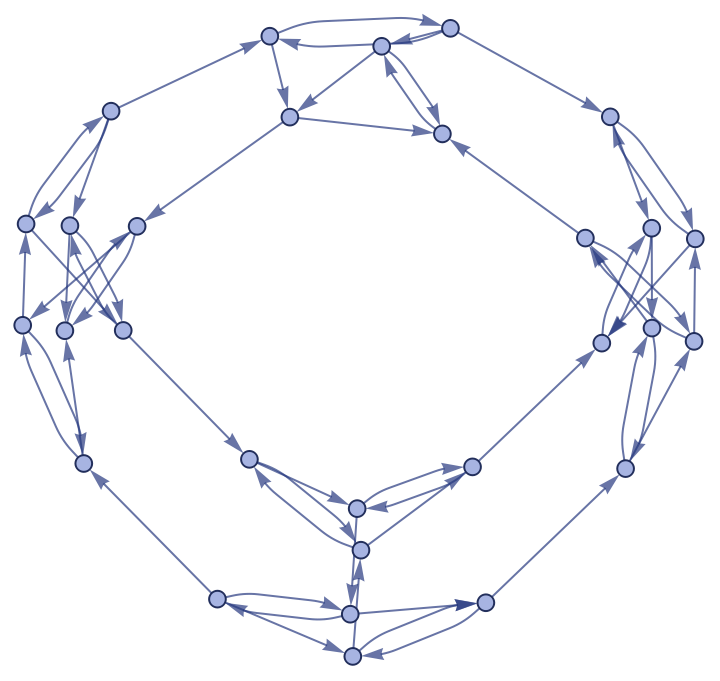
The issue with stitching these plots together is that often they will completely flip or change orientation. In these 12 steps alone, the image flips 3 times. When animating an expanding graph, having the image completely change direction like this every so often would be disorienting.
One solution to this issue was presented in a previous project on the topic where each hypergraph (from each updating event) is stitched together into one large 4 dimensional hypergraph, only after which the spring electric simulation is run. While this does ensure that the graph will not significantly change frame to frame (as adjacent graphs have persistent vertices connected and therefore influence each others positions), the animation of the graph’s expansion is not smooth at all and the graph may still exhibit these unwanted behaviors longterm. [1]
One solution to this issue was presented in a previous project on the topic where each hypergraph (from each updating event) is stitched together into one large 4 dimensional hypergraph, only after which the spring electric simulation is run. While this does ensure that the graph will not significantly change frame to frame (as adjacent graphs have persistent vertices connected and therefore influence each others positions), the animation of the graph’s expansion is not smooth at all and the graph may still exhibit these unwanted behaviors longterm. [1]
Another solution is to perform the physics simulation as the graph expands, not at each state. This way one can see the vertices move in real time, repelling each other with the spring electric system, allowing for the animation of the graph to not only be coherent long-term but also smooth short-term, as there is time for the graph to “interpolate” between updating events.
Creating a Physics Engine
Creating a Physics Engine
The Wolfram Language’s tools for visualizing graphs do not, unfortunately, allow us to watch the spring electric simulation at work. This means that we will need to replicate it with our own physics engine that does show each frame of the simulation.
Electric Forces
Electric Forces
In the simulation, each vertex should exert a repelling electric force on each other vertex. However in practice this was cut down to only the 20 nearest to prevent excessive computation time given to calculating negligible forces.
Cycles through all vertices and applies force from 10 nearest vertices that aren’t itself (if the vertex applying a force is itself a zero force is applied)
The force’s strength is determined by the inverse square law, as defined by this function:
The force is capped at a certain value to prevent errors in the simulation as well as dense packings of vertices from creating extremely high forces.
Spring Forces
Spring Forces
When two vertices are connected by an edge, they exert a spring force on each other. The spring force is modeled by a Hooke’s law spring, which means its force is proportional to the distance between the vertices.
A spring force is then applied to the vertices in each interaction as if it was a regular edge.
Spring forces are also capped in the same way electric forces are to prevent excessively high force values.
Spring forces are also capped in the same way electric forces are to prevent excessively high force values.
Damping
Damping
To prevent the simulation from continuing indefinitely, every frame velocities are damped by a set factor. This acts as a sort of “friction”.
Updating Velocities & Positions
Updating Velocities & Positions
Once all forces have been calculated, they are ready to be applied to each point. This function adds the forces to the existing velocities.
Expanding the Graph
Expanding the Graph
The physics system is complete, however this engine will only simulate a graph of constant size. If we want the graph to expand as the simulation progresses, there needs to be a function to add vertices & edges based on a Wolfram Model as the simulation progresses.
The first step in adding a vertex is to find which existing vertices it will share hyperedges with.
Next, the vertex is placed near the average point of those it is connected to. A spherical/annular shell is used to make sure that when the vertex is only connected to one other, they are not accidentally placed on top of each other. The spherical shell guarantees this minimum radius.
If the vertex is not connected to any other vertex through a hyperedge, it is placed at the center of the simulation by default.
This function applies this algorithm to every vertex that will be newly created in the next hypergraph update. It also gives all new vertices a starting velocity of zero.
Putting it all Together
Putting it all Together
This function puts the entire physics simulation together.
It takes in a list of initial positions and velocities, the Wolfram Model to animate, and the amount of time steps to run it for.
It takes in a list of initial positions and velocities, the Wolfram Model to animate, and the amount of time steps to run it for.
The “graphUpdatePeriod” determines how many time steps there are between each hypergraph update event. Every time this number of time steps passes, new vertices are added to the graph using the process outlined before.
Positions & velocities are then updated using the physics simulation.
Positions & velocities are then updated using the physics simulation.
After computation is complete, the function outputs the complete list of all positions for each frame.
Defining Constants
Defining Constants
When coding a physics engine it is often useful to add constants that one can play around with later. These particular values work well for most 3 dimensional Wolfram Models tested during this project, however other values could work better in specific cases.
Animation in 2-D & Examples
Animation in 2-D & Examples
Methodology
Methodology
To animate the graph’s expansion, we take the already nicely formatted position data for each frame from the physics simulation, combine it with the edge data obtained from the wolfram model, and draw a graph.
◼
Vertices are visualized as disks with a small radius
◼
Hyperedges including 2 vertices
◼
Hyperedges are visualized as polygons with a translucent infill.
◼
Hyperedges mapped from a vertex to itself are depicted as an annulus around the vertex.
Bounding variables format size of graph so that all vertices are always in view.
Annuli list controls the radius of annuli around points - if more hyperedges are present
Annuli list controls the radius of annuli around points - if more hyperedges are present
Once frames are rendered, they are put together into an animation using this function:
The animation can also be saved as a video file:
Examples
Examples
Here are some examples of animated 2D graphs generated with this method:
Balloon-type Structure
Bowling Pin-type structure
Animation in 3-D & Examples
Animation in 3-D & Examples
Methodology
Methodology
3D animation of hypergraph expansion works similarly to that of 2D, except
◼
Disks to display points are replaced with small spheres
◼
Lines to display edges are replaced with thin cylinders
◼
Annuli are replaced with tori around points
Examples
Examples
Here are some examples of animated 3D graphs generated with this method:
Horn-type structure
Tube-type Structure
Shell-type structure
Other Applications
Other Applications
This engine can be used to render other graphs, not just Wolfram Physics Project models. One example is the graphs obtained from multiway tag systems. Another is the expansion of hydrocarbons through polymerization.
Tag Systems
Tag Systems
What is a Tag System?
What is a Tag System?
This is an example of a tag system that increases in size exponentially.
Rendering Tag Systems
Rendering Tag Systems
To display tag systems as growing graphs, we first have to convert them into a format that our renderer can use.
This function takes in the list of strings in a tag system and converts them to a list of edges in a graph.
This function takes in the list of strings in a tag system and converts them to a list of edges in a graph.
Obtains edge list of the tag system’s state graph, then converts each string to a unique vertex in graph using key
However, before the tag system converted to a graph layout, it needs to be created from a set of rules.
Here is some nifty code that does exactly this (which I did not write myself, check out Max Niederman’s essay on tag systems listed in the citations to learn more) [3].
Here is some nifty code that does exactly this (which I did not write myself, check out Max Niederman’s essay on tag systems listed in the citations to learn more) [3].
Running these functions together, we can now generate a tag system and convert it to a format which the physics engine can accept.
Here is an example of a tag system rendered using these functions:
Here is an example of a tag system rendered using these functions:
2-sided string structure
Rule:
Rule:
Polymerization
Polymerization
Many molecules, especially hydrocarbons, undergo reactions called “polymerization”. A polymerization reaction is when individual monomers combine to form a polymer.
In this reaction, a 4-carbon polymer called butane reacts with a 1-carbon polymer called methane to create a 5-carbon polymer called pentane.
This can be modeled by a rule, where each time the rule is is applied to a graph it corresponds to a methane molecule being added to the end of a polymer.
Such a rule would look like this:
Such a rule would look like this:
Carbon atoms in the hydrocarbon structure are depicted as vertices that map to themselves, while hydrogen atoms are depicted as vertices that do not.
This rule can then be animated, and we can watch a polymerization reaction as it progresses.
We can even convert molecules directly to graphs.
This could then be used to procedurally generate visualizations of polymerization and other types of reactions.
Future Work
Future Work
◼
Define point positions & velocities with differential equations and use a more efficient method to solve, for example Runge-Kutta (the current method for calculating positions and velocities is equivalent to Euler’s method)
◼
Would greatly speed up processing time to generate animation
◼
Parallelize rendering process across multiple kernels
◼
Model large groups of vertices as “chunks” that exert a singular electric force to keep forces at large scales accurate while reducing computation time.
◼
Find Wolfram-Hausdorff dimension of graphs and relate this to graph expansion rate in both 2d and 3d space
◼
Find a way to procedurally convert chemical reactions into graph rules & simulate their progress
Citations
Citations
1
.Animating Wolfram Model evolutions in 3D by Dugan Hammock Wolfram Community, STAFF PICKS, July 12, 2023 https://community.wolfram.com/groups/-/m/t/2959098
2
.Wolfram Physics Project (2020), “Registry of Notable Universes”, https://www.wolframphysics.org/universes/
3
.Growth and Evolution of Multi-Way Tag Systems by Max Niederman Wolfram Community, July 11, 2024
https://community.wolfram.com/groups/-/m/t/3216229
https://community.wolfram.com/groups/-/m/t/3216229
Acknowledgements
Acknowledgements
Thank you to my amazing mentor Dugan Hammock for providing me with a basis upon which to build this project and assisting with many of the functionalities of the simulation, to Jason Sonnenberg for helping with the chemistry aspect, and to Maximilian Niederman for his exorbitantly nifty tag system code. Finally, thank you to all of the directors, mentors, and TAs that made this incredible summer program possible.
CITE THIS NOTEBOOK
CITE THIS NOTEBOOK
HyperPlot: on the generation of temporally coherent hypergraphs
by Gregory Roudenko
Wolfram Community, STAFF PICKS, July 12, 2024
https://community.wolfram.com/groups/-/m/t/3216034
by Gregory Roudenko
Wolfram Community, STAFF PICKS, July 12, 2024
https://community.wolfram.com/groups/-/m/t/3216034