It’s that time again—there’s a new version of Mathematica and Wolfram Language, and this one is a big one. I have had to ask for extra time for my Overview of Version 15 webinar on June 24, and even then I will have to skim over many of the new features.
You can read Stephen's view on the release here or the item-by-item documentation here, but for those in a hurry, here is my much shorter (personal) view of the top three highlights.
You can read Stephen's view on the release here or the item-by-item documentation here, but for those in a hurry, here is my much shorter (personal) view of the top three highlights.
AI assistance for everyone
AI assistance for everyone
While a relatively small change, it is a profound one.
Including free AI assistance for everyone with an active license and making the interface more accessible (with a floating footer cell and a docked sidebar) is a game-changer for getting started with Wolfram Language or for accessing unfamiliar capabilities (none of us know every function).
Backed by tooling to read documentation on demand, the AI can write code, execute code, debug code or translate from other programming languages. Lack of familiarity with Wolfram Language is no longer a barrier to using it. This is particularly an issue in teaching, where the learning time for any language takes away from the subject-matter learning that you want the language to enable.
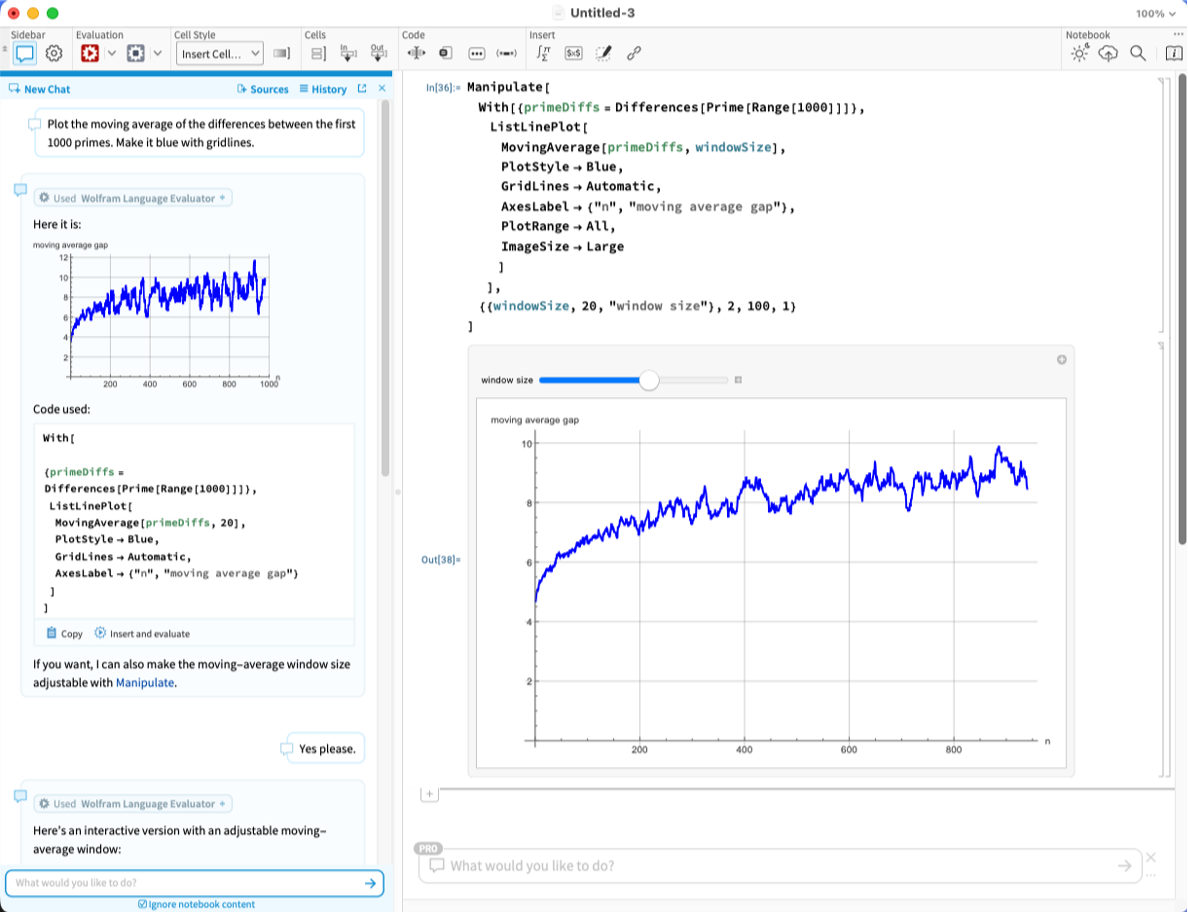
For software developer types, we have also started building out integration tools for dedicated AI coding environments like Claude Code and Cursor, a key component being a local MCP server.
I experiment and present in Wolfram Notebooks, but when I write code for our larger consulting projects, I work in Visual Studio with Copilot. Adding better Wolfram support into that (and 17 other coding environments) is a real benefit, particularly when working with multiple-language projects and Git team coordination.
New model-fitting framework
New model-fitting framework
My next favourite improvement is the new model-fitting framework, not just because it adds important capabilities for automatic model selection, but because it embodies everything that is best about the way we build Wolfram Language. I always explain the advantages of Wolfram Language with three principles: “all in one,” “automated” and “integrated,” and this framework exemplifies all three. The first is simple—of course it is included in the core, not an add-on toolbox. Now let’s look at the automation. For simple tasks, it appears to be just a new syntax:
In[]:=
data=Table[{x,(x-4)^2-x^3/20+RandomReal[5]+x^3/30},{x,0,10,0.05}];
Instead of:
In[]:=
LinearModelFit[data,{1,x,x^2},x]
Out[]=
FittedModel
The new framework uses:
In[]:=
m=ModelFit[data,PolynomialModel[2]]
Out[]=
PolynomialModel


In[]:=
ListPlot[data,PlotFit->m]
Out[]=
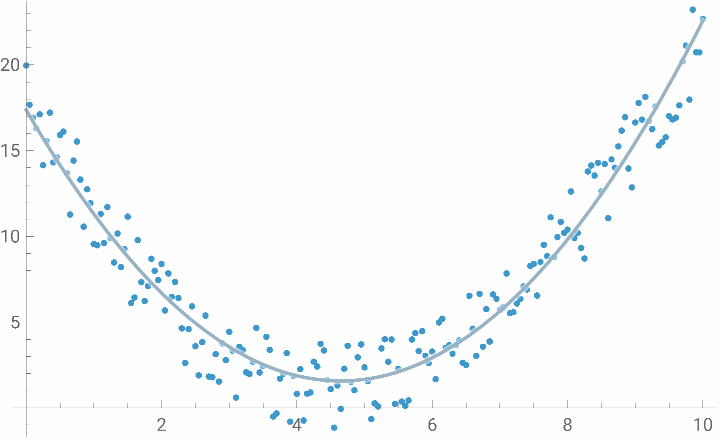
But the first big win with the new framework is that you don’t need to specify the model parameter. By leaving that free, the automation kicks in and chooses the best model out of all the possible polynomials. In this case, it picks an order 3:
In[]:=
ModelFit[data,PolynomialModel[]]
Out[]=
PolynomialModel

So that’s the automation, but what about integration? Well, the elegant thing about this framework is that ModelFit fits all kinds of models, not just polynomial models. It unifies the world of linear and nonlinear regression with machine learning and other forms of regression. Here is a k-nearest neighbour model with a specified k:
In[]:=
nn=ModelFit[data,NearestModel[10]]
Out[]=
NearestModel

In[]:=
ListPlot[data,PlotFit->nn]
Out[]=
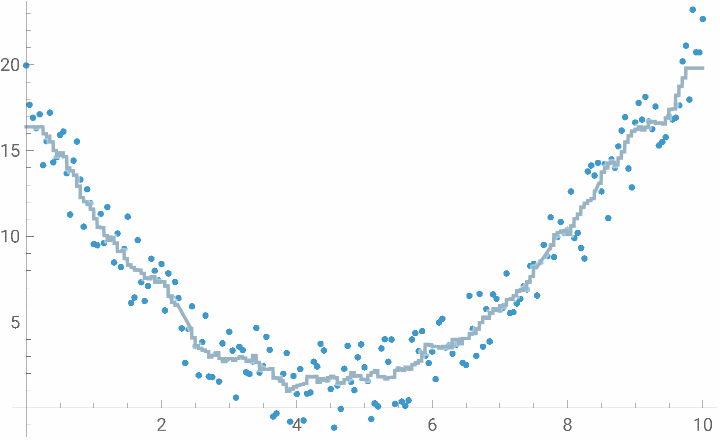
Where possible, the model types tie neatly into other frameworks. Here is the actual neural network that it uses if I ask it to choose the best PerceptronModel from a range of hyperparameters:
In[]:=
pm=ModelFit[data,PerceptronModel[<|"Width"->5;;10,"Depth"->UpTo[3],"Activation"->Ramp|>]]
Out[]=
PerceptronModel

In[]:=
Information[pm,"Net"]
Out[]=
NetChain


In[]:=
Information[Information[pm,"Net"],"SummaryGraphic"]
Out[]=

In[]:=
Information[ModelFit[data,DecisionTreeModel[]],"Expression"]
Out[]=
Ifx.[1]≤8.25,Ifx.[1]≤1.5,Ifx.[1]≤0.8,Ifx.[1]≤0.2,17.5896,Ifx.[1]≤0.55,Ifx.[1]≤0.25,14.1463,If[x.[1]≤0.35,16.3789,15.2324],13.6387,Ifx.[1]≤0.95,11.7471,Ifx.[1]≤1.2,10.3272,If[x.[1]≤1.45,9.20076,11.1483],Ifx.[1]≤6.85,Ifx.[1]≤2.25,Ifx.[1]≤1.6,6.27302,Ifx.[1]≤1.65,9.77638,Ifx.[1]≤2.,If[x.[1]≤1.8,6.88576,8.13635],6.74835,Ifx.[1]≤5.65,Ifx.[1]≤3.6,Ifx.[1]≤2.65,Ifx.[1]≤2.6,If[x.[1]≤2.45,4.44104,3.10781],5.38258,Ifx.[1]≤2.85,2.06938,Ifx.[1]≤3.05,3.5812,If[x.[1]≤3.1,0.602288,3.04024],Ifx.[1]≤3.7,-0.4112,Ifx.[1]≤5.5,Ifx.[1]≤5.2,If[x.[1]≤5.05,1.70577,-0.0979618],If[x.[1]≤5.4,3.53742,1.25787],0.311567,Ifx.[1]≤6.5,Ifx.[1]≤6.4,Ifx.[1]≤6.05,If[x.[1]≤5.85,4.03035,2.65337],If[x.[1]≤6.15,5.09004,3.58361],2.56892,Ifx.[1]≤6.55,6.53334,If[x.[1]≤6.65,3.82686,4.96115],Ifx.[1]≤7.55,Ifx.[1]≤7.3,If[x.[1]≤7.1,6.47286,5.88634],7.44264,Ifx.[1]≤7.7,8.94868,Ifx.[1]≤8.15,Ifx.[1]≤7.85,9.95087,If[x.[1]≤8.05,11.0121,10.054],9.01448,Ifx.[1]≤9.65,Ifx.[1]≤8.95,Ifx.[1]≤8.6,Ifx.[1]≤8.55,If[x.[1]≤8.45,13.9347,13.4186],11.06,If[x.[1]≤8.85,15.3675,13.4025],Ifx.[1]≤9.15,17.3358,Ifx.[1]≤9.45,If[x.[1]≤9.3,16.8442,15.5247],17.0934,If[x.[1]≤9.8,19.7623,21.8326]
I love it when Wolfram Language joins up nicely.
New TimeSeries infrastructure
New TimeSeries infrastructure
I am as guilty as the next person of presenting the worth of upgrades in terms of the number of new functions. But making life better for people who are already users is as much about revisiting existing functionality even if, by selection bias, it is probably “good enough” already. So my third vote goes to the reengineering of the existing TimeSeries and EventSeries. Don’t panic; they work as they did before, but what happens behind the scenes has drastically changed.
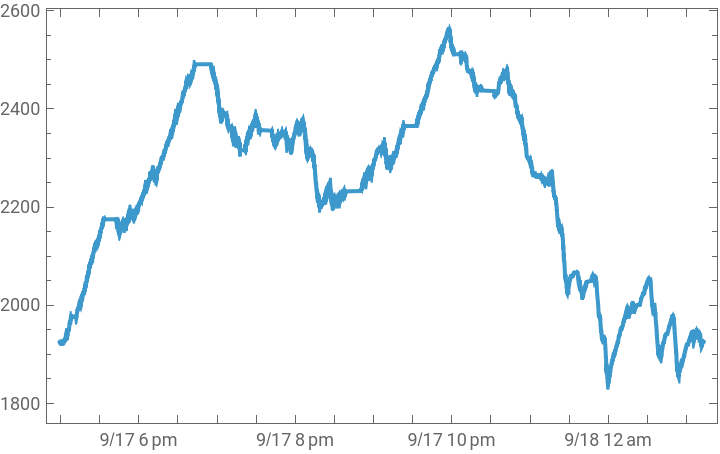
It’s another story of integration and automation. Up to now, TimeSeries was based around the idea of time-value pairs that are expected to represent temporal observations. By a side effect of our general symbolic framework, it was possible for the observations to be symbolic expressions, but they were always considered single values (though simple uses of List or Association values sometimes worked as a side effect of other automation). In Version 15, TimeSeries and EventSeries are designed to support multivalued observations, and the syntax of a number of functions, especially graphics, has been updated to make it easy to work with specific columns directly.
It’s another story of integration and automation. Up to now, TimeSeries was based around the idea of time-value pairs that are expected to represent temporal observations. By a side effect of our general symbolic framework, it was possible for the observations to be symbolic expressions, but they were always considered single values (though simple uses of List or Association values sometimes worked as a side effect of other automation). In Version 15, TimeSeries and EventSeries are designed to support multivalued observations, and the syntax of a number of functions, especially graphics, has been updated to make it easy to work with specific columns directly.
In[]:=
ts=TimeSeries;

In[]:=
DateListPlot[ts->"Elevation"]
Out[]=
In[]:=
GeoListPlot[Take[ts,100]->"Track"]
Out[]=
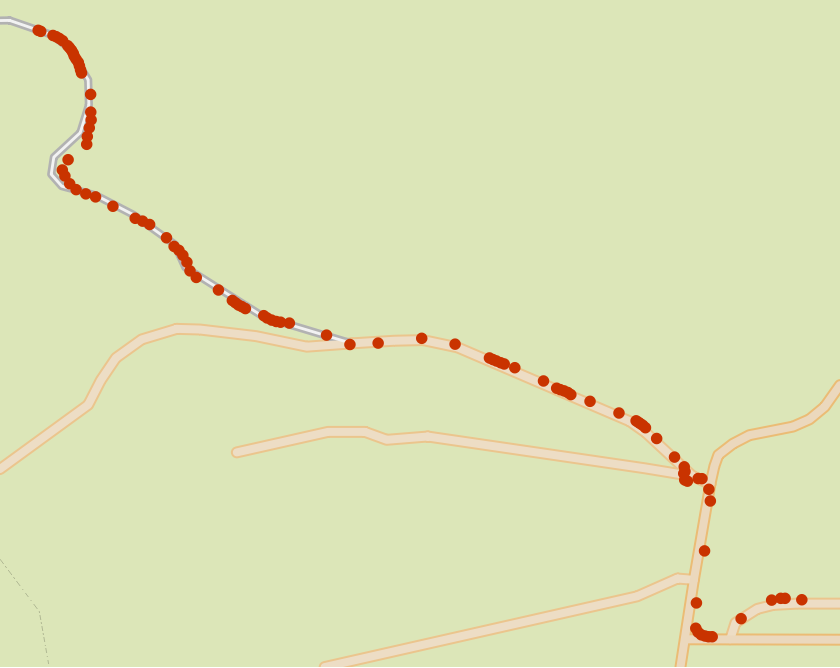
Date specifications have been improved to handle date granularity properly by averaging values that occur within the window of time. Resampling and handling missing data has been extended so that not every observed value needs be present at each observation time.
You might expect such overhead to come at a price in performance. But TimeSeries is also significantly faster in Version 15. This was possible because of a long chain of development. Starting back in 2019, we introduced the new compiler technology (improved further in this release), which, as well as giving you the chance to write type-optimised Wolfram Language code, has enabled our developers to easily do the same. This enabled the development of the Tabular framework, released in 2025 and improved in Version 14.3, which automated the recognition of common data types in column-oriented rectangular data, optimised their representation and used compiler-optimised operations for accelerated processing. (Version 15 extends Tabular with fast support for the experimental error object Around.) And what is inside a time series? Tabular data. So in Version 15, internally, TimeSeries are Tabular, and you can trivially swap between the two objects. The only real difference is how we interpret the objects and what automatic rules of computation apply to them; their internal representation is entirely unified, and the fast machinery we built applies to both.
While speed is nice, the important thing is that one can scale to much larger problems before time or memory become constraints.
Learn more
Learn more
To hear the full version of my take on Wolfram Language 15, including improvements to the front end, visualizations and computations in engineering, biosciences, astronomy, programming, maths and music, join my webinar on June 24, followed by deeper dives into the technology from the developers themselves:
CITE THIS NOTEBOOK
CITE THIS NOTEBOOK
New in Wolfram V15: my favourite three improvements
by Jon McLoone
Wolfram Community, STAFF PICKS, June 16, 2026
https://community.wolfram.com/groups/-/m/t/3734779
by Jon McLoone
Wolfram Community, STAFF PICKS, June 16, 2026
https://community.wolfram.com/groups/-/m/t/3734779