Goal and Background
Goal and Background
Object detection is a very interesting computer vision problem with a variety of real world applications, such as facial recognition, autonomous driving, anomaly detection, and object tracking. The traditional computer vision methods for this task date back to the late 90s, and since then, many creative approaches to this problem have been documented. In general, object detection consists of both object classification and object localization. The object detectors most commonly used today can be categorized into two types: networks that perform the localization and classification separately (like R-CNNs), and networks that do both at once (like YOLO and SSD). R-CNNs in general consist of a region proposal network, which is a method to create multiple possible region proposals, and a convolutional neural network (CNN) that classifies each region proposal and outputs a final bounding box. For my project, I am using a simpler modified version of R-CNN. The goal of this project is to determine if a US flag is present in an image, and specify its location with a bounding box. To accomplish this goal, I used a combination of the built in function ImageBoundingBoxes, the Wolfram ImageIdentify Net V1, my own bounding box algorithm, and my own trained classifier. My Region Proposal Network will consist of the ImageBoundingBoxes function and my own bounding boxes algorithm, and the classifying part of my algorithm will consist of the Wolfram ImageIdentify Net V1 neural network and my own classifier.
Detecting the Main Objects in the Image
Detecting the Main Objects in the Image
My first method of attack is to use the ImageBoundingBoxes function to detect the major objects in an image. An example and visualization of this function is below. The ImageBoundingBoxes function uses the YOLO V2 algorithm, a popular convolutional neural network for object detection optimized for speed.
This code shows an example of the ImageBoundingBoxes function in action. Notice that the flag was misidentified as a kite.
In[]:=
ClearAll[testImage1]testImage1=
;Module[{boundingBox},Column[{boundingBox=ImageBoundingBoxes[testImage1],HighlightImage[testImage1,boundingBox]}]]

Out[]=

One of the issues that I noticed is that the output classes of ImageBoundingBoxes do not include "flag", so it cannot identify the presence of a flag. So, I disregarded the labels of the output and used another neural network to classify each of the bounding boxes.
Classifying the Bounding Boxes
Classifying the Bounding Boxes
Below, I used the pre-trained Wolfram ImageIdentify Net V1 neural network to classify each bounding box. I used this particular model because it does have "flag" as one of its output classes, meaning that it can identify flags.
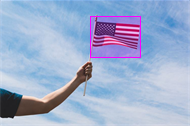
The below code uses the previous test image and uses the Wolfram ImageIdentify Net V1 neural network to classify each bounding boxes and only display the one identified as a flag. Notice that the flag is properly identified this time.
In[]:=
Module{boundingBoxCoords,trimmedImages,results},boundingBoxCoords=Flatten@Values[ImageBoundingBoxes[testImage1]];(*Coordinatesoftheboundingboxes*)trimmedImages=ImageTrim[testImage1,boundingBoxCoords];(*piecesoftheimagespecifiedbytheboundingboxes*)results=net[#]&/@trimmedImages;(*Theresultoftheneuralnetclassification*)IfMemberQresults,,HighlightImagetestImage1,AssociationThread[results,boundingBoxCoords],"No Flag Detected"
Out[]=
Custom Bounding Box Algorithm to Catch Mistakes
Custom Bounding Box Algorithm to Catch Mistakes
One issue with ImageBoundingBoxes is that it sometimes misses the US flag and doesn't put a bounding box around it. This would mean that the US flag would never be classified and result in the entire image being classified as not having a US flag. To fix this mistake, I created an algorithm to generate bounding boxes around the US flag by searching for red, white, and blue in the image.
Filtering the colors
Filtering the colors
First, I used a filtering function to filter out all of the colors except red, white, and blue
In[]:=
ClearAll[filter3]filter3[image_Image]:=ImageApply[If[ColorDistance[RGBColor[#[[1]],#[[2]],#[[3]]],Red]<0.5||ColorDistance[RGBColor[#[[1]],#[[2]],#[[3]]],Blue]<1.0||ColorDistance[RGBColor[#[[1]],#[[2]],#[[3]]],White]<0.1,#,{1,1,1}]&,image]
In[]:=
testImage2=
;filter3[testImage2]


Plotting points
Plotting points
Then, I used ImageCorners on the filtered image
This is a visualization of the points plotted on the filtered image
In[]:=
ClearAll[see]see[image_Image]:=Module[{filter=filter3[image]},HighlightImage[filter,ImageCorners[filter]]]
In[]:=
see[testImage2]
Out[]=

Clustering and Boxing
Clustering and Boxing
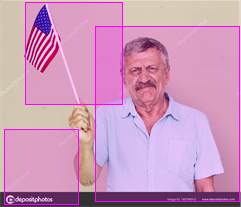
Finally, by clustering the points made previously using FindClusters and making bounding boxes out of each cluster using BoundingRegion, appropriate bounding boxes can be created
A visual of the bounding boxes created by my bounding box algorithm
In[]:=
ClearAll[betterBoundingBox]betterBoundingBox[image_Image]:=Module[{f8=FindClusters[ImageCorners[filter3[image]]]},HighlightImage[image,Table[BoundingRegion[f8[[n]],"MinRectangle"],{n,1,Length[f8]}]]]
betterBoundingBox[testImage2]
Differentiating US Flags From Other Flags
Differentiating US Flags From Other Flags
Another issue that needs to be addressed is that the Wolfram ImageIdentify Net V1 neural network cannot differentiate between different types of flags. To resolve this issue, I trained my own classifier to identify if a flag is a US flag or another country's flag using Google Image Search data.
Obtaining and Filtering the Data
Obtaining and Filtering the Data
In order to get images of US flags and flags from other countries, I used a Google Chrome extension to download images from the Google Image Search website. Below is the code used to import the data into the notebook.
Note: The below code imports images from a local file.
Import/@FileNames[All,"C:/Users/abach/Downloads/ImageAssistant Batch Image Downloader/1"]Import/@FileNames[All,"C:/Users/abach/Downloads/ImageAssistant Batch Image Downloader/0"]
After this import, a series of manual and computational filtering operations were performed on the data. The filtering involved deleting bad data by hand and extracting all of the possible bounding boxes using ImageTrim.
Below is the final form of the data that will directly be entered into the classifier. 1 means that the US Flag is present and 0 means that it is not.
ClearAll[usFlagPresent,notUSFlag]usFlagPresent=;(*IconizeddatacontainingthetrimmedimagesoftheUSFlags*)yes=#1&/@usFlagPresent;notUSFlag=;(*Iconizeddatacontainingthetrimmedimagesoftheflagsofafewothercountries*)no=#0&/@notUSFlag;
The below code combines and shuffles the data into one list of rules and splits it into training and test datasets (80:20 split)
In[]:=
ClearAll[fTotal,totalData]fTotal=RandomSample@Join[yes,no];(*Combinesallofthedataandrandomlyshufflesit*)totalData=TakeDrop[fTotal,339];(*Listcontainingthetrainingandtestingdatasets*)
Training the Classifier
Training the Classifier
I used the Classify function to train the classifier and wound up with an accuracy of 96%.
ClearAll[freedomPresent]freedomPresent=Classify[totalData[[1]]]

Putting it All Together
Putting it All Together
The below code is the aggregation of all of the functions shown so far and can detect the location of a US flag on an image and returns "US Flag Not Detected" if it is not there. This function prioritizes the ImageBoundingBoxes function to create bounding boxes, but if it misses the US flag, then my custom bounding boxes algorithm will activate and be used to create the final bounding box.
Areas for Future Exploration
Areas for Future Exploration
In the future I want to add more training and testing data as well as augment it to improve my classifier. I also want to add functionality for generating multiple bounding boxes for multiple US flags in an image. Finally, I would like to improve the speed of my function.
Acknowledgements
Acknowledgements
I would like to thank my mentor Harshal Gajjar for guiding me throughout this project. I would also like to thank Alex Alexandrovskiy as well as Giulio Alessandrini for further assistance in my project.
Keywords
Keywords
◼
Object Detection
◼
Neural Network
◼
Classify
◼
Image Processing