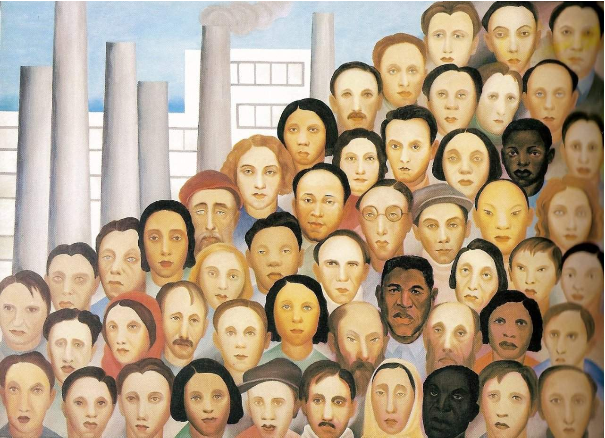
Operários (workers) is a masterpiece from Tarsila do Amaral from 1933.
Here we are going to run some machine learning supper functions to analyze the painting, as a data science exploration.
Here we are going to run some machine learning supper functions to analyze the painting, as a data science exploration.
Background
TextCell[StringSplit[WikipediaData["Tarsila do Amaral"],"\n"][[1]],"Text"]
Out[]=
Tarsila de Aguiar do Amaral (Portuguese pronunciation: [taɾˈsilɐ du ɐmaˈɾaw]; September 1, 1886 – January 17, 1973) was a Brazilian painter, draftswoman, and translator. She is considered one of the leading Latin American modernist artists, and is regarded as the painter who best achieved Brazilian aspirations for nationalistic expression in a modern style. As a member of the Grupo dos Cinco, Tarsila is also considered a major influence in the modern art movement in Brazil, alongside Anita Malfatti, Menotti Del Picchia, Mário de Andrade, and Oswald de Andrade. She was instrumental in the formation of the aesthetic movement, Antropofagia (1928–1929); in fact, Tarsila was the one with her celebrated painting, Abaporu, who inspired Oswald de Andrade's famous Manifesto Antropófago.
TextCell[StringSplit[TextTranslation[WikipediaData["Operários",Language"Portuguese"],"Portuguese"->"English"],"\n"][[1]],"Text"]
Out[]=
Workers is a painting painted in 1933 by Tarsila do Amaral that represents the process of industrialization of the state of São Paulo and the immense number and ethnic variety of people coming from all parts of Brazil to work in factories, which began to emerge in the country at the beginning of the 20th century and peaked in the 1930s, mainly in the metropolises, boosting capitalism and immigration. The painting is located in the Boa Vista Palace and is part of the collection of the Government of the State of São Paulo.
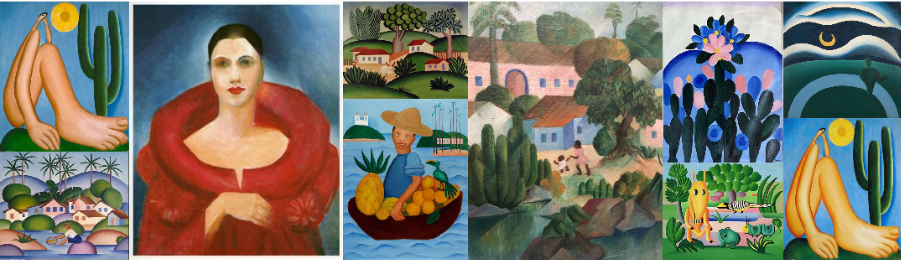
Some popular Tarsila paitings:
ImageCollage[WebImageSearch["Tarsila do Amaral"]]
Out[]=
There are curated data about her, facing she is a popular artist (Notable Person):
Out[]=
ColumnDeleteMissingMap#->[#]&,["Properties"]
Out[]=
This is the Operários painting:
In[]:=
operarios=
;
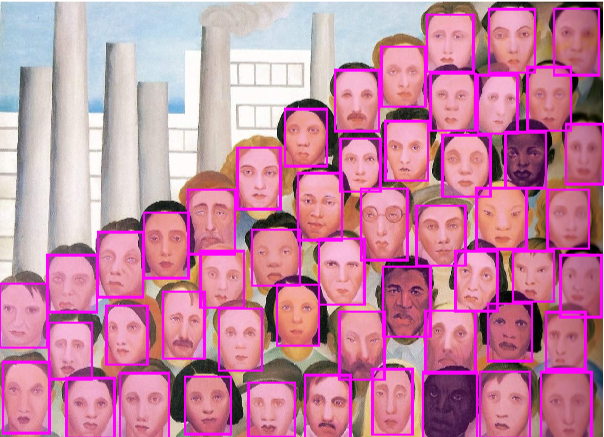
Lets identify how many faces there are in the painting:
FindFaces[operarios]HighlightImage[operarios,%]
Out[]=
{Rectangle[{585.5,197.5},{675.5,326.5}],Rectangle[{304.5,340.5},{398.5,479.5}],Rectangle[{206.5,300.5},{302.5,437.5}],Rectangle[{1035.5,775.5},{1132.5,910.5}],Rectangle[{344.5,169.5},{432.5,311.5}],Rectangle[{936.5,513.5},{1038.5,643.5}],Rectangle[{645.5,-0.5},{741.5,134.5}],Rectangle[{502.5,486.5},{593.5,617.5}],Rectangle[{807.5,703.5},{900.5,830.5}],Rectangle[{224.5,156.5},{311.5,281.5}],Rectangle[{630.5,420.5},{723.5,562.5}],Rectangle[{253.5,0.5},{356.5,139.5}],Rectangle[{463.5,144.5},{554.5,275.5}],Rectangle[{1033.5,164.5},{1126.5,286.5}],Rectangle[{1116.5,652.5},{1208.5,787.5}],Rectangle[{903.5,777.5},{1002.5,898.5}],Rectangle[{764.5,378.5},{862.5,529.5}],Rectangle[{1011.5,646.5},{1095.5,770.5}],Rectangle[{964.5,270.5},{1053.5,397.5}],Rectangle[{810.5,216.5},{911.5,364.5}],Rectangle[{788.5,8.5},{873.5,147.5}],Rectangle[{815.5,547.5},{906.5,673.5}],Rectangle[{1008.5,401.5},{1114.5,531.5}],Rectangle[{102.5,126.5},{193.5,245.5}],Rectangle[{720.5,523.5},{805.5,635.5}],Rectangle[{5.5,11.5},{103.5,162.5}],Rectangle[{1070.5,531.5},{1156.5,649.5}],Rectangle[{1172.5,770.5},{1268.5,911.5}],Rectangle[{525.5,3.5},{624.5,119.5}],Rectangle[{1159.5,402.5},{1247.5,527.5}],Rectangle[{881.5,366.5},{985.5,494.5}],Rectangle[{1085.5,290.5},{1173.5,397.5}],Rectangle[{1145.5,-6.5},{1252.5,141.5}],Rectangle[{391.5,9.5},{488.5,131.5}],Rectangle[{911.5,652.5},{1006.5,773.5}],Rectangle[{532.5,324.5},{634.5,443.5}],Rectangle[{-0.5,192.5},{99.5,328.5}],Rectangle[{900.5,138.5},{1006.5,271.5}],Rectangle[{139.5,2.5},{241.5,128.5}],Rectangle[{674.5,284.5},{771.5,423.5}],Rectangle[{895.5,-1.5},{1009.5,141.5}],Rectangle[{1016.5,2.5},{1122.5,142.5}],Rectangle[{708.5,651.5},{802.5,781.5}],Rectangle[{99.5,268.5},{204.5,389.5}],Rectangle[{718.5,125.5},{813.5,269.5}],Rectangle[{1198.5,539.5},{1276.5,666.5}],Rectangle[{1155.5,147.5},{1239.5,268.5}],Rectangle[{423.5,277.5},{516.5,397.5}],Rectangle[{397.5,391.5},{497.5,527.5}],Rectangle[{602.5,577.5},{692.5,698.5}],Rectangle[{1186.5,257.5},{1273.5,389.5}]}
Out[]=
And extract the faces in a list:
In[]:=
faces=FindFaces[operarios,"Image"]
Out[]=
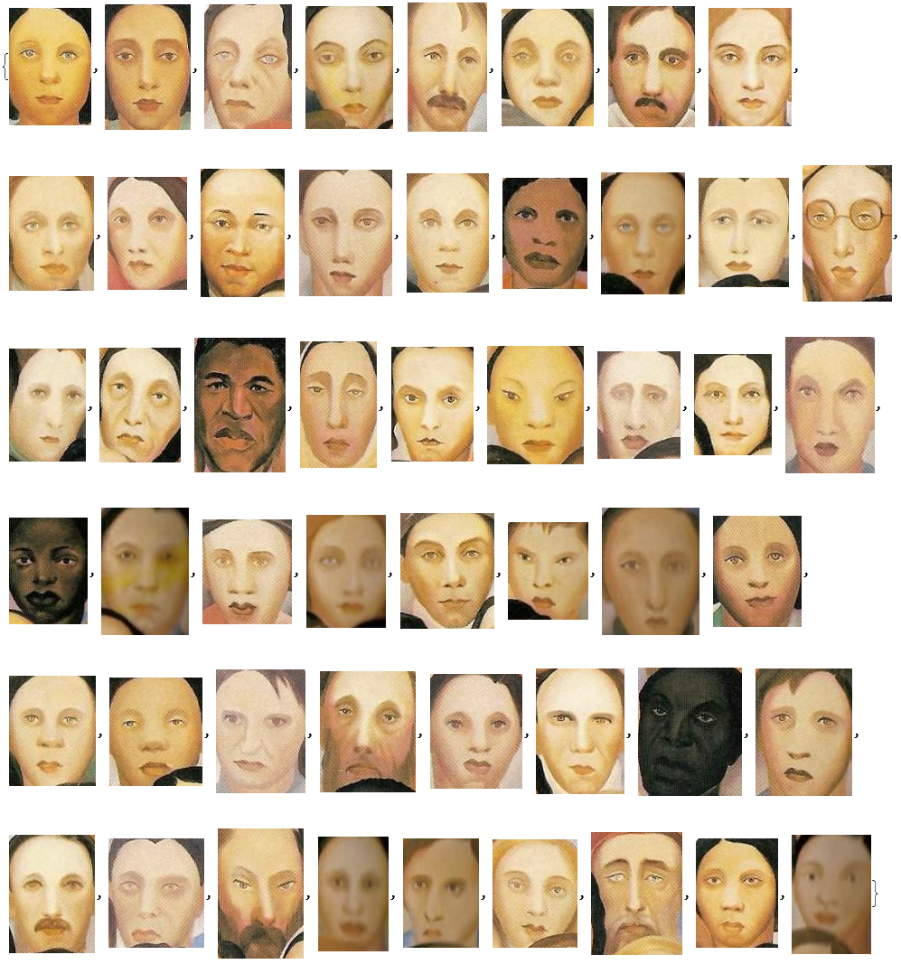
Check the number of faces:
Create a cluster of faces:
Just for fun, we can check out with notable person those faces looks like:
And we can check facial features too, notes that those machine learning supper functions ware trained with real human faces.
Lets see a bar chart for faces ages:
And a age histogram:
Lets check genders:
And faces emotions:
Now we can try to get some Tarsila paintings and use image identify to inspect probabilities...