First, grab the XMLObject representation of https://www.opentable.com/state-of-industry:
In[]:=
opentablexml=Import["https://www.opentable.com/state-of-industry","XMLObject"];
Inspecting the web page's source code, we can see that the data is JSON encoded in a "script" element in the HTML. Note that the JSON needs some cleanup (it is wrapped in JavaScript code that we don't need), hence the StringReplace.
We extract and import the JSON encoded data thusly:
We extract and import the JSON encoded data thusly:
In[]:=
jsonstr=StringReplace[Replace[Cases[opentablexml,XMLElement["script",{},{s_String?(StringContainsQ[#,"dagAnalytics"]&)}]s,Infinity],{x_}x],{___~~"__INITIAL_STATE__ = ",";})(window);"~~EndOfString}""];
There are character encoding issues in the JSON, and Import[str, "JSON"] throws an error. Therefore, we use ReadRawJSONString from the Developer` context to get the JSON string into an Association:
In[]:=
json=Developer`ReadRawJSONString[jsonstr]["covidDataCenter"];
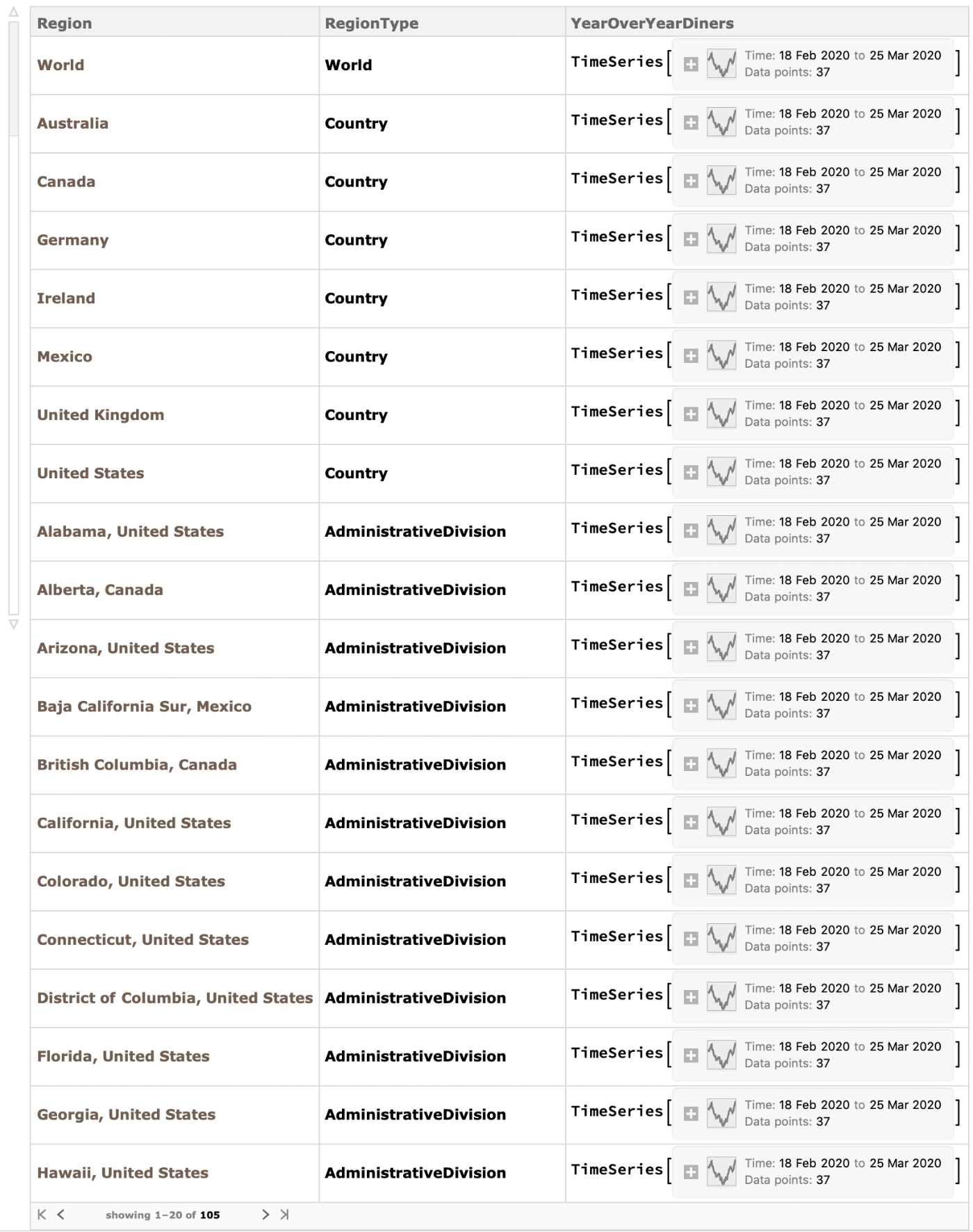
In making a Dataset, we take the three region types ("Country", "AdministrativeDivision", and "City"), use Interpreter to turn those region names into Wolfram Language Entities, and join Associations of data by region type together.
Note that Interpreter needs a little help with the "Mexico City" administrative division, we are adding the year to the dates to make them complete, and that we create a special case for the "Global" region.
Note that Interpreter needs a little help with the "Mexico City" administrative division, we are adding the year to the dates to make them complete, and that we create a special case for the "Global" region.
In[]:=
ds=Dataset[Join[Module[{dates=json["headers"],countries=json["countries"]},dates=DateObject[DateList[{#<>"/2020",{"Month","/","Day","/","Year"}}],"Day"]&/@dates;<|"Region"Interpreter["Country"][#["name"]],"RegionType"If[#["name"]==="Global","World","Country"],"YearOverYearDiners"TimeSeries[Partition[Riffle[dates,Quantity[#,"Percent"]&/@#["yoy"]],2]]|>&/@countries],Module[{dates=json["headers"],add=json["states"]},dates=DateObject[DateList[{#<>"/2020",{"Month","/","Day","/","Year"}}],"Day"]&/@dates;<|"Region"Interpreter["AdministrativeDivision"][Replace[#["name"],"Mexico City""Distrito Federal"]<>" "<>#["country"]],"RegionType""AdministrativeDivision","YearOverYearDiners"TimeSeries[Partition[Riffle[dates,Quantity[#,"Percent"]&/@#["yoy"]],2]]|>&/@add],Module[{dates=json["headers"],cities=json["cities"]},dates=DateObject[DateList[{#<>"/2020",{"Month","/","Day","/","Year"}}],"Day"]&/@dates;<|"Region"Interpreter["City"][#["name"]<>" "<>#["state"]<>" "<>#["country"]],"RegionType""City","YearOverYearDiners"TimeSeries[Partition[Riffle[dates,Quantity[#,"Percent"]&/@#["yoy"]],2]]|>&/@cities]]]
Out[]=
Now that the scrape is done we deploy it to the Wolfram Cloud.
CloudPut[ds,"OpenTableStateOfTheIndustry"]
Out[]=
Visualizations of the Data
Visualizations of the Data
In[]:=
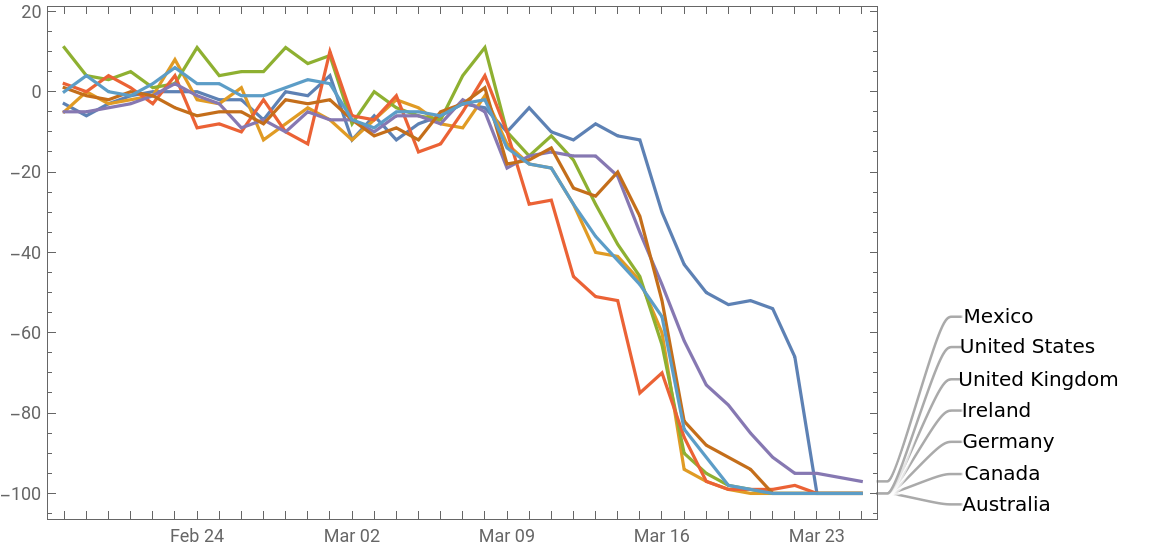
DateListPlot[ds[Select[#RegionType==="Country"&]][[All,"YearOverYearDiners"]],PlotLabelsNormal@ds[Select[#RegionType==="Country"&]][[All,"Region"]],ImageSizeLarge]
Out[]=
In[]:=
Manipulate[With[{data=ds[Select[#Region===region&]]},BarChart[Values[First[data[[All,"YearOverYearDiners"]]]],ColorFunctionFunction[{height},ColorData["RedGreenSplit"][height]],ChartLabelsPlaced[Rotate[DateString[#,{"MonthShort","/","Day"}],90Degree]&/@First[data[[All,"YearOverYearDiners"]]]["Dates"],Above],ImageSizeLarge]],{region,Normal@ds[[All,"Region"]]},SaveDefinitionsTrue]
Out[]=
In[]:=
ManipulateGeoRegionValuePlot[Normal[#Region#YearOverYearDiners[date]&/@ds[Select[#RegionType===regiontype&]]],ColorFunctionColorData["BlueGreenYellow"],PlotLabelDateString[date,"ISODate"]],{regiontype,{"Country","AdministrativeDivision","City"},PopupMenu},{date,First[ds[Select[#RegionType===regiontype&]]][["YearOverYearDiners"]]["Dates"]},Initializationregiontype="Country",date=,SaveDefinitionsTrue
Out[]=