In this project, we studied mobile automata movement and we came up with a method for classifying the different movement of the head cell with programmatically approach.
We used the displacement of the head cell between the iterations, also expanding the same analysis with 3 color rules and finding more complex behaviours.
We used the displacement of the head cell between the iterations, also expanding the same analysis with 3 color rules and finding more complex behaviours.
Introduction
Introduction
What is a Mobile Automaton
What is a Mobile Automaton
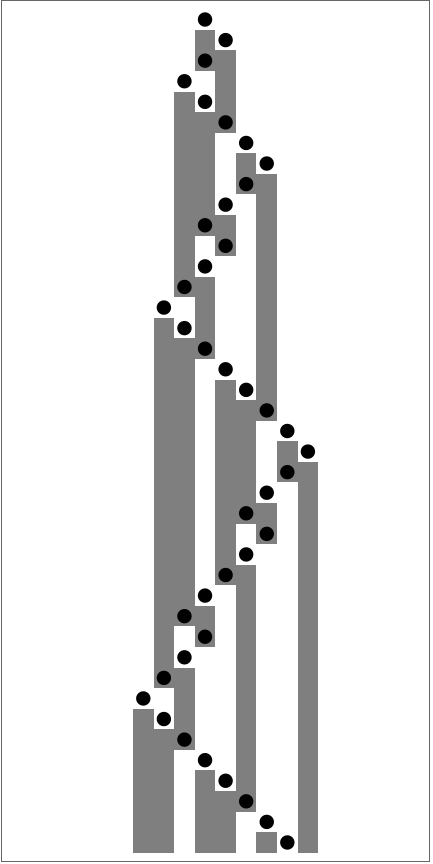
Mobile automata are a particular type of cellular automaton characterized by the movement and updating of a single active cell, known as the “head,” rather than simultaneous updates of all cells in the grid. This focused approach allows for a distinct set of dynamics and interactions, setting mobile automata apart from traditional cellular automata. In a mobile automaton, the “head” moves across a grid according to specific rules. These rules govern not only the movement of the head but also how its state changes and how it affects the states of other cells it interacts with.
For example, the head might move based on the states of neighboring cells, predefined directional rules, or a combination of both.
For example, the head might move based on the states of neighboring cells, predefined directional rules, or a combination of both.
In[]:=
ResourceFunction["MobileAutomatonPlot"][ResourceFunction["MobileAutomaton"][{51,28},{ConstantArray[0,20],10},40]]
Out[]=
How does a rule work?
How does a rule work?
The rules in mobile automata are very simple. The first part of the rule is the environment that triggers the rule (example 1), while the second part concerns the color in which the underlying cell should be set and the direction in which the Head should move: right, left, or center.
◼
Example 1 (Rule Enviroment)
Out[]=
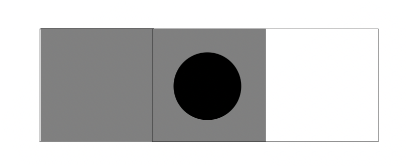
The environment is nothing more than a list of 3 elements (each element corresponds to a cell) that can have a value of 0 for an inactive cell and 1 for an active cell. If we use a set of rules with 3 colors (as we will see later), the values will be 0 for the inactive cell, 1 for the gray cell, and 2 for the black cell.
The head, for each rule, can move right, left, or stay centered. This is essential for defining which cells will be used in the next iteration to determine the subsequent movement. Finally, there is a cell that defines the color of the underlying cell, following the same logic for both two-color and three-color sets.
The head, for each rule, can move right, left, or stay centered. This is essential for defining which cells will be used in the next iteration to determine the subsequent movement. Finally, there is a cell that defines the color of the underlying cell, following the same logic for both two-color and three-color sets.
◼
Example 2 (3 Colors Rule)
In[]:=
RulePlotWithMultipleColors[RandomChoice[testRules]]
Out[]=

Each of our rule sets must contain all possible cases. Therefore, in the case of a two-color set (0,1), the number of rules in a set must be 8. When there is a three-color set, 64 rules are needed per set, and so on each time a color is added.
Generating all the possible rules
Generating all the possible rules
There are possible rules because a rule is composed of 3 dependent cells that can be either 0 or 1 for each cell. Then, we need to decide how to modify the cell, which can be 0 or 1, and the direction, which can be -1 (left), 0 (center), or 1 (right). Knowing that we generate all the possible rules in a list.
2
256
In[]:=
allPossibleRules = Flatten[Table[{i, j}, {i, 256}, {j, 256}],1];
Also we need to define the initial condition, we do that generating a list of 140 element of white cells, and we define the initial position of the head, in this case on the center of the grid:
In[]:=
initialCondition={ConstantArray[0, 140], 140/2};
Constructing the head movement analyzer
Constructing the head movement analyzer
We started the classification by defining some primitives. These primitives are the “simple” movements that the mobile automaton can perform. The first primitive is moving to the right (or to the left).
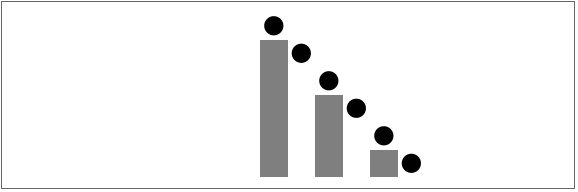
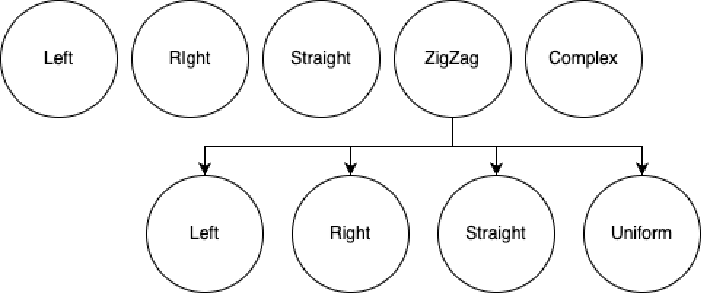
Then we have the zigzag movement, which goes back and forth. When we analyzed this movement, we noticed that it is much more complex because there are several things to consider. We represented the different types as a tree, where only the zigzag (the most complex movement among the primitives) has child nodes. A zigzag movement can be classified as zigzag to the left, zigzag to the right, zigzag downward, and also uniform zigzag. We define uniform zigzag as the type of movement where the distance between the peaks continues to widen, creating a uniform movement. Here is a simple classification diagram:
Then we have the zigzag movement, which goes back and forth. When we analyzed this movement, we noticed that it is much more complex because there are several things to consider. We represented the different types as a tree, where only the zigzag (the most complex movement among the primitives) has child nodes. A zigzag movement can be classified as zigzag to the left, zigzag to the right, zigzag downward, and also uniform zigzag. We define uniform zigzag as the type of movement where the distance between the peaks continues to widen, creating a uniform movement. Here is a simple classification diagram:
The main variable to recognize the different types of movement is the displacement, which is simply the movement of the “Head” iteration by iteration.
In[]:=
exampleDisplacement = MADisplacement[{51, 28}, {ConstantArray[0,20], 10}, 8];ListLinePlot@exampleDisplacement
Out[]=
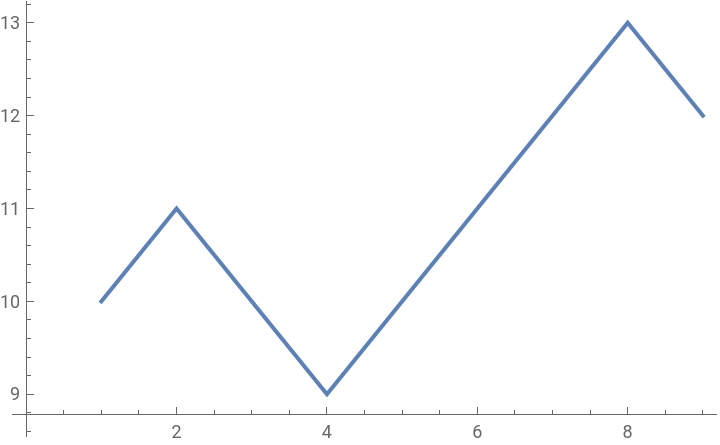
Based on the rules, we get a different displacement, and thanks to the peaks or the direction it is taking, we can determine the type of movement being performed.
Defining the different type of behaviours
Defining the different type of behaviours
For convenience during the detection phase, we have defined types based on those visible in the diagram above, in order to categorize each rule.
In[]:=
types=<|0->"Left",1->"Right",2->"ZigZag",3->"Straight",4->"ZigZag Left",5->"ZigZag Right",6->"ZigZag Down",7->"ZigZag Uniform",8->"Complex",100->"END"|>;
We also have two functions for ‘Convenience’ that allow us to convert from text to type and from type to text.
In[]:=
FromTextToType[value_] := PositionIndex[types][value][[1]]
In[]:=
FromTypeToText[type_]:= types[type]
Displacement
Displacement
An important thing that we need for analyzing the head movement is getting the displacement of the head for every iteration, we do that selecting all the new position using the MobileAutomaton function in the Wolfram Function Repository.
In[]:=
MADisplacement[rules_List,{world_List,n_Integer},steps_Integer]:=ResourceFunction["MobileAutomaton"][rules,{world,n},steps][[All,2]]
Detection of the Primitive “ZigZag”
Detection of the Primitive “ZigZag”
This function measures how much data points tend to cluster along a line, which allows us to determine if it is a zigzag or not by using the difference in peaks as references. One problem with this function is that sometimes it might fail because we need to find the right hyperparameters for each type of displacement. This could be an improvement to make in the future. The function also performs multiple checks to avoid detecting other types of movements, given that detecting zigzag is the first check performed, as it is the most complex among the simple movements.
detectZigZagSameStepDifference[data_] := Module[{th, f, line},f=Fit[data,{1,x},x];line[x_]:=Evaluate[f];th=0.01;Total[Table[line[x]-data[[x]],{x,Length[data]}]]<=th]detectZigZag[data_] := Module[{ndata, result},result = False;If[Length[Abs[Differences[Last/@FindPeaks[data, 0.8]]]] <=2, ndata = Round/@Abs[Differences[Last/@FindPeaks[data, 0.8]]], ndata = Drop[Drop[Abs[Differences[Last/@FindPeaks[data, 0.8]]],-1]],1];If[Length[FindPeaks[data, 0.8]] <= 1, Return[False], _];If[Length[ndata] <=2, result = First@ndata == Last@ndata, result = First@ Drop[Drop[ndata, 1], -1] == Last@ Drop[Drop[ndata, 1], -1]];If[result== False, detectZigZagSameStepDifference[data], True]];
Detection of Simple Primitives: “Left”, “Right”, “Straight”
Detection of Simple Primitives: “Left”, “Right”, “Straight”
Simple primitives such as left, right, and straight are very easy to identify. We just need to understand the direction and check if there are no peaks to identify each of these.
The function detectStraight[data_] checks if the data contains no peaks (using FindPeaks) and if the first element is equal to the last. If both conditions are satisfied, it returns True; otherwise, it returns False.
The function detectStraight[data_] checks if the data contains no peaks (using FindPeaks) and if the first element is equal to the last. If both conditions are satisfied, it returns True; otherwise, it returns False.
In[]:=
detectStraight[data_] :=If[Length[FindPeaks[data]] == 0, First@data == Last@data , False];
DetectLeft uses Module to create a modified version of the data (newData), removing the first and last elements. It then checks if the differences between the peaks found in newData are empty and if the last element of newData is less than the first. If both conditions are satisfied, it returns True; otherwise, it returns False.
In[]:=
detectLeft[data_]:= Module[{newData },newData = Drop[Drop[data, -1],1]; If[Differences[Last/@FindPeaks[newData]]=== {}, Last@newData < First@newData, False]]
The function detectRight is very similar to detectLeft, but it checks if the last element of newData is greater than the first. If both conditions are satisfied, it returns True; otherwise, it returns False.
In[]:=
detectRight[data_]:= Module[{newData }, newData = Drop[Drop[data, -1],1]; If[Differences[Last/@FindPeaks[newData]]=== {}, Last@newData > First@newData, False]]
Detection of “Fixed” Behaviour
Detection of “Fixed” Behaviour
The detection for the fixed pattern is based on understanding if the difference between peaks is constant. If this difference is constant, it means that the pattern is of the fixed type. The fixed pattern, which differs from the uniform one, is characterized by the fact that the distance between peaks never goes beyond its ‘boundaries’. The functions to determine the direction is identical to that of the functions for direction primitives.
Detection of “Uniform” Behaviour
Detection of “Uniform” Behaviour
Uniform movement is characterized by a pattern where the distance between peaks continually increases, resulting in a cone-like shape. To recognize this type of behavior, we examine whether each peak is consistently larger than the preceding one. This method allows us to distinguish uniform movement from other patterns based on the systematic expansion of peak distances over time.
Putting all the tools together
Putting all the tools together
We have two functions: one function that returns the primitive type, such as left, right, zigzag, etc., and another function that gives us the specific type, like zigzag with direction or uniform zigzag. This ensures that if we want to find other types of classification in the future, it will be very simple since this type of system is highly modular.
Combining all the classification functions together we obtain an easily extendible and modular system.
Mobile Automata Analysis
Mobile Automata Analysis
Here is an example using the classic rule {51,28} which should return ZigZag Uniform. We obtain the displacement and pass it to the Analyzer function.
In some cases, it can happen that the function fails to recognize the movement because the displacement might have been cut off due to insufficient steps, and thus it returns Complex.
Classification using two colors
Classification using two colors
Now that we have all the tools, we can attempt to analyze 1000 rules from all possible ones. At this stage, it’s quite straightforward as we simply need to map the ‘analysis’ function to the first 1000 rules and observe the results.
We will use a pie chart to visualize the distribution:
We noticed that there is some symmetry between left and right movements.
Adding a third color
Adding a third color
Adding another color is very simple since the function in the function repository inherently supports multiple colors thanks to its implementation based on executing replacements. However, what we need to do is generate the combinations of environment cells to trigger the rules that we generate randomly.
Plotting Rules with more than 2 Colors
Plotting Rules with more than 2 Colors
When we have rules with 3 colors, as mentioned before, the minimum rule set expands drastically. Therefore, to plot it, we will need to divide it into two columns. Another relevant fact is that the function within the Function Repository does not support colors but rather grayscale tones, so unfortunately, we will have to adhere to its color code. The function is very simple; it simply divides the rule set to be plotted by 32.
Classification using three colors
Classification using three colors
Testing the functions using 3 Colors
Testing the functions using 3 Colors
Now let’s try to classify 1000 rules with 3 colors and verify the result. To do this, we need to generate the rules. We simply use randomness for each factor, both for displacement and for the color of the underlying cell. After that, we iterate the rule generator function 1000 times.
Now we can perform a count and then create a pie chart to visualize our data. We will discuss these data and other insights in the conclusion.
Conclusion
Conclusion
In this project we analyzed 2D and 3D color rules for Mobile Automata and its head movement classification. We used different methods for classifying the movement as peak analysis. We generated interesting results such a symmetry between right and left movement of the active cell in ZigZag movement and also in Straight Lines.
Future Directions
Future Directions
◼
Finding a way to generate hyper parameters based on the displacement
◼
Removing grayscale restriction of MobileAutomataRulePlot
Acknowledgments
Acknowledgments
I would like to thank my mentor Felipe Amorim for the support he provided during the project when there were moments of struggle. I also thank the TA Nicolò Monti. Thank you to all the staff of the Wolfram High School Summer Camp for the opportunity and the support given.
References
References
◼
Wolfram, S. (2002). Mobile automata NKS.
◼
Wolfram, S., & Mangaldan, J. (2021). MobileAutomaton. Wolfram Function Repository.
https://resources.wolframcloud.com/FunctionRepository/resources/MobileAutomaton/
https://resources.wolframcloud.com/FunctionRepository/resources/MobileAutomaton/
◼
Wolfram, S., & Mangaldan, J. (2021). MobileAutomatonPlot. Wolfram Function Repository. https://resources.wolframcloud.com/FunctionRepository/resources/MobileAutomatonPlot/
◼
Wolfram, S., & Mangaldan, J. (2021). MobileAutomatonRulePlot. Wolfram Function Repository. https://resources.wolframcloud.com/FunctionRepository/resources/MobileAutomatonRulePlot/
CITE THIS NOTEBOOK
CITE THIS NOTEBOOK
Analyze forms of head motion in mobile automata
by Adam Essemaali
Wolfram Community, STAFF PICKS, July 12, 2024
https://community.wolfram.com/groups/-/m/t/3216952
by Adam Essemaali
Wolfram Community, STAFF PICKS, July 12, 2024
https://community.wolfram.com/groups/-/m/t/3216952