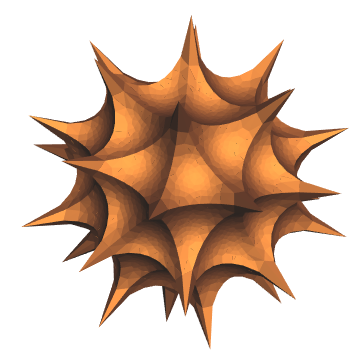
I was recently inspired by Tuseeta Banerjee's post on making a 33-point spikey, and wondered if a slightly different route would give similarly stunning results. Unlike in her post and the original work by Pegg, Trott and Peterson (hereafter PTP), I will not consider putting holes in the final result, nor will I be worrying about water-tightness for 3D printing. (Perhaps another enterprising soul can pick up where I left off.)
To generate a 33-point spikey, I need to make an initial set of points distributed on the sphere. Tuseeta and PTP used points that are optimal in the Thomson sense, and I am aware that one can start from the built-in function SpherePoints, but for an application like this, I felt that an equally good initial configuration would be the point distribution introduced by Koay. Thankfully, the WFR has the function KoayPoints for generating them:
kp33=ResourceFunction["KoayPoints"][33];
Here are two ways to visualize the resulting points:
GraphicsRow[{ConvexHullMesh[kp33],ResourceFunction["SphericalVoronoiDiagram"][kp33,EdgeStyle->Directive[AbsoluteThickness[4],Darker[Blue,0.6]],"PointStyle"->AbsolutePointSize[6],"ShowOriginalPoints"->True]}]
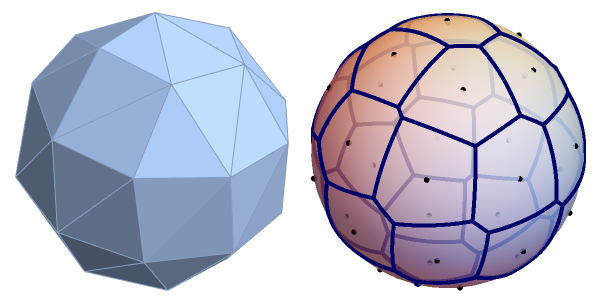
Even with Koay’s points, I felt that the distribution could be improved further, so I decided to use them as the starting point for a spherical version of the Lloyd algorithm. Unfortunately, the implementation I made some time back no longer works in the current version of Mathematica, so I needed to modify it a bit:
vectorRotate[vv1_?VectorQ,vv2_?VectorQ]:=Module[{v1=Normalize[vv1],v2=Normalize[vv2],c,d,d1,d2,t1,t2},d=v1.v2;If[TrueQ[Chop[1+d]==0],c=UnitVector[3,First[Ordering[Abs[v1],1]]];t1=c-v1;t2=c-v2;d1=t1.t1;d2=t2.t2;IdentityMatrix[3]-2(Outer[Times,t2,t2]/d2-2t2.t1Outer[Times,t2,t1]/(d2d1)+Outer[Times,t1,t1]/d1),c=Cross[v1,v2];dIdentityMatrix[3]+Outer[Times,c,c]/(1+d)-LeviCivitaTensor[3].c]]
(*exponentialmapforsphere*)sphereExp[q_?VectorQ,p_?VectorQ]/;Length[q]==Length[p]+1:=With[{n=Norm[p]},vectorRotate[{0,0,1},q].Append[pSinc[n],Cos[n]]]
(*inverseofexponentialmapforsphere*)sphereLog[q_?VectorQ,p_?VectorQ]/;Length[q]==Length[p]:=Most[vectorRotate[q,{0,0,1}].p]/Sinc[VectorAngle[p,q]]
(*BussandFillmore'ssphericalcentroid;https://doi.org/10.1145/502122.502124*)SphericalPolygonCentroid[pts_?MatrixQ]:=Module[{k=0,n=Length[pts],cp,h,pr},cp=Normalize[Total[pts]];pr=Internal`EffectivePrecision[pts];While[cp=sphereExp[cp,h=Sum[sphereLog[cp,p],{p,pts}]/n];k++;Norm[h]>10^(-pr/2)&&k<=30];cp]
With[{maxit=55,(*maximumiterations*)tol=0.0001(*distancetolerance*)},fl=FixedPoint[Function[pts,Block[{ch,polys,verts,vor},ch=ConvexHullMesh[pts];verts=MeshCoordinates[ch];polys=First/@MeshCells[ch,2];vor=Normalize[Cross[verts[[#2]]-verts[[#1]],verts[[#3]]-verts[[#1]]]]&@@@polys;SphericalPolygonCentroid[vor[[#]]]&/@Values[KeySort[GroupBy[EdgeList[MeshConnectivityGraph[ch,{2,0},0]],Last->(#[[1,2]]&)]]]]],kp33,maxit,SameTest->(Max[MapThread[VectorAngle,{#1,#2}]]<tol&)]];
Visualize the “relaxed” point set:
GraphicsRow[{ConvexHullMesh[fl],ResourceFunction["SphericalVoronoiDiagram"][fl,EdgeStyle->Directive[AbsoluteThickness[4],Darker[Blue,0.6]],"PointStyle"->AbsolutePointSize[6],"ShowOriginalPoints"->True]}]
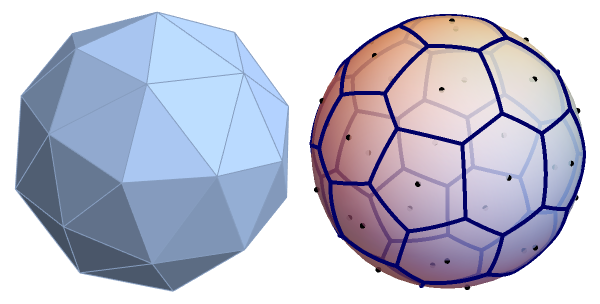
To my eye, the configuration now looks better than the original, so I’ll use this for building my take on the spikey:
cm=ConvexHullMesh[fl];
I then use a slightly modified “hyperbolicization” function, based on the one used by Trott for version 5, to transform flat polygons:
hyperbolicize[cR_][p_]:=p/.Polygon[x_]:>PolygonNormalize[#]With{t=(Norm[#]/cR)},ReArcSin+&/@N[x]
1
π
7-8t
6t-7
1
2
PlotReArcSin+,{t,0,1}
1
π
7-8t
6t-7
1
2
This function can then be applied to the faces of the convex hull, after initially subjecting them to refinement with TriangulateMesh:
Graphics3D[{EdgeForm[],hyperbolicize[1]@MeshPrimitives[TriangulateMesh[cm,MaxCellMeasure{"Length"0.1}],2]},Boxed->False,Lighting"Classic"]
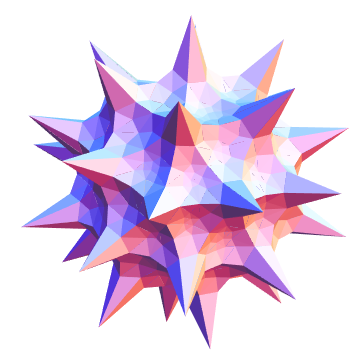
With an even finer subdivision, and a change of colors, I get an appearance that I like (this might take some time and memory to evaluate):
Graphics3D[{Glow[ColorData["Legacy","IvoryBlack"]],ColorData["Legacy","Sepia"],Specularity[ColorData["Legacy","Brick"],5],EdgeForm[],hyperbolicize[1]@MeshPrimitives[TriangulateMesh[cm,MaxCellMeasure{"Length"0.05}],2]},Boxed->False,Lighting->"Accent"]