Hijacking, extending, and spreading of Wolfram's
LLM interfacing designs
LLM interfacing designs
Introduction
Introduction
In this notebook I would like to proclaim my efforts to program the Large Language Model (LLM) Raku packages, [AAp1p6-AAp5p6] and Python packages, [AAp1py-AAp4py].
I heavily borrowed use case ideas and functionality designs from the LLM works of Wolfram Research, Inc. (WRI), see [SW1, SW2]. Hence, opportunistically, I discuss comparisons with Wolfram Language (WL).
How to read?
How to read?
Here are few ways to read/skim/browse the content of this notebook:
1
.Read the next section and the first subsection of the section "Observations, remarks, and conclusions".
2
.See the tabulated packages and watch some of the tabulated movies.
3
.If familiar with WL's LLM functions and chatbooks, read the section "Primary use case" and watch one of the movies discussing notebook-wide multi-cell chats.
4
.Read it all and watch it all, in the given order.
Article structure
Article structure
◼
Why are WL's LLM functionalities being ported to other languages?
Certain utilitarian reasons are expected
Certain utilitarian reasons are expected
◼
Primary use case
Chatbook's workflow and flowchart as a warm-up
Chatbook's workflow and flowchart as a warm-up
◼
Tabulated comparisons
Quicker overview, clickable entries
Quicker overview, clickable entries
◼
LLM functions examples
Fundamental in order to "manage" LLMs
Fundamental in order to "manage" LLMs
◼
LLM prompts examples
Tools for pre-conditioning and bias (of LLMs)
Tools for pre-conditioning and bias (of LLMs)
◼
Chatbook multi-cell chats
Must have for LLMs
Must have for LLMs
◼
Why reprogramming from Raku to Python?
A way to review and verify designs
A way to review and verify designs
◼
Observations, remarks, and conclusions
Could be used to start the article with...
Could be used to start the article with...
◼
Future plans
Missing functionalities
Missing functionalities
Mind-map
Mind-map
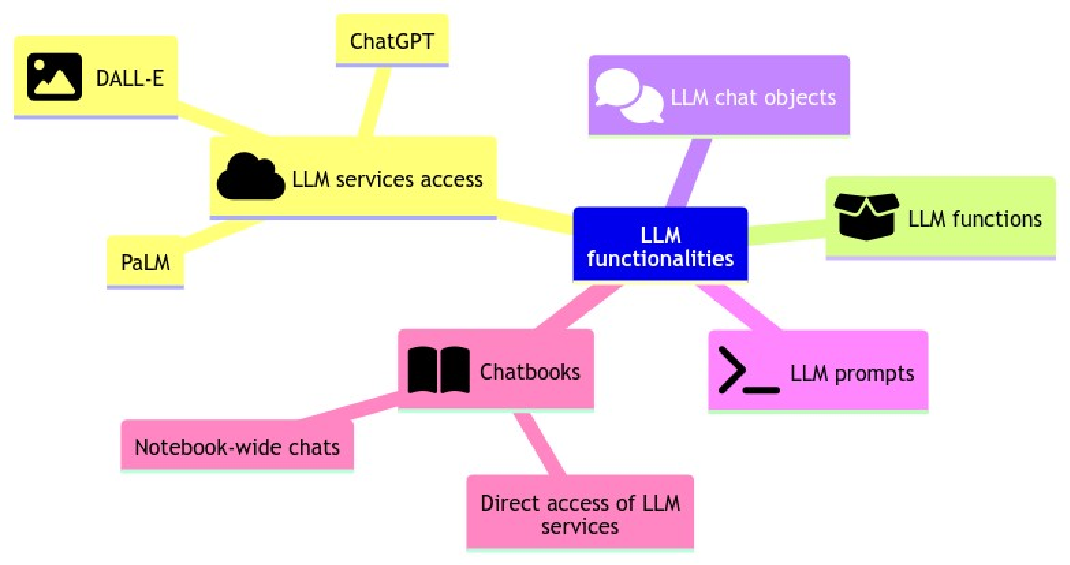
Here is a mind-map aimed at assisting in understanding and evaluating the discussed LLM functionalities in this document:
Out[]=
Why are WL's LLM functionalities being ported to other languages?
Why are WL's LLM functionalities being ported to other languages?
LLM functions
LLM functions
The motivation for translating WL's LLM functionalities into other programming languages is to ensure consistent workflows across diverse systems. I consider LLM functions to be most instrumental for making LLM workflows that have certain software engineering qualities such as reproducibility, robustness, and functional separation. I aimed for a standardized LLM workflow creation experience, similar to what WL's LLM offers.
This means that optimal LLM workflows need to be established and documented for all intended programming languages. I have compiled LLM workflow notebooks in Raku, Python, and WL. Here are the links to these notebooks:
Remark: I haven't developed the corresponding R packages yet, as the R ecosystem currently offers seamless integration with Python. Admittedly, this is also a convenient excuse for my procrastination.
Remark: The LLM function packages include LLM access configuration functions and LLM chat objects.
Using LLM functions is relatively easy to program Raku and Python functions corresponding to FindTextualAnswer, and then re-implement the paclet "NLPTemplateEngine", [AAv6], into Raku and Python.
Prompts
Prompts
Possessing a vast and meticulously organized set of prompts simplifies the use of LLM considerably. Enhancements with prompt expansion features further facilitate the coordination of LLM interactions in both LLM-function-driven workflows and LLM-chat-notebooks.
So, I "harvested" approximately 200 prompts from the Wolfram Prompt Repository, [SW3, WRIr1], and made corresponding Raku and Python packages, [AAp2p6, AAp2py].
Chat notebooks
Chat notebooks
The chat notebook design and features of WL offer a less foundational but highly user-friendly interface for LLM interactions. After developing the LLM functions and prompts, I attempted to emulate WL's chat notebook in Raku and Python using the Jupyter framework. While this adapted Jupyter design might not be as interactive, it offers a certain ease of use of the Jupyter session chat objects that some users might find attractive.
Primary use case
Primary use case
A primary use case for LLMs in Raku (and Python and WL) is the following:
A "chat notebook solution" -- chatbook -- that allows convenient access to LLM services and facilitates multiple multi-cell chat-interactions with LLMs.
We are interested in other types of workflows, but they would be either readily available or easy to implement if the primary use case is developed, tested, and documented.
An expanded version of the use-case formulation can be as follows:
The Raku chatbook solution aims to provide a user-friendly interface for interacting with LLM (Language Model) services and offers seamless integration for managing multiple multi-cell chats with LLMs. The key features of this solution include:
1. Direct Access to LLM Services:
The notebook solution provides a straightforward way to access LLM services without the need for complex setup or configuration. Users can easily connect to their preferred LLM service provider and start utilizing their language modeling capabilities.
1. Direct Access to LLM Services:
The notebook solution provides a straightforward way to access LLM services without the need for complex setup or configuration. Users can easily connect to their preferred LLM service provider and start utilizing their language modeling capabilities.
2. Easy Creation of Chat Objects:
The solution allows users to effortlessly create chat objects within the notebook environment. These chat objects serve as individual instances for conducting conversations with LLMs and act as containers for storing chat-related information.
The solution allows users to effortlessly create chat objects within the notebook environment. These chat objects serve as individual instances for conducting conversations with LLMs and act as containers for storing chat-related information.
3. Simple Access and Invocation of Chat Cells:
Users can conveniently access and invoke chat cells within the notebook solution. Chat cells represent individual conversation steps or inputs given to the LLM. Users can easily interact with the LLM by adding, modifying, or removing chat cells.
Users can conveniently access and invoke chat cells within the notebook solution. Chat cells represent individual conversation steps or inputs given to the LLM. Users can easily interact with the LLM by adding, modifying, or removing chat cells.
4. Native Support for Multi-Cell Chats:
The notebook solution offers native support for managing multi-cell chats per chat object. Users can organize their conversations into multiple cells, making it easier to structure and navigate through complex dialogues. The solution ensures that the context and history of each chat object are preserved throughout
The notebook solution offers native support for managing multi-cell chats per chat object. Users can organize their conversations into multiple cells, making it easier to structure and navigate through complex dialogues. The solution ensures that the context and history of each chat object are preserved throughout
Here is a flowchart that outlines the solution derived with the Raku LLM packages discussed below:
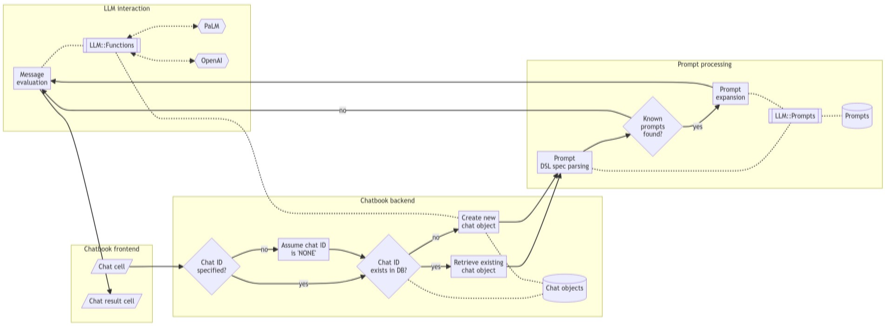
The flowchart represents the process for handling chat requests in the Raku chat notebook solution "Jupyter::Chatbook" , [AAp4p6]. (Also, for Python's "JupyterChatbook" , [AAp4py].)
1
.When a chat request is received, the system checks if a Chat IDentifier (Chat ID) is specified.
◼
If it is, the system verifies if the Chat ID exists in the Chat Objects Database (CODB).
◼
If the Chat ID exists, the system retrieves the existing chat object from the database.
◼
Otherwise, a new chat object is created.
2
.Next, the system parses the DSL spec of the prompt, which defines the structure and behavior of the desired response.
◼
The parsed prompt spec is then checked against the Known Prompts Database (PDB) to determine if any known prompts match the spec.
◼
If a match is found, the prompt is expanded, modifying the behavior or structure of the response accordingly.
3
.Once the prompt is processed, the system evaluates the chat message using the underlying LLM function.
◼
This involves interacting with the OpenAI and PaLM models.
◼
The LLM function generates a response based on the chat message and the prompt.
4
.The generated response is then displayed in the Chat Result Cell (CRCell) in the chat interface.
◼
The system also updates the Chat Objects Database (CODB) to store the chat history and other relevant information.
Throughout this process, various components such as the frontend interface, backend logic, prompt processing, and LLM interaction work together to provide an interactive chat experience in the chatbook .
Remark: The flowchart and explanations are also relevant to a large degree for WL's chatbook solution, [SW2].
Tabulated comparisons
Tabulated comparisons
In this section we put into tables corresponding packages of Raku, Python, Wolfram Language. Similarly, corresponding demonstration videos are also tabulated.
Primary LLM packages
Primary LLM packages
We can say that the Raku packages "LLM::Functions" and "LLM::Prompts" adopted the LLM designs by Wolfram Research, Inc. (WRI); see [SW1, SW2].
Here is a table with links to:
◼
"Primary" LLM Raku packages
◼
Corresponding Python packages
◼
Corresponding Wolfram Language (WL) paclets and prompt repository
Out[]//TableForm=
What? | Raku | Python | WL |
OpenAI access | |||
PaLM access | |||
LLM functions | |||
LLM prompts | |||
Chatbook | |||
Find textual answers |
Remark: There is a plethora of Python packages dealing with LLM and extending Jupyter notebooks with LLM services access.
Remark: Finding of Textual Answers (FTAs) was primary motivator to implement the Raku package "LLM::Functions". FTA is a fundamental functionality for the NLP Template Engine used to generate correct , executable code for different computational sub-cultures. See [AApwl1, AAv5].
In[]:=
Needs["TypeSystem`"]
DeduceType[]
Secondary LLM packages
Secondary LLM packages
The "secondary" LLM Raku packages -- inspired from working with the "primary" LLM packages -- are "Text::SubParsers" and "Data::Translators" .
Here is a table of the Raku-Python-WL correspondence:
Out[]//TableForm=
Post processing of LLM results | Raku | Python | WL |
Extracting text elements | |||
Shapes and types | |||
Converting to texts formats | - | ||
Magic arguments parsing | |||
Copy to clipboard |
Introductory videos
Introductory videos
Here is a table of introduction and guide videos for using chatbooks:
LLM functions
LLM functions
In this section we show examples of creation and invocation of LLM functions.
I consider LLM functions to be most instrumental for making LLM workflows that have certain desirable software engineering qualities. (Reproducibility, robustness, functional separation.)
In WL LLM functions use template objects. The "natural" equivalent of WL's string template objects in Raku and Python are pure (or lambda) functions using interpolated strings.
Remark: Because the name "LLMFunctions" was approximately taken in PyPI.org, I used the name "LLMFunctionObjects" for the Python package. That name is, actually, more faithful to the design and implementation of the Python package -- the creator function llm_function produces function objects (or functors) that have the __call__ magic.
Raku
Raku
Here we create an LLM function:
my &f1 = llm-function({"What is the $^a of the country $^b?"});
Here is an example invocation of the LLM function:
&f1('GDB', 'China')
# The official ISO 3166 - 1 alpha - 2 code for the People’s Republic of China is CN . The corresponding alpha - 3 code is CHN .
# The official ISO 3166 - 1 alpha - 2 code for the People’s Republic of China is CN . The corresponding alpha - 3 code is CHN .
Here is another one:
&f1( |<population China> )
# As of July 2020, the population of China is estimated to be 1,439,323,776.
# As of July 2020, the population of China is estimated to be 1,439,323,776.
Python
Python
Here is the corresponding Python definition and invocation of the Raku LLM function above:
from LLMFunctionObjects import *
f1 = llm_function(lambda a, b: f"What is the {a} of the country {b}?")
print(
f1('GDB', 'China')
)
# The GDB (Gross Domestic Product) of China in 2020 was approximately $15.42 trillion USD.
f1 = llm_function(lambda a, b: f"What is the {a} of the country {b}?")
print(
f1('GDB', 'China')
)
# The GDB (Gross Domestic Product) of China in 2020 was approximately $15.42 trillion USD.
Wolfram Language
Wolfram Language
Here is the corresponding WL definition and invocation of the Raku LLM function above:
LLM prompts
LLM prompts
The package "LLM::Prompts" provides ≈200 prompts. The prompts are taken from Wolfram Prompt Repository (WPR) and Google's generative AI prompt gallery . (Most of the prompts are from WPR.)
Both the Raku and Python prompt packages provide prompt expansion using a simple DSL described in [SW2].
Raku
Raku
Here is an example of prompt spec expansion:
my $pewg = llm-prompt-expand("@EmailWriter Hi! What do you do? #Translated|German")
Here the prompt above is used to generate an email (in German) for work-leave:
llm-synthesize([$pewg, "Write a letter for leaving work in order to go to a conference."])
# Sehr geehrte Damen und Herren,
#
# Ich schreibe Ihnen, um meine Abwesenheit vom Arbeitsplatz für eine Konferenz bekannt zu geben. Ich werde die nächsten zwei Tage nicht im Büro sein, da ich an der Konferenz teilnehmen werde.
# Während meiner Abwesenheit werde ich # meine Aufgaben durch meine Kollegen erledigen lassen.
#
# Falls Sie weitere Informationen benötigen, können Sie mich jederzeit kontaktieren.
#
# Vielen Dank für Ihr Verständnis.
#
# Freundliche Grüße,
# [Your name]
# Sehr geehrte Damen und Herren,
#
# Ich schreibe Ihnen, um meine Abwesenheit vom Arbeitsplatz für eine Konferenz bekannt zu geben. Ich werde die nächsten zwei Tage nicht im Büro sein, da ich an der Konferenz teilnehmen werde.
# Während meiner Abwesenheit werde ich # meine Aufgaben durch meine Kollegen erledigen lassen.
#
# Falls Sie weitere Informationen benötigen, können Sie mich jederzeit kontaktieren.
#
# Vielen Dank für Ihr Verständnis.
#
# Freundliche Grüße,
# [Your name]
Python
Python
The Python implementation is completely analogous:
from LLMPrompts import *
print(
llm_prompt_expand("@EmailWriter Hi! What do you do? #Translated|German")
)
# Given a topic, write emails in a concise, professional manner.
# Hi! What do you do? Respond to the prompts only in German. Do not use any language other than German.
# DO NOT TRANSLATE THE INPUT.
# Provide answers to questions, or follow up on statements. Do not translate the input.
print(
llm_prompt_expand("@EmailWriter Hi! What do you do? #Translated|German")
)
# Given a topic, write emails in a concise, professional manner.
# Hi! What do you do? Respond to the prompts only in German. Do not use any language other than German.
# DO NOT TRANSLATE THE INPUT.
# Provide answers to questions, or follow up on statements. Do not translate the input.
Wolfram Language
Wolfram Language
I am not sure is there a WL implementation corresponding to Raku's and Python's, but prompt expansion can be easily achieved via LLM synthesis:
Remark: The Raku package "LLM::Functions", [AAp1p6], has the function llm-synthesize; the Python package "LLMFunctions", [AAp1py], has the function llm_synthesize.
Chatbook cells
Chatbook cells
Raku
Raku
Creation:
#%chat yoda1, prompt='@Yoda'
Hi! Who are you?
# A Jedi Master, I am. Known as Yoda, am I. How may I assist you, young one?
Hi! Who are you?
# A Jedi Master, I am. Known as Yoda, am I. How may I assist you, young one?
Alternative creation via chat meta cell:
#%chat yoda2 prompt
@Yoda
# Chat object created with ID : yoda2.
# Expanded prompt:
# ⎡You are Yoda.
# Respond to ALL inputs in the voice of Yoda from Star Wars.
# Be sure to ALWAYS use his distinctive style and syntax. Vary sentence length.⎦
@Yoda
# Chat object created with ID : yoda2.
# Expanded prompt:
# ⎡You are Yoda.
# Respond to ALL inputs in the voice of Yoda from Star Wars.
# Be sure to ALWAYS use his distinctive style and syntax. Vary sentence length.⎦
Here is an interaction with the first chat object:
#%chat yoda1
How many students did you teach? What is the color of your light saber?
# Many students, I have taught. Countless, they are. Young Padawans, eager to learn the ways of the Force. Lightsaber, you ask about? Green, it is. The color of wisdom and tranquility, it represents.
How many students did you teach? What is the color of your light saber?
# Many students, I have taught. Countless, they are. Young Padawans, eager to learn the ways of the Force. Lightsaber, you ask about? Green, it is. The color of wisdom and tranquility, it represents.
Here is screenshot (showing prompt expansion):
Remark: For better impressions of Raku Jupyter chatbook cells usage see the videos "Jupyter Chatbook LLM cells demo (Raku)" and "Jupyter Chatbook multi-cell LLM chats demo (Raku)" .
Python
Python
%load_ext JupyterChatbook
Creation using a magic argument for prompt (and prompt expansion):
%%chat -i mad --prompt='@MadHatter'
Hi! Who are you?
# Ah, greetings, my dear interlocutor! I am none other than the Mad Hatter, at your service . Delighted to make your acquaintance, I must say .
# Pray tell, have you ever attended a tea party? Oh, the joyous revelry that ensues! But I digress, for I am here to engage in whimsical banter with you .
# So, what brings you to my peculiar corner of Wonderland?
Hi! Who are you?
# Ah, greetings, my dear interlocutor! I am none other than the Mad Hatter, at your service . Delighted to make your acquaintance, I must say .
# Pray tell, have you ever attended a tea party? Oh, the joyous revelry that ensues! But I digress, for I am here to engage in whimsical banter with you .
# So, what brings you to my peculiar corner of Wonderland?
%%chat -i mad
I am looking for Alice...
# Ah, Alice! A delightful young lass, indeed. Curiosity personified, she is. But alas, I must inform you that I have not seen her lately.
# She tends to wander off into the most peculiar of places, you see. Perhaps she has found herself in the company of the Cheshire Cat or engaged in a riddle with the Queen of Hearts.
# Oh, the adventures she embarks upon! But fret not, my friend, for tea time shall surely bring her back.
# Would you care to join me for a cuppa while we await her return?
I am looking for Alice...
# Ah, Alice! A delightful young lass, indeed. Curiosity personified, she is. But alas, I must inform you that I have not seen her lately.
# She tends to wander off into the most peculiar of places, you see. Perhaps she has found herself in the company of the Cheshire Cat or engaged in a riddle with the Queen of Hearts.
# Oh, the adventures she embarks upon! But fret not, my friend, for tea time shall surely bring her back.
# Would you care to join me for a cuppa while we await her return?
Remark: For better impressions of Python Jupyter chatbook cells usage see the videos "Jupyter Chatbook LLM cells demo (Python)" and "Jupyter Chatbook multi cell LLM chats teaser (Python)".
Wolfram Language
Wolfram Language

Why, hello there, my dear interlocutor! You find yourself conversing with none other than the Mad Hatter, regent of repartee, the sultan of silliness, the purveyor of peculiarity! Now, would you care for a spot of tea? It's always tea time here in Wonderland, you see. As for the 'what do you do' part of your query, why I do a myriad of madcap things! I throw tea parties, I talk to dormice, I pose perplexing riddles and I delight in dishing out a dollop of delightful absurdities! Now, tell me, how do you do?
I am looking for Alice...

Why reprogramming from Raku to Python?
Why reprogramming from Raku to Python?
Here is a list of reasons why I did the Raku-to-Python reprogramming:
◼
I am mostly doing that kind re-programmings for getting new perspectives and -- more importantly -- to review and evaluate the underlying software architecture of the packages.
◼
Generally speaking, my Raku packages are not used by others much, hence re-programming to any other language is a fairly good way to review and evaluate them.
◼
Since I, sort of, "do not care" about Python, I usually try to make only "advanced" Minimal Viable Products (MVPs) in Python.
◼
Hence, the brainstorming perspective of removing "the fluff" from the Raku packages.
◼
Of course, an "advanced MVP" has a set of fairly useful functionalities.
◼
If the scope of the package is small, I can make its Python translation as advanced (or better) than the corresponding Raku package.
◼
Good, useful documentation is essential, hence:
◼
I usually write "complete enough" (often "extensive") documentation of the Raku packages I create and publish.
◼
The Raku documentation is of course a good start for the corresponding Python documentation.
◼
...and a way to review and evaluate it.
◼
In the re-programming of the Raku LLM packages, I used a Raku Jupyter Chatbook for translation of Raku code into Python code.
◼
In other words: I used LLMs to reprogram LLM interaction software.
◼
That, of course, is a typical application of the principle "eat your own dog food."
◼
I also used a Raku chatbook to write the Python-centric article "Workflows with LLM functions", [AAn3py].
◼
The "data package" "LLM::Prompts" provides ≈200 prompts -- it is beneficial to have those prompts in other programming languages.
◼
The usefulness of chat cells in chatbooks is greatly enhanced with the prompt expansion provided by "LLM::Prompts", [AAv2].
◼
It was instructive to reprogram into Python the corresponding Domain Specific Language (DSL) for prompt specifications.
◼
Again, an LLM interaction in a chatbook was used to speed-up the re-programming.
Observations, remarks, and conclusions
Observations, remarks, and conclusions
Wolfram Language sided
Wolfram Language sided
◼
Mathematica's / WL's mature notebook solution provides much better chatbook experience than anything that can be done with Jupyter.
◼
The prompts of Wolfram Prompts Repository work best with OpenAI's ChatGPT -- not so much with Google's PaLM.
◼
It is not clear or documented how to add new LLM services to WL's solutions. (Like PaLM.)
◼
That is both "open sourced" and documented for Raku and Python.
◼
WL's integration of LLMs is much closer than those of Raku and Python.
◼
For example, generating an image with DALL-E is readily available as an image object in WL.
◼
Displaying LLM-derived images in Raku and Python is easy, but it is much harder to convert them into actual image objects amenable for further manipulation.
Raku and Python sided
Raku and Python sided
◼
For a long time Jupyter did not guarantee sequential evaluation of sequentially placed cells. Hence:
◼
It was natural to use magic arguments with cell identifiers and have chat meta-cells to access the chat objects in a notebook session.
◼
I.e. I did not bother to emulate WL's chatbook sequential evaluation of LLM cells.
◼
Even if that is fixed (i.e. guaranteed) in Jupyter at this point, it is not something I consider explicitly using or leveraging in my Raku and Python packages.
◼
I consider the chat objects to be "enough."
◼
The Python package for LLM services access provided a significant jump-start of the reprogramming endeavors.
◼
Related, it is not trivial to program the corresponding (good) LLM services access packages in Raku and WL.
◼
Much easier to program Jupyter chatbook cells in Python.
◼
"IPython" facilitates extensions with custom magics in a very streamlined way.
◼
Not very documented, though -- I had look up concrete implementations in GitHub to figure out:
◼
Argument parsing details
◼
Placing of cell-evaluation results
◼
It is expected other LLM services to have Python packages for them. Hence, new LLM services can be easily included in Python Jupyter-chatbooks.
◼
Figuring out (in Python) the prompt expansion DSL parsing and actions took longer than expected.
◼
Although, I "knew what I was doing" and I used LLM facilitation of the Raku to Python translation.
◼
Basically, I had to read and understand the Python way of using regexes. (Sigh...)
◼
For some reason, embedding Mermaid-JS diagrams in Python notebooks is not that easy.
◼
Making chat cells tests for Python chatbooks is much easier than for Raku chatbooks.
◼
Parsing of Python-Jupyter magic cell arguments is both more restricted and more streamlined than Raku-Jupyter.
◼
In Python it was much easier and more obvious (to me) to figure out how to program creation and usage LLM function objects and make them behave like functions than implement the Raku LLM-function anonymous (pure, lambda) function solution.
◼
Actually, it is my TOD list, see below.
◼
Copying to clipboard was already implemented in Python (and reliably working) for multiple platforms.
◼
Working Python code is much more often obtained than Raku code when using LLMs.
◼
Hence, Python chatbooks could be seen preferable by some.
◼
My primary use-case was not chatbooks, but finding textual answers in order to re-implement the NLP Template Engine from WL to Raku.
◼
◼
Working on the "workhorse" function llm-find-textual-answer made me look up WRI's approach to creation of LLM functions and corresponding configurations and evaluators; see [SW1].
◼
The adoption (or popularity) of the Python package "JupyterChatbook" is hard to judge, but here is a related download statistics page.
◼
Quite a few fragments of this document were created with via LLM chats:
◼
Initial version of the comparison tables from "linear" Markdown lists with links
◼
The extended primary use formulation
◼
The narration of the flowchart
◼
I did not just copy-and-pasted the those LLM generated fragments -- I read then in full and edited them too!
Future plans
Future plans
Common
Common
◼
Chatbooks can have magic specs (and corresponding cells) for:
◼
DeepL
◼
ProdGDT
◼
A video with comprehensive (long) discussion of multi-cell chats.
◼
Ideally, featuring all three programming languages.
Raku
Raku
◼
Make Python chatbooks re-runnable as Raku chatbooks.
◼
This requires the parsing of Python-style magics.
◼
Implement LLM function objects (functors) in Raku.
◼
In conjunction of the anonymous functions implementation.
◼
Which one is used is specified with an option.
◼
Figure out how to warn users for "almost right, yet wrong" chat cell magic specs.
◼
Implement copy-to-clipboard for Linux and Windows.
◼
I have put rudimentary code for that, but actual implementation and testing for Linux and Windows are needed.
Python
Python
◼
Documenting how LLM-generated images can be converted into image objects (and further manipulated image-wise.)
Wolfram Language
Wolfram Language
◼
Create an "LLMUtilties" paclet for:
◼
Prompt expansion function(s) based on regexes
◼
Parsing of definition notebooks from Wolfram Prompt Repository
◼
Import and export prompts via JSON files
References
References
Articles
Articles
[SW1] Stephen Wolfram, "The New World of LLM Functions: Integrating LLM Technology into the Wolfram Language", (2023), Stephen Wolfram Writings .
[SW2] Stephen Wolfram, "Introducing Chat Notebooks: Integrating LLMs into the Notebook Paradigm", (2023), Stephen Wolfram Writings .
[SW3] Stephen Wolfram, "Prompts for Work & Play: Launching the Wolfram Prompt Repository", (2023), Stephen Wolfram Writings .
Notebooks
Notebooks
[AAn1py] Anton Antonov, "Workflows with LLM functions (in Python)" , (2023), community.wolfram.com .
Python packages
Python packages
Raku packages
Raku packages
Wolfram Language paclets
Wolfram Language paclets
Videos
Videos
[AAv2] Anton Antonov, "Jupyter Chatbook multi-cell LLM chats demo (Raku)", (2023), YouTube/@AAA4Prediction .
[AAv3] Anton Antonov, "Jupyter Chatbook LLM cells demo (Python)" , (2023), YouTube/@AAA4Prediction .
[AAv4] Anton Antonov, "Jupyter Chatbook multi cell LLM chats teaser (Python)" , (2023), YouTube/@AAA4Prediction .
[AAv5] Anton Antonov, "Simplified Machine Learning Workflows Overview (Raku-centric) , (2022), YouTube/@AAA4Prediction .
[AAv6] Anton Antonov, "Natural Language Processing Template Engine", (2022), WTC-2022, YouTube/@WolframResearch.