How vegetated is Sacramento? Computing vegetation indices from Landsat 8-9
by Julián Laverde
Wolfram Research,
Sound & Vision.
05/03/2022
by Julián Laverde
Wolfram Research,
Sound & Vision.
05/03/2022
Modern remote sensing from its beginning when G. Tournachon took aerial photos of Paris in his balloon in 1858, is arguably one of the disciplines that has provided scientists with most useful data, from military purposes to agriculture and climate science, crucial disciplines for human safety and wellbeing. In this post, we will explore some of the publicly available data from the latest satellites of the USGS-NASA program Landsat and we will use it to calculate some of the most commonly used vegetation indices, useful for spatial and temporal analysis of biomass in aerial scenes.
Landsat
Landsat
The Landsat Program is a joint program between the U.S. space agency NASA and the U.S. Geological Survey (USGS) consisting of a series of Earth-observing satellite missions that have continuously acquired images of the Earth’s land surface, providing uninterrupted data to help land managers and policymakers make informed decisions about natural resources and the environment [1]. The planning and development of the program started in 1967 and the first mission, Earth Resources Technology Satellite, was launched in 1972 and later renamed Landsat 1 in 1975, which makes the Landsat Program the longest-running Earth observation mission in history. With millions of satellite images taken, free and open to access and new imagery has resulted in a myriad of innovative applications and novel scientific insights [2] and. According to mission scientists, Landsat is the most economically impactful Earth science program [2] with applications in agriculture, environmental sciences, forestry, water resources research, art, among others [3].
Landsat 8-9
Landsat 8-9
In February 2013, the eighth satellite in the Landsat program, the Landsat Data Continuity Mission (LDCM) was successfully launched, being the seventh to reach orbit successfully. Later renamed Landsat-8, adds to the archive an unprecedented number of daily acquisitions with improved geometric and radiometric properties leading to expanded scientific and operational capabilities [4].
Landsat 9 was successfully launched in September, 2021 from Vandenberg Space Force Base in California. This satellite replaces Landsat 7, which on 31 May 2003, presented a failure in the Scan Line Corrector (SLC) in the ETM+ instrument resulting in some areas that are imaged twice and others that are not imaged at all. The net effect is that approximately 22% of the data in a Landsat 7 scene is missing [4].
Landsat 9 carries two scientific instruments — the Operational Land Imager 2 (OLI-2) and the Thermal Infrared Sensor 2 (TIRS-2) — that can detect minute changes in lakes, rivers and forests. These two optical sensors will detect 11 total spectral bands of visible, near-infrared, shortwave infrared, and thermal infrared light. The satellite is almost a duplication of the design of Landsat 8 with the exception of the thermal sensor, which was upgraded.
Landsat 9 was successfully launched in September, 2021 from Vandenberg Space Force Base in California. This satellite replaces Landsat 7, which on 31 May 2003, presented a failure in the Scan Line Corrector (SLC) in the ETM+ instrument resulting in some areas that are imaged twice and others that are not imaged at all. The net effect is that approximately 22% of the data in a Landsat 7 scene is missing [4].
Landsat 9 carries two scientific instruments — the Operational Land Imager 2 (OLI-2) and the Thermal Infrared Sensor 2 (TIRS-2) — that can detect minute changes in lakes, rivers and forests. These two optical sensors will detect 11 total spectral bands of visible, near-infrared, shortwave infrared, and thermal infrared light. The satellite is almost a duplication of the design of Landsat 8 with the exception of the thermal sensor, which was upgraded.
Orbital properties
Orbital properties
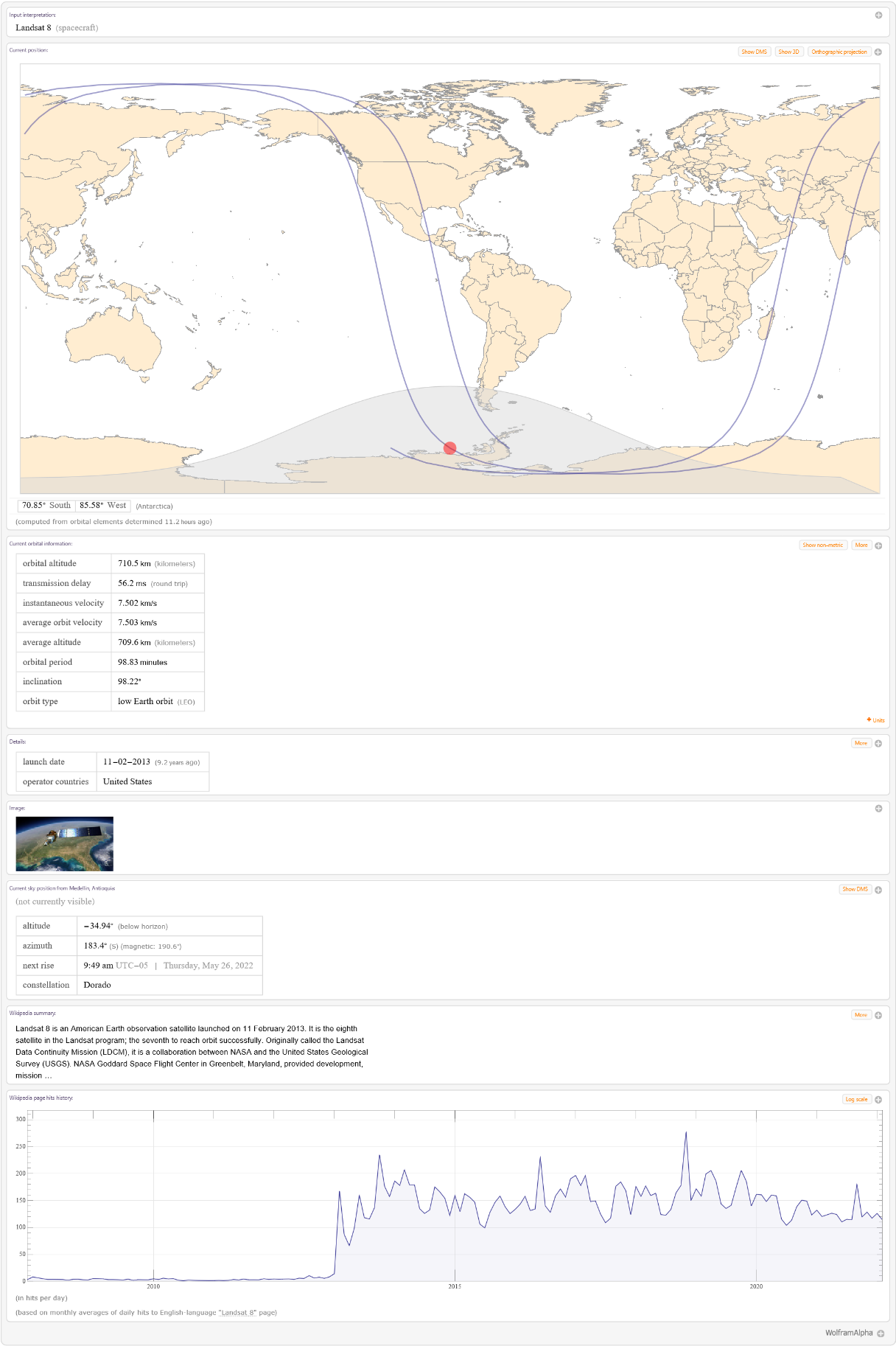
Landsat 8 orbits the Earth in a sun-synchronous, near-polar orbit (98.2 degrees inclination), achieved an altitude of 705 km (438 mi). Completes one Earth orbit every 99 minutes and has a 16-day repeat cycle with an equatorial crossing time of 10:00 a.m. +/- 15 minutes. It acquires about 740 scenes a day on the Worldwide Reference System-2 (WRS-2) path/row system, with a swath overlap (or sidelap) varying from 7 percent at the equator to a maximum of approximately 85 percent at extreme latitudes [5].
Some information can be found in Wolfram Alpha.
Some information can be found in Wolfram Alpha.
Wolfram Alpha notebook query for Landsat 8:
In[]:=
Landsat 8
Landsat satellites can also be found as entities for Wolfram Language with dozens of available properties:
Show available properties of Landsat 9 entity:
In[]:=
Out[]=
,,,,,,,,,,,,,,,,,,,,,,,,,,,,,,,,,,,,,,,,,,,,,,,,,,,,,,,,,,,,
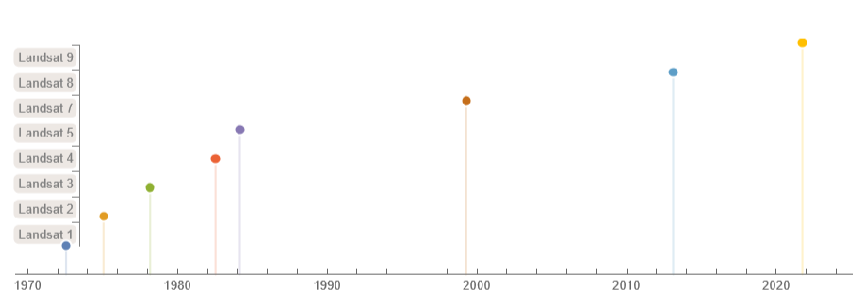
Show a time line of the launch date of all satellites in the Landsat program:
In[]:=
TimelinePlotEntityValueAppendEntityList,,{"Name","LaunchDate"},"EntityAssociation",Filling->Axis

Landsat 9 Instruments
Landsat 9 Instruments
Operational Land Imager 2 (OLI-2)
Operational Land Imager 2 (OLI-2)
OLI-2 provides data for nine spectral bands with a maximum ground sampling distance (GSD), both in-track and cross track, of 30-meters (98 feet) for all bands except the panchromatic band, which has a 15-meters (49 feet) GSD. OLI-2 also provides both internal calibration sources to ensure radiometric accuracy and stability, as well as the ability to perform solar and lunar calibrations. It captures data with improved radiometric precision over a 14-bit dynamic range, which improves overall signal to noise ratio, especially over darker areas such as water or dense forests. This translates into 16,384 potential grey levels, compared with only 256 grey levels in Landsat 1-7 8-bit and 4,096 grey levels in Landsat 8 12 bit-bit instruments [5].
The nine spectral bands, including a pan band are:
◼
Band 1 Visible (0.43 - 0.45 µm) 30 m
◼
Band 2 Blue Visible (0.450 - 0.51 µm) 30 m
◼
Band 3 Green Visible (0.53 - 0.59 µm) 30 m
◼
Band 4 Red (0.64 - 0.67 µm) 30 m
◼
Band 5 Near-Infrared (NIR) (0.85 - 0.88 µm) 30 m
◼
Band 6 Short-Wave Infrared (SWIR) 1(1.57 - 1.65 µm) 30 m
◼
Band 7 SWIR 2 (2.11 - 2.29 µm) 30 m
◼
Band 8 Panchromatic (PAN) (0.50 - 0.68 µm) 15 m
◼
Band 9 Cirrus (1.36 - 1.38 µm) 30 m
Thermal Infrared Sensor 2 (TIRS-2)
Thermal Infrared Sensor 2 (TIRS-2)
In addition to the OLI-2 improvement, TIRS-2 has significantly reduced stray light compared to the Landsat 8 Thermal Infrared Sensor (TIRS) which enables improved atmospheric correction and more accurate surface temperature measurements [8].
◼
The two spectral bands:
◼
Band 10 TIRS 1 (10.6 - 11.19 µm) 100 m
◼
Band 11 TIRS 2 (11.5 - 12.51 µm) 100 m
Overall, these two sensors provide seasonal coverage of the global landmass at visible, NIR, SWIR, thermal, and panchromatic vision.
Data
Data
Landsat 8-9 can be obtained from Earth Explorer, a tool from the USGS where users can search for catalogs of satellite and aerial imagery. From Earth Explorer, Landsat 8-9 datasets can be download and usually contains several TIF files of the aerial images corresponding the each band of the satellite’s sensors, a metadata file and several other additional files.
In this case, I arbitrarily decided to explore the Sacramento, California, USA area in October 2018.
After downloading the data from Earth Explorer, we can import the data to the notebook:
In this case, I arbitrarily decided to explore the Sacramento, California, USA area in October 2018.
After downloading the data from Earth Explorer, we can import the data to the notebook:
Select dataset directory:
In[]:=
imgdir=FileNameJoin[{NotebookDirectory[],"Sacramento Area Data 07-10-2018"}];
Import Meta-data from Dataset Complementary Information:
In[]:=
metaData=Import[FileNameJoin[{imgdir,"LC08_L1TP_044033_20181007_20181029_01_T1_MTL.txt"}],"Data"];metaData=AssociationThread[metaData[[1;;224,1]],metaData[[1;;224,3]]];
This dataset (level 1) consist of quantized and calibrated scaled Digital Numbers (DN) representing the multispectral image data that has not been corrected for atmospheric conditions which is necessary for the calculation of some vegetation indices. However, data can be rescaled to the top of atmosphere (TOA) reflectance and/or radiance using radiometric rescaling coefficients provided in the metadata file. For that purpose, let’s extract the specific coefficients that are going to be needed later.
Get coefficients from metadata for atmospheric and sun position corrections:
In[]:=
reflectanceMultBands=metaData["REFLECTANCE_MULT_BAND_"<>ToString[#]]&/@{5,4,3,2};reflectanceAddBands=metaData["REFLECTANCE_ADD_BAND_"<>ToString[#]]&/@{5,4,3,2};sunElevationAngle=metaData["SUN_ELEVATION"];
Import bands without Atmospheric Correction in DN (with Radiometric correction):
In[]:=
{bandIR,bandR,bandG,bandB}=Import[FileNameJoin[{imgdir,"LC08_L1TP_044033_20181007_20181029_01_T1_B"<>ToString[#]<>".TIF"}],"Data"]&/@{5,4,3,2};
In this case, the files were imported as “Data” so they need to be converted to images and adjusted for visualization. At this point, we have only imported some bands and their associated metadata and the reason is that these bands (red, green, blue, and near-infrared) are the only ones needed for the computation of the vegetation indices. Now, let’s see how one of these images look like:
Considering that these bands are DN, we need to use ImageAdjust to rescale the values to a displayable image:
In[]:=
MinMax[bandG]
Show green band raw image
Sometimes it is useful to get rid of the black border of the images as it interferes with arithmetic calculations that are performed on the images. To do so, I wrote the following function that, calculates the angle of rotation by scanning the pixel values, and crops the image using ImagePad with BorderDimensions based on a reference image (so all images will have the same dimensions regardless of small pixel differences). In this case, I used the IR band image as reference.
Rotate and crop the images:
Show the rotated and cropped raw green band:
Now that the images are properly rotated and cropped, we can apply the atmospheric and sun position corrections given by the following formula:
Where
Define and apply the atmospheric and solar position correction to the raw images:
At this point, we can combine the red, green and blue channels to form an RGB image. I enhanced the resulting image with Lighter for presentation purposes.
Show RGB image:
Vegetation indices
Vegetation indices
There are hundreds of vegetation indices for remote sensing, from complex calculations to simple ratios between specific wavelengths and all offer different advantages (some with more success) and disadvantages. Derived from reflectance properties of the vegetation, the indices are designed to enhance the light contribution of vegetation in a digital image allowing spatial and temporal analysis. Each index is design to accentuate a property of vegetation and often correct for particular conditions of the scene. Let’s explore some of the main indices for vegetation.
Normalized Difference Vegetation Index
Normalized Difference Vegetation Index
The normalized difference vegetation index (NDVI) is a graphical indicator used to analyze remote sensing measurements, quantifying vegetation by measuring the difference between the reflected near-infrared and red light as the near-IR is strongly reflected by vegetation while red light is absorbed. This means that regions with healthy or dense vegetation will have high NDVI values, and regions with unhealthy vegetation or barren land result in low or negative NDVI values, for example, negative values indicate that it’s highly likely that it’s water [6, 7, 8]. The NDVI is the most commonly used vegetation index due to its versatility in identifying general biomass.
The NDVI value is computed using the following formula:
The NDVI value is computed using the following formula:
The NDVI value of a pixel is a scalar from -1 to 1. Let’s visualize the differences between the red band and the NIR band:
Show the red and NIR bands:
We can clearly notice, by comparing to the RGB image, that greener regions look brighter on the NIR band. Now, let’s compute the NDVI.
Compute the Reflectance-derived Normalized Difference Vegetation Index:
It is always a good practice to check the minimum and maximum values of the computed NDVI as values outside of [-1,1] could indicate that the atmospheric and/or solar position corrections were performed incorrectly or not at all.
Check the range of the computed NDVI
Although the values span in the correct range, it is usually useful to stretch the image histogram for better visualization. In this case, I picked a percent clip stretch that applies a linear stretch between the defined percent clip minimum and percent clip maximum pixel. With this stretching, values that are outside the range [minimum, maximum] will be shifted to the extremes.
I created the following function to calculate the minimum and maximum values based on the image histogram.
I created the following function to calculate the minimum and maximum values based on the image histogram.
Define stretching values function:
Values outside the region enclosed by the two red lines will be shifted to the extremes.
Show the minimum and maximum values on the image histogram:
For each vegetation index I arbitrary picked values for the minimum and maximum percentage values to emphasize the differences and properties of each index.
We can do a good visual comparison with the RGB image in a subregion of the scene.
We can do a good visual comparison with the RGB image in a subregion of the scene.
Show NDVI image:
We can see that greener regions appear much brighter.
Enhanced Vegetation Index
Enhanced Vegetation Index
The Enhanced Vegetation Index (EVI) is very similar to the NDVI but it is considered an optimized index that enhances the vegetation signal with improved sensitivity in high biomass regions as the EVI is more responsive to canopy structural variations, including leaf area index, canopy type, plant physiognomy, and canopy architecture [9]. EVI can be calculated using the following formula:
Where
Now, let’s compute the EVI.
Compute the Enhanced vegetation index:
As with NDVI, it is a good practice to check the min/max values.
Check the range of the computed EVI
In this case, we have values that out the of the correct range. We can calculate the percentage of values that are outside of the valid range:
We can see that is less than 0.5% of the total pixels, so it is not unreasonable to clip these pixels as they might be just errors from data capture or arithmetic calculations.
Now we can stretch the EVI and compare it with the NDVI:
Show EVI image:
We can see that the image less saturated so green regions are easier to compare. In general, NDVI is very depending on the time of the day, producing inaccurate data due to varying factors including shadowing, air moisture, and variations in the soil, these variations are corrected by using EVI [10].
Soil-Adjusted Vegetation Index
Soil-Adjusted Vegetation Index
The Soil-Adjusted Vegetation Index (SAVI) is a vegetation index that minimizes the influences of ground brightness using a ground brightness correction factor by the shifting of the origin of reflectance spectra plotted in NIR-red wavelength space to account for first-order soil-vegetation interactions and differential red and NIR flux extinction through vegetated canopies [11]. SAVI can be calculated using the following formula:
Where
An L value of 0.5 in reflectance space was found to minimize soil brightness variations and eliminate the need for additional calibration for different soils. The transformation was found to nearly eliminate soil-induced variations in vegetation indices.
Compute the Soil Adjusted Vegetation Index:
Check the range of the computed SAVI
With values in the correct range, we can compare SAVI with NDVI:
Show SAVI image:
We can notice that SAVI does a much better job in land regions where the vegetation cover is low thanks to the soil brightness correction.
Modified Soil Adjusted Vegetation Index
Modified Soil Adjusted Vegetation Index
This particular index uses the uncorrected images, as defined by the authors.
Compute the Modified Soil Adjusted Vegetation Index:
Check the range of the computed MSAVI
As the values are in the correct range, we can compare the results:
Show MSAVI image:
Indexes visual comparison
Indexes visual comparison
We can now make a visual comparison between all indices. For better presentation, a color function is often used.
Using the image functionalities of Wolfram Language it is easy to compute and visualize different indices, and combined with temporal and spatial analysis tools, it is possible to create extensive and comprehensive studies from publicly and reliable data. For example, the NDVI is often used to calculate Land Surface Temperature (LST).
References
References
1
.Landsat Missions | U.S. Geological Survey. (2022, June 2). USGS. Retrieved June 6, 2022, from https://www.usgs.gov/landsat-missions
2
.Wulder, M. A., Loveland, T. R., Roy, D. P., Crawford, C. J., Masek, J. G., Woodcock, C. E., Allen, R. G., Anderson, M. C., Belward, A. S., Cohen, W. B., Dwyer, J., Erb, A., Gao, F., Griffiths, P., Helder, D., Hermosilla, T., Hipple, J. D., Hostert, P., Hughes, M. J., Zhu, Z. (2019). Current status of Landsat program, science, and applications. Remote Sensing of Environment, 225, 127–147. https://doi.org/10.1016/j.rse.2019.02.015
3
.Thompson, A. (2021, September 27). NASA launches powerful Landsat 9 satellite to monitor climate change, forest cover and more. Space.com. Retrieved June 6, 2022, from https://www.space.com/nasa-landsat-9-earth-observation-satellite-launch-success
4
.G. (2022, May 27). Landsat Program: 50+ Years Archive of Earth. GIS Geography. Retrieved June 6, 2022, from https://gisgeography.com/landsat/
5
.Landsat 9 | U.S. Geological Survey. (2020, July 23). USGS. Retrieved June 6, 2022, from https://www.usgs.gov/landsat-missions/landsat-9
6
.Normalized difference vegetation index. (2022, May 6). In Wikipedia. https://en.wikipedia.org/wiki/Normalized_difference_vegetation _index
7
.GISGeography. (2022, May 30). What is NDVI (Normalized Difference Vegetation Index)?. Retrieved June 6, 2022, from https://gisgeography.com/ndvi-normalized-difference-vegetation-index/
8
.Kraetzig, N. M. (2020, September 1). 5 Things To Know About NDVI (Normalized Difference Vegetation Index). UP42 Official Website. Retrieved June 6, 2022, from https://up42.com/blog/tech/5-things-to-know-about-ndvi
9
.Enhanced vegetation index. (2022, May 6). In Wikipedia. https://en.wikipedia.org/wiki/Enhanced_vegetation_index
10
.EVI vs NDVI: What’s the difference? (2022, April 3). VineView. Retrieved June 6, 2022, from https://vineview.com/evi-vs-ndvi-whats-difference/
11
.Huete, A. (1988). A soil-adjusted vegetation index (SAVI). Remote Sensing of Environment, 25(3), 295–309. https://doi.org/10.1016/0034-4257(88)90106-x
12
.Qi, J., Chehbouni, A., Huete, A., Kerr, Y., & Sorooshian, S. (1994). A modified soil adjusted vegetation index. Remote Sensing of Environment, 48(2), 119–126. https://doi.org/10.1016/0034-4257(94)90134-1