ABSTRACT: In this article, inspired by Arnoud Buzing's "Mapping Wildfires" and Mads Bahrami's "US Fire Map", I perform some data parsing, analysis and visualization on the data from the “INPE's Fire Database” that uses the NASA MODIS (Moderate Resolution Imaging Spectroradiometer) data to search for wildfires and automatically extract the geographical position, administrative division and the radioactive fire power. Through some parsing functions, the raw CSV dataset can be transformed into a more computable dataset with entities and quantities.
Introduction
Introduction
Out[]=
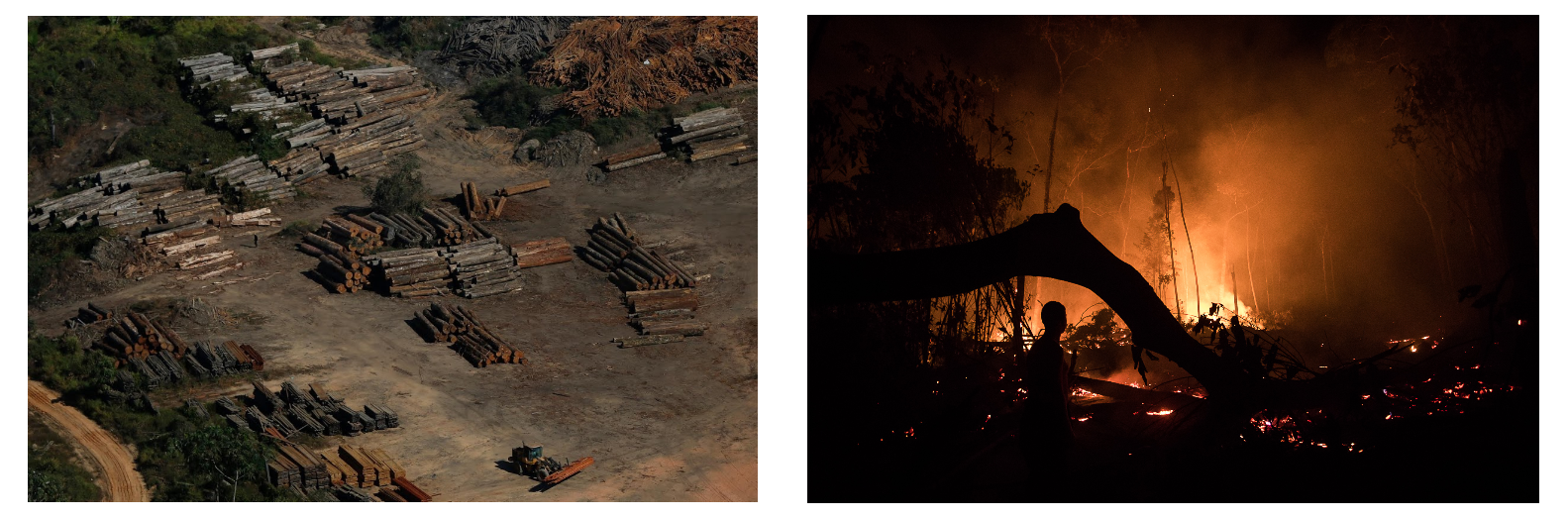
Photography of “Illegal loggers, 2020” and “Apui fire, 2020” taken by Bruno Kelly.
The year of 2020 has been a cruel year, with both wildfires and criminal fires to all the six biomes of Brazil, the Atlantic Forest, Amazon, Pampa, Pantanal, Caatinga, and Cerrado. A couple of news articles claim devastating effects in the 2020 wildfires and criminal fires through all biomes, some include: “On 14 days of this month, the Amazon already has more wildfires than in all September of last year.”, “Burning Amazon 20: Burns consume trees and animals in southern Amazonas”, and “Wildfires leave deep marks in the Amazon”.
In this article, I’ll be analysing the complete NASA MODIS Land data from January 1st to August 31th of the year 2020, performing statistical analysis, and geographical visualization of the data.
Data Parsing
Data Parsing
I’ve wrote one helper function that automatically parses the INPE’s Fire Database datasets into a more computable form of dataset, with entities and with the Wolfram Language knowledge.
Set the current directory to the notebook directory.
In[]:=
SetDirectory[NotebookDirectory[]]
Out[]=
/home/peter/Documents/WolframLLC/Articles/BrazillianWildfires
This notebook already contains this raw piece of data, so there is no need for importing or downloading.
Iconized March 2020 dataset.
In[]:=
RawMarchData=;
Definition of the helper function ParseINPEDataset.
In[]:=
ParseINPEDataset`StateNames=;
In[]:=
ParseINPEDataset[data_]:=Module[{parsed},(*Deleteafewcolumns.*)parsed=data〚All,{1,4,5,6,7,8,9,10,11,12}〛;(*Renameallcolumns.*)parsed〚1〛={"DateTime","State","County","Biome","DaysWithoutRain","RainIndex","FireRisk","GeoPosition","Longitude","FRP"};(*Interpretdatetimecolumn.*)parsed〚2;;,1〛=DateObject[ToExpression[StringTrim[#]]&/@StringSplit[#,{"/",":"," "}]]&/@parsed〚2;;,1〛;(*Changestatenamestoentities.*)parsed〚2;;,2〛=StringTrim[#]&/@parsed〚2;;,2〛;parsed〚2;;,2〛=parsed〚2;;,2〛//.ParseINPEDataset`StateNames;(*Translateandnormalizebiomenamestoenglish.*)parsed〚2;;,4〛=StringTrim[#]&/@parsed〚2;;,4〛;parsed〚2;;,4〛=parsed〚2;;,4〛/.{"Mata Atlantica""AtlanticForest","Amazonia""Amazon"};(*Convert"DaysWithoutRain"todays,replace-999toMissing["NotAvailable"].*)parsed〚2;;,5〛=If[MatchQ[#,-999]||MatchQ[#,"-999"]||MatchQ[#,""],Missing["NotAvailable"],Quantity[#,"Days"]]&/@parsed〚2;;,5〛;(*Convert"RainIndex"tomilimeters,replace-999toMissing["NotAvailable"].*)parsed〚2;;,6〛=If[MatchQ[#,-999]||MatchQ[#,"-999"]||MatchQ[#,""],Missing["NotAvailable"],Quantity[#,"Millimeters"]]&/@parsed〚2;;,6〛;(*Convert"FireRisk"topercentage,replace-999toMissing["NotAvailable"].*)parsed〚2;;,7〛=If[MatchQ[#,-999]||MatchQ[#,"-999"]||MatchQ[#,""],Missing["NotAvailable"],Quantity[100*#,"Percent"]]&/@parsed〚2;;,7〛;(*Join"Latitude"and"Longitude"intoasingle"GeoPosition"column.*)parsed〚2;;,8〛=parsed〚2;;,{8,9}〛;parsed〚2;;,8〛=GeoPosition[#]&/@parsed〚2;;,8〛;(*Convert"FRP"tomegawatts,replace-999toMissing["NotAvailable"].*)parsed〚2;;,10〛=If[MatchQ[#,-999]||MatchQ[#,"-999"]||MatchQ[#,""],Missing["NotAvailable"],Quantity[#,"Megawatts"]]&/@parsed〚2;;,10〛;(*Transformrowsintoanassociation.*)parsed〚2;;〛=AssociationThread[parsed〚1〛,#]&/@parsed〚2;;〛;(*Drop"Longitude"and"County"row.*)parsed=parsed〚2;;,{1,2,4,5,6,7,8,10}〛;(*Returnflawlesslyparseddataset.*)Return[SortBy[parsed,First]]];
Parse the first 10 elements of the unprocessed fire dataset with the ParseINPEDataset function.
In[]:=
Dataset[ParseINPEDataset[RawMarchData〚1;;11〛]]
Out[]=
Downloading the Datasets
Downloading the Datasets
The dataset can be downloaded directly from the Wolfram Cloud. The file consists of a Wolfram Binary Dump, it’s a space and memory efficient way of holding computable data without any effort, the only downside is that you cannot read it as a raw file. This file will be monthly updated until the end of 2020 by me.
Define FireData as a CloudObject.
In[]:=
FireData=CloudObject["BrazilianFireData_2020.mx"]
Out[]=
Information about the FireData CloudObject.
In[]:=
Information[FireData]
Out[]=
For importing, you can use CloudImport[] or just import locally using Import[].
Retrieve the FireData CloudObject as BrazilianFireData.
Import the FireData Dataset as BrazilianFireData.
Dataset Information
Dataset Information
The dataset is a list of associations, containing 8 rules. In terms of the Wolfram Language, the dataset is equivalent to a list of associations, containing 8 rules for each list. Here is a description of all columns.
Generate a dataset called ColumnsDescription with the description of all columns.
Get a random sample of the BrazilianFireData dataset.
Get five random samples of the BrazilianFireData dataset and display as a formatted dataset.
Dataset Segmentation
Dataset Segmentation
For the easiness of manipulation of the dataset, it’s possible to segment the data by month and date.
Segment the BrazilianFireData dataset into lists by month.
Segment the BrazilianFireData dataset into lists by day.
Statistical Analysis and Visualization
Statistical Analysis and Visualization
In this section, many statistical functions and different plotting methods will be applied on the dataset. For the easiness of visualization and interaction of this notebook, every interactive plot is saved, so it’s not necessary to run them again.
Let’s visualize the trend of the amount of fires per day, and the mean fire radiative power per day.
Plot a list line graphic of the amount of fires reported per day.
Plot a list line graphic of the mean fire radiative power per day.
Plot a histogram of the amount of days without rain.
Plot a bar chart of the fires and their biomes.
Data Querying and Comparison
Data Querying and Comparison
Some interesting questions can be computationally extracted from the datasets.
Q: What was the most affected biome by the fires?
Dataset of the count for every biome from the reverse sorted dataset.
Q: What was the day that had the most fires? How many fires were there?
Q: What was the biggest period without rain?
Q: What was the biggest radiation emissive fire?
Geographical Visualization
Geographical Visualization
For understanding better where the fires happened through the months, let’s geographically plot them using GeoGraphics[].
Define a function called NormalizeValue that normalizes a number based on minimum and maximum values.
Define a function called MonthFirePlot that plots the geographical position of all fires in a given month.
Make a side by side plot of the fires from January and September.
It’s also interesting to visualize the fires per biome, and differentiate the geographical points with colors for each of the six biomes.
Define a function called MonthFirePlot that plots the geographical position of all fires in a given month.
Make an animated list plot of the fires from January to August separated by biome.