The program provides an interactive visualization to explore the relationships between the sides of a right triangle and the unit circle, using the trigonometric functions sine and cosine. This interactive tool serves as an educational aid, offering geometric insights into trigonometric functions and their relationships within a unit circle context.
Main Features
Main Features
1
.Triangle Visualization :
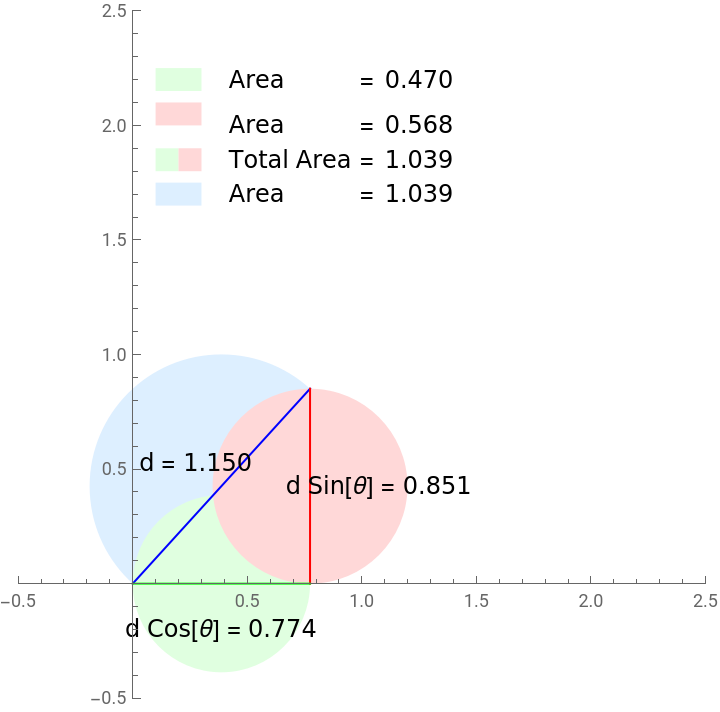
A right triangle is constructed with its hypotenuse extending from the origin to a point (x,y) in the first quadrant . The angle θ between the x - axis and the hypotenuse can be varied using a slider .
A right triangle is constructed with its hypotenuse extending from the origin to a point (x,y) in the first quadrant . The angle θ between the x - axis and the hypotenuse can be varied using a slider .
2
.Circle Demonstrations :
Three distinct circles (or disks) can be visualized :
Three distinct circles (or disks) can be visualized :
◼
X - Circle (Light Green) : A circle centered on the midpoint of the triangle' s base (along the x - axis) with a diameter equivalent to the triangle' s base length d Cos[θ].
◼
Y-Circle (Light Red): A circle centered on the midpoint of the triangle’s height (along the y-axis) with a diameter equivalent to the triangle’s height d Sin[θ].
◼
Hyp-Circle (Light Blue): A circle centered at the midpoint of the triangle’s hypotenuse with a diameter equivalent to the hypotenuse length d.
3
.Area Computations :
◼
The areas of the X-Circle and Y-Circle are computed and displayed in the legend.
◼
When both X-Circle and Y-Circle are displayed, the combined area of these two circles is computed as “Total Area”.
◼
The area of the Hyp-Circle is also computed and shown.
4
.Educational Insights :
◼
The program offers a tangible way to understand the geometric interpretations of the sine and cosine functions.
◼
By manipulating the hypotenuse length d and angle θ, users can see how these changes affect the triangle’s sides and the associated circles’ areas.
◼
The combined area of the X-Circle and Y-Circle provides insight into how the individual components (sine and cosine) contribute to the total area relative to the hypotenuse’s circle.
Code
Code
In[]:=
Manipulate[Module[{x,y,offset,perpUnitVec,diskAreaX,diskAreaY,hypCircleArea,totalArea},x=N[dCos[angle]];y=N[dSin[angle]];perpUnitVec=Normalize[{-y,x}];offset=0.15perpUnitVec;diskAreaX=N[Pi(x/2)^2];diskAreaY=N[Pi(y/2)^2];hypCircleArea=N[Pi(d/2)^2];totalArea=diskAreaX+diskAreaY;Graphics[{If[showHypCircle,{LightBlue,Disk[{x/2,y/2},d/2],{LightBlue,Rectangle[{0.1,1.65},{0.3,1.75}]},Text[Style["Area =",12,Black],{0.42,1.7},Left],Text[Style[NumberForm[hypCircleArea,{Infinity,3}],12,Black],{1.1,1.7},Left]}],If[showXCircle,{LightGreen,Disk[{x/2,0},x/2],{LightGreen,Rectangle[{0.1,2.15},{0.3,2.25}]},Text[Style["Area =",12,Black],{0.42,2.2},Left],Text[Style[NumberForm[diskAreaX,{5,3}],12,Black],{1.1,2.2},Left]}],If[showYCircle,{LightRed,Disk[{x,y/2},y/2],{LightRed,Rectangle[{0.1,2.0},{0.3,2.1}]},Text[Style["Area =",12,Black],{0.42,2.0},Left],Text[Style[NumberForm[diskAreaY,{5,3}],12,Black],{1.1,2.0},Left]}],{Blue,Line[{{0,0},{x,y}}]},{Red,Line[{{x,0},{x,y}}]},{Green,Line[{{0,0},{x,0}}]},Text[Style["d = "<>ToString@NumberForm[d,{Infinity,3}],12,Black],0.5{x,y}+offset],Text[Style["d Sin[θ] = "<>ToString@NumberForm[y,{Infinity,3}],12,Black],{x+0.3,y/2}],Text[Style["d Cos[θ] = "<>ToString@NumberForm[x,{Infinity,3}],12,Black],{x/2,-0.2}],If[showXCircle&&showYCircle,{{LightGreen,Rectangle[{0.1,1.8},{0.2,1.9}]},{LightRed,Rectangle[{0.2,1.8},{0.3,1.9}]},Text[Style["Total Area =",12,Black],{0.42,1.85},Left],Text[Style[NumberForm[totalArea,{5,3}],12,Black],{1.1,1.85},Left]}]},PlotRange->{{-0.5,2.5},{-0.5,2.5}},Axes->True]],{{d,1,"d"},0.1,2},{{angle,Pi/4,"θ (radians)"},0,Pi/2},{{showXCircle,False,"X-Circle"},{True,False}},{{showYCircle,False,"Y-Circle"},{True,False}},{{showHypCircle,False,"Hyp-Circle"},{True,False}}]
Out[]=


CITE THIS NOTEBOOK
CITE THIS NOTEBOOK
Interactive visualization of Pythagorean relationships
by Jonathan Kinlay
Wolfram Community, STAFF PICKS, August 8, 2023
https://community.wolfram.com/groups/-/m/t/2986765
by Jonathan Kinlay
Wolfram Community, STAFF PICKS, August 8, 2023
https://community.wolfram.com/groups/-/m/t/2986765