It’s estimated that it would take an individual five million years to to watch all of the video streaming across global networks every month. Video data accounts for approximately 80% of data on the web, and with such massive amounts of data comes the need to efficiently sort, sift and mine through this mountain of video data to extract valuable information from the all of the noise.
This task is called video retrieval. Typical video retrieval systems rely on textual tagging, often at the general video rather than frame level, with limited awareness for what is actually depicted at each point within the video. How much better would it be if we could ask a semantically-aware video search engine “Give me a summarization of this National Geographic documentary showing all of the elephants, but no people”, or “Show me parts of this security footage that contain anomalies.” The goal of this project is to achieve just that - a configurable, semantic video summarization and retrieval tool to help humans intelligently sift through the massive amount of video data in the world.
This task is called video retrieval. Typical video retrieval systems rely on textual tagging, often at the general video rather than frame level, with limited awareness for what is actually depicted at each point within the video. How much better would it be if we could ask a semantically-aware video search engine “Give me a summarization of this National Geographic documentary showing all of the elephants, but no people”, or “Show me parts of this security footage that contain anomalies.” The goal of this project is to achieve just that - a configurable, semantic video summarization and retrieval tool to help humans intelligently sift through the massive amount of video data in the world.
VideoSummary
VideoSummary
Let’s begin at the end to see what we’ll build together today. Here is the VideoSummary function:
In[]:=
Options[VideoSummary]={"Precomputed"False,"NumberOfFrames"5,"TemporallyDistributed"True,"TargetEntities"->{},"AvoidEntities"->{}};VideoSummary[video_Video,frameClusters_List:{},OptionsPattern[]]:=ImageCollage[InterclusterSample[IntraclusterSample[If[OptionValue["Precomputed"],frameClusters,ClusterAndAnnotateVideo[video]],OptionValue["TargetEntities"],OptionValue["AvoidEntities"]],OptionValue["NumberOfFrames"],OptionValue["TemporallyDistributed"]]]
When called with a video (or pre-annotated frame clusters we’ll generate soon), VideoSummary returns a collage of frames summarizing the video with a strong bias towards choosing frames depicting content in the TargetEntities list, and against choosing frames depicting content in AvoidEntities list.
Let’s look at some example input and output to get you excited before we begin.
How to Download the Example Video
How to Download the Example Video
We begin with raw video. We’ll use this 75 second clip of an elephant that became friends with a sheep because it’s adorable.
In[]:=
EmbeddedService["https://www.youtube.com/watch?v=hR2tS3EyirQ"]
Out[]=
Video is currently only supported on Wolfram Desktop. In order to follow along, you must do the following before you continue:
1. DOWNLOAD the attached notebook
2. DOWNLOAD the video file titled "sheep_elephant_friends.mp4" attached to the very bottom of this post.
3. MOVE "sheep_elephant_friends.mp4" into the same directory as the notebook
2. DOWNLOAD the video file titled "sheep_elephant_friends.mp4" attached to the very bottom of this post.
3. MOVE "sheep_elephant_friends.mp4" into the same directory as the notebook
In[]:=
video=VideoFor["sheep_elephant_friends",75]
Out[]=
VideoSummary Examples
VideoSummary Examples
NOTE ! These preliminary examples will take up to 2 - 3 minutes to run on CPU, but we will perform optimizations allowing for 12.5 x speedup later on.
Here I request a chronological, 2 - frame summary with elephants, but no people.
In[]:=
VideoSummaryvideo,"NumberOfFrames"2,"TargetEntities"->,"AvoidEntities"
Out[]=
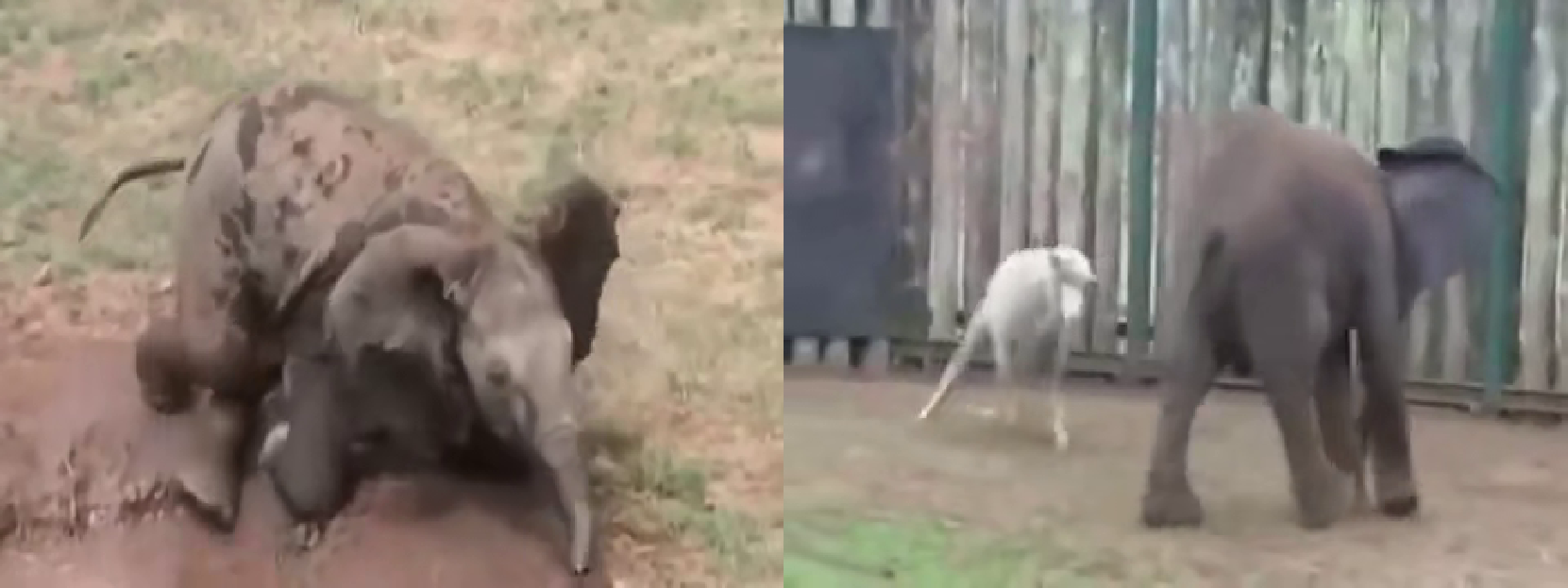
And here I request a non-chronological 3-frame summary with people and sheep, but no elephants :
In[]:=
VideoSummaryvideo,"NumberOfFrames"3,"TemporallyDistributed"False,"TargetEntities"->,,"AvoidEntities"
Out[]=
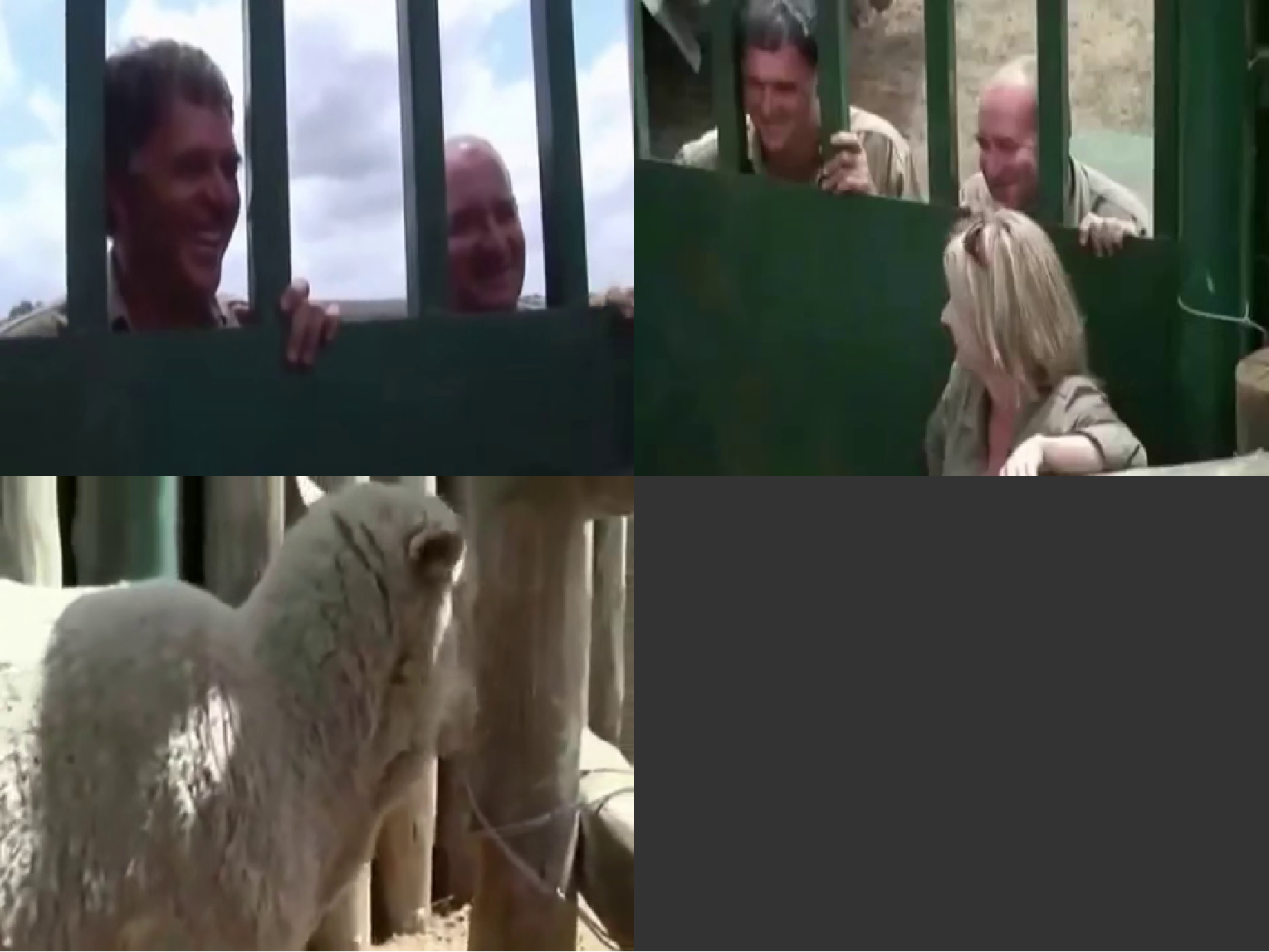
With an added step, this could be expanded to included a sequence of frames rather than still frames, offering dynamic video summarization. But one step at a time. Today we’ll focus only on the static video summary use case.
Our Approach
Our Approach
Our approach to video summarization is a four step process. Each step is encapsulated in a single function.
The four steps are:
1) Cluster
2) Annotate
3) IntraclusterSample (i.e. sample frames from within a cluster)
4) InterclusterSample (i.e. sample frames across clusters).
Let’s dive into each of these four functions to rebuild the VideoSummary function together.
Cluster Frames
Cluster Frames
Our reason for clustering similar frames is to achieve close to human performance for shot delineation. We do this in order to prevent repetition of frames in the video summary. Clustering very similar frames together into a single list gives us the option of extracting only the single best frame from that shot, as we’ll do later.
Clustering is a 3 step process:
1) Extract still-frames from the video
2) Reduce the dimensionality of our image data from tens of thousands of dimensions to just three dimension using TSNE
3) Cluster the reduced frames using DBSCAN
Extract Frames
Extract Frames
We extract four frames per second and append the Timestamp of each frame to the Image' s MetaInformation for quick lookup in later steps.
I found that four frames per second was optimal in terms of performance-to-quality tradeoff. Any fewer frames, and the data was too sparse to cluster well. Any more frames, and most operations became linearly slower without much increase in quality.
We can now easily access the Timestamp from any frame in constant time with a utility method.
(NOTE: The Utility Methods used throughout this demonstration are included at the bottom of the notebook)
Reduce the Dimensions of the Image Data
Reduce the Dimensions of the Image Data
Our data begins in a very high dimensional space. One image is actually a 500000+ dimensional vector!
A 100x100x3 image, for example, is really just a reshaped 30,000-length vector. Much of the information encoded in this higher dimensional space will not be relevant, or worse, will even be confusing for clustering. So we would like to reduce dimensions before clustering. Which method should we use to do so?
Ideally, each cluster should correspond to what a human would identify as a single shot. As we can see in the FeatureSpacePlot below, there is sufficient diversity in this heterogeneous video to delineate the different shots in a two dimensional space.
The dimension reduction method behind FeatureSpacePlot is t-stoachastic neighbor embedding (TSNE). Noticing how well this dimension reduction method performed for FeatureSpacePlot, we decided to use it as the Method option for Wolfram’s built-in DimensionReduce method in order to reduce our ImageData down to just three dimensions.
Cluster across the Reduced Feature Space
Cluster across the Reduced Feature Space
We experimented with several clustering algorithms, and in the end we found that density-based clustering methods like Density-based spatial clustering of applications with noise (DBSCAN) outperformed partitioning-based clustering algorithms like K-Means in both performance and quality. So we use DBSCAN for the Method option in Wolfram’s configurable FindClusters algorithm.
The function below nests our three operations into one neat function: We extract frames, reduce dimensions with TSNE, then cluster with DBSCAN.
ClusterFrames performs quite well as the foundation of VideoSummary. Though it occasionally misclassifies frames, there are steps we can take in the intracluster and intercluster sampling steps to mitigate the propagation of these misclassifications into the final video summary output.
Now that we have our frames clustered in a way that approximates shots, lets annotate each frame using the built-in ImageContents function to endow our algorithm with a semantic understanding of what it is “seeing” in each frame.
Annotate Frames
Annotate Frames
The ImageContents function returns a neat Dataset showing the location and probability ratings for entities it identifies in an image.
All three of these data points (concept, bounding box, and probability) will come in handy later, so we append the entire Dataset to each frame’s MetaInformation just like we did with the Timestamp in the frame extraction step.
We we can now access the contents, bounding boxes and probabilities for each frame in constant time.
Precomputing Video for Faster Retrieval
Precomputing Video for Faster Retrieval
The most computationally consuming steps for our video summarization (clustering and annotating) have now been completed. Organizations interested in leveraging fast and user-friendly video summarization and retrieval at scale would be well-advised to create a means of pre-computing these steps in separate long-running process, and save the output for later use by the video summarization system.
We provide a function here to perform the two above steps together, returning to the user clustered and annotated frames which can be saved and later passed directly to VideoSummary with a "Precomputed" -> True option.
If we cluster and annotate our frames before running the following steps, we enjoy a 12.5 x speedup!
WITH Pre-processing: < 10 Seconds
WITH Pre-processing: < 10 Seconds
WITHOUT Pre-processing: 113 Seconds
WITHOUT Pre-processing: 113 Seconds
Intracluster Sampling
Intracluster Sampling
Our frames are now annotated and neatly separated into clusters of shots. How do we choose which frame in the cluster is most representative and well-composed, and therefore worthy of inclusion in the VideoSummary?
We employ an ensemble of scoring methods which are totalled together into a single QualityScore. This QualityScore determines which frame within a shot will move on to the next round, and which will be discarded.
Quality Score
Quality Score
The Quality score is a combination of of a frame’s content, composition, and sharpness.
Content Score
Content Score
The ContentScore is the central feature of our semantic video summarization algorithm. It’s composed of four sub parts: an ObjectScore, a PeopleScore, a TargetEntityScore, and an AvoidEntityScore. Let’s look what each contributes to the whole.
First off, we have the ObjectScore. ObjectScore simply counts the number of items the ImageContents function identified in the frame, and multiplies each by their probability score. Image contents with lower probability scores will therefore have a lower rating.
The PeopleScore is a hard-coded bias towards frames with people in them. I saw this as a sensible default for many applications, but it can of course counteracted easily by adding the “person” entity to AvoidEntities option if a user wants a video summary with no people in it.
We weight occurrences of TargetEntities within frames much higher than plain objects or people. This 100x weighting boosts the overall QualityScore dramatically to ensure that frames with target entities reign supreme in the Intracluster and Intercluster sampling steps.
We negatively weight occurrences of AvoidEntities within frames to diminish the overall QualityScore dramatically. This greatly biases Intracluster and Intercluster sampling steps against choosing frames with avoided entities.
All four of these sub-scores together add up to the ContentScore, the largest component of the overall QualityScore.
Here' s the ContentScore applied to an image WITHOUT the TargetEntity:
Here' s the ContentScore applied to an image WITH the TargetEntity :
Let' s now look at the two tiebreakers for frames with similar content : composition and sharpness.
Composition Score
Composition Score
We prefer that our video summarization algorithm, when given frames with the same content, would choose the frame which is better composed, i.e. more content in the center.
We have everything we need already on our frame’s MetaInformation to determine how much content is in the center of the image.
We will use centering in the middle 50 % of the frame as a proxy for the classic photography heuristic for composition, the Rule of Thirds. Though not as exact as the Rule of Thirds, this will deliver a quick and cheap quality boost to our video summaries.
This is conveniently provided in the image contents MetaInformation we appended to every frame after clustering, so we can fetch it in O(1) time.
We see that the area of intersection for the centered image is far greater than it is for the uncentered image.
We total the area of the identified objects bounding boxes with the center of the frame, then multiply it by a scalar.
I leave CompositionScore as a total of ContentCenteringScore because I imagine, like ContentScore, this can be expanded to account for other elements of good photographic composition, like symmetry and lighting.
We see that the centered frame gets a much higher CompositionScore. As a tiebreak for frames with the same content, this will push the centered frame closer to the top.
Sharpness
Sharpness
We’d like a means of boosting frames which are sharp above those which are blurry. Convolving a GradientFilter over our image and then taking the top quantile of sharpness achieves this.
Well - focused shots will often have a very sharp foreground figure, and a very blurry background. This image sharpness score accounts for that by taking the top quantile, rather than the mere average across the frame.
We see that the sharpest image receives the highest score, which steadily descends to the blurriest. The scaling of this aspect of the QualityScore could use some better scaling, but again as a tiebreaker between similarly well-composed and contentful shots, sharpness does the trick.
Intracluster Sample
Intracluster Sample
We’re now familiar with the three components of our QualityScore - content, sharpness, and composition.
IntraclusterSample chooses the frame from within the cluster that has the highest QualityScore:
Note on Currying: QualityScore accepts 3-arguments (an image, target entities, and avoid entities), but we want to map this over our frame clusters, which is easier to do with a unary function. We curry QualityScore with our target and avoid entities lists, then call the unary function which is returned in order to append the QualityScore to each chosen frame’s MetaInformation. Currying is a great functional programming technique anytime you want to make a mappable unary function out of a non-unary function.
Notice how IntraclusterSample correctly identified one unique, centered shots from each cluster.
Intercluster Sampling
Intercluster Sampling
Now that we’ve selected a quality frame from within each cluster, it’s time to sample N frames from across those clusters. This is the job of intercluster sampling.
A good summary should be uniformly distributed temporally across the video’s duration. The summary should also continue to choose those frames which depict the most TargetEntities and the least AvoidEntitities.
If the user sets TemporallyDistributed to False, then our job is essentially done. We just sort the Intracluster samples by the highest QualityScore and take the top N results, where N is the number of frames requested for the video summary:
Chronological Summary
Chronological Summary
If the user would like a chronological summary, we have some more work to do.
Here is the distribution of the frames sampled by our intracluster algorithm across the video’s duration. Hover over each dot to get a Tooltip of the frame.
For the chronological option, we would like intercluster sample to uniformly sample one frame per N regions of the video. To achieve this, we bin the frames into N sections by Timestamp:
We want to pick the frame with the highest QualityScore from within each time bin. This recursive function does the trick:
All together, with both temporally distributed and non-temporally distributed options, our Intercluster function is complete:
And we see that InterclusterSample does indeed pick one frame per time period.
The final step in our VideoSummary function: pass the output of InterclusterSample to an ImageCollage to neatly see the results. Note that these clusters were note biased towards any entities, so frames were chosen mainly for their CompositionScore.
Conclusion
Conclusion
Video summarization has immediate application in the security, entertainment, medical and many other industries. Many human hours are spent on tasks like parsing through security footage looking for anomalies and sorting hours of footage while editing documentaries. Machine learning is now approaching a point where it has become more efficient for computers to do this heavy lifting for us, leaving us to focus on more creative work. Perhaps soon online video platforms will leverage techniques like those shown here to deliver multi-video summarizations to answer plain English queries like “Show me a 2-minute summary of three different documentaries about elephants. Make sure there are no humans in any of the shots.”
Points for Expansion
Points for Expansion
I see several opportunities to improve this Wolframe Video Summarization system:
VideoSummary could be fairly easily expanded to include dynamic rather than just static video summarization, stitching together multiple moving shots containing/excluding and entity into a sequence, rather than merely concatenating extracted still-frames.
The QualityScore function underlying VideoSummary’s entity-aware frame retrieval is highly configurable and could be customized for other use cases, like getting all scenes from a movie containing a certain actor.
Hierarchicalizing the entity detection system could allow for categorical rather than specific target and avoid entities for even more generalizable video summarization.
Finally, the current system optimizes for heterogeneous videos with diverse content and frequent cuts, such as movies, shows, music videos and documentaries. Adding an AnomalyDetection option for homogeneous video like security footage could expand it’s application to other domains.
The QualityScore function underlying VideoSummary’s entity-aware frame retrieval is highly configurable and could be customized for other use cases, like getting all scenes from a movie containing a certain actor.
Hierarchicalizing the entity detection system could allow for categorical rather than specific target and avoid entities for even more generalizable video summarization.
Finally, the current system optimizes for heterogeneous videos with diverse content and frequent cuts, such as movies, shows, music videos and documentaries. Adding an AnomalyDetection option for homogeneous video like security footage could expand it’s application to other domains.
Utility Methods
Utility Methods
Here are the utility methods which I use throughout.
Video and Frame Importing
Video and Frame Importing
Test Data
Test Data
Frame Annotation
Frame Annotation
Debugging
Debugging
Metrics Visualization
Metrics Visualization
Content Score
Content Score